AI vendor price changes: how to protect unit economics
AI vendor price changes do not have to wreck your margins. Plan model routing, prompt limits, and workflow fallback paths before costs jump.
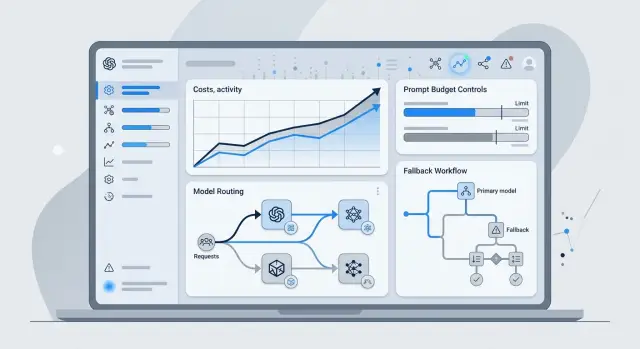
Table of Contents
What breaks when prices change
One vendor price update can turn a healthy margin into a problem almost overnight. A team picks a model, tests it, launches a feature, and sets customer pricing around current costs. Then the vendor raises input, output, or tool call prices. The feature still works, but every request costs more, and the difference comes straight out of profit.
Most teams look at the wrong problem first. They ask whether the model is still good enough. Quality matters, but it is a separate issue. If response quality drops, you may have a prompt, routing, or context problem. If quality stays the same and margins shrink, the problem is pricing. Mixing those up leads to bad fixes.
The biggest risk sits in daily, repeatable flows. A pricey model used for an occasional planning task is annoying, but it usually does not wreck the budget. Support replies, document summaries, classification, extraction, moderation, and internal copilots are different. A tiny increase on one call looks harmless. Multiply it by 50,000 or 200,000 requests, and the monthly bill changes fast.
Teams feel this most when one model handles everything by default. That setup is easy to launch and hard to defend. There is no room to move simple tasks to a cheaper model, no limit on oversized prompts, and no way to cut repeat calls. When prices move, the budget takes the hit.
The first cracks usually show up in fixed price plans that assumed lower model costs, free tiers that quietly become money losing, and internal tools with heavy usage but weak cost tracking.
Resilience does not mean avoiding every price increase. That is impossible. It means keeping service stable and keeping unit economics for AI inside a range your business can live with. Customers should still get a good result at a predictable speed. Your team should still know what one task costs, what margin it leaves, and where to cut or reroute work before the numbers get ugly.
Map where your spend really comes from
Most teams look at monthly token totals and stop there. That hides the real problem. Users do not buy tokens. They buy actions. Price changes hurt most when you cannot trace spend back to a product event.
Start with a plain inventory of every AI call your product makes in a normal day. Include user facing requests, background jobs, retries, moderation checks, embeddings, summaries, and any internal tools your team uses for support or operations. Small calls look harmless on their own. At scale, they turn into a large bill.
A simple table is enough. Track what the call does, how often it runs, the average input and output size, and what user or system action triggers it.
This usually changes the picture fast. A team may assume chat is the expensive part, then find that long document parsing, repeated classification checks, or retry loops eat more money than the visible feature.
Group calls by task, volume, and average input size. That shows where the cost comes from and why. Two calls can use the same model and still have very different economics if one runs 50 times a day with short text and the other runs 20,000 times with long context.
Then measure cost per user action, not just cost per token. One click on "generate report" may trigger a planner call, a retrieval step, a long answer, and a fallback retry. Finance cares about the full cost of that click. Product should care too.
Mark which calls affect revenue or retention. If a call helps close a sale, keeps paying users active, or prevents churn, you may accept a higher cost there. If a call only improves a minor feature that few people use, set a tighter budget and watch it closely.
Lean teams often find that a small share of workflows creates most of the spend. Once you can name those workflows and attach a cost to each user action, price changes stop feeling mysterious. You know where to cut, where to protect quality, and where a model swap would matter most.
Set up routing in small steps
Routing usually goes wrong when a team adds too many choices too early. Start with one task and only two or three models that can all handle it. For example, use one model as the default, a cheaper one for simple requests, and a stronger one for harder cases.
That gives you a model routing strategy you can actually debug. If you test six models at once, you will not know whether cost, latency, or quality changed because of the model, the prompt, or the routing rule.
Keep the first rules plain enough that anyone on the team can read them and predict the result. In practice, good routing rules often depend on request size, risk, and response format. Short, low risk prompts can go to the cheaper model. Long inputs, files, or strict structured output can go to the stronger one. If a request times out, retry once and then switch to a backup model. When possible, keep the same output schema across models so the rest of the product does not care which route handled the job.
A fallback path matters even if prices stay flat. Rate limits, outages, and sudden slowdowns can force traffic onto a second provider with no warning. If the backup model needs a different prompt shape or returns a different JSON format, failover breaks at the worst time.
Real testing matters more than neat routing logic on a whiteboard. Use a batch of actual prompts from recent traffic, including messy ones. A support queue, sales inbox, or internal operations workflow usually has enough variation to expose bad rules fast.
Review more than cost before you shift traffic. Check response time, error rate, format compliance, and how much human editing the answer still needs. That last point gets ignored all the time. A cheaper model that saves 2 cents but adds three minutes of cleanup is not cheaper.
Roll traffic out in stages. Start with 5 percent, then 20 percent, then more if quality holds. When prices move, simple routing rules that have already seen real traffic are much easier to trust.
Trim prompt cost without hurting results
Prompt spend often grows through habit, not need. Teams paste the same policy text, examples, and formatting rules into every call, even for routine jobs. That looks harmless until volume rises.
Start by separating fixed rules from task specific context. If a rule never changes, keep it in the system prompt or enforce it in app logic. Date formats, allowed categories, banned phrases, output length, and fallback behavior do not need to travel in every user message.
Routine work also needs hard context limits. A support labeler does not need a 40 message thread if the last two messages and the customer plan are enough. A code review bot usually needs the diff, not the whole repository. Set a default cap and allow exceptions only when the app detects a clear reason.
Caching saves more than many teams expect. If the model already produced a clean summary, sentiment label, or structured tag set for the same input, store it and reuse it. This works especially well for repeated internal jobs such as ticket triage, document summaries, and content labeling.
Strict output formats cut waste in a quieter way. Loose prompts often cause retries because the model adds extra text, changes field names, or forgets one required item. Ask for exact fields, fixed JSON, or a short template with clear limits. Your parser fails less often, and your app stops spending money on cleanup calls.
A quick prompt review catches most bloat. Remove repeated instructions that the app can enforce. Trim examples that do not change the result. Cap context for routine requests. Cache reusable outputs. Require a fixed response shape.
This does not mean making prompts vague. It means paying only for tokens that change the answer. Teams running high volume AI workflows often keep quality flat while cutting token use by 20 to 40 percent with these changes alone. That margin gives you room to react instead of rushing into a rewrite.
Redesign workflows so costly calls do less work
Expensive model calls often do too many jobs at once. A single prompt reads the input, finds facts, decides what matters, writes the answer, and formats it. That feels simple, but it burns tokens on work that a rule, a small model, or a database query could handle for less.
When prices rise, this matters more than model shopping. Workflow redesign for AI lets you replace one expensive step instead of rewriting the whole feature. It also protects unit economics for AI because the costly model only handles the narrow part that needs judgment or strong writing.
A support flow shows the idea clearly. First, a cheap classifier sorts the message by topic, language, and urgency. Next, the system fetches only the order record or help article that matches that topic. Only then does a stronger model draft the reply for the few cases that need a custom answer. Password resets and shipping status updates often need no large model at all.
A simple pattern works well. Classify the request with rules or a small model. Pull only the few facts that step needs. Call the stronger model for the final draft or decision. Stop the flow when confidence falls below your threshold. Hand unusual cases to a person.
That last step saves real money. Teams often react to uncertainty by adding another model call, then another. Spend rises fast, while quality barely moves. If a refund case looks messy or a contract clause seems unclear, send it to an agent or reviewer. One human check often costs less than a long chain of retries.
Context control matters just as much. Many teams send full chat history, long system prompts, and extra documents to every step. Most steps need only a few fields, such as account type, product name, and last action. Good prompt cost control starts with sending less. Cleaner inputs also improve answers because the model has fewer distractions.
This is where workflow redesign for AI usually beats prompt tinkering. Reduce the work inside each call, and your model routing strategy gets easier. You stop paying premium rates for routine sorting, repeated lookup, and guesswork when confidence is low.
A realistic example
A support team drafts 10,000 email replies each month. Before any changes, it sends every ticket to the same strong model and includes the full conversation thread every time. That feels safe, but it is expensive. Most tickets do not need that much model power or that much context.
Assume the team sees two broad groups. About 8,500 tickets are simple refunds, order status questions, or policy clarifications. The other 1,500 involve charge disputes, suspected account abuse, or a customer who might churn. The first group needs a clear, polite draft. The second group needs better judgment, tighter wording, and more history.
After a small routing change, the team sends the simple refund work to a cheaper model. It passes only the latest customer message, a short order summary, and the refund policy. For disputed or risky cases, it sends the ticket to the stronger model and includes the full conversation history, notes from the account record, and the reason the case was flagged.
The cost difference is not subtle. If the old setup used 2,400 input tokens and 250 output tokens on all 10,000 tickets, monthly spend could land near $315 with a premium model. The routed setup looks very different. The simple queue uses far fewer tokens on a cheaper model, and the risky queue keeps the premium model for the cases that need it. In this example, monthly spend drops to about $51.
This split also softens the blow when the premium model gets more expensive. If its price jumps by 50 percent, the old setup climbs from about $315 to $473. The routed setup rises from about $51 to about $71. The support team still feels the increase, but the unit economics stay intact because only a small share of tickets depends on the expensive model.
That is the point of workflow redesign for AI. You do not need one perfect model. You need a system that spends carefully on the hard cases and stops overspending on the easy ones.
Mistakes that raise spend fast
The fastest way to lose control of AI spend is to send every task to the same model. A short classification job, a rough summary, and a hard reasoning task do not need the same level of power. If you treat them as equal, your average cost climbs long before anyone notices.
The same problem gets worse when a team builds the whole product around one provider, one model, and one prompt shape. Then a price increase lands, switching feels risky, and the team keeps paying more because there is no prepared backup.
Another common problem is prompt reuse. A prompt built for a complex task often carries extra instructions, examples, and safety rules that a simple task does not need. If you run that same heavy prompt for cheap work, you pay for tokens that add no real value. It is a quiet leak, and it grows with volume.
Document handling causes the same waste. Many systems send an entire file, chat history, or knowledge base chunk when only a few paragraphs matter. If the model needs one product policy, do not pass the full handbook. Pull the right extract first, then call the model. That one change can cut cost fast.
Cost math also breaks when teams count only successful responses. Real usage includes retries, timeouts, rate limit errors, partial failures, and calls users abandon halfway through. If your dashboard shows only the happy path, your margins look better than they are.
The warning signs are usually obvious once you look for them: one model handles every request type, prompt length stays about the same across simple and hard tasks, large context windows are always full, and retry volume is missing from spend reports.
The worst mistake is waiting for a price increase before testing alternatives. You do not want your first routing test to happen during a billing shock. Run small comparisons now. Keep backup prompts ready. Check whether a cheaper model can handle most of the traffic without hurting the result.
Teams that do this early stay calm when prices move. Teams that wait usually start cutting features instead.
Quick checks before you call it resilient
A stack is not resilient because it worked last month. Prices move, one model gets slower, retries pile up, and margin disappears quietly. Teams usually notice the problem only when the invoice looks wrong.
A short checklist catches most weak spots before pricing turns into a budget problem:
- Measure cost per workflow step, not just per request. If one flow uses OCR, extraction, validation, and a final answer, track the average tokens, latency, and failure rate for each step.
- Swap models without changing product behavior. Run the same test set through your main route and your backup route. If the output format, tone, or accuracy shifts enough to break downstream logic, the fallback is not ready.
- Put hard limits on prompt size and retries. Cap context length, cap tool calls, and stop retry loops after a small number of attempts.
- Write fallback rules for both outages and price spikes. Decide when traffic moves to a smaller model, when the workflow drops optional steps, and when the product should return a simpler answer instead of waiting too long.
- Test margins after a 20 to 30 percent price move. Use real traffic numbers, not guesses.
One simple test works well. Take a common workflow, raise model cost by 25 percent, add a small bump in retries, and check the final cost per successful task. If that number breaks your pricing, you still depend too much on one vendor or one large prompt.
Teams that handle this well usually do one more thing. They redesign work so expensive calls do less. They summarize first, filter early, and send only the minimum context to the most expensive model. That is what protects unit economics for AI when the market shifts.
Next steps for your team
Start with one workflow that runs a lot and already costs real money. A support draft, document summary, or code assistant step is enough. Measure it for one week and track five numbers: request count, average tokens, model used, failure rate, and cost per successful result. Without that baseline, teams argue from instinct.
Then make one routing change. Add one alternate model and one fallback rule. A simple setup works well: send normal requests to the cheaper model, and send only long, risky, or low confidence cases to the stronger one. That gives you a model routing strategy without turning the stack into a maze.
Prompt cost control should start with the noisiest tasks. Look for prompts that keep growing because people paste extra context, repeat system instructions, or ask for output that nobody uses. Set token budgets for input and output, and trim prompts until quality drops. Most teams find waste faster than they expect.
A short review with finance, product, and engineering keeps this honest. Finance can check whether savings matter at real volume. Product can say whether quality still meets the bar. Engineering can confirm the fallback rules, logs, and alerts work when prices move.
A practical first pass is simple: pick one heavy workflow this week, add one cheaper or backup model for the same task, write one fallback rule for hard cases, set prompt budgets for the biggest token burners, and review the numbers together before you pick the next change.
If one change cuts cost by 15 percent with no drop in outcomes, keep going. If quality slips, redesign the workflow before you spend more on a better model. Sometimes the fix is smaller steps, less context, or fewer calls.
If you want an outside review, Oleg Sotnikov at oleg.is works as a Fractional CTO and startup advisor and helps teams tighten AI architecture, routing, and infrastructure costs. A fresh pair of eyes often spots expensive habits that feel normal inside the team.
Frequently Asked Questions
What is the first sign a vendor price change is hurting us?
Watch your cost per successful user action, not just monthly token totals. If margins shrink while answer quality stays about the same, pricing probably changed faster than your product can absorb.
Should we switch models right away when prices go up?
No. First trace where the spend comes from and see which tasks actually need the stronger model. Many teams save more by routing easy work to a cheaper model than by rushing into a full switch.
Which AI tasks should we audit first?
Start with high-volume tasks that run every day, like support replies, summaries, classification, extraction, moderation, and internal copilots. A small price change on those flows can move your monthly bill a lot.
How should we measure AI cost so the numbers mean something?
Measure cost per product action. If one click triggers retrieval, a model call, a retry, and formatting cleanup, count the full chain and track the average cost, latency, and failure rate for that action.
What is the easiest routing setup to start with?
Begin with one task and two or three models. Use a cheaper model for short, low-risk requests, keep a stronger model for long or risky cases, and add one backup route for timeouts or outages.
How can we lower prompt cost without hurting results?
Trim repeated instructions, cap context, and stop sending text the app can enforce on its own. Caching repeated summaries or labels also cuts spend fast without changing the user experience much.
When should we redesign the workflow instead of tuning the prompt?
Redesign wins when one expensive call does too many jobs at once. Split the flow so rules or a small model handle sorting and lookup, then let the stronger model write or decide only when the case really needs it.
How do we know a cheaper model is really cheaper?
Check the total cost after retries, cleanup, and human edits. If the cheaper model saves a few cents but adds slow responses or extra manual work, it is not actually cheaper.
How can we test whether our AI stack is resilient to price spikes?
Run a test with real traffic, raise model cost by about 25 percent, add a small bump in retries, and recalculate cost per successful task. If that breaks your pricing, your stack still leans too hard on one provider or one heavy prompt.
When should a human step in instead of making another model call?
Hand the case to a person when confidence drops, the request looks risky, or the model keeps retrying without getting clearer. One human review often costs less than a chain of expensive calls that still gives a shaky answer.


