AI support documentation workflow from tickets to product docs
Learn an AI support documentation workflow that groups repeated tickets, drafts clear product articles, and sends each draft to the right reviewer.
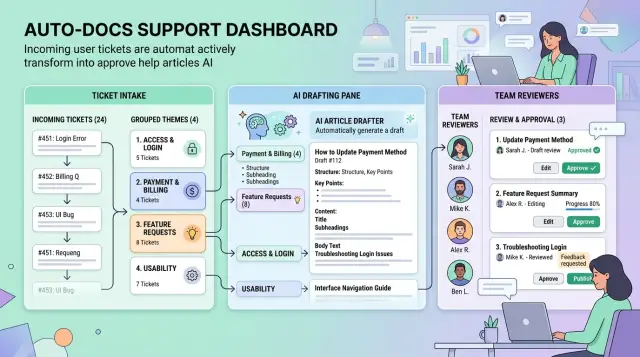
Table of Contents
Why ticket knowledge stays buried
Support teams answer the same question again and again because the fix lives inside a closed ticket, not in a doc anyone can find. A customer writes in, an agent solves the issue, the case gets marked done, and the answer disappears into the queue. Two days later, someone else hits the same problem and the team starts over.
That happens because support work rewards speed. Agents need to clear the backlog, calm frustrated users, and move on. Writing a clean article takes extra time, so the useful part stays buried in chat logs, screenshots, and one-off replies.
Writers feel this gap fast. They usually work from polished product language, but customers do not talk that way. They describe what they saw, what they expected, and where they got stuck. If docs miss those exact words, they read neatly but fail in search and fail real users.
New team members pay for it too. Without a shared record of solved issues, they answer old questions from scratch. They ask a senior teammate, dig through old threads, or copy a reply that may already be outdated. That wastes time and creates small inconsistencies that add up.
Most teams get stuck for the same reasons. Fixes stay in private replies instead of shared docs. Similar tickets get tagged in different ways. Nobody owns the handoff from support to documentation. Docs get updated after a big release, not after a month of repeated pain.
A good AI workflow changes one thing: it treats tickets as raw material, not dead history. If customers ask the same thing twice, the answer should not live in two separate threads. It should become one clear article that support, writers, and new hires can all use.
Choose the tickets worth turning into docs
Start with tickets that show up again and again. If the same question lands in support every week and the answer stays mostly the same, it is usually a good doc topic. Repeated questions matter more than loud or recent ones.
The best candidates often come from login trouble, billing steps, account setup, imports, exports, and common feature confusion. These issues waste support time because agents keep typing the same answer. They also frustrate users because the fix is often simple once someone explains it clearly.
Skip tickets that only help one person. A strange browser bug, a broken third-party integration, or a one-off account mess can matter, but it should not become product docs right away. If the answer depends on custom data, manual support work, or a bug fix that is still moving, wait until the situation settles.
Tagging helps if you keep it simple. Each ticket should tell you four things: where the issue happens, what the user is trying to do, why they are doing it, and what the eventual article will need. That might mean a product area like billing, an action like export, a goal like downloading a report, and a note that the draft needs screenshots or a policy check.
That structure makes support ticket clustering much cleaner later. It also cuts down on arguments about what a ticket means because each one follows the same basic shape.
Some topics need extra care before they go public. Interface changes can make screenshots stale. Tiny details can make step-by-step instructions fail. Billing, refunds, permissions, and security issues often need a policy or legal check before anyone publishes anything.
A practical rule works well: if five users asked roughly the same thing in the last month, and support answered it the same way each time, it probably belongs in docs. If every answer looks different, leave it out for now.
Group similar issues into clear themes
Good groups make the rest of the process easier. Bad groups create messy drafts, confused reviewers, and articles that answer the wrong question.
Start by cleaning the tickets. Remove names, email addresses, order numbers, account IDs, and anything else that points to a real person. AI can group text well, but it does better when the input is safe and consistent.
Then group by intent, not by wording. One customer might say, "I can't change where invoices go." Another writes, "billing emails still go to my old address." If the fix is the same, they belong together.
Keep each theme narrow. Two tickets can sound close but still need different fixes. "Can't log in" often hides several separate problems: a password reset issue, a single sign-on failure, a locked account, or an expired invite. If you force all of that into one group, you end up with a vague article that helps nobody.
A simple test works here. Put tickets together when the user's goal matches. Split them when the fix, owner, or product area changes. Ignore emotional wording and focus on the actual problem. If the group name sounds muddy, rename it before anyone drafts a doc.
Plain names work best. "Reset billing email" is clear. "Invoice communication issue management flow" is not. Writers, reviewers, and support agents should understand the topic in a few seconds.
If a group keeps growing, read ten tickets yourself. You will usually find one of two problems: the group is too broad, or it mixes a bug with a how-to question. Catch that early. Clean themes lead to cleaner docs, and cleaner docs cut repeat tickets.
Draft articles from real ticket language
Start with a small batch of real tickets from the same issue. Five to ten is usually enough. Fewer can miss the pattern. Too many pull in edge cases that do not belong in the main article.
Read the tickets before you send anything to AI. Pull out the exact problem statement, common user wording, error text, product area, and the fix support repeats most often. Good docs sound like your product and your users. Bad docs sound like they could fit any app.
Draft one article for each issue group, not one article for each ticket. A ticket is one person's story. A group is the repeat problem you want users to solve on their own. If you draft per ticket, you create duplicates and waste time merging them later.
Use the same structure every time:
- Problem: what the user sees, in plain language
- Steps: the shortest fix that works
- Result: what should happen after the fix
- Limits: when the advice will not work, or when support should step in
This format keeps the draft practical. It also makes review easier because everyone checks the same parts instead of guessing what belongs in the article.
Stay close to the product. Use real setting names, actual error messages, plan limits, and the steps users can take today. If tickets show users hitting an "Export failed" message after reaching a file size limit, say that clearly. Do not drift into broad advice about browsers, storage, or uploads unless the tickets actually point there.
That detail matters more than many teams expect. Generic help articles can look polished and still do nothing for ticket volume. Product docs from support tickets work better because users recognize their own problem in the first few lines.
Send each draft to the right owner
A draft without an owner usually dies in a shared inbox. Give every product area one named reviewer and keep that map simple. Billing drafts go to the billing owner. Login drafts go to the person who owns accounts and access.
This sounds minor, but it is often the difference between published docs and stale notes. Routing decides whether the process moves.
Most teams do fine with a short owner map. Finance or operations should review billing, refunds, and invoices. The product or engineering owner for identity should review account access and permissions. The engineering owner for the API should review API behavior and webhooks. Setup steps and user guidance usually belong with a support lead or customer success lead.
Do not send every draft to engineering by default. Engineers can confirm technical facts, but they should not review a refund article if finance owns the process. The closer the reviewer is to the actual workflow, the fewer wrong steps reach users.
Support leads should still see most drafts before publishing. They catch tone problems fast. They also notice gaps that ticket history makes obvious, like a missing screenshot, an unclear error message, or a step that assumes too much.
Keep the review path short
Two reviewers are usually enough. One person checks accuracy. One person from support checks clarity and missing steps. Add more people and drafts start waiting for everyone and belonging to no one.
Set a review deadline when the draft is created. Three business days works well for common issues. For urgent topics, use one day. If nobody responds, send one reminder and then escalate to the manager or fallback owner.
If a draft answers a question support handled five times this week, it should not sit untouched for two weeks. Fast review beats perfect review. You can update the article after it goes live.
Build the workflow step by step
Start with a fixed batch instead of a live stream of tickets. One week is enough for a busy support team. A month works better if volume is lower. Pull the ticket subject, message text, product area, tags, agent notes, and final resolution if you have it.
Before you send anything to a model, clean the export. Remove names, email addresses, account numbers, and repeated signature text. Collapse long back-and-forth threads into a short summary plus the customer's original problem. Cleaner input gives you cleaner groups.
A simple workflow looks like this:
- Pick one time window and export the tickets. Keep the scope narrow at first, such as login issues, billing questions, or onboarding problems.
- Normalize the language. Agents use shortcuts, internal terms, and pasted macros. Replace those with plain words so similar tickets look similar.
- Group tickets by intent, not exact wording. Give each group a label that reads like a customer question.
- Generate drafts with one article template. Tell the model to stay close to the tickets and flag anything uncertain.
- Route each draft to the owner who can approve the facts, then send it to support for a clarity check.
- Publish the article and watch the next round of tickets. If agents still answer the same question by hand, fix the doc instead of starting over.
This is where the process either stays useful or turns messy. If every draft lands in one person's inbox, the queue grows fast. Simple routing rules keep it moving.
After publication, keep the loop tight. Watch whether new tickets match an article you just published. If they do, and agents still rewrite the answer every time, the article is probably unclear, hard to find, or missing a step. Feed those tickets into the next batch and improve the existing article.
A simple example from a SaaS team
A small SaaS team keeps seeing the same complaint: users ask for a password reset, wait, then open another ticket because they still cannot sign in. In one month, the team collects about 80 tickets on this one issue. At first glance, it looks like one problem that needs one help article.
The ticket text says otherwise.
When the team groups those tickets with AI, three patterns appear:
- Some reset emails arrive late because a corporate mail server holds them for a few minutes.
- Some users open the link after it has expired.
- Some accounts use single sign-on, so a password reset does not work at all.
That changes the whole approach. If the team writes one broad article, users have to guess which part applies to them. Most people do not read carefully when they are locked out. They skim, try one step, and come back to support.
So the team drafts three separate articles from real ticket language. One explains email delays in simple terms and tells users how long to wait before trying again. Another covers expired links and shows the fastest way to request a fresh one. The third handles the single sign-on case clearly: if your company signs in through Google, Okta, or another identity provider, you need that login path, not a local password.
The drafts do not go live right away. The workflow sends all three to the auth owner, because that person knows the edge cases and the exact sign-in rules. They fix a few steps, remove one wrong assumption about link timing, and approve the final versions.
After that, support adds the new docs to saved replies. Agents stop typing the same explanation. Users get answers that match the real cause of their problem. That is the whole point. The workflow turns messy ticket history into docs people can use on the first try.
Mistakes that slow the whole process
This kind of workflow can save a lot of repeat work, but a few small mistakes can turn it into a content factory nobody trusts. The problem is usually not the model. It is the input, the grouping logic, and the review path.
The first slowdown starts before grouping. If you feed raw tickets straight into AI, you give it noise instead of patterns. Email signatures, copied chat logs, stack traces, internal notes, and duplicate replies pull the draft in the wrong direction. Clean the tickets first. Keep the parts that describe the customer's problem and the fix.
Grouping by keywords causes a quieter failure. Two customers can describe the same issue with different words, while one word can show up in five unrelated problems. If you group tickets by terms like "login," "sync," or "billing," you often mix symptoms instead of causes. Group by intent, trigger, and resolution. "Users cannot reset passwords after single sign-on setup" is a much better group than "password issue."
Review becomes the next bottleneck when teams send every draft to one person because it feels safe. That rarely lasts. One approver gets buried, articles wait for days, and minor fixes pile up. Route each draft to the person who owns that area: product for feature behavior, engineering for technical accuracy, support for customer wording.
Draft quality also drops fast when support shorthand leaks into published docs. Phrases like "cannot repro," "L2 escalated," or internal feature names make sense inside a queue, not on a help page. Rewrite them in plain language and replace case-specific details with steps most readers can follow.
Then comes the long-term problem: teams publish the article and forget it exists. Product changes, screens move, error messages change, and the doc starts sending people down the wrong path. Give every article an owner and review it when the product changes.
Quick checks before you publish
A draft can look clean and still fail the person who opens it in a hurry. Before you publish, read it the way a frustrated user or busy support agent will read it: quickly, with one problem in mind.
Start with the title. If users ask, "Why did my invoice fail?" and the article says "Billing exception troubleshooting," many people will skip it or doubt it applies to them. Use the same words customers use in tickets, search, and chat.
Then check the first step. It should begin on the screen people actually see when the problem appears, not on the ideal path through the product. If the error shows up during checkout, do not start with account settings. Start where the confusion starts.
Approval needs a real name behind it. The final answer should come from the product manager, engineer, or support lead who owns that part of the product. "Reviewed by team" is too vague. If nobody owns the answer, nobody updates it later.
A simple test works well: give the article to a support agent who did not write it and ask them to use it in a live reply without rewriting it. If they need to fix the wording, add missing steps, or explain a hidden assumption, the article is not ready.
Time matters as much as accuracy. Read the draft once more and ask whether it will still make sense next month. Watch for brittle details like button text that changes often, temporary workarounds, or references to an old layout. Stable wording lasts longer.
Before publishing, make sure the title matches how users ask the question, the first step starts on the real screen, one owner approved the answer, support can send it as-is, and the wording will still work after the next release.
What to do next
Start smaller than you think. Pick one support queue that produces the same question every week, assign one owner, and use one article template. Small scope makes the workflow easier to fix, and it shows quickly whether the team will actually use it.
Keep the template plain: the problem, the likely cause, the fix, and the point where a customer should contact support again. Use the language people use in real tickets, not polished marketing copy. That usually gives you clearer docs and fewer confusing edits.
Then measure the result before expanding anything. Count how many repeat tickets that topic creates in a normal week. After you publish the article, check the same number again for the next few weeks. If the number stays flat, review the title, the search terms, and whether support agents are actually sending customers to the new doc.
Most teams rush to add more prompts, more models, and more tools. That is usually the wrong move. Fix review rules first, because that is where messy handoffs start.
A practical setup is enough: one queue with frequent repeat issues, one owner who can approve or reject a draft, one template for every article, and one report that tracks repeat tickets before and after publishing.
Make ownership clear before the first draft leaves the AI step. Product should review feature behavior. Support should check whether the fix matches what agents see every day. Security, billing, and legal topics need their own reviewer. That routing logic matters more than a clever prompt.
If your team wants outside help setting this up, Oleg Sotnikov at oleg.is works with startups and small businesses as a Fractional CTO and advisor. He helps teams build practical AI-first development and automation workflows, which makes him a natural fit for this kind of support-to-docs process.
Once one queue works, copy the same pattern to the next one.
Frequently Asked Questions
Which tickets should I turn into docs first?
Start with questions that show up every week and get the same answer each time. Login trouble, billing steps, account setup, imports, exports, and common feature confusion usually give you the fastest win because support already repeats the fix by hand.
How many similar tickets do I need before I write an article?
A simple rule works well: if about five users asked the same thing in the last month and support solved it the same way each time, write the doc. If every answer changes, wait until the pattern settles.
Should I group tickets by keywords or by user intent?
Group by intent and resolution, not by shared words. Two users can describe the same issue in very different language, while one word like "login" can hide several separate problems.
How much ticket history should I send to AI?
Use a small batch from one issue group, usually five to ten tickets. That gives AI enough real language to find the pattern without dragging too many edge cases into the draft.
What do I need to clean out of tickets before using AI?
Remove names, email addresses, account numbers, order IDs, and long signature blocks. Then trim the thread down to the customer's problem, the useful context, and the final fix support gave.
What article format works best for support-based docs?
Keep it plain and repeat the same structure every time: the problem, the shortest fix, the result the user should see, and the limit where support needs to step in. That format stays easy to review and easy to reuse in replies.
Who should review each draft before it goes live?
Send each draft to the person who owns that product area, not to one shared queue and not to engineering by default. Billing belongs with finance or ops, account access goes to the auth owner, and support should still check clarity before you publish.
How do I keep review from turning into a bottleneck?
Keep the path short. One reviewer should check facts, and one support lead should check clarity. Set a clear deadline, send one reminder, and escalate fast if nobody answers.
Why do some new help articles fail to reduce repeat tickets?
Most docs fail because they miss the real user wording, start on the wrong screen, or skip a step that agents know from experience. If support still rewrites the answer after you publish, fix the article instead of writing a new one.
Can a small team run this workflow without a big tool stack?
Yes. Start with one support queue, one article template, one owner, and one simple report that compares repeat ticket counts before and after publishing. If that small loop works, copy it to the next queue.


