AI-generated tests: when to suggest them, not write
AI-generated tests save time, but they miss context in risky or unfamiliar code. Use risk and code familiarity to decide when people should design checks.
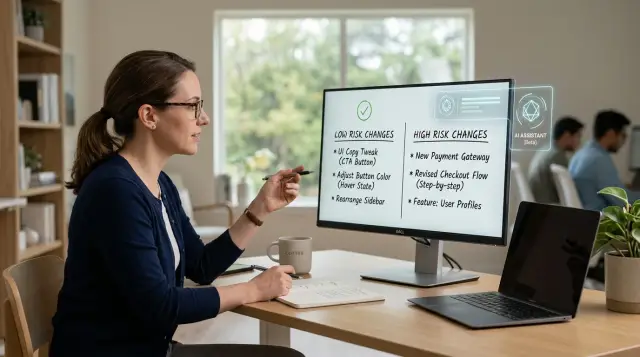
Table of Contents
The problem with asking for tests too early
Teams often ask for AI-generated tests as soon as a ticket appears. It feels efficient, especially when the change looks small. But test writing should not come first. The first question is simpler: what failure would actually matter?
If nobody defines the risk, the assistant usually copies the logic it can see. It reads conditions, inputs, outputs, and current behavior, then writes checks that confirm the code matches itself.
That sounds useful, but it often misses the point. Code shows what the system does today. It does not always show why a rule exists, which edge case would hurt customers, or which mistake would cost money.
That is where teams lose time. They get a clean batch of passing tests and assume the change is covered. In practice, they may have covered only the obvious paths while missing the one failure that would cause real damage.
A small UI label change and a discount rule update should not get the same treatment. For a low risk change, speed matters more than deep test design. For a high risk change, someone needs to name the failure first and decide what proof would catch it.
Ask one plain question before generating anything: what could go wrong if this ships broken?
Maybe a label looks odd on one page. Maybe a customer gets the wrong price. Maybe an approval rule stops working. Maybe a refund slips past the allowed limit. Those cases need different checks.
The assistant can draft tests quickly, but it usually mirrors structure, not intent. Human-designed checks still win when the team needs to protect a policy, a customer promise, or a messy edge case that lives in someone's head rather than in the code.
Oleg Sotnikov has seen this pattern in AI-first software teams. Once people define the risk, assistants help a lot. Before that, they often produce tidy test files that prove very little.
How risk level changes the answer
When code changes, start with a blunt question: what happens if this fails in production? The answer tells you whether the assistant should draft tests right away or whether a person should define the checks first.
Risk is about the cost of being wrong. Some failures annoy users for a minute. Others lose money, expose data, or break a rule the business has to follow. Those are different problems, and they need different testing habits.
Low risk changes usually have small, visible effects. Think wording edits, button labels, email copy, spacing fixes, or simple formatting rules. If a page shows the wrong punctuation, people notice quickly, and the fix is usually small. In that kind of change, drafted tests can save time because the downside of a missed case is limited.
Medium risk changes need more care. A search filter, discount display, or notification rule can confuse users and create support tickets. The system still runs, but people can make bad decisions because the behavior feels inconsistent. Here, an assistant can suggest likely checks, but a person should decide which cases matter most.
High risk changes need human-designed checks before anyone writes test code. Put anything tied to money, security, privacy, contracts, tax rules, or legal obligations in this group. If the code can charge the wrong amount, grant the wrong access, or keep the wrong record, a person should spell out the business rules in plain language first.
A simple split works well:
- Low risk: text changes, simple formatting, cosmetic UI updates
- Medium risk: user flows that affect behavior but do not touch billing, security, or legal rules
- High risk: payments, permissions, personal data, audits, compliance, and anything customers may dispute
Checkout makes the difference obvious. Changing "Buy now" to "Place order" is low risk. Changing how sales tax is applied is high risk. One can use drafted tests as a quick safety net. The other needs exact expected outcomes, edge cases, and failure conditions before the assistant writes anything.
If failure would cost a few minutes, drafted tests are often enough. If failure would cost money, trust, or legal trouble, people should design the checks first.
How code familiarity changes the answer
A team that knows a feature well can review AI-generated tests quickly. A team that barely knows the code often cannot tell whether a passing test checks the right thing or just repeats the current behavior, bug included.
Use bug history before gut feeling. If one module keeps causing regressions, or the same edge case breaks every few releases, treat that as a warning. Code can look small and still hide a lot of trouble. The bug trail usually tells the truth.
Slow down when the team just inherited an area. That is a bad moment to ask an assistant to write a full test suite, because nobody can judge the hidden rules yet. A generated test may look clean and still lock in a wrong assumption.
Confusing names are another red flag. If methods, events, or states make people stop and ask, "What does this actually do?", write human-designed checks first. The same goes for flows that bounce across several services or screens before anything visible happens.
You can move faster when the team knows the feature from real work, not from a quick code tour. You usually feel that difference right away. Engineers can describe the edge cases without opening five files. Recent bugs were rare and easy to explain. Product and engineering agree on what must never change.
When those signs are present, an assistant can draft tests and save time on setup, fixtures, and repetitive cases. People still need to review the intent, but the draft usually helps.
When those signs are missing, ask the assistant for test ideas, failure cases, and questions instead of finished tests. That gives the team room to map the behavior first, then turn that understanding into checks they can trust.
A simple way to decide
Start with the exact change you plan to ship. Write it as one plain sentence. "Users can reset a password only after confirming their email" gives the assistant something real to work with. "Clean up login flow" does not.
Then add one sentence about harm. Who gets hurt if this fails, and what happens to them? If one staff member sees a bad label, the cost is small. If customers cannot pay, log in, or get the right invoice total, the cost rises quickly.
Now rate code familiarity honestly. Does your team know this part of the code well, or does everyone slow down when they open it? Familiar code gives the assistant a fair shot at suggesting useful tests. Unfamiliar code is where wrong assumptions creep in.
A quick filter is enough. Can you describe the change in one clear sentence? Is the damage small if it fails? Does the team know this code well? Do you want test ideas, or proof before release?
If the answers are clear change, low risk, and familiar code, ask for test ideas first. That usually means cases to try, boundary conditions, and odd inputs. In that situation, AI-generated tests can save time because the assistant is filling in around a change the team already understands.
Do not jump straight to full test files. A complete-looking suite can still miss the one case that hurts users. Asking for ideas first keeps the discussion focused on behavior, not on whether the code sample looks polished.
When risk is high or the code is unfamiliar, let a person design the final checks. That person should decide what must pass before release, what needs manual review, and what deserves extra monitoring after deployment. The assistant can still help after that by drafting cases from those decisions.
This takes a few minutes, but it saves hours. Reviewing a short list of smart test ideas is much easier than untangling fifty confident-looking tests built on a bad guess.
When assistants can draft tests
AI-generated tests work well when the code is boring in a good way. The behavior is known, the inputs are easy to list, and the output is easy to check. In that case, the assistant is not making product decisions. It is turning known rules into test cases.
Small refactors are a good fit. If a team cleans up a helper function, renames methods, or splits one function into two, drafted tests can confirm that nothing changed by accident. A date formatter, a price rounding helper, or a parser that trims whitespace are typical examples. The team already knows what correct looks like.
This also works for utility code the team has lived with for a while. If people trust the function and use it across the codebase, an assistant can draft a solid baseline quickly. You still review the names, assertions, and missing cases, but the first pass often saves 15 to 30 minutes.
Repeated patterns are another safe area. If the codebase already has several good tests for one kind of service, validator, or mapper, the assistant can copy that shape and adapt it. Strong examples matter here. Without them, the assistant tends to guess.
Low risk form logic is often fine too, especially when rules are simple and boundary values are obvious. A signup form that accepts 3 to 20 characters for a username is a plain case. The assistant can draft tests for 2, 3, 20, and 21 characters without much danger, plus a few invalid formats.
One rule helps: let assistants draft tests when failure is cheap and behavior is settled. If the team can describe expected results in one short comment, the assistant can probably turn that into useful tests. If people still argue about the rule, a drafted test will only make the confusion look tidy.
When people should design checks first
People should write the first checks when a mistake can lock someone out, charge the wrong amount, or break a promise in the product. In those cases, AI-generated tests often look tidy but miss the rule that actually matters. A person usually knows where users panic, where support tickets pile up, and which edge case turns into a refund.
Payments and account recovery belong in that group. A test suite can confirm that a form submits or that a reset email sends. That is not enough. Someone has to ask harder questions. What happens after three failed payment retries? Can a user recover an account after changing both email and phone number? Do fraud controls block real customers?
The same goes for rules tied to pricing, tax, and contracts. These rules rarely live in one clean function. They leak into invoices, discounts, renewals, exports, and support workflows. An assistant can read code, but it may not know which rule comes from law, which comes from a sales promise, and which came from a one-off deal nobody documented well.
Old code needs the same caution. Legacy systems often have strange side effects that make no sense until someone who knows the history explains them. A small change in one place can alter a report, skip a webhook, or create duplicate records two steps later. Human-designed checks win here because people can trace the weird parts that code alone does not explain.
Past bug history is another strong signal. When an area already hurt customers, start with human judgment and plain-language scenarios before any assistant writes test code.
This is where a person should lead: payment failures and refunds, account recovery and identity checks, pricing and billing terms, older code with surprising side effects, and any area where previous bugs caused support spikes or lost revenue.
After that, an assistant can still help. It can turn those scenarios into draft tests, expand coverage, and catch obvious gaps. But the first move should come from someone who knows what failure looks like in the real business, not just in the code.
A realistic example: changing checkout rules
An online store adds a new rule: same day delivery works only when the cart total is at least $35. The rule sounds small, so a team might want AI-generated tests right away.
The assistant is useful at the boundary first. It can suggest the obvious checks around the amount: $34.99 should block same day delivery, $35.00 should allow it, $35.01 should allow it, and removing an item so the total drops below $35 should turn the option off.
That is a good use of the assistant. The rule is clear, local, and easy to express.
The harder cases sit outside the amount itself. A person who knows the checkout flow will ask what happens when a coupon drops the total under $35. Someone else might ask how store credit, gift cards, or tax affect the threshold. Support may remember that refunds create their own mess after the order ships.
Split orders make the picture less clean. A customer may buy three items, but the warehouse may ship only one today and the rest tomorrow. The code can pass the simple amount checks while the real checkout behavior still breaks in a way the assistant would never guess from the rule alone.
Before the team ships the change, they should review failed orders from the last month. That gives them real patterns to test against. Maybe customers often stack coupons. Maybe refunds create edge cases in order history. Maybe same day delivery fails most often when inventory changes during payment.
The assistant can propose the first layer of tests. People should design the checks that reflect how the store actually behaves. That mix catches more problems than a fast, full suite written from the rule alone.
Mistakes that waste time
Teams lose hours when they ask for tests before they name the real risk. A request like "write tests for this change" sounds clear, but it hides the part that matters most: what failure would actually hurt you. A broken button label and a double charge are not the same problem, yet an assistant may treat them as equal if you do not say otherwise.
That is why vague requests often produce neat-looking work that does not protect much. You get lots of checks around the easy path while the costly path stays untouched.
Coverage numbers cause a similar problem. A report can show high coverage even when nobody checked the cases that lead to refunds, bad data, or blocked users. AI-generated tests push that number up quickly, which feels productive. It is not enough on its own. If the tests only repeat the current code path, they may confirm the bug instead of catching it.
This happens a lot when the assistant does not know the code well. It reads the function, copies its assumptions, and writes tests that prove the function behaves exactly as written. If the logic is wrong, the tests are wrong in the same way. You spent time, raised coverage, and learned almost nothing.
A short brief prevents most of this. State what can go wrong, which users or money flows are at stake, what odd case worries you most, and which checks still need a person.
Manual checks still matter for rare but expensive paths. Think duplicate payments, unusual tax rules, expired discounts, or a permission rule that affects only one customer group. These cases may happen rarely, but the cleanup can take days. A person usually spots the weak point faster than a generated suite.
The fastest teams do not ask for "more tests." They ask for tests around a specific risk, then manually probe the few paths where being wrong costs real money or trust.
A quick check before you ask
A short pause before you ask for AI-generated tests can save hours of cleanup. Teams get better results when they check the risk of the change and how well they know the code before they ask an assistant to write anything.
If the change touches money, access, or stored data, a person should usually decide what success and failure look like first. That does not ban automation. It keeps the first draft grounded in business rules instead of guesses.
Keep the review simple. Ask what happens if the change fails in production. Check how familiar the team is with this part of the code. Look at old bugs, support tickets, and rollback notes. Think about user impact in plain terms. Could someone lose money, lose access, or lose data? If yes, slow down and define the checks with care.
Then decide who should design the final checks. For low risk changes in code the team knows well, the assistant can draft tests. For anything sensitive, a person should outline the cases and let the assistant help with the repetitive parts.
A small example makes the point. Say you change a checkout rule so a discount applies only to new buyers. If the team knows the code well and the rule is already clear, the assistant can draft useful tests quickly. If old bugs show edge cases around refunds, guest accounts, or expired coupons, human-designed checks usually win because they ask better questions first.
That is the whole filter. High risk or low code familiarity means people should think first and write prompts later. Low risk and strong code familiarity give the assistant much better odds of producing tests you can trust.
What to do next
Start with a rule your team can remember on a tired Friday afternoon: when risk goes up and team familiarity goes down, people should design the checks before any assistant writes tests.
Keep that rule short enough to fit in a pull request template or team doc. If nobody can repeat it from memory, it is too long.
For low risk work, ask for draft tests, edge cases, and missing scenarios, then review them quickly. For medium risk work, ask for test ideas first, choose the cases a person wants, and only then let the assistant draft them. For high risk work, define business rules, failure modes, and rollback checks with a person first, then use the assistant for routine test code.
Then review one recent bug. Skip blame and look for the missed judgment call. Maybe the team knew the code but missed a customer rule. Maybe the code looked simple, but a timing issue or unusual user path changed the result. That small review often shows where human-designed checks still win.
Your first experiments should stay boring. Use AI-generated tests in places with clear inputs and outputs, stable code, and a low cost of failure. A parser, formatter, or small helper function is a much better place to start than checkout, billing, auth, or a migration.
A simple team habit works well: assistants propose, people choose, assistants draft, people review. That keeps the speed without pretending the tool understands every product rule.
Some teams need help turning that into a working policy. Oleg Sotnikov shares this kind of practical Fractional CTO advice at oleg.is, especially for startups and smaller companies trying to use AI in testing, delivery, and day-to-day development without losing control of risk.
Frequently Asked Questions
Should I ask AI to write tests as soon as I open a ticket?
Usually no. First name the failure that would hurt users or money. If you skip that step, the assistant often copies the current code path and misses the case you actually care about.
What should I ask before generating any tests?
Ask, "What could go wrong if this ships broken?" That one sentence forces the team to name the harm, like a wrong price, blocked login, or bad refund limit. Once you know the risk, you can ask for the right checks.
How do I tell if a change is low risk or high risk?
Look at the cost of being wrong in production. Text, spacing, and simple formatting usually sit on the low side; payments, permissions, personal data, tax, and legal rules sit on the high side.
When can AI draft tests and actually save time?
Use it when behavior is settled and failure is cheap. Small refactors, helpers, formatters, parsers, and simple form rules usually fit because your team already knows what correct looks like.
When should a person design the checks first?
Let a person lead when the change can charge the wrong amount, lock someone out, expose data, or break a promise in the product. Human judgment catches the messy edge cases that never show up clearly in code.
Does team familiarity with the code really matter?
Yes. A team that knows the feature can spot bad assumptions fast. A team that just inherited the area may approve clean tests that freeze the current bug in place.
Why not ask for a full test suite right away?
A polished suite can create false confidence. You may spend an hour reviewing fifty neat tests and still miss the one path that causes refunds, support tickets, or broken access.
What should I ask the assistant for instead of full tests?
Start with test ideas, failure cases, and questions. That keeps the conversation on behavior first, then your team can choose the cases that matter and let the assistant draft the routine code.
Can high coverage still mean weak protection?
It can. Coverage shows which lines ran, not whether the tests checked the right outcome. If the assistant mirrors buggy logic, high coverage only proves the bug runs the same way every time.
What simple rule can my team use?
Keep one rule in your pull request template: when risk goes up and code familiarity goes down, people design the checks first. When risk stays low and the team knows the code well, let the assistant draft and let humans review.


