AI team without a project manager: a first month plan
AI team without a project manager works better with clear scope rules, review windows, and one place for blocked work in the first month.
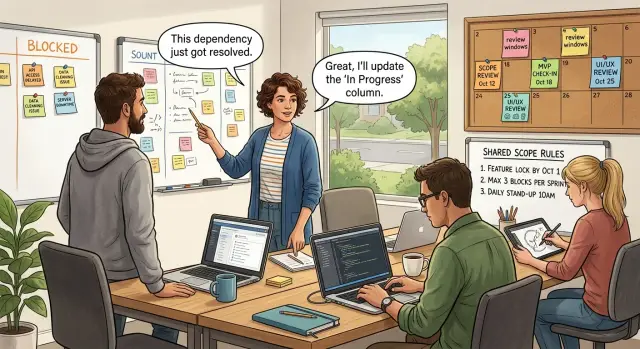
Table of Contents
Why the first month feels messy
The first month usually feels noisy because the team removed a role that used to absorb small bits of chaos. Nobody is trying to create confusion, but people start asking for updates in chat all day because they no longer know where work lives or when they'll hear back.
One question turns into ten. An engineer gets a message from sales, then a note from the founder, then a reply in a group chat that changes the task again. By lunch, the team has three versions of the same job and no clear answer on which one counts.
AI-heavy teams feel this faster than traditional ones. AI tools can produce drafts, mockups, code suggestions, summaries, and test cases in minutes. That speed helps at first, then creates a new problem: someone has to review all of it. Instead of chasing one update, the team starts chasing several possible outputs, and each one can pull the work in a different direction.
The mess grows when tasks change while someone is still working on the old version. A developer may build what the ticket said at 9 a.m. while the founder rewrites the scope in chat at 11 a.m. Both people think they're moving fast. They're actually creating rework.
Blocked work often disappears in direct messages. Someone writes, "I need copy before I can finish this," or "The API key still fails," and that note stays in a private thread. Nobody else sees the blocker, nobody picks it up, and later the team asks for status because the work looks stuck for no obvious reason.
Small teams feel this more sharply because each person covers more ground. One missing answer can stall design, code, QA, and launch notes at the same time.
This early mess does not mean the team made a bad decision. It usually means the team removed a person before it added a simple system. Once work has one place to live, one way to change scope, and one place to show blockers, the daily noise drops fast.
Write scope rules people can follow
Teams get messy fast when work lives in chat, tasks change midweek, and every new idea feels urgent. AI tools add fuel to that because they make drafts and side paths cheap. If nobody writes clear scope rules, the team stays busy but ships less.
Start with one short note for the month. Keep it plain enough to read in two minutes. By the end, people should know what the team plans to ship, what can wait, and who can edit the plan.
A good scope note is simple. It names three to five things the team plans to ship that month, a short list of work that stays out for now, the people allowed to approve changes, and the single place where the current scope lives.
Write the shipping list as results, not vague activity. "Improve onboarding" is too loose. "Ship a new signup flow with email verification" is clear. A tight sentence can save hours of back-and-forth.
The out-of-scope list matters just as much. It stops the team from quietly adding "small" extras that turn into a week of work. Put tempting ideas, edge cases, and cleanup tasks there if they are real but not for this month. When someone suggests one later, you can point to the note and move on.
Be strict about who can change a task. If everyone can rewrite scope, nobody knows what is real. In a small team, one person should own product scope. A tech lead can split or size the work, but should not add new goals alone. Other people can suggest changes, but they should not make them final.
Keep all scope notes in one shared place. One document, one board, one source of truth. Do not spread scope across chat threads, meeting notes, and task titles. That's how status chasing starts again.
A small example makes the rule concrete. If the monthly plan says the team will ship a billing fix, a lighter onboarding flow, and basic AI support replies, then a dashboard redesign stays out unless the scope owner approves the swap. That one rule keeps the month calmer.
Set review windows and stick to them
Random review timing wastes more time than most teams admit. One person waits, another forgets, and by late afternoon everyone starts asking for updates. Fixed review windows cut that noise quickly.
Pick two or three review times each workday and treat them like office hours. People know when feedback will arrive, so they stop chasing it in chat. That predictability matters more than instant feedback on every task.
A simple schedule is enough: 10:00 for quick reviews, 14:00 for normal work, and 17:00 for urgent fixes only.
Keep the windows short. Twenty to thirty minutes is usually enough if people prepare well and automated checks run first. That order works especially well for small teams: let machines catch the obvious issues, then use human time for judgment.
Not every change should follow the same path. A copy fix, small UI tweak, or log message update can go into the quick window. A change that touches payments, auth, database structure, or prompts that affect customer output should go through a separate risk review. That review may need more than one person and a wider time box.
Reviewers should leave direct comments, not vague signals. "Rename this field to match the API" helps. "Needs work" does not. Clear comments save a full back-and-forth cycle, which often means 15 to 20 minutes on a small task and much more on a large one.
Late feedback needs a rule too. If someone misses the 14:00 window, their comments move to the next one unless the issue is urgent and clearly stated. That sounds strict, but it stops one of the worst habits: dropping surprise feedback at 18:30 and forcing someone else to switch context.
Teams get calmer when review time becomes boring. Boring is good here. People build around it, plan better, and spend less time asking who is waiting on whom.
Keep blocked work in one queue
Blocked work spreads quickly when nobody owns status full time. One person drops a note in chat, another mentions it in a call, and a third keeps waiting in silence. A few days later, nobody knows what is truly stuck.
Use one shared board or list for every blocked item. Not two boards, not a private note, not a chat thread that disappears by lunch. If work cannot move, it goes into that queue.
This matters even more in AI-heavy teams because blockers are often strange and easy to miss. A task may wait on API access, a prompt change, missing test data, a model budget limit, or a product decision that nobody owns. If those issues sit in different places, people start asking each other for updates all day.
Each blocker note should stay short. Most teams do well when every blocked item includes the task that stopped, the exact reason it stopped, one owner, one next action, and the time it was added.
That is enough for fast triage. "Waiting on review" is too vague. "Checkout copy needs legal approval, Anna asked at 10:40, next action is legal reply by 3:00" gives the team something clear to act on.
Pick one time each day to clear blockers. Keep it brief and regular. A 15-minute pass at the same hour works better than random pings whenever someone feels stuck. People learn when to surface issues, and they stop chasing each other between meetings.
Picture a small product team. An engineer cannot finish an onboarding flow because the AI summary output changed after a prompt edit. The task goes into the blocked queue, the engineer owns it, and the next action is to sync with the person who changed the prompt. If nobody resolves it by the daily blocker review, the team can decide whether to roll back, adjust the schema, or pause that release.
One queue does not remove delays. It makes delays visible early, while the fix is still small.
Roll this out over four weeks
Change usually breaks when a team tries to fix planning, reviews, and blockers all at once. The first month goes better when each week changes one habit and keeps the rest steady. People need time to trust a new rhythm.
Weeks 1 and 2
Use week 1 to map the work you already have. Put every active task in one shared place with an owner and a current state. Then make a second list of every place where work gets discussed: chat channels, email, direct messages, issue comments, and meeting notes. Most small teams find the same task scattered across two or three places, and that's where status chasing begins.
A five-person product team can often do this in one afternoon. One founder, two engineers, one designer, and one tester can spot the leaks fast once they see all current work and all discussion channels side by side.
Week 2 is for written scope rules and fixed review windows. Keep the rules short enough that people will actually read them. A scope note should answer five plain questions: What problem are we solving? What is out of scope this week? Who can approve a change? When do we review it? What counts as done?
Set review times that match how the team really works. If code reviews already happen at noon and 4 p.m., keep those times for a full week before changing anything. If AI drafts need human review before they ship, make that rule explicit and repeatable.
Weeks 3 and 4
Week 3 is when blocked work stops hiding in chat. Move every blocker into one queue, one board, or one column named Blocked. Each item needs a short reason, a clear owner, and the next action. If a task waits for access, a product decision, test data, or a prompt change, it belongs there.
This does two useful things fast. People stop asking for updates in three different chats, and the team can see which problems keep freezing work.
Week 4 is cleanup. Look at the rules nobody follows and cut them without drama. If the scope template is too long, shorten it. If review windows slip every day, reduce the number of windows. Good rules feel almost boring. People can remember them and use them under pressure.
After four weeks, the team should know where work lives, when reviews happen, and where blockers go. That is enough structure to replace a lot of daily status chasing.
A simple example from a small product team
Maya runs a four-person SaaS team. She no longer wants to spend half her day answering status questions. Before the team changed its routine, work moved in bursts. Someone would start a task, get stuck, send a message, wait for a reply, then ping again when a review sat too long.
They did not fix this with more meetings. They fixed it with clearer writing.
Maya started using AI to draft the first version of tickets, bug notes, and short spec docs. She would drop in a voice note or a rough paragraph, and the draft would come back with acceptance rules, open questions, and a basic test plan. The team never treated that draft as final. A person cleaned it up, cut the vague parts, and added the thing AI often misses: what not to build.
That alone cut a lot of back-and-forth. Engineers stopped guessing. The designer knew which screens mattered. Maya spent less time repeating the same explanation in chat.
The bigger change came from review windows. Instead of random approval pings all day, the team agreed on two review times: late morning and late afternoon. If someone finished code at 1 p.m., they queued it for the next review window unless production was on fire. The rule felt strict for three days. Then everyone relaxed. Fewer interruptions meant people could finish real work before switching context.
They also kept blocked work in one place. When anyone got stuck for more than about 20 minutes, they moved the task to a simple blocker board with one line: what is blocked, who can unblock it, and the next action. No long thread. No detective work.
After two weeks, the team could see who needed help next without chasing updates. Maya checked that board first, not chat. The team still talked a lot, but the talk had a point. AI handled the first draft. People handled decisions.
Mistakes that bring back status chasing
The first bad habit is simple: people treat scope like a live chat. A designer adds one more change, an engineer spots a cleaner approach, a founder drops a new AI idea into chat. Each change looks harmless. Together, they turn every task into a moving target, so people start asking for updates just to learn what the work even is now.
This gets worse quickly in teams that rely heavily on AI. Model behavior changes, prompts change, test cases change, and people feel tempted to reopen work at any hour. If the team allows that, nobody can finish anything with confidence.
Review can create the same mess. When leads review work all day, work never feels clearly in review or clearly done. People wait for comments, watch chat, and send pings to ask whether anyone saw the latest version. Review windows stop that loop. Outside those windows, people build. Inside them, reviewers review.
Blocked work needs its own place. If blocked items sit on the same board as normal tasks, the board lies. It looks like progress, but some tasks cannot move at all. Then someone calls a meeting just to ask what is stuck. A separate blocked queue makes the problem visible right away: what stopped, who owns the next step, and what decision is missing.
Calls create another leak. Teams make decisions in a meeting, then nobody writes them down where the task lives. The next day, people remember different versions of the same choice. That is how status chasing returns. People ask for updates because they cannot trust the record.
Watch for a few warning signs. Tasks reopen after they are marked done without a written reason. Reviewers leave comments at random times every day. Blocked items stay mixed with active work. People ask, "What did we decide on that call?" Team members DM each other for status instead of checking one board.
A small product team can often correct this in a day. Freeze scope changes until the next planning slot. Move blocked cards into one queue. Write every decision on the task before people leave the call. These moves sound basic, but they cut a surprising amount of noise.
A quick weekly check
A team can drift fast when nobody owns status full time. A 10 to 15 minute weekly check keeps work clear without adding another heavy meeting. Start in writing. If something is still fuzzy after that, talk for five minutes and end it.
Use the same four checks every week. Ask each person to write the current scope in one or two lines. If the answers differ, the scope is too loose. Confirm the next review window for every live task so reviewers know the day and the rule for what they are reviewing. Look at blocked work and make sure every blocker has one owner, not "the team." Remove stale AI output too. If a draft, test, or prototype no longer fits the plan, close it or discard it.
These checks sound small, but they stop a common slide back into status chasing. When scope is vague, people ask for updates all week. When review windows are unclear, work sits in limbo. When blocked items have no owner, everyone assumes someone else will handle them. Old AI drafts make this worse because they look like progress even when nobody plans to ship them.
A blunt rule helps: if the team cannot answer one of those four checks in under a minute, fix that gap before starting new work. That rule works because it forces clarity before motion.
Teams Oleg advises often keep this review in the same place as their blocked work board and task notes. That keeps the check short. Nobody has to hunt across chat threads, docs, and half-finished AI experiments to understand what is live.
The weekly check should leave a tiny written record: current scope, next review times, blocker owners, and what the team closed. Next week, compare it with reality. If the same blocker appears twice, treat it as a team problem and change the rule, the owner, or the review window.
Next steps for your team
Pick one team, one product area, and one simple workflow. Do not roll this out across the whole company at once. A small test shows you where people get confused before bad habits spread.
A good starting point is the part of the product that changes often and already depends on AI tools for drafts, code, research, or support work. That gives you enough movement to see whether written rules actually reduce status chasing.
Write the rules in plain language. If a new hire cannot follow them in one read, they are too vague. Short rules work better than polished ones.
A practical starter set is enough: define what counts as ready work and what counts as done, set fixed review windows and say who reviews what, put blocked work in one shared place with one reason per block, say when work needs a new scope note instead of a chat message, and name one person to update the rules after the test.
Add one or two examples under each rule. If a task grows beyond the original request, the owner writes a new scope note before anyone keeps building. If a reviewer misses the agreed review window, the task goes back into the queue with a visible reason. Clear examples save a lot of back-and-forth.
Run the setup for two weeks. That is long enough to spot friction, but short enough that people will still give honest feedback. Watch for the same problems showing up more than once. If the team keeps asking where to put blocked work, the rule is unclear. If reviews still happen in random chat threads, the window is too loose.
Then adjust only what broke. Do not rewrite everything. Most teams need fewer rules, not more.
If the team still slips back into daily check-ins and status chasing, an outside operator can help. Oleg Sotnikov at oleg.is works with startups as a Fractional CTO and advisor, and this kind of lightweight operating system for AI-heavy teams is the sort of thing he helps put in place without adding another management layer.
Frequently Asked Questions
Why does the first month feel so chaotic?
Because the team removed a role before it added a simple system. Work spreads across chat, scope shifts mid-task, and AI drafts create more things to review. Put scope, reviews, and blockers in one shared flow, and the noise drops fast.
What should go in a monthly scope note?
Keep it short. Name three to five results the team will ship, say what stays out this month, name who can approve changes, and point to the single place where current scope lives.
Who should own scope changes?
Give that job to one person, usually the founder or product owner. Other people can suggest changes, but one person should decide what enters the plan so the team does not chase three versions of the same task.
How often should we review work?
Start with two or three fixed times each workday. That rhythm cuts random pings, gives people a clear wait time, and lets reviewers focus instead of reacting all day.
Do all changes need the same review path?
No. Send small copy or UI fixes through the normal window, but route payments, auth, database changes, and customer AI output through a tighter risk review. Let automated checks catch obvious issues first, then let people judge the risky parts.
Where should blocked work live?
Put every blocked item in one shared queue or one Blocked column. If someone leaves a blocker in chat or a private message, the team loses sight of it and starts asking for status again.
What should a blocker note include?
Write the stopped task, the exact reason, one owner, one next action, and the time the block started. That gives the team enough detail to act fast without turning the note into a long doc.
How should we roll this out over the first month?
Take it one week at a time. First map active work and all the places where people discuss it, then write scope rules and set review windows, then move blockers into one queue, and last cut any rule people keep ignoring.
What should we check every week?
Run a short written check on current scope, the next review time for each live task, the owner of every blocker, and which old AI drafts you will close. If the team cannot answer one of those fast, fix that gap before you start new work.
When should we ask for outside CTO help?
Bring in outside help when the same problems keep coming back after two weeks of clear rules. If you want hands-on help, Oleg Sotnikov can step in as a Fractional CTO or advisor and help your team set up a calmer workflow.


