AI shared inbox automation for faster team replies
AI shared inbox automation helps teams sort requests, spot missing details, and prepare reply drafts so staff can approve faster with less back-and-forth.
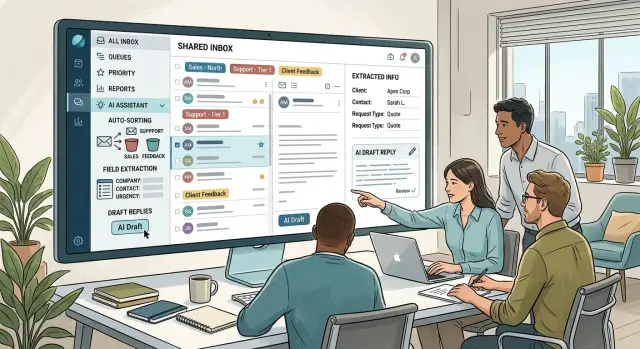
Table of Contents
Why shared inboxes get messy
A shared inbox rarely stays simple for long. In one hour, the team might get a refund request, a product question, a password problem, and a note from a vendor about an invoice. Everything lands in the same place, and subject lines usually do a poor job of explaining what the message is really about.
That creates the first delay. Before anyone replies, someone has to decide who owns the email. Support sees a billing question and passes it along. Billing notices a product issue in the same thread and sends it back. Sales thinks the sender might be a lead, but the message also mentions a bug. A reply that should take two minutes turns into ten minutes of sorting, reassigning, and waiting.
The inbox slows down even more when the sender leaves out basic details. A customer asks for help but forgets the order number. A prospect wants pricing but never says team size or use case. A vendor asks for approval without the purchase reference. Every missing detail creates another email, another delay, and another chance for the thread to stall.
Then there is the repetitive work. Teams ask for account IDs, invoice dates, screenshots, shipping addresses, or contract names over and over. Each request looks small on its own. Together, they eat a surprising amount of time.
Consistency slips too. When several people answer similar emails by hand, the wording starts to drift. One person is clear and direct. Another writes too much. Someone else forgets to ask for the one detail the team always needs. Customers notice when similar questions get different answers.
That is why this kind of automation gets attention. The problem is not just inbox volume. It is the constant sorting, the missing context, and the repeated typing that drain time before the real work even starts.
Choose what the AI handles first
Most teams try to automate too much on day one. That is usually where things go wrong. Drafts get sloppy, staff lose trust, and the system becomes one more thing to check.
A better starting point is narrower. Pick four to six request types that appear every week and already follow a familiar pattern. In many inboxes, that means categories like billing issues, refund requests, sales leads, bug reports, and account access problems.
Keep the labels short and plain. If one teammate says "payment problem" and another says "invoice question," the system may split similar emails into different buckets. One clear name for each request type keeps routing steady.
Start with requests that already look alike. A refund email usually needs the same details every time: an order number, purchase date, and reason for the request. A bug report usually needs the affected area, steps to reproduce, and maybe a screenshot. When the pattern is stable, the system can classify the message, spot what is missing, and draft the next reply for quick human review.
Leave edge cases alone at first. If an email mixes billing, support, and a legal threat in the same thread, send it to manual review. Do the same for VIP requests, unusual partner emails, or messages that change tone halfway through.
There is a simple test for whether a category is ready. Take ten recent emails and ask two teammates to label them. If they mostly agree, that category is a good candidate for automation. If they argue about half of them, the label is too vague or too broad.
Good early categories save time without adding much risk. That is the sweet spot.
Capture the details each request needs
Good drafts start with a simple rule: do not move a request forward until you have the facts your team actually uses. If those facts are missing, the system should ask for them instead of guessing.
Write those requirements by request type, not as one giant checklist for the whole inbox. A billing question needs different information than an access request or a bug report. Most teams do best when each category has a short set of required fields, usually four to eight.
For a lot of inboxes, the same basics show up again and again: an order or invoice number, the account or company name, the affected product area, the deadline, and the person who can approve the action. The more concrete the field, the better the draft. "More context" is too vague. "Order number" works. "Which product area is affected" works.
Once you have the fields, split them into two groups. First, note what the system can often pull directly from the email, such as names in signatures, dates in the body, product names in the subject line, or order numbers copied from a receipt. Then note what still requires a follow-up question if it is missing or unclear.
A small table in a spreadsheet is enough. For each request type, list the field, whether the system can usually extract it, and the exact question to ask when it cannot.
A simple access request shows why this matters. Imagine an email that says, "Please give Maria access to the analytics dashboard before Friday." The system can probably identify the deadline and guess that this is an access request. It may also recognize the product area. But it still needs Maria's work email, the account name, and the name of the person who approved access. The draft should ask only for those missing items.
That one change cuts down on back-and-forth. Staff see cleaner drafts, and customers get faster replies that ask for the right details the first time.
Build the first workflow
Start with one route your team already handles every day. Pick a common inbox type, such as support, sales questions, or partnership requests. The narrower the first path, the easier it is to judge whether the workflow is actually helping.
The order of steps matters more than most teams expect. If the system writes too early, it fills gaps with guesses.
A clean sequence
A solid first workflow usually looks like this:
- Receive the email in one shared inbox.
- Classify the message by intent.
- Extract the fields the team needs.
- Check what is still missing.
- Draft a reply and route it to the right reviewer.
Classification comes first because the label decides what details matter. A refund request needs order data. A demo request needs company size, use case, and contact details. A bug report needs steps, device, and urgency.
After that, tell the system which fields belong to each message type. Keep the list short. If you ask for ten fields, people will ignore half of them and the model will start filling in blanks on its own. Three to five fields is often enough for an early workflow.
When something important is missing, the system should say so clearly. It can extract what it finds, mark the gaps, and hold the draft until it has enough context. Sometimes the best next step is not a full answer. It is one short follow-up question. That still saves time because the reviewer does not have to read the whole thread and work out what to ask.
A useful draft should match both the label and the available facts. If the sender forgot an order number, the draft should ask for it. If the sender already included everything, the draft should move the conversation along by confirming receipt, explaining the next step, or routing the case.
Approval rules
Routing is the last piece. Billing drafts should go to finance. Product questions should go to support. Urgent issues should reach the person on duty. A lot of shared inboxes slow down because every message lands in front of the same few people.
Take a simple example. A customer writes, "I was charged twice on invoice 4821." The system tags it as billing, pulls out the invoice number, sees that the account email is present, drafts a reply that confirms review, and sends it to the finance owner for approval. A human checks it, makes any edits, and sends it. That path can take under a minute instead of ten.
Keep humans in control
A shared inbox runs better when the system prepares the work and a person sends the final reply. That split keeps the speed without handing too much authority to the model.
The system is good at sorting requests, extracting details from messy emails, and drafting a response. It is not good enough to make the final decision on sensitive issues by itself.
People also need to see why the system made each choice. If a message gets tagged as billing, sales, or bug report, show the reason in plain language. Do the same for extracted fields such as company name, order number, deadline, or a missing attachment. When staff can check the logic in a few seconds, they catch bad guesses before they reach a customer.
What reviewers need to see
The review screen should stay simple. Reviewers need the label, a short reason for that label, the fields the system found, the source text nearby, any missing details that block a complete reply, and a draft they can edit before sending. The screen should also flag uncertainty clearly.
That last part matters. A weak draft can still be useful if it saves most of the typing. Staff can fix the tone, remove wrong details, and add context the system could not know.
Sensitive topics need hard stops
Some emails should always stop for human review. Refunds are an obvious example. Legal complaints are another. Account changes, billing updates, cancellation disputes, and anything involving identity or access also need a person in charge.
A simple rule works well: if the message touches money, legal risk, or account ownership, the system can classify it and draft the next step, but a staff member should approve every word.
Imagine a customer who asks for a refund and also wants to change the email on the account. The system can tag both issues, notice that an order number is missing, and draft a polite verification request. The agent then checks the wording and decides what to send. That extra minute is usually cheaper than fixing a bad reply later.
A simple inbox example
A billing message lands in the shared inbox at 8:12 a.m. The customer writes, "Our invoice failed, and our service stopped. We paid last week for Northside Dental. Can someone fix this today?" It is urgent, but it is also easy for a busy team to overlook.
The first pass should take seconds. The system reads the email, tags it as billing, and marks it urgent because service has stopped. That alone saves an agent from sorting it by hand.
Next, it pulls out the details it can find with confidence. In this case, it catches the account name, Northside Dental, and the payment timing mentioned in the message. Those details help the agent check the billing record faster instead of rereading the email and copying information into another tool.
The useful part comes when the message is incomplete. The system looks for the invoice number and does not find one. It does not invent it. It adds a single question to the draft: "Can you send the invoice number from the failed payment notice?" One short question is usually enough. Five questions at once slows the reply and annoys the customer.
The draft itself should stay plain and calm:
"Thanks for flagging this. I can see this is urgent. We are checking the billing record for Northside Dental and the payment you mentioned. Please send the invoice number from the failed invoice notice so we can match the account quickly. Once we confirm the payment status, we will update you on the next step."
The agent still makes the final call. They can approve the draft as written, adjust the tone, or replace it with a direct answer if they already see the issue in the billing system. That is where this workflow works best: the system handles triage and prep, and the human handles judgment.
What creates bad drafts
Bad drafts usually come from bad setup, not bad writing.
One common mistake is adding too many labels too early. Teams try to sort every message into ten or fifteen categories on day one because it sounds organized. Real inboxes are messier than that. Two or three broad buckets, such as billing, support, and sales, usually work better at the start.
Too many labels force the system to make thin distinctions that do not help anyone. A refund request becomes "billing issue," "account issue," or "customer complaint" based on small wording changes. Routing gets shaky, and the drafts start to feel inconsistent.
Another mistake is drafting the full reply before checking what information is missing. If someone asks about a refund but leaves out the order number, a polished answer still fails. The better path is simple: classify the request, extract the needed fields, ask for the missing detail, and only then write the full response.
Tone creates problems fast too. A shared inbox should not use the same voice for an angry customer, a confused user, and a new lead. One needs a calm apology and a direct next step. Another needs a friendly intro and a short explanation of what happens next.
Low-confidence classifications need extra care. If the system is unsure whether a message belongs to support or sales, it should not guess and push out a full draft anyway. That early mistake affects everything that follows. It is better to send unclear messages to a person or run a second pass with fewer choices.
Some requests need human review every time. Account changes, cancellations, refunds, access resets, and anything tied to security should never move ahead without a person checking the facts. The system can collect details and prepare a draft, but a human should approve both the reply and the action.
A few warning signs usually show up early:
- Drafts mention steps the sender never asked for.
- Replies sound cheerful when the sender is upset.
- The system fills blank fields with guesses.
- Unclear classifications still get full drafts.
- Sensitive requests move forward without review.
Fix those habits early, and the drafts get shorter, clearer, and much easier to approve.
Test before launch
A short test with real mail tells you more than a week of planning. Before you trust the workflow with customer messages, run 20 to 30 real emails through it and review every step.
Use a mixed sample. Include billing questions, support requests, vague one-liners, follow-ups, and a few messy emails with missing context. Clean samples make every system look smarter than it is.
For each message, check two things first: did the system choose the right label, and did it notice what was missing? If someone asks for a refund but leaves out the order number, the draft should ask for that. If a bug report has no steps, the reply should ask what happened, when it happened, and what the person was using.
Then read the draft like a customer would. The tone should sound like your team, not a stiff template. The facts need to stay accurate. The reply should be short enough to read quickly but complete enough to move the conversation forward.
A simple review sheet helps. Track whether staff kept or changed the label, whether they edited the missing-information question, whether they sent the draft with light edits or rewrote it completely, and whether the draft included anything wrong, vague, or too long.
After a few dozen messages, the patterns usually become obvious. If staff keep changing labels, your classification rules need work. If they rewrite most replies, the prompt or tone guide is off. If the system keeps forgetting the same field, your intake checklist is incomplete.
Keep one safe fallback path for anything unclear. When a message is emotional, mixes several issues, mentions security, or simply makes no sense, the system should stop, mark it for human review, and avoid guessing.
A missing draft slows one reply. A confident bad draft creates a much bigger mess.
Roll out in one small slice
Start with one inbox and one request type that appears every day, such as refund requests, access requests, or simple status questions. That gives you enough volume to learn quickly without creating too much risk.
For the first two weeks, watch a short set of numbers: time from email arrival to first draft, time from draft to human approval, drafts that needed major edits or were rejected, and requests that got the wrong label or missed a required field.
Those numbers tell you whether the workflow is actually saving time. If reply time drops but approval time rises, the draft rules are probably too loose. If people keep fixing labels by hand, the categories are either too broad or too similar.
Use the same two-week window to tighten the basics. Fix overlapping labels. Add rules for details the system often misses, such as an account ID, order number, due date, or the name of the affected product. Keep the approval path simple too. Everyone involved should know when to approve, when to ask for more information, and when to pass the message to another team.
Once one request type works well, add the next closest category. Do not jump straight to the hardest cases. Teams do that all the time, especially when one inbox mixes product questions, support requests, and internal operations work. The result is predictable: weaker classification, slower approvals, and drafts that sound plausible but miss the point.
If your inbox sits across product, operations, and support, outside help can make the first rollout much cleaner. Oleg Sotnikov at oleg.is works as a Fractional CTO and startup advisor, helping small and medium businesses move processes into practical AI workflows without a large rebuild. For a setup like this, that usually means defining the approval rules, the routing logic, and the few automations that save time right away.
That is enough for a first rollout. You do not need a perfect system. You need one workflow that replies faster, asks for the right details, and still earns the team's trust two weeks later.


