Access control in AI search: filter answers by role
Access control in AI search keeps private content out of answers by filtering chunks and citations by role before the model writes a reply.
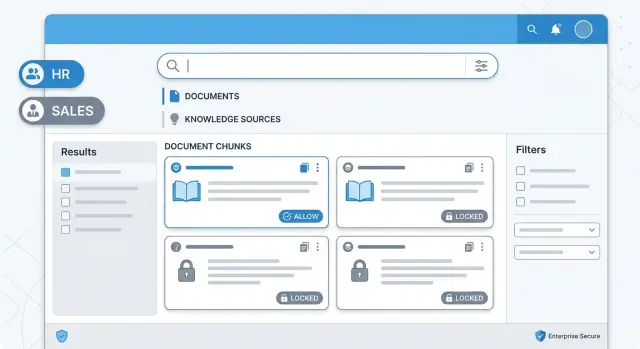
Table of Contents
Why this problem matters
AI search can leak data in a way that feels harmless at first. Someone asks a simple question, gets a clean summary, and never opens a file. But the answer may still come from documents they are not allowed to read.
That gap is the problem. In a normal document system, a user hits a permission wall. In AI search, the system can pull lines from several files, blend them into one reply, and present the result as if it were common knowledge.
The leak does not need to be dramatic. A citation title alone can reveal too much. File names such as 2025 salary review, Project Atlas acquisition plan, or customer churn - board update already say a lot, even when the body text stays hidden. Project names, salary bands, customer issues, and legal work often appear in titles, folder names, and snippet previews.
One bad reply can break trust fast. People stop using the tool. Managers start asking whether finance, HR, or leadership files are safe. Security teams treat the whole system as risky, even when the bug came from one edge case.
Access control has to happen before the model sees any content. If an employee cannot open a file by hand, the model should never receive text from that file. It should not receive the citation, title, or metadata either. Telling the model to ignore restricted content does not solve this. Once the content enters the prompt, the leak can already happen.
A simple rule keeps the system aligned with the rest of your tools: the assistant can answer only from content the user could open manually at that moment.
Where leaks happen in the answer flow
Many teams lock files in Google Drive, SharePoint, or an internal wiki and assume the assistant will follow the same rules. It will not unless every step checks permissions before the model sees any text.
The first leak often starts in retrieval. A search query can pull chunks from every document that matches the words, even if the user can open only some of them. If your index stores text without role or user filters, the retriever treats private contracts and public guides as equal candidates.
The next problem shows up in reranking. Teams add a second layer that scores chunks for relevance, then keeps the best few. That sounds harmless, but some rerankers look only at semantic fit. If they ignore document permissions, they can push blocked text to the top simply because it answers the question better.
Once the model reads restricted text, the leak may already be real. It does not need to copy a sentence word for word. It can paraphrase a private salary policy, summarize a customer issue, or mention one number from a blocked report. The user still gets data they could not open manually.
Citations create another leak, even when the answer itself looks safe. A reference like Board-M&A-plan-2025.docx or Layoff-forecast.xlsx tells the user that the file exists. In some cases, the file name, folder name, or short preview gives away the secret before the user reads a single line.
Caching causes quieter failures. An admin asks a question, the system stores the retrieved chunks or final answer, and a regular employee asks something similar a minute later. If the cache key uses only the query text, the second user can inherit the first user's access.
Access control has to apply before retrieval, before reranking, before citation building, and before cache reuse. If one step skips the check, later steps cannot clean up the mistake.
Set the rules before you index
Access control starts before the first file enters the index. If you wait until answer time to sort out permissions, you end up chasing edge cases for weeks. The index should already know who can read what.
Pick one source of truth for roles and group membership. That might be your identity provider, your HR system, or your document platform. Do not mix role data from three places and hope they agree. If finance-manager means one thing in Google Drive and another in your app, the assistant will eventually expose the wrong file.
Each document needs a clear permission record when you ingest it. Keep that record simple enough that a non-engineer can read it. A good rule set answers five plain questions:
- Who owns the document?
- Which users can open it?
- Which groups can open it?
- Does it inherit access from a folder or workspace?
- What happens if that access data is missing?
Write inherited rules in plain language before you turn them into code. Everything in the payroll folder is visible only to payroll staff and the CFO is much better than a vague note about inherited ACL behavior. Plain language exposes bad assumptions early, and legal, security, and operations teams can review it without reading query logic.
When access data is missing, make one hard choice: deny access. Untagged files, broken group syncs, and stale folder metadata should stay out of the index or move into quarantine. That feels strict, but it is cheaper than cleaning up a leak.
A small example makes this easier to test. Say the company has three folders: All hands, Sales, and Board. An employee in sales can search files from All hands and Sales. The same employee should never retrieve a chunk from Board, even if that chunk mentions the same product plan and scores higher in retrieval.
Teams that do this well keep the permission model boring. One identity source. One map from documents to rules. One default when data is unclear: deny.
Filter chunks and citations before generation
The safe order is simple: check access, search, then generate. If the model sees everything and you try to hide restricted details later, you are already too late. It can still mix private facts into a summary, even when the final answer looks clean.
Start each request by identifying the person, their active role, and any scope that changes access. A user may belong to several groups, so do not guess. Use the role selected for that session, plus the same permission rules your app uses when someone opens files by hand.
Then build the allowed document set. This is the full list of files, pages, tickets, or records the user can open right now. Search should run only inside that set. That one choice removes a lot of risk because the retriever never even sees blocked material.
A small example makes this clearer. Imagine a manager who can read team plans but not salary reviews. If vector search runs across the whole company index, a query like why is this team unhappy might pull chunks from private performance notes. If search stays inside the manager's approved documents, those chunks never enter the answer flow.
What to filter out
Permission tags need the same care as the content itself. If a chunk has no tag, an unreadable tag, or a tag that does not match its source document, drop it. Do not try to repair access on the fly. Broken metadata is a security bug, not a small data quality issue.
Citations need the same rule. Keep citations only from the approved chunk set that fed the answer. If the model cites a document outside that set, discard the citation and regenerate or return a safe fallback.
The final gate
Before you call the model, send only approved chunks in the prompt. No extra context, no hidden system attachment with broader search results, and no just in case snippets. The model can answer only from what it receives.
That is strict by design. Access control works best when the model never gets a chance to see anything outside the user's allowed set.
Use a simple example to test the design
Access control gets easier to judge when you use one plain test case. Pick two people with different permissions, give them the same question, and check whether the assistant changes both the answer and the citations.
Imagine a sales rep and an HR manager inside the same company. The sales rep can open product price lists and approved revenue reports. They cannot open payroll files. The HR manager can open salary files and staffing budgets, but they cannot read draft deal terms from sales.
Now both ask: What drove quarterly costs up?
The sales rep should get an answer built from documents they already have access to, such as discount tables, commission reports, or vendor price changes tied to sales activity. The assistant might say costs rose because discounts increased, shipping got more expensive, or a product line had lower margin that quarter. Every citation should point to files the sales rep can open on their own.
The HR manager should get a different answer. Their version may focus on overtime, new hires, bonuses, or benefit costs because those are the documents they can read. The assistant should not cite draft deals, pricing strategy notes, or sales negotiation documents, even if those files would improve the answer.
That is the whole test: one question, two users, two different retrieval sets.
A good result looks like this:
- The sales rep sees only sales and pricing sources.
- The HR manager sees only payroll and staffing sources.
- The answer changes with the source set.
- Every citation opens a file that user can actually read.
- The assistant says it lacks enough data when permissions block the missing context.
This small scenario catches a lot of design mistakes early. If both users get the same answer, your retrieval layer probably ignored document permissions. If the answer text changes but the citations do not, citation filtering happens too late in the pipeline.
Test real roles and edge cases
Good permission rules on paper mean little until you run the same question through real accounts. Problems show up in mixed roles, revoked access, stale caches, and missing metadata. That is where small mistakes turn into quiet leaks.
Start with the simplest comparison. Ask the same question with an admin account and a regular account. The admin may see five relevant chunks and three citations. The regular user should see only what they can open by hand in the source system. If the answer sounds correct but cites a blocked document, the filter failed.
A short test set catches most problems:
- Run identical queries with high access and low access users.
- Test one user who has two roles and confirm which rule wins.
- Remove access to a document, then ask the same question again.
- Corrupt or delete permission metadata for a few records.
- Recheck saved and cached answers after any role change.
Users with two roles need extra attention. Some systems combine permissions from both roles. Others let a deny rule override an allow rule. Pick one rule and test it on purpose. If your team cannot explain the result in one sentence, users will not trust it either.
Revoked access is another weak spot. Suppose a manager could read a budget file yesterday, but not today. After you remove access, old citations to that file should disappear from fresh searches. If your product stores previous answers, check those too. A shared cache can leak data long after the permission changed.
Broken metadata deserves a harsh test. Remove the role field from a chunk, set the user group to an empty value, or attach the wrong document ID. Search should stop using that content. Do not let the system guess. When permission data is incomplete, it should fail closed and return less, not more.
One practical scenario works well. Put a policy document in a folder that only finance can open, and a general handbook in a folder everyone can read. Ask both groups the same question about travel spending. Finance can see both sources. Everyone else should get an answer built only from the handbook, even if the restricted policy is the better match.
If you test role changes, broken metadata, and cached results before launch, you catch the leaks that usually slip through demos.
Mistakes that cause data leaks
Most leaks do not start with a dramatic breach. They start with a shortcut that looked harmless during development. Small mistakes change who can see what, and the model will not fix that for you.
The worst pattern is filtering after generation. If the model reads restricted chunks first, the answer is already shaped by data the user should never see. Removing a sentence at the end does not undo that. A user may still get a summary, a hint, or a suspiciously precise answer built from blocked content.
Another common leak shows up in citations. Teams hide the answer text but still display document names, page titles, or file paths from blocked sources. That alone can expose a planned acquisition, a customer name, or a payroll file. If a person cannot open the document by hand, the assistant should not show any trace that it exists.
Stale permissions cause quieter leaks, and they are easy to miss. A system may copy access rules into the index once a day, while the live app changes roles every few minutes. Someone leaves a project at noon, asks a question at 12:05, and the search layer still thinks they belong there. That gap is enough.
Folder names are another trap. People often treat labels like HR, finance, or private as if they were real security rules. They are not. A folder can contain mixed files, inherited permissions, or one document shared with a special group. Retrieval should check the actual access rule for each chunk, not guess from where the file sits.
Debugging can leak just as much as the product itself. Teams often save retrieved chunks, blocked chunks, model prompts, and raw citations in logs so they can inspect failures later. If those logs keep restricted text, anyone with log access may read data the user never should have touched.
A simple test catches many of these problems. Take one restricted document, one public document, and two users with different roles. Ask the same question from both accounts. Then inspect the answer, the citations, the logs, and the cache entries. If restricted text appears anywhere in that path, the design is still unsafe.
Quick checks before launch
A safe system fails closed. If the search layer cannot confirm who can read a chunk, it should return nothing from that chunk and move on.
Every chunk needs two pieces of metadata at index time: a document ID and a permission tag. The document ID ties the chunk back to the source file. The permission tag tells the retriever who can read it. If either field is missing, search should stop using that result instead of guessing.
Before launch, check a few basics:
- Every indexed chunk has a document ID.
- Every chunk has a current permission tag.
- Retrieval stops when permission metadata is missing or unreadable.
- Citations come only from chunks the user can open.
- Logs record blocked results without storing blocked text.
Citations deserve a separate check because they often slip past teams. A model might write a safe answer, then attach a citation from a file the user cannot access. That still leaks information. The citation layer should use the same approval rules as retrieval and reject any source that did not pass the permission check.
Logging helps, but logs can become a second leak path. Record the document ID, user role, timestamp, and reason for the block. Do not save the blocked snippet, summary, or quoted text. If an admin needs to debug a case, they can inspect the source in the normal system with the right permissions.
Permission updates also need a fast path. If a manager removes access to a folder at 10:05, the index should reflect that change quickly. Long sync delays create a gap where the assistant still sees content a person can no longer open. Tight sync jobs, event-based updates, or cache expiry rules all help. Slow updates are a real security bug, not a small operations detail.
One last check is easy to miss: revoke access for a test user, run the same query again, and confirm that both the answer and the citations change right away. If they do not, do not launch.
What to do next
If your team has not shipped role filtering yet, do not start with the whole company knowledge base. Pick one collection that would hurt if it leaked, such as HR files or customer contracts. A smaller scope is easier to inspect, and reviewers can check real answers by hand.
Then turn your policy into tests. For each release, ask the same questions as an employee, a manager, an admin, and a user with no access at all. Run those tests again after every prompt update. Small prompt edits can reopen old leaks.
A simple rollout plan is enough:
- Choose one protected collection and tag each document with the same permissions people already use.
- Block retrieval before generation, then allow citations only from chunks the user can open.
- Log denied retrieval attempts and compare them with the citations in the final answer.
- Stop the response if the model tries to cite a blocked chunk, even when the wording looks harmless.
Those logs show where the weak spots are. If denied retrievals jump after a release, inspect that change first. If citation mismatches appear even once, treat that as a bug, not a rare edge case. A system that answers with the wrong citation is already too close to exposing the wrong text.
Treat access control as a product safety rule, not a prompt trick. Keep the first rollout narrow, test it every time you ship, and expand only after the basics hold up.
If you want a second opinion, Oleg Sotnikov at oleg.is works as a Fractional CTO and startup advisor on AI-first software development, RAG, and production rollout. That can help when the weak point sits between indexing, retrieval, citations, and the final answer rather than in one obvious component.
Frequently Asked Questions
What does “filter by role before generation” mean?
It means your system checks what the user can open first, searches only inside that allowed set, and sends only those chunks to the model. The assistant never sees restricted text, titles, or metadata, so it cannot leak them in the reply.
Why can’t I just hide restricted text after the model writes the answer?
No. Once the model reads restricted content, it can still paraphrase or blend that information into a summary. You need to block restricted chunks before retrieval, reranking, and prompt building.
When should permission checks happen in an AI search pipeline?
Start before indexing. Attach clear permission data to every document and chunk when you ingest it, then enforce the same rules again at query time. That approach removes a lot of edge cases later.
Do citations and file names really matter if the answer text looks safe?
No. File names, folder names, and snippet previews can reveal a lot on their own. If a user cannot open the source manually, do not show any citation, title, or metadata from it.
What metadata does each chunk need?
Keep it simple: store a document ID and a permission tag on every chunk. The document ID ties the chunk to the source file, and the permission tag tells search who can read it right now.
What should I do when a chunk has missing or broken permission data?
Deny access and drop that content from search. Do not guess, repair, or infer access during the request. Broken permission data is a security problem, not a cleanup task for the model.
How can caching leak private data?
Caches often reuse old retrieval results or full answers. If your cache key uses only the query text, one user can receive results that came from another user with broader access. Include user scope in the cache logic or skip cache reuse for sensitive content.
How do I test whether role filtering actually works?
Ask the same question from two accounts with different access and compare both the answer and the citations. If both users get the same sources, or one user sees a file they cannot open by hand, your filter has a gap.
What happens when someone loses access to a document?
Remove access, refresh the permission data fast, and run the same query again. The answer and the citations should change right away. Check saved answers and caches too, because old data often lingers there.
Should two users ever get different answers to the same question?
Yes, and that is normal. The assistant should answer from each person's approved documents, so two users can ask the same question and get different summaries with different citations. When access blocks needed context, the assistant should say it does not have enough data.


