AI rules in code: keep model judgment separate from policy
AI rules in code helps teams update thresholds, permissions, and approvals without retraining prompts or behavior. Learn a simple split that lasts.
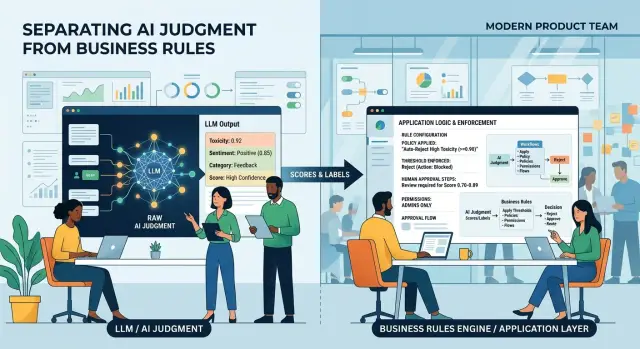
Table of Contents
Why rules inside the model cause trouble
When a team hides business rules inside prompts, the system gets hard to change and harder to trust. The model ends up doing two different jobs: reading messy human input and deciding company policy. That feels convenient at first. Later, it turns into maintenance work.
The first problem is simple. People forget where the rules live. A spending cap, a permission check, or an approval rule gets added during a prompt edit and then buried under examples, instructions, and edge cases. A few months later, nobody knows whether the "$500 needs approval" rule lives in the app, the prompt, or both.
Small policy changes become annoying fast. If finance raises the cap to $750, someone has to edit prompt text, test a handful of cases, and hope nothing else changed. That's a bad trade. A number change should feel like a config update, not a mini retraining exercise.
It also becomes harder to explain decisions. If the system approves one request and rejects another, people want a reason they can read. They don't want, "the model interpreted the prompt this way." They want something clear: amount over limit, missing approval, wrong department, expired permission.
Different teams make the problem worse. Sales may want flexible discounts. Finance may want strict approval steps. HR may need one rule for contractors and another for employees. If all of that sits inside one prompt, every new exception makes behavior murkier.
The same issues show up again and again:
- different prompts end up with different versions of the same rule
- tiny policy edits take too long to test
- support teams can't explain decisions cleanly
- departments argue about behavior nobody can see directly
The better split is straightforward. Let the model judge fuzzy input, such as whether a note sounds urgent or whether a receipt matches a category. Let code handle thresholds, permissions, and approvals. Then teams can change policy without rewriting model behavior every time someone updates a number or adds a new approval path.
What the model should do
Give the model the parts humans are bad at doing consistently: reading messy text, pulling signal out of noise, and explaining odd cases in plain language. A model is good at turning a sloppy request into a clean set of facts that code can use later.
People rarely write requests in a neat format. They paste email threads, leave out dates, mix opinions with facts, and use vague words like "soon" or "small purchase." The model can read that mess and extract the pieces that matter, such as amount, person, reason, timing, and anything missing.
A simple example helps. If someone writes, "I had to book a last-minute hotel near the client site because my flight changed and the cheaper places were sold out," the model can pull out the likely facts, note that the booking was urgent, and flag that the price may need extra review. That's a good use of model judgment. It reads the situation better than a rigid form.
The model also helps when the input is unclear. It can compare possible readings and say which one seems more likely. If a request says "team dinner after the event" but never states whether clients attended, the model can say, "This may count as client entertainment, but I'm not fully sure because the attendee list is missing." That kind of uncertainty note is useful.
When a human needs to review a case, the model should write a short summary that saves time. A good summary includes the facts it found, what looks unusual or incomplete, why the case may need review, and how sure it is about that reading.
That last part matters. The model should not force a clean answer when the input doesn't support one. If details conflict, or if the text leaves a gap, it should say so directly. "Unsure" is better than a confident guess that sends a request down the wrong path.
What code should do
Code should own every hard boundary. The model can read a request, summarize facts, and offer a recommendation. Code should decide whether anyone can act, how far they can go, and who must approve the result.
Start with permission checks. Code should verify the user, role, team, and account state before anything happens. If a support agent can issue refunds up to a set amount, code should enforce that rule every time. It should not matter whether the model sounds confident.
Money limits and score cutoffs belong outside the model too. Put them in config, a database table, or a small policy service. Then a team can change a refund cap from $200 to $300, or raise a fraud score cutoff from 0.70 to 0.82, without touching prompts.
In most systems, code needs to do four things well: confirm permission, compare the request against numeric limits, route failed cases to the right approver, and save the rule, inputs, and result for later review.
Approval rules should stay explicit. Don't ask the model to guess who seems senior enough to approve a purchase or unlock customer data. Code should look up the right person from the org chart, budget owner list, or account settings. That keeps approvals consistent even when teams change.
Recording the final rule matters just as much as enforcing it. Save the exact policy version, the threshold that applied, the user who made the request, and the reason the action passed or failed. When someone asks, "Why was this blocked?" your team should answer with one clear line from the log, not a vague summary from the model.
This split makes policy safer and easier to update. The model handles judgment. Code handles permission checks, thresholds, approvals, and the audit trail behind the final action.
A split your team can actually implement
Start with one workflow that already has clear business limits. Expense approvals and refunds are good first choices because the rules are easy to name, test, and debate.
Write those rules as plain conditions in code. Keep them boring. If the amount is under a set limit, approve it. If the receipt is missing, reject it. If the request comes from a contractor, send it to a manager.
A small ruleset might look like this:
- under $200 with a valid receipt: auto-approve
- $200 to $1,000: manager approval
- over $1,000: finance approval
- no receipt: reject
- duplicate receipt number: hold for review
Then give the model a narrower job. Ask it to read the request and return structured facts, not the final decision. For an expense claim, that might be vendor name, amount, currency, date, whether a receipt is present, likely category, and whether the receipt looks blurry or incomplete.
The flow is simple. The model extracts facts into JSON. Your application checks those facts against rules in code. The user gets a result such as "approved," "needs manager review," or "rejected - missing receipt."
Log both sides every time. Save the model output, the confidence score if you use one, and the exact rule that fired. When finance asks why a claim was blocked, you should be able to point to something concrete like Rule EXP-04 rejected this because no receipt was detected.
That log matters more than teams expect. When policy changes, you update a rule, not model behavior. If the auto-approve limit moves from $200 to $300, you change one value and rerun tests. You don't rewrite prompts and hope the model starts acting differently.
Expense approvals as a realistic example
Maria files a travel expense after visiting a customer. She uploads a hotel receipt, enters "$184.50," and adds a short note: "Taxi from airport and one night near client office."
The model has a narrow job. It reads the note and receipt, then turns messy input into structured fields. It can pull out the amount, label the expense as travel, notice that the taxi fare and hotel stay are mixed together, and flag that the note doesn't say which customer meeting the trip supported.
If the receipt image is blurry or the currency is unclear, the model can say that too. That's useful judgment. It isn't policy.
Then code takes over. The app can check whether Maria can submit travel expenses for this department, whether she is still inside her budget limit, whether company policy requires a receipt above a set amount, and whether expenses above a threshold need manager approval.
If the claim is below the limit and the receipt rule passes, the system approves it right away. If the amount crosses the threshold, the system sends it to Maria's manager. If the receipt is missing, the system asks for it before review starts.
That's what approval rules in code look like in practice. The model helps interpret the submission. The code applies permissions, thresholds, and routing.
This split pays off when finance changes policy. Say the company raises the auto-approval limit from $200 to $300 before a busy conference season. An engineer updates one config value or rule in code, and the workflow changes on the next request.
Nobody needs to rewrite prompts. The model still extracts amount, category, and missing details the same way it did yesterday.
Teams usually want this because policy changes often. Budgets shift. Roles change. Receipt rules tighten during audits, then loosen later. When those decisions live in code, finance can ask for a change without touching the model logic, and the system stays predictable.
Common mistakes teams make
The biggest mistake is letting the model approve exceptions on its own. A model can read context, spot odd patterns, and explain why a request looks risky. It should not decide that a hard rule suddenly doesn't apply.
Another common problem is hiding approval limits inside prompts. One prompt says expenses over $500 need sign-off. Another says $750 after a quick edit. A month later, nobody knows which one matches the real policy.
Teams also mix hard limits with fuzzy language. They write prompts like "usually allow" or "approve if it seems reasonable" next to strict rules about money, access, or security. That gives the model room to improvise. If the business rule is fixed, write it as a fixed rule. If the model is unsure, make it return "needs review" and stop there.
You can usually spot this problem quickly:
- the same request gets different decisions in two tools
- support can't explain why an exception passed
- a policy update means editing prompts in several places
- logs show a model opinion, but not the rule version behind the decision
Skipping a safe fallback is another mistake. Models sometimes see incomplete data, vague wording, or unusual cases. When that happens, the system should pause, ask for missing details, or send the request to a person. Low confidence is not permission to guess.
Versioning matters too. Policies change all the time. Finance raises a threshold. Legal tightens access. A startup cuts discretionary spend for one quarter. If you change rules without versioning them, you lose the ability to answer a basic question: which policy made this decision?
This is often one of the first cleanups an experienced Fractional CTO pushes for. Move thresholds, permissions, and approval paths into code or a rule store. Let the model judge the facts. Let the system enforce the rules.
Make policy changes easy
Most policy changes are small. A team raises a refund cap, adds a second approver for one department, or blocks a role from taking one action. Those changes should take minutes, not a model rewrite.
Put limits, permission checks, and approval rules in code that reads from a config file or an admin screen. Then the model can keep doing the same job: classify, summarize, compare, or flag edge cases. Your team changes policy by editing a number, a role, or a condition.
Names matter more than many teams expect. If a rule says rule_17, people will guess. If it says "Manager approval required above $750" or "Contractors cannot approve vendor payments," people know what it does right away.
Clear names help during reviews, support work, audits, and handoffs. People can spot a bad change faster, explain a decision in plain English, and understand rule history without relying on tribal knowledge.
You also need a simple history for every rule change. Show who changed it, when they changed it, and what the old value was. If finance raises a threshold on Monday and problems start on Tuesday, the team should be able to find that change in seconds.
The changelog doesn't need to be fancy. A small admin log or Git history can work if people actually use it. What matters is that the record is easy to read and hard to lose.
Keep policy review separate from model review. When someone changes an approval limit, reviewers should check the business decision, not reopen the prompt. When someone updates model behavior, reviewers should test judgment quality, not every company policy.
That separation saves time and cuts confusion. It also lowers risk. Teams can change rules often, which they usually need to do, while model behavior stays stable enough to test properly.
Checks before release
A release is not ready if a policy change still means prompt surgery. Try one small change before you ship: raise a spending limit, change a user role, or add one extra approval step. If someone has to edit model instructions instead of code or config, you're still mixing judgment with policy.
A short release review catches most problems:
- change one limit in config and rerun the same request - the outcome should change because code changed
- read every outcome in one sentence - "Approved because the total is under the limit and the requester has manager rights" is clear
- force an unsure model response - the system should pause the action, ask for review, or take the stricter path
- test every approval branch you care about, including reject, escalate, retry, and missing-data cases
Boring checks beat clever ones here. A model can judge whether a receipt looks suspicious, whether a request is incomplete, or whether a message sounds risky. Code should decide who may approve, what limit applies, and what happens when the model is unsure.
When this split is done well, policy updates take minutes, results stay explainable, and mistakes show up in testing instead of production.
What to do next
Pick one workflow that already has clear approval steps and a small blast radius if something goes wrong. Expense approvals work well. Refunds, discount requests, and access requests also fit because most teams already know who can approve what.
Then pull the rules out of the prompt first. Put thresholds, permission checks, and approval paths in code or configuration, even if the rest of the flow still feels manual. That gives you a safer starting point because the model can judge the situation while the system still decides who gets to act.
A practical first pass is simple:
- choose one workflow with a written path from request to approval
- encode limits, roles, and escalation paths outside the model
- add logs for every recommendation, approval, rejection, and override
- keep a human approval step until the logs look boring and predictable
Logs matter more than most teams expect. If the model suggests approval for a $480 request and your code blocks anything over $300, you want that mismatch recorded. After a week or two, patterns show up fast. You'll see where the model needs better instructions, where employees bypass the process, and where the policy itself is messy.
Don't automate five workflows at once. Start with one, clean it up, and only then copy the pattern to the next case. Teams that rush usually end up arguing about edge cases in production, which is a bad place to write policy.
If you need help designing that split, Oleg at oleg.is works as a Fractional CTO and startup advisor on AI-augmented development workflows. A quick review of the boundary between model judgment and code-level policy can save a lot of cleanup later.
Frequently Asked Questions
Why is it a bad idea to keep approval rules inside the prompt?
Because prompts hide policy in a place that drifts over time. A spending cap or approval step should live in code or config, where your team can change one value, test it, and know exactly what changed.
What should the model do in this setup?
Let it read messy input and turn it into facts your app can use. It can extract amounts, dates, categories, missing details, and an uncertainty note when the request does not say enough.
What rules belong in code instead of the model?
Put hard boundaries in code. That includes permissions, spending limits, approval routing, role checks, duplicate checks, and the final allow or block decision.
How do I start if our system already mixes rules and prompts?
Start with one workflow that already has simple limits, like expenses or refunds. Keep the model on fact extraction, then move thresholds and approval paths into code or config first.
What should happen when the model is unsure?
Stop the action and take the stricter path. Ask for missing details or send the case to a person instead of letting the model guess.
How should we log decisions so support and finance can explain them?
Save both parts of the decision. Record the model output, any confidence signal you use, the rule name or version, the requester, and the final result with the reason.
Where should thresholds and limits live?
Store them in config, a database table, or a small policy service. That lets you change $200 to $300 without rewriting prompts or changing how the model reads requests.
Can the model approve exceptions on its own?
No. Let the model flag an odd case and explain why it looks unusual, but let code decide whether the rule allows an exception and who must approve it.
How do we test this boundary before release?
Try one small policy change before release, like raising a limit or adding an approval step. If your team has to edit the prompt to make that change work, the split is still wrong.
Which workflow should we separate first?
Pick a workflow with a small blast radius and rules people already understand. Expense approvals, refunds, discount requests, and access requests usually work well because teams already know who can approve what.


