AI product risk when outputs affect money or records
AI product risk matters when a wrong answer can change payments or records. Learn approval points, audit trails, and escalation rules in plain terms.
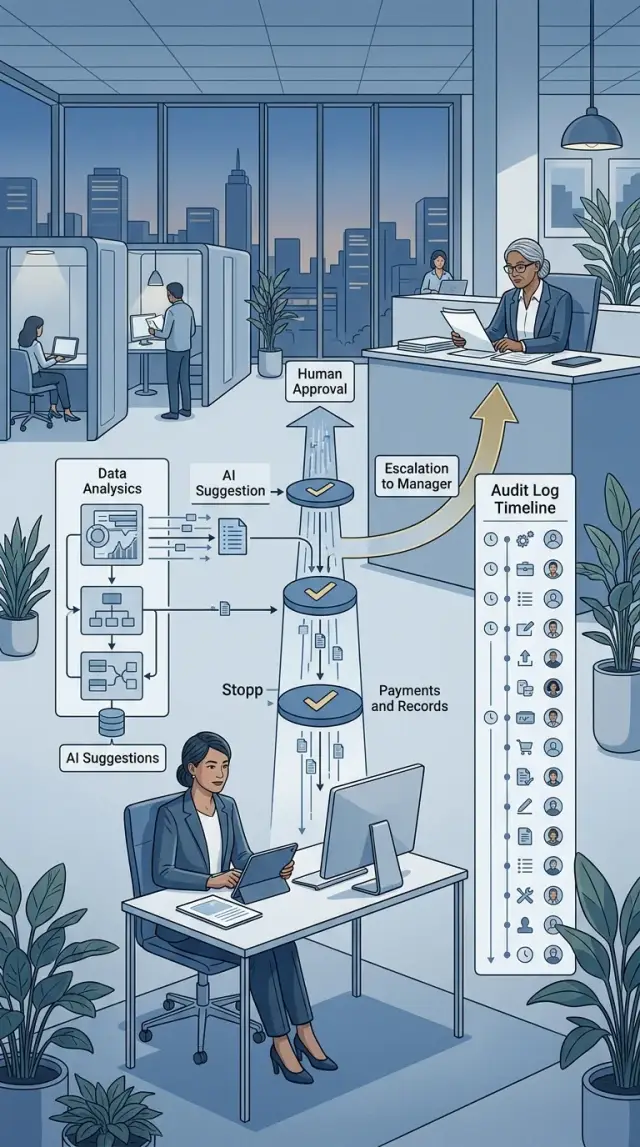
Table of Contents
What goes wrong when AI touches money or records
When AI handles refunds, invoices, payroll, or account balances, a small mistake stops being small. One wrong output can approve a refund that should stay blocked, change a balance by the wrong amount, or write bad data into a customer record that other teams later trust.
Scale makes it worse. A person might make one bad edit and catch it on the next screen. An AI tool can repeat the same mistake across 50, 200, or 2,000 records before anyone notices. If it reads one field wrong, matches the wrong customer, or flips a credit into a charge, the error spreads fast and still looks tidy enough to seem correct.
Confidence lowers people's guard. A clean summary and a firm answer feel reliable even when the source document says something else. Teams skip the extra check because the output sounds certain. That is how AI product risk shows up in everyday work: people trust the polish instead of the evidence.
A simple case makes the problem obvious. A support tool reads an invoice dispute and suggests, "refund full amount." If the invoice already had a partial credit, that suggestion sends out too much money. If the same rule runs on every similar case that day, the business has a batch problem, not a single error.
Fixing money and record errors also costs more than teams expect. Someone has to find every affected entry, reverse transactions, correct reports, explain the problem to finance or support, and answer customers who now see the wrong number. That cleanup usually costs more than a short manual review at the start.
The real damage comes from speed, repetition, and misplaced trust. One wrong answer turns into many bad records.
Choose where people must approve
Do not ask a person to approve "AI" in general. Put approval at the exact point where an output can change money, records, or account status. A simple workflow map helps: mark each step as read, suggest, or write. Risk rises sharply when a suggestion becomes a payment or a saved record.
Reading data is usually the safest step. Suggesting a change is safer than writing one, but only if someone checks the source first. Writing is where teams need hard limits, especially when one change triggers another.
Put hard stops before real consequences
Most teams should stop automation before it can:
- send a payment
- edit the ledger
- issue a refund
- change an invoice, order, or account status
- change bank, tax, or payee details
Each stop needs a named owner. Use a role, not a vague group. "Finance manager approves refunds over $500" works. "Someone from finance checks it" does not. If nobody owns the decision, people assume somebody else already handled it.
Use stricter approval when the amount is large or the request looks odd. One approval may be enough for a $40 credit note tied to a clear support case. A $7,500 refund, a ledger edit after month-end close, or a payment to a new account should need a second person or a manager. Small teams can still keep this simple: normal cases go to one reviewer, exceptions go to two.
A plain test helps. If this action is wrong, who fixes it, how long does that take, and what does it cost? If the answer is "finance will spend days untangling it" or "customers could lose access by mistake," put a human approval step there before the system writes anything.
Write approval points in plain language
People make fewer mistakes when approval rules read like work instructions, not policy notes. If an AI tool can change an invoice, refund, payment, or customer record, the rule should name one person or role who must approve that action.
Use role names, not fuzzy labels. "Finance manager" is clear. "Appropriate reviewer" is not. If different actions need different reviewers, say so directly. A support lead may approve small refunds, while a finance manager must approve bank detail changes.
A good rule answers four questions: who approves, what records or amounts it covers, what evidence the reviewer must check, and what to do if anything looks wrong.
That evidence step matters more than most teams expect. Do not tell reviewers to "check accuracy" and leave it there. Tell them exactly what to compare. That might be the original invoice, the AI suggestion, the payment record, a customer email, or the account history. When reviewers know what to open, the work gets faster and more consistent.
Set limits in plain numbers. "Support lead can approve refunds up to $200" works. "Large refunds need approval" does not. Do the same for record types. A team may let AI draft updates to mailing addresses, but any change to tax details, legal names, or bank accounts should get a higher level of review every time.
Exception rules should be just as direct. If the source document is missing, the total does not match, or the record belongs to a VIP or restricted account, the reviewer should stop and send it to a named person or queue. Reviewers should not have to guess.
Write the response to bad output as a short instruction. "Reject the change, add a note with the reason, and send it to finance operations" is enough. Everyone follows the same path when the output looks wrong.
If two reviewers would make different choices after reading the rule, the rule is still too vague.
Keep an audit trail people can read
When AI can touch payments, invoices, refunds, payroll, or customer records, the log cannot be an afterthought. If a number changes, you need a clear record of what the AI saw, what it suggested, what a person decided, and what the system finally did.
A useful audit trail starts with the full chain, not just the final result. Save the prompt or instruction that triggered the task, the AI output, and the final action taken in the product. If someone edits the result before approval, save that edit too. Otherwise, you end up with a clean final record and no clue how it got there.
Tie every step to the underlying data. Record source file names, record IDs, document numbers, and version numbers. If the AI read invoice 1842 from one file version and a team member approved a change on another version, that difference matters.
A readable audit trail should answer five questions: what data the AI used, what it suggested, who approved or changed it, when each step happened, and which system made the change.
Plain language matters as much as technical detail. Write short reasons such as "amount did not match purchase order" or "customer name needed manual fix." Time-stamp each step, and include the system name for every action, whether that was your app, a billing tool, or a back-office script.
Search matters too. During a dispute, nobody wants to open ten raw log files and guess what happened. People should be able to search by record ID, customer name, date, approver, and action type. Good search cuts hours off an internal review.
This is where teams often get sloppy. They focus on model quality and forget that disputes usually start after the output leaves the model. A readable log gives finance, support, and legal teams the same story. If they cannot follow the trail in a few minutes, the trail is not good enough.
Set escalation rules before trouble starts
Escalation rules stop small mistakes from turning into payment errors or bad records. They should make three things clear: when the system must stop, who reviews the case, and how fast that person needs to respond.
Most teams do not need a thick policy document. They need a few plain rules that still work on a busy day. If the AI suggests an action that crosses a money limit, touches a regulated record, or conflicts with another source, the task should pause and move to a person.
A simple set of triggers is usually enough. Send large payments, refunds, or write-offs to a manager once they pass a set amount. Pause the task if numbers or names do not match across systems such as billing, CRM, or payroll. Stop the change when supporting evidence is missing, unclear, or expired. Route tax, payroll, and legal record changes to the specialist who owns that area. Give every escalation one owner and one deadline so it does not sit untouched.
The money limit should fit the business. For one team, that might be anything over $500. For another, it might be $10,000. The habit matters more than the number. People need to know the AI can suggest the action, but it cannot push it through alone above that line.
Conflicts across systems deserve extra care. If the invoice says one amount and the accounting system shows another, the AI should not guess. Guessing feels cheap until someone has to fix the ledger.
Missing evidence should trigger a stop as well. No receipt, no signed approval, no contract update means no automatic change. That sounds strict, but it saves hours of cleanup later.
Ownership is where many teams slip. Every escalation needs a named person, a backup, and a response window. A payroll issue might need review within two hours. A disputed vendor address might wait until the next business day. Clear timing keeps the queue moving and stops risky tasks from being ignored.
Set up the flow step by step
Start with one narrow task. Do not give the AI every billing or record-keeping job on day one. Pick something small, repeatable, and easy to check, such as drafting invoice correction suggestions for low-value cases.
That keeps the blast radius small. If the task goes wrong, the damage stays limited, and your team can see where the weak spots are.
Next, draw a hard line around what the tool may read. Good inputs are structured and complete: an invoice number, customer ID, amount, reason code, and the original record. Block messy inputs that invite guesses, such as screenshots, pasted chat logs, missing fields, or requests that touch locked accounting periods.
Put the operating rules on one page. Keep the language plain enough that finance, support, and engineering all read it the same way. Spell out what the AI may do on its own, what a person must approve, what the system must log every time, what events force escalation, and what the AI may never do.
Then test real cases before launch. Use a sample of past requests and compare the AI result with the decision a trained person already made. If the tool changes totals, picks the wrong reason code, or misses exceptions, do not wave it away. Fix the rule or narrow the task.
When you go live, keep manual approval turned on. Let the AI prepare the draft, but make a person approve the final change. That adds a few seconds per case, but it is much cheaper than cleaning up bad records later.
Review errors every week. Look for patterns, not one-off mistakes. You may find that the system handles standard refunds well but struggles with tax changes or split payments.
Use those reviews to tighten the flow. Block riskier inputs, add clearer approval points, and update escalation rules when people keep stepping in for the same reason. A safe process usually starts a bit strict, then loosens only where the evidence says it should.
A simple example: fixing an invoice
Invoice changes look minor, but they can change the books and trigger the wrong payment. That makes them a good test case.
Picture a supplier email that says an invoice needs a correction. Maybe the invoice number is 1847, the amount should be $12,480 instead of $12,048, and the supplier says a line item was entered wrong. The AI reads the email, pulls out the invoice number, the new amount, and the stated reason, then prepares a draft change in the accounting system.
It should stop there.
The draft gives a finance lead something concrete to review, but the AI does not post the edit on its own. The finance lead checks the supplier email, confirms the sender makes sense, opens the current accounting record, and compares both sides. If the invoice number, amount, and reason match, the lead can approve the draft. If anything looks off, the lead rejects it and asks for clarification.
Large changes need one more set of eyes. A simple rule works well: if the amount change crosses a set threshold, such as 10% or more than $5,000, a second reviewer must approve before anyone updates the record. That extra step slows things down a little, but it prevents ugly mistakes.
The system should keep a readable trail of the original supplier email, the fields the AI extracted, the draft correction it prepared, who approved or rejected it and when, and the final posted edit.
That trail matters when finance, audit, or management asks why a record changed. A clean record lets the team answer in minutes instead of digging through inboxes and chat messages. If the AI guessed the wrong amount and the reviewer fixed it before posting, the trail should show that too. That is the difference between assisted work and silent automation.
Mistakes that cause trouble
Trouble usually starts when a team trusts the tool more than the process. The risk becomes real when a model can change an invoice, create a payment record, or edit customer data without a clear stop point.
The worst mistake is letting AI write straight into the ledger. That may feel fast, but one wrong vendor name, tax code, or amount can spread through reports, payouts, and month-end close. A person should approve any change that touches money, compliance records, or legal history.
Logs also cause trouble when only engineers can read them. A record like "job 7f3 completed with status 200" does not help a finance lead or an auditor. People need plain entries that show who asked for the change, what the AI suggested, what data it used, who approved it, and what the final system did.
Teams run into problems when they use the same approval rule for every case. A $12 expense correction and a $12,000 vendor update should not follow the same path. Small, low-risk changes can use a light review. Larger amounts, unusual edits, or changes to past records should trigger a stricter check.
Duplicate records are another quiet mess. AI often sees two similar invoices and treats them as separate, or it merges partial matches that should stay apart. If the name, amount, date, or reference number almost matches, the system should pause and ask someone to decide.
The warning signs are usually obvious once you look for them. The AI can post entries without human approval. The audit trail makes sense only to developers. Approval thresholds ignore amount, risk, or record type. Duplicate checks miss near matches and split records. No one owns escalations when something looks wrong.
That last point matters a lot. If an invoice looks suspicious at 4:45 p.m., someone must know who decides: finance manager, controller, or product owner. Without a named owner, people guess, delays grow, and bad data slips through.
Quick checks before launch
Run one dry test before you turn anything on for real. Use a normal case first, then try one messy case. Money and records usually break in boring ways, not dramatic ones.
Start with the review screen. The person approving the change should see the source data, the AI suggestion, and the final action in one place. If they need to jump across tabs or tools, they will miss something sooner or later.
Next, ask someone on the team to explain the flow out loud. They should be able to say, in under a minute, where the process stops, who approves it, and when it moves to a manager or finance lead. If that explanation gets fuzzy, the rule is still too loose.
Then do a trace test. Pick one changed record from last Tuesday and follow it from start to finish. You should find who touched it, what the AI suggested, what changed, and why the final record looks the way it does. If that takes ten minutes and three people, your audit trail is too thin for work that affects money.
You also need a pause switch. The team should be able to stop the flow without waiting for a code release. An admin toggle, queue pause, or manual hold works fine. When an input format changes or the model starts acting oddly, that switch saves a lot of pain.
Bad-input tests matter more than happy-path tests. Try a record with missing fields, a duplicate invoice, a refund with a negative amount, a very large number that is still technically valid, and a currency or date format mismatch.
If the system handles those cases cleanly, you are in much better shape. These checks do not remove AI product risk, but they make it visible, explainable, and easier to control before real money or real records are on the line.
Next steps for a safer rollout
Start small. Pick one workflow where a wrong answer is annoying, not expensive. A good first pilot might suggest expense categories, fill invoice fields for review, or flag possible duplicates. Leave refunds, payroll changes, and ledger edits for later.
Watch the process for a few weeks and measure what people actually do. Three numbers tell you a lot: how long reviews take, how often reviewers approve something they later reverse, and how much rework the team does after the AI step. If review time drops but rework climbs, the tool may look fast while quietly creating a mess.
A short scorecard is enough: review time per item, false approvals that slip through, rework per batch or per week, and incidents that reached a customer, bank, or official record.
Treat every incident as a rule update, not as bad luck. If the AI picks the wrong tax code or changes a date in the wrong record, ask why your flow allowed it. Then tighten the approval point, add a clearer warning, or send that case to a person sooner. Small rule changes after each miss usually work better than a big rewrite twice a year.
Expand one step at a time. Add one document type, one team, or one threshold, then watch the numbers again. That keeps the risk visible. When something goes wrong, you can usually tell which change caused it.
If the process affects revenue or regulated records, get an experienced review before widening the rollout. Oleg Sotnikov at oleg.is offers Fractional CTO advisory for startups and smaller businesses and can review approval flows, audit trails, and escalation rules before they turn into an expensive cleanup.
Frequently Asked Questions
Where should human approval happen?
Put approval right before any step that writes to money, records, or account status. Let the AI read and draft first, then make a named role approve the final action. If nobody owns that step, errors slip through fast.
What should AI never do by itself?
Do not let it send payments, issue refunds, edit the ledger, change bank or tax details, or change account status on its own. Those actions create cleanup work, customer impact, and finance risk that outweigh a short manual review.
How many reviewers do we need?
Use one reviewer for small, clear cases and two for large or odd ones. A rule like one person under $200 and two people over $5,000 or over 10% keeps the flow simple without treating every case the same.
What should an approval rule include?
Write who approves, what the rule covers, what evidence they must compare, and what they do if something looks wrong. Keep the wording plain. If two reviewers read the rule and make different choices, rewrite it.
What belongs in the audit trail?
Save the source data, the instruction that started the task, the AI output, any human edits, the approver name, timestamps, and the final system action. Make the log easy to search by record ID, customer, date, approver, and action so someone can trace a case in minutes.
When should the system escalate a case?
Escalate when the amount crosses your set limit, records conflict across systems, evidence is missing, or the change touches payroll, tax, or legal data. Give each escalation one owner, one backup, and a response time so nothing sits in limbo.
What is a safe first AI workflow to roll out?
Start with a narrow task that a person can check fast, like drafting invoice corrections or filling invoice fields for review. Skip refunds, payroll, and ledger edits at first. You want a small blast radius while the team learns where the tool makes bad guesses.
What should we test before launch?
Run a dry test with normal cases and messy ones. Check whether reviewers can see the source, the AI suggestion, and the final action in one place, then try missing fields, duplicates, bad dates, odd currency formats, and unusually large amounts. Keep a pause switch ready from day one.
What mistakes cause the most trouble?
Teams get hurt when they let AI write straight into live records, keep logs that only engineers can read, use one approval rule for everything, or ignore near-duplicate matches. The pattern is simple: the tool looks neat, so people stop checking the evidence.
What should we measure after rollout?
Track review time, reversals after approval, rework per batch, and any incident that reaches a customer, bank, or official record. If reviews get faster but reversals or rework go up, tighten the flow before you expand it.


