AI product domain boundaries that stop prompt sprawl
AI product domain boundaries help you split retrieval, reasoning, intent, and actions so one prompt cannot control the whole product.
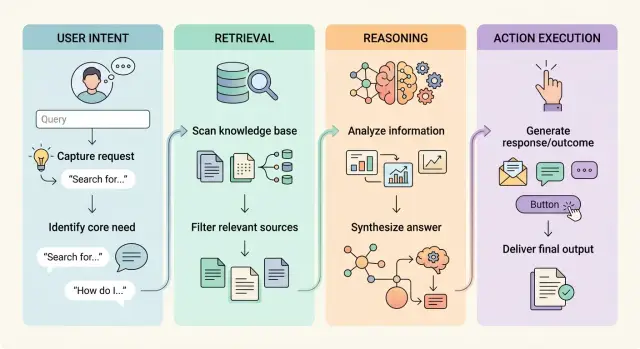
Table of Contents
What goes wrong when one prompt runs everything
One giant prompt often starts with good intentions and ends in a tangle. It asks the model to read the user, pull facts, think through the problem, write the answer, and sometimes take action too.
When all of that lives in one place, the model mixes jobs that should stay separate. It may guess missing facts instead of waiting for retrieval. It may treat a vague request like a command and try to act on it. That is how you get answers that sound sure of themselves but drift away from the source, or actions that fire before anyone meant them to.
The bigger problem is visibility. If a support bot gives the wrong refund answer, what failed? Maybe it fetched the wrong document. Maybe it misunderstood the user. Maybe the action rule sat too close to the answer-writing rule and the model blurred them together. In one large prompt, those failures collapse into the same vague problem.
Small edits make it worse. A team adds one safety sentence, one formatting rule, or one new exception, and something unrelated starts breaking. The assistant suddenly ignores the knowledge base, asks odd follow-up questions, or stops using the right tool. Nothing looks connected, but the whole prompt now nudges the model in a different direction.
For a small product team, that debugging cost adds up fast. You reread long prompts, replay old chats, compare outputs line by line, and still cannot tell whether the bug came from routing, retrieval, reasoning, or execution. Prompt sprawl grows because every fix becomes another paragraph in the same file.
That is why these boundaries matter. If one prompt owns the whole system, every bug looks like a prompt bug, even when the real cause sits somewhere else.
The four jobs your AI system should split
When one prompt tries to do everything, small mistakes spread fast. A support bot might guess what the user wants, pull the wrong record, make a shaky decision, and then send a refund. Splitting the system into separate jobs keeps those mistakes smaller and easier to trace.
The first job is user intent. It answers a simple question: what is this person asking for right now? The input is the user message, plus a little session context if needed. The output is a short label or route, such as "billing question," "cancel order," or "product advice."
The second job is retrieval. It fetches approved facts, documents, and records. Its input is the chosen intent and any safe identifiers, like an order number or account ID. Its output is evidence: the few records or passages that match. Retrieval should not decide what to do. It should only bring back facts.
The third job is reasoning. This step compares the facts, applies rules, and picks a response or a next step. Its input is the retrieved evidence, the user intent, and your policy rules. Its output is a proposed answer or a proposed action. Reasoning should not reach into databases on its own, and it should not send anything.
The last job is action execution. This is any step that changes data, sends an email, creates a ticket, or charges a card. Its input is a structured instruction with checks already passed. Its output is a result such as "ticket created" or "refund blocked."
Each job needs its own inputs and outputs because each one fails in a different way. Once you split them, you can test each part, swap tools later, and keep one bad prompt from pulling the whole product off course.
Decide user intent before you fetch or think
Most bad AI flows start by fetching data too soon. If the system pulls documents before it knows what the user wants, it burns tokens, drags in noise, and gives the model too many ways to go wrong.
Start with a short, fixed set of intents. Most products only need a handful: answer a factual question, explain or compare options, troubleshoot a problem, draft or rewrite content, request an action, or mark the request as out of scope.
A vague request needs one follow-up, not an interview. If a user says, "Can you look into this?", ask one clean question such as, "Do you want an explanation, a diagnosis, or a change?" If they still stay vague, pause instead of guessing.
Stopping early matters too. If the request sits outside the product's job, say so before retrieval or reasoning starts. A billing assistant should not drift into legal advice. A Fractional CTO assistant should not treat "change our production config now" the same way as "review our cloud costs."
Store the chosen intent as structured data, not as a sentence buried inside the prompt. Fields like intent=troubleshoot, domain=infra, action_allowed=false, and needs_followup=true make routing simpler, keep logs clean, and give later steps clear rules.
When the system labels intent first, retrieval stays narrow, reasoning stays focused, and actions stay behind checks.
Keep retrieval narrow and factual
Once your system knows the user's intent, retrieval should do one small job: fetch the few facts that match that intent. Nothing more. If a user asks about a refund, search refund records and the policy that covers refunds, not the whole help center, account history, and every past ticket.
Retrieval should not guess, explain, or decide. It should collect the smallest set of fresh facts that the next step needs. In practice, that usually means short snippets instead of full document dumps, record IDs and timestamps, the latest relevant version of a record, and one policy excerpt kept separate from customer data.
That separation saves a lot of trouble. Policy text answers "what should happen." Customer and product data answer "what did happen." When you blend them into one blob, the model starts mixing rules with facts and gets sloppy.
Stale and duplicate records also cause quiet damage. A model that sees two versions of the same return policy may quote the older one. A model that gets five copies of the same CRM note may treat repetition as proof. Clean that up before the model sees anything.
A support example makes this plain. If someone asks, "Where is my refund?", fetch the refund transaction, its current status, the last update time, and the refund policy snippet if timing matters. Do not send the user's full profile, unrelated shipping events, or a long policy manual.
Small retrieval payloads make answers easier to trust. They also make failures easier to test, because you can inspect exactly which facts the model used and which facts it never saw.
Give reasoning a separate workspace
A model reasons better in a small, clean room. Give it the facts that matter for one decision and leave everything else outside. If you dump full chat history, tool schemas, policy text, and raw documents into the same prompt, the model starts guessing which part matters.
This step should not control tools. Ask it for a decision, a ranked plan, or a short explanation of trade-offs. Then let another part of the system decide whether any action is allowed.
A good reasoning input is narrow. For a support refund case, the model may need the order status, payment result, refund policy, and the user's request. It does not need database credentials, full logs, or every past ticket from that customer.
Make the model say what it still does not know before it moves on. That habit cuts a lot of bad decisions. If the shipping status is missing or the policy version is unclear, the model should return "missing facts" instead of filling the gap with a guess.
Keep the output small
The next step should get a short structured result, not another essay. Four fields are often enough: decision, reason, missing_facts, and confidence.
That output is easy to test, log, and review. It also keeps the flow honest. Reasoning stays reasoning. Retrieval finds facts. Action execution happens later, under checks.
This separation looks boring on a diagram, but it saves real time when something goes wrong. You can see whether the model got bad facts, made a bad judgment, or passed a weak result forward.
Put actions behind hard checks
The sharpest boundary sits where the system can change something outside the chat. Reading data is one thing. Sending money, changing an account, deleting a file, or posting a message is different. That step needs rules the model cannot talk its way around.
Start with explicit action names and typed arguments. Do not let the model write a vague instruction like "fix the billing issue." Make it choose a defined action such as issue_refund(customer_id, amount, reason) or suspend_account(account_id, duration). Typed inputs catch sloppy guesses early and make review much easier.
Before any side effect, your app should verify permission, enforce limits, reject missing or malformed arguments, and block actions that touch protected accounts or systems. Those checks should live outside the prompt. If the model asks to send a refund above the allowed limit, the system should refuse it. If the model tries to email every customer instead of one customer, the system should stop it.
Some actions need a second human step. Ask for confirmation before money moves, messages go out, or account details change. One extra click is cheaper than apologizing to 800 customers.
Keep an audit trail too. Log who asked for the action, who approved it, the exact arguments the model sent, and the final result. When a support bot issues credits or an internal assistant triggers a deployment, you need a record people can inspect later.
Many teams get careless here. They build a good assistant, then hand it broad tool access. A safer setup treats action execution like a locked door: the model can request entry, but your product decides whether it opens.
Build the flow in simple steps
Start small. Pick one user intent and one action that is easy to verify, such as "reset my password" and "send a reset link after confirmation." A narrow first version makes bugs easy to spot and keeps the boundaries clear.
A simple build order works better than one giant prompt:
- Create an intent router that sorts messages into a few clear buckets.
- Connect one safe action with hard rules, such as permission checks and a confirmation step.
- Add retrieval only after routing works well on real messages.
- Add reasoning as a separate call that returns a strict format like JSON.
That order matters. If the router is weak, retrieval pulls the wrong facts and the reasoning step starts from bad input. Teams often blame the model when the real issue sits earlier in the flow.
Keep the reasoning step boxed in. Give it the user intent, the small set of fetched facts, and a required output shape like {"decision":"approve|reject","reason":"..."}. Do not let it call tools directly. Another layer should decide whether any action can run.
Before you connect live tools, test edge cases on purpose. Try vague requests, mixed intents, missing account data, stale documents, and users who ask for actions they should not have. A support bot that handles "I can't log in" well might still fail on "I changed phones and lost access to everything."
Measure failures at each handoff, not just the final answer. Track intent mismatches, bad retrieval, broken output formats, and blocked actions. When you can see where the flow breaks, fixes get much faster.
A simple example from support
A support bot for shipping address changes shows why this split matters. A user types, "I moved. Please send my order to 18 Pine Street instead." That sounds simple, but the system should not let one prompt guess the intent, pull data, make a policy call, and edit the order in one shot.
First, the request goes through intent routing. The system labels it as an order change request, not a refund, not a tracking question, and not a general chat message. That one decision keeps the next steps narrow.
Then retrieval pulls only the facts the bot needs: the order status, whether the signed-in user matches the account on the order, and the address rules for that order type. If the package already shipped, or if the order belongs to another account, the bot now has clear facts instead of vague context.
Reasoning happens after that. Its job is to read those facts and choose between three paths: allow the change, refuse it, or send it to a human. If the order is still in processing and the account matches, the model can suggest an update. If the order already left the warehouse, it should refuse the edit and explain why. If the request looks risky, it should escalate.
The action layer stays separate from that decision. It does not trust free-form text alone. It checks the allowed outcome and then does one small thing: ask the user to confirm the new address, or open a support ticket for a human agent.
That split keeps the bot calm and predictable. It also makes prompt sprawl much less likely, because each part has one job.
Mistakes that blur boundaries
Teams usually blur boundaries when they try to make one clever prompt do every job. It feels faster at first. Then the bot starts guessing, pulling too much context, and acting on weak signals.
A common failure starts with retrieval. Instead of fetching only the few facts needed for the request, the system grabs whole manuals, old tickets, policy notes, and random chat history just in case. That extra text does not make the answer smarter. It gives the model more chances to latch onto the wrong detail.
The next mistake is tool access that is far too wide. A reasoning model that only needs to explain a billing issue should not also have the power to cancel a plan, change account data, or send emails. When teams do not separate retrieval and reasoning, the model can slide from "thinking" into "doing" without a clean handoff.
Another problem hides in the prompt itself. Policy rules, long-term memory, fetched documents, user instructions, and action logic get stuffed into one giant block. After that, intent routing gets fuzzy. The model tries to decide what the user wants, what facts matter, and what action is allowed, all in the same pass.
A small support example shows how this breaks. A customer says, "I was charged twice. Can you fix it?" The bot pulls every billing article, reads an outdated refund rule, decides the customer wants a refund, and triggers a credit without confirmation. The reply sounds smooth, but the flow is wrong at three levels: intent, facts, and action.
Confidence makes this worse. If the reply sounds polished, teams skip the final check. That is risky for anything that changes data, sends messages, or spends money. Actions need a hard pause, a clear rule, or direct user approval.
Error handling gets ignored too. Many products hide failures behind a generic apology. Users and operators need to know which step failed: intent detection, retrieval, reasoning, or action execution. That is how you debug prompt sprawl instead of feeding it.
Quick checks before launch
A clean demo can hide messy boundaries. Before launch, push the system through a few ugly cases and make sure each step fails in a way your team can actually see.
Run a short test pass before you ship:
- Read the logs for one failed request. You should see the exact step that broke: intent routing, retrieval, reasoning, or action. If everything shows up as one blob of prompt text, debugging will drag on.
- Try to trigger an action without an intent label. The model should refuse, ask one follow-up question, or stop. It should not guess its way into sending, updating, or deleting anything.
- Feed the system stale data and compare the result. If old account state, inventory, or policy text can change what action runs, add freshness checks before execution.
- Turn actions off and ask the same questions again. The system should still answer safely, explain limits, and stop at advice. If a risky case appears, a human reviewer should understand it in seconds, not after reading a raw prompt dump.
These checks look simple, but they catch most leaks between parts of the system. They also tell you whether the boundaries exist in code or only in a diagram.
A support flow makes this obvious. If a user says, "Refund my last order," the system should label the intent first, fetch the order state second, reason about policy third, and ask for review if the case looks risky. If your logs cannot show that chain clearly, or if stale order data changes the final action, launch is early.
Teams often skip these checks because the happy path works. The happy path is not the problem. The messy request at 4:55 PM on a Friday is the real test.
Next steps for your product team
Most teams do not need a full rebuild. They need a clean map of the system they already have. Take the current prompt and split its work into four blocks: intent, retrieval, reasoning, and action.
Pick one workflow that can cause real damage if it guesses or overreaches. Refund approvals, account changes, pricing exceptions, and outbound emails are common trouble spots. Fix that path first. A narrow change is easier to test, and it shows the team where the boundary problems really are.
A short contract between steps helps more than a longer prompt. The intent step should return a label and a confidence score. Retrieval should return only approved facts. Reasoning should draft an answer or propose an action. The action step should run only after checks pass.
Write those contracts before you add more prompts. Define what each step can read, what it can return, and what should stop the flow. If a step fails, send the request to a person or ask the user a clarifying question. That is usually better than letting one prompt improvise.
Review action rules early too. Decide who can trigger a real action, what logs you keep, and which actions always need approval. Small guardrails prevent expensive mistakes.
If you want an outside review, Oleg Sotnikov at oleg.is works as a Fractional CTO and startup advisor, and this sort of system design review fits the work he does with startups and small teams. It is easiest to fix these boundaries while the workflow is still small enough to change quickly.


