AI procurement questions before you promise AI in operations
Use these AI procurement questions to check data location, review rights, fallback plans, and audit evidence before sales and legal lock terms.
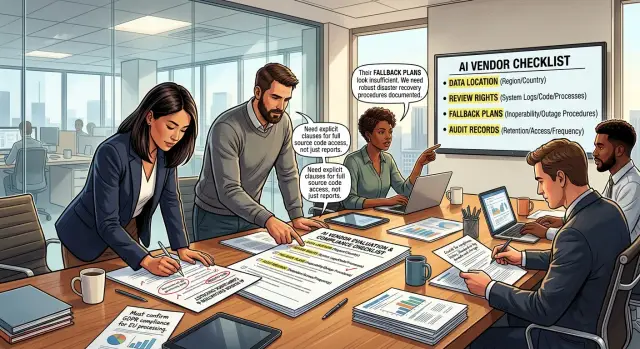
Table of Contents
Why this gets messy before legal
Most deals do not stall in legal because lawyers suddenly become difficult. They stall because the hard questions stayed vague while everyone else moved fast. By the time legal reads the draft, the team has already promised timelines, savings, or automation that nobody checked against the vendor's actual controls.
Sales often starts the problem. A rep hears "we want AI in operations" and says yes before anyone confirms where the data will go, how people will review outputs, or what happens if the model fails on a busy day. That early promise feels harmless. Later, someone has to defend it in writing.
Operations teams add another layer. They often assume the tool will fit the current process with only light setup. In practice, even a good tool can change approval steps, exception handling, reporting, and who owns mistakes when the output is wrong. If nobody maps that early, the buyer walks into procurement with confidence but not much proof.
Procurement usually enters late and asks the questions that should have shaped the deal from day one. Where is the data stored? Who can see prompts and responses? Can the buyer review logs, test records, or model behavior? What is the fallback if the tool goes down or starts giving unstable results? If the seller did not collect those answers early, the review turns into a scramble of screenshots, policy files, and partial replies.
Legal gets the mess last. Lawyers inherit gaps that are not really contract problems. They are product, security, and process problems that nobody closed earlier. That is why a simple AI operations deal can get stuck for weeks even when both sides want to move.
What the buyer will ask first
Most buyer questions start in plain language, not in a security questionnaire. They want to know what you are changing in daily work. If you say, "we want AI in operations," the review will drag. If you say, "we want AI to draft exception notes for delayed purchase orders," people can react to something real.
The next question is about inputs. Name the data that goes into the tool in simple terms. Say whether it will receive supplier emails, invoice fields, delivery dates, internal comments, product codes, or employee names. Broad labels like "operational data" sound tidy, but they hide risk and force the buyer to keep digging.
Then the buyer will ask who depends on the output. That matters more than many teams expect. A draft that one analyst reviews before sending carries one level of risk. A recommendation that warehouse staff or finance staff act on without checking carries another. The same model can be fine in one workflow and a poor fit in another.
You also need a direct answer for failure. If the AI gets it wrong, what happens next? Maybe someone spends 15 minutes fixing a draft. Maybe the team misses a delivery window, sends the wrong update to a supplier, or approves the wrong next step. Buyers do not want drama. They want a clear description of the damage, the delay, and who cleans it up.
A short internal note saves a lot of time. It should cover four points:
- the exact process you want to change
- the data the tool will receive
- the people or teams who will use the result
- the cost of a wrong answer
If your team cannot write those four lines without debate, the promise is still too vague. Usually that means the tool is ahead of the process design. Fix that first, and every later review gets easier.
Where the data lives and where it moves
One of the hardest questions is also one of the most basic: where does the data actually go? Many teams get a vague answer like "hosted in the cloud" and move on. That is not enough when operations data includes customer records, internal notes, tickets, forecasts, or pricing.
Start with storage. Ask the vendor to name the country or region for primary data storage, not just the cloud provider. "US" may be fine for one buyer and a deal breaker for another. If they offer regional hosting, ask which regions are available now, which need a special contract, and whether any part of the service still leaves that region.
Then map the full route. Data rarely stays in one place. A prompt might start in your app, pass through an API gateway, land in the vendor's service, move to a model provider, and then get copied into logging or monitoring tools. File uploads, embeddings, analytics, and email alerts can all create extra stops.
A short written map should show:
- where users send the data from
- where the app processes it
- which model or subprocess receives it
- where logs, backups, and exports sit
Training use needs its own answer. Live prompts used to generate a result are not the same as data kept for model training or product improvement. Ask whether the vendor stores prompts and outputs, how long they keep them, and whether they use them to train models by default, never, or only with opt-in approval. If they use third-party models, ask the same question for each provider in the chain.
Logs and backups cause more trouble than the main workflow. Teams often lock down production data, then forget that logs may capture prompts, attachments, user IDs, or error payloads. Backups may live in another region. Support staff may open admin tools from another country. That still counts as data movement, and buyers will ask about it.
If the vendor cannot give you exact locations and a simple flow map, pause the promise. A clear answer now can save weeks of back and forth once security and legal teams start reading the fine print.
Who can review the system and what they can see
Set review rights before the sales promise hardens into a contract. If you wait, the buyer may assume they can inspect far more than you planned, especially after an outage or a bad output.
Start with a plain question: what can the customer inspect, and under which conditions? Some buyers only need security documents and uptime records. Others will ask for model settings, prompt flows, change logs, and incident history. If you do not name the boundary early, legal teams will fill the gap with their own version.
Most teams also need a clear incident review path. If the tool makes a harmful decision, delays work, or produces a false result, who joins the review and how fast? Write down whether the customer gets a written summary, a live walk-through, or both. Decide who leads the call, who answers technical questions, and which evidence you will share.
Source code access needs its own answer. Many buyers ask for it when they worry about lock-in or hidden risk. In most deals, full code access is not realistic. A better approach is to say what they can see instead: architecture notes, test results, deployment records, model version history, and redacted logs. That gives them something useful without opening the full codebase.
Logs and traces create the most confusion because they can expose user data, internal prompts, and staff activity. Name the people and roles that may see them, such as the customer security lead, the vendor incident owner, named engineers on the case, and outside auditors if both sides approve. Then define the scope. Can they see raw logs, filtered logs, or only a report? Can they inspect production traces, or only samples from a secure session?
This gets even more important when a small team runs a lot of automation. Oleg Sotnikov at oleg.is often works with lean, AI-heavy operations, and the same pattern comes up again and again: buyers care less about team size than about whether access rules are written down. A simple review matrix can prevent a week of argument later.
What happens when the AI tool fails
One hard procurement question is very simple: what do people do when the tool is down, slow, or wrong? If you cannot answer that before rollout, the team will invent its own workaround under pressure. That usually means missed steps, messy records, and arguments about who approved what.
Start with a manual path for the same task. Keep it boring and clear. If the AI sorts support tickets, routes invoices, or drafts replies, write down how staff do that work by hand and where they record each step.
A useful backup path answers four points:
- who takes over the task
- which screen, file, or queue they use
- how they mark work that the AI already touched
- when they switch back to normal use
Ownership matters just as much as the backup process. Decide who owns a full outage, who checks bad answers, and who tells the business to stop using the tool for a while. If nobody owns those calls, people keep using the system after it starts making obvious mistakes.
Bad answers need a policy, not just a support ticket. Say what counts as a minor error and what counts as a stop-work issue. A wrong summary might be fixable. A wrong customer refund, shipment release, or compliance note is different.
Keep a rollback option that regular staff understand. That can be as simple as turning off one automation rule, going back to the previous queue, and using a saved template. If rollback needs three engineers and a late-night call, it is not a real rollback.
Test the team without the tool before you promise results. Run one short drill. Turn the AI off for an hour and watch what happens. You will quickly see where instructions are vague, where approvals stall, and which people need extra training.
A small example helps. If operations staff use AI to classify incoming vendor emails, test a day where they classify them manually in the shared inbox. Measure delay, error rate, and who gets stuck. That gives you a real fallback plan, not a guess written for procurement.
Which audit proof to collect now
Audit proof is the part teams leave too late. Once legal or security asks for evidence, people start digging through email, chat, and old meeting notes. That turns a simple review into a slow argument.
Start with recent security material from the vendor. Ask for the latest security report, penetration test summary, compliance letter, or control overview they can share. You do not need a huge folder on day one. You need enough to confirm who did the review, when they did it, what they checked, and whether the vendor fixed serious issues.
Do not stop at formal reports. Save release notes, incident notices, and product update messages as you receive them. AI products change fast, and small changes can affect data handling, output quality, or approval scope. If the product changes after your internal sign-off, you want a record that shows what changed and when.
Model changes need their own record. Write down the model name, version, provider, and any setting that affects answers, retention, or routing. If the vendor switches between several models behind the scenes, record that too. When a buyer asks why results changed in June, you need a dated record, not guesses.
It also helps to keep copies of the answers you relied on during review. Save screenshots, policy extracts, ticket replies, and meeting notes in one place. If a vendor later changes its wording, your team can still show what it approved against.
The point is simple: collect proof while the answers are fresh. Waiting until the contract is already moving through legal is how easy reviews turn into long disputes about memory.
How to run this check before you commit
Most procurement problems start with a loose promise on a sales call. Someone says the AI tool is secure, easy to review, or ready for audit, and nobody writes down what that claim actually means.
Start with the claims your team wants to make. Keep them plain and concrete. If sales plans to say the tool keeps data in one region, has a human review option, or can fall back to a manual process, each point needs an answer you can verify.
A simple working method helps:
- Write every customer-facing claim in one document.
- Turn each claim into a vendor question with a yes, no, or short factual answer.
- Give one person ownership of each answer.
- Set a hard stop date before pricing talks go too far or anyone reaches signature.
- Save every answer, note, and file in one shared place.
This sounds basic because it is basic. It also prevents the usual mess. Without one owner, people assume someone else asked about data location or audit logs. Without a stop date, gaps stay open until legal finds them late and the deal slows down.
Keep the questions narrow. Instead of asking, "Is your AI secure?" ask, "Where is customer data stored, where is it processed, and can we restrict either one by region?" Instead of asking, "Can we audit this?" ask, "What records can you give us if an incident happens, and how long do you keep them?"
One shared source matters more than a polished slide deck. A spreadsheet, ticket board, or short internal memo is enough if the team actually uses it. Put vendor replies, screenshots, policy extracts, and follow-up decisions in that same place.
If your team sells technical services, this check should happen before anyone promises outcomes to a client. Experienced advisors usually work this way too: get the facts early, name an owner, and stop the deal if the answers do not hold up.
A simple example from an operations rollout
A support team wants to use an AI tool to sort incoming tickets before a human reads them. The goal is simple: push billing issues to one queue, product bugs to another, and urgent account problems to the front so customers wait less.
The demo looks fine, so the team feels ready to say yes. Then procurement asks a basic question that changes the whole conversation: where does the customer text go after the tool receives it?
That question matters because tickets often include names, email addresses, order details, and screenshots. If the vendor sends that text to another region, stores it longer than expected, or uses it to improve its own model, the company now has a data problem, not just a support workflow.
The vendor gives a partial answer. It can explain where data is processed, but it offers only limited review rights. The buyer can see a short security packet and a standard audit report, yet it cannot inspect much beyond that or test the system in depth. That does not kill the deal, but it changes the level of risk the team accepts.
So the support lead makes one smart choice: keep a manual queue as backup. If the AI tool misroutes tickets, slows down, or goes offline, staff can switch to the old triage method the same day. It is slower, but customers still get help and urgent cases do not disappear.
Before legal sees the contract, the team sends a short fact summary instead of a long opinion memo. It includes:
- what data the tool receives in each ticket
- where the vendor says it processes and stores that data
- what review rights the company gets and what it cannot inspect
- how the manual fallback works if the tool fails
- which audit evidence the vendor already shared
That short note saves time because legal starts with facts, not guesses. It also keeps the promise to the business honest. The team can still move forward, but now everyone knows the limits, the backup plan, and the proof on hand.
Mistakes that turn a quick review into a fight
Most review fights start before procurement sends the first checklist. A sales or product team promises faster operations with AI, then someone asks a basic question about data, access, or backup steps. If nobody checked those details early, the conversation gets tense fast.
One common mistake is promising automation before anyone reviews the data. Teams say the tool will handle invoices, support tickets, or internal requests, but they have not checked what the AI will receive, where that data goes, or whether it includes customer records, contract terms, or staff details. Procurement hears the promise first and the limits second. That order creates friction almost every time.
Another mistake is treating one report as the whole answer. A security report can help, but buyers usually want more than a badge or a PDF. They may ask where prompts are stored, how long logs stay in the system, whether training uses their data, and what evidence you can show later if an auditor asks questions.
Teams also skip the vendor chain. They review the tool they plan to buy, but they never ask who else touches the data. Many AI products rely on model providers, cloud hosts, logging tools, and support contractors. If nobody names those parties early, legal finds them later and trust drops.
The exit plan often gets ignored because the team wants the deal to move. That is shortsighted. Buyers want to know what happens if model quality drops, pricing changes, or the service goes down during a busy week. If you cannot explain how staff will keep working, the buyer will assume the risk sits with them.
A quick reset fixes most of this. Review the real data before anyone promises full automation. Ask for the full vendor and subcontractor list. Write down the manual fallback and rollback path. Bring audit evidence, not only a summary report. Include operations staff before the commercial call ends.
That last point matters more than most teams expect. Operations staff know where exceptions pile up, which tasks still need human review, and how much downtime the process can tolerate. When they join late, the deal already carries promises that the workflow cannot keep.
Quick checks before you move forward
A procurement review moves faster when your team can answer a few plain questions in writing. If every answer needs a call and a slide deck, the deal is not ready.
Good review questions sound simple because buyers need facts they can verify fast. They want short, direct answers they can copy into an internal review.
- Name the data region in one sentence, and say whether data crosses into any other region for processing, logging, support, or backups.
- Show review rights in writing. State who can inspect logs, outputs, prompts, model settings, and admin activity.
- Confirm whether staff can keep working during an outage. Name the fallback process, the manual path, and who owns the switch.
- Hand over audit proof now. That can include access logs, policy documents, test records, incident notes, and retention rules.
If any answer turns vague, stop there. Words like "secure," "global," or "compliant" do not settle buyer concerns. Procurement teams usually ask the same follow-up: where is the proof, who can check it, and what happens when the tool goes down on a normal workday?
A small operations example makes this obvious. Imagine a support team that uses AI to draft replies and route tickets. If the system fails, agents still need a manual queue, a basic template set, and a way to log work without losing customer history. If nobody can explain that backup flow in two minutes, the rollout is not ready.
If the answers stay fuzzy, get an experienced technical review before the deal reaches legal. Oleg Sotnikov, through oleg.is, often helps teams pin down data flow, review access, outage handling, and audit evidence without turning a simple vendor check into a long argument.
Put the answers on one page, name the owner for each point, and send that page with the deal. If you cannot do that yet, do not promise AI in operations.
Frequently Asked Questions
Why do AI deals get stuck in legal?
Legal usually gets stuck because the team made broad promises before anyone checked data flow, review access, failure handling, and proof. Fix those gaps early, and legal can review facts instead of cleaning up guesses.
What should we define before we talk about an AI tool?
Write down the exact workflow you want to change, the data the tool will receive, who will use the output, and what a wrong answer would cost. If your team argues over any of that, slow down and sort it out before you promise results.
What data details will a buyer ask for first?
Buyers want plain answers first. Tell them what data goes in, who depends on the output, and what happens when the model gets something wrong. Simple details like supplier emails, invoice fields, or employee names help much more than broad labels like operational data.
How do we ask where our data actually goes?
Ask the vendor to name the storage region and the processing region in clear terms. Then ask where logs, backups, exports, support access, and any model provider sit, because data often moves through more places than the main app.
Do we need to ask if the vendor trains on our data?
Yes. Ask whether the vendor stores prompts and outputs, how long they keep them, and whether they use them for training or product improvement. If the vendor relies on outside model providers, get the same answer for each one.
What review rights should we lock down before the contract?
Set the boundary early. Decide whether the customer can review security documents, incident records, model settings, change logs, or redacted logs, and say who may see each item. If you leave that vague, the buyer will ask for more after an outage or bad result.
What should our fallback plan include if the AI fails?
Start with a manual version of the same task and keep it simple enough for normal staff to use. Name who takes over, where they work, how they mark items the AI already touched, and who decides when the team switches back.
What audit proof should we collect now instead of later?
Collect recent security reports, test summaries, incident notices, retention rules, release notes, and records of model changes. Save the exact vendor answers you relied on, including screenshots, emails, and meeting notes, so your team can show what it approved against.
What mistakes turn a quick procurement review into a fight?
Teams slow themselves down when they promise automation before they review the real data, skip subcontractors in the vendor chain, or treat one security PDF as the full answer. They also create trouble when they ignore the exit plan and bring operations staff in too late.
When should we pause the deal or ask for outside help?
Stop when the vendor cannot answer basic questions in writing about data location, review access, retention, training use, or outage handling. Bring in an experienced technical reviewer when answers stay fuzzy, because a short fact check now costs less than a stalled deal later.