AI operators in business processes: what humans still own
AI operators in business processes can take over routing, follow-ups, and status checks, while named people still own approvals, edge cases, and risk.
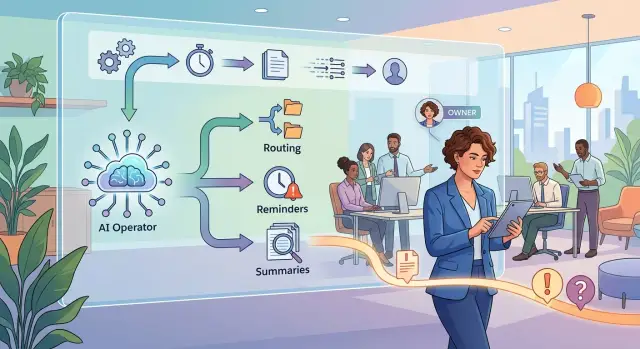
Table of Contents
Why middle layers pile up
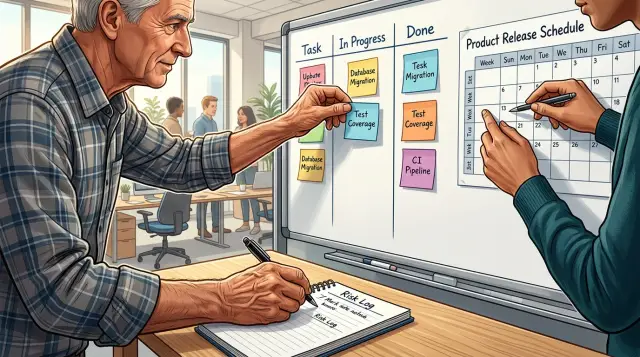
Middle layers usually don't appear because someone designed them well. They appear when work keeps moving but nobody sets clear rules for what happens next.
One person starts asking for updates. Another checks whether a task is ready. A third passes the answer along. After a while, the company has more coordination than progress.
It often starts with good intent. A founder wants fewer surprises. A manager wants better visibility. Someone gets asked to "keep things moving." That person then spends half the week chasing replies in chat, setting up status calls, and reminding people about deadlines. The role exists because the process can't move on its own.
Handoffs make this worse. If sales sends work to operations, operations sends it to product, and product waits on engineering, every gap creates more messages. When nobody owns the next step, teams add another person to watch the queue. That feels safer than fixing the rule, so the extra layer stays.
Status meetings grow for the same reason. Teams meet because they don't trust the process to show what is blocked, what is done, or who needs to act. A 15-minute check in sounds harmless. Four of them each week across three teams can burn hours people needed for real work.
Small approvals create the slowest loops. A request waits for a manager, then finance, then legal, then someone who is "just taking a quick look." Each approval looks minor by itself. Together, they can turn a simple task into two days of waiting.
The warning signs show up early. People ask "who owns this now?" several times a day. The same update gets copied into chat, email, and a spreadsheet. Work stops when one manager goes offline. Teams meet to trade status instead of making decisions.
A fractional CTO usually spots the pattern fast: the company didn't build a process, it built a relay race. Before AI can help, the team needs fewer handoffs, fewer tiny approvals, and one named owner for each step.
What AI can take off people's plates
Most process drag comes from follow-up work, not hard judgment. People spend time asking for missing details, checking who owns a task, nudging someone for an update, and turning long message threads into something useful. This is where AI operators in business processes usually help first.
A common example is incomplete input. Someone fills out a form, sends a chat message, or forwards an email but leaves out the order number, deadline, budget, or file the team needs. An AI operator can spot the gap, ask a clear follow-up question, and keep asking until it gets a usable answer. That saves a person from doing the same back and forth twenty times a day.
Routing is another strong use case. Many teams still rely on one person who reads each request and decides where it should go. That's repetitive work. If the rules are simple, the AI can read the request, tag it, and send it to the right queue based on topic, urgency, amount, region, or account type.
Message cleanup matters more than people expect. A long thread in email or chat often hides one simple decision and two open tasks. AI can turn that thread into a short summary with the next action, the current blocker, and who needs to respond. People stop rereading fifteen messages just to remember what happened.
Deadlines and stalled work are also a good fit. AI can watch for silence, send a reminder after a set number of hours, and flag items that are close to late. It can also spot patterns, such as a request that keeps bouncing between two teams or approvals that always get stuck on Friday afternoon.
Picture a small operations team handling vendor onboarding. The AI checks each submission, asks for missing tax details, routes legal questions to the right person, reminds finance if approval sits too long, and posts a short status note for everyone else. Nobody gives up control, but people stop acting like human glue.
That kind of coordination work is often the first thing a fractional CTO cleans up because the rules are visible and the time savings show up quickly.
What still needs a named human owner
Some decisions should stay with a person, even when AI handles most of the routine flow. If a choice can lose money, create legal risk, damage trust, or hurt someone, put one person's name on it.
Money is the clearest example. AI can match invoices, draft refund notes, or flag unusual spending. It should not decide on a large payment, accept new legal terms, or make a policy exception on its own. Those calls change the company's risk, so a named owner needs to approve them.
The same rule applies when goals collide. A process can reach a point where speed fights accuracy, sales fights margin, or customer happiness fights policy. AI can surface the tradeoff, but a person has to decide which goal matters more in that moment and accept the result.
People issues also need a human hand. Angry customers rarely want a perfect template. They want judgment, tone, and sometimes a plain apology. Staff issues are even more sensitive. If someone reports harassment, burnout, or unfair treatment, don't send the case down an automated path and hope for the best.
Bad data is another place where ownership has to be explicit. AI can copy errors much faster than a tired employee. One wrong customer status, pricing field, or compliance tag can spread across support, billing, and reporting in minutes. A named owner should have the power to stop the flow, quarantine the data, and roll back the damage.
In practice, that owner needs authority to approve or reject exceptions, pause the process when data looks wrong, make the final call when goals conflict, and answer for failures.
That last part is easy to skip and expensive to learn later. When the process fails, someone must own the incident. Not a team name. Not "operations." One person. They gather facts, decide the next step, talk to affected people, and make sure the same failure doesn't repeat.
In small companies, this owner is often a founder, team lead, or operations manager. A fractional CTO can help design the boundaries and handoff points, but the company still needs an internal name beside each high-risk exception. If nobody owns the hard cases, the work doesn't disappear. It comes back as rework, customer damage, and confusion late at night.
How to draw the exception path
A process only feels automatic until something odd happens. A customer asks for a refund outside policy. An invoice total doesn't match the purchase order. A sales lead uses unusual contract terms. This is where many teams fail: the normal path is clear, but the break points are vague.
Start by marking every moment where the flow can leave the normal path. Look for missing data, conflicting data, low-confidence answers, policy edge cases, legal risk, money movement, and anything that could affect a customer badly if the AI guesses wrong. If you can't explain the exception in one short sentence, the rule is still too fuzzy.
One owner per exception matters more than most teams expect. Don't send hard cases to "ops" or a shared inbox. Name one person for each type of issue, even if that person later pulls in others. A real name removes the usual pause where everyone assumes someone else will pick it up.
A workable map is simple. Define the trigger that breaks the normal flow. Assign one human owner to that trigger. Set a response time, such as 15 minutes or 4 business hours. Give the AI a clear stop rule and a clear escalation message. Then record the final decision in plain language.
The stop rule needs real boundaries. "Escalate if unsure" sounds fine, but it fails in practice because the AI will be unsure in different ways. Write what stop means. For example: "Stop and escalate if contract value is over $10,000, if billing terms differ from the template, or if confidence is below 85%." People can test a rule like that.
Response time matters too. If the owner doesn't answer fast enough, the process stalls and people start working around it. Set a timer and a backup owner. If finance doesn't reply within two hours, route the case to the head of operations. If support doesn't reply in 20 minutes, alert the shift lead.
Write the final decision as if a new hire will read it next month. "Approved because the customer was double charged and the payment logs confirm it" is better than "exception accepted per review." Clear notes help the next human, and they also help improve the stop rules later.
How to move one process step by step
Start with one process that repeats often and hurts a little every week. Good candidates are invoice approval, lead qualification, support triage, or weekly reporting. If the steps change every time, wait. AI works best when the path is boring and the rules are mostly stable.
Write the current process down exactly as it happens, not as people say it happens. Mark every handoff, every approval, and every place where work sits in a queue. Most teams find that much of the delay comes from small coordination tasks like asking for updates, copying notes between tools, and reminding someone to reply.
That is usually the first work to cut. If a person only checks status, chases answers, or moves the same facts from one place to another, AI can often do that part well enough. Keep the human work for judgment, tradeoffs, and exceptions.
A good rollout is narrow. Pick one repeatable workflow with clear inputs and a clear finish. Map the real path, including waits, approvals, and rework. Remove status-only tasks that don't change the outcome. Then give the AI one job, such as triage, follow-up, or drafting, and name one person who takes over when the rules say it should stop.
Narrow scope matters. Don't ask the AI to "run onboarding" or "manage support." Ask it to sort incoming requests, collect missing details, or prepare a first draft for review. In human-in-the-loop workflows, small wins beat big promises because teams can see where the tool helps and where it fails.
Test the ugly cases before rollout. Feed it missing data, vague requests, duplicate records, angry customer messages, and conflicting approvals. Then check whether it stops, asks a clear question, or sends the case to the right owner. If AI exception handling is weak, the process will create more mess than it removes.
A good pilot saves time in a measurable way. If the AI cuts one approval loop and removes twenty status messages a week, that's enough to justify the next step.
A simple example from a small team
A small firm that sells CTO advisory or infrastructure help can automate more of sales intake than most people expect. A new lead comes in through the website form. The AI reads the company size, problem, budget range, and urgency, then decides whether the lead fits the service.
If the lead looks like a match, the AI offers meeting times, books the call, and writes a short brief for the sales owner. That brief can include the prospect's pain point, likely service scope, and a draft agenda for the first call. A person doesn't need to copy details between tools or chase basic facts.
This works well because the job is repetitive and mostly about coordination. The AI can also draft follow-up notes after the call, suggest next steps, and prepare a plain quote from approved pricing rules.
The handoff starts when the deal stops being standard. If the prospect asks for custom pricing, the sales owner should approve it by name. Price changes affect margin, scope, and expectations, so a human needs to make that call.
Finance should step in when payment terms change. Net 30, split invoices, deposits, late payment clauses, or billing across borders all affect cash flow. AI can flag the request and collect context, but finance owns the answer.
A manager should take over when the deal touches legal risk. That can happen when a prospect asks for unusual liability terms, data handling promises, security language, or contract edits that go beyond the normal template. AI can spot those phrases and route the deal, but it should not approve them.
The rule can stay simple: AI handles intake, fit checks, scheduling, and draft notes. The sales owner approves any custom price or scope change. Finance approves payment term changes. A manager reviews anything with legal or policy risk.
That setup keeps the fast parts fast. It also makes human in the loop workflows clear, because every exception has one owner instead of three people guessing in a chat thread.
The goal isn't to cut people out. It's to stop using them for copying and pasting, status chasing, and other glue work, so they can spend time on judgment where mistakes cost real money.
Mistakes that create more work
Most teams create extra work long before the model makes a bad call. They give the AI a messy job, unclear authority, and no clean way to stop.
That's why automation often disappoints at first. The model may be fine. The process around it is what breaks.
A common mistake is vague rules. Teams write prompts like "handle urgent requests first" or "flag risky orders" and assume the AI will infer the same meaning every manager has in mind. It won't. Give it thresholds, approved actions, and a few plain examples. If a refund over $300 needs review, say that. If missing tax data means stop, say that too.
Shared ownership creates another mess. When three people can approve the same exception, nobody truly owns it. The AI sends the case to sales, sales thinks finance should answer, and finance waits for ops. The customer waits while the team talks in circles. One exception type needs one named human owner.
Teams also bury exceptions inside chat. Someone fixes an odd case in Slack, another person handles the next one in email, and none of it enters the process record. A week later, the AI hits the same edge case again and the team solves it from scratch. Put exceptions in one place with a short reason code and the final decision.
Stopping points matter more than most teams expect. If the AI lacks a required field, sees conflicting numbers, or drops below a confidence threshold, it should stop and ask. Many teams skip that guardrail because they want full automation fast. Then they spend hours cleaning up bad approvals, wrong messages, or duplicate work.
Speed can fool people too. Saving 20 minutes a day looks good on a dashboard. One bad payout, one wrong contract, or one missed compliance check can erase that gain in a single afternoon. Measure rework, escalations, customer complaints, and error cost alongside cycle time.
You can usually spot trouble early. The same odd case gets answered in chat every week. Two people think the other one owns approval. The team reviews output after sending it instead of before a risky action. Reports track volume and speed, but not rework.
This is the sort of problem a fractional CTO often catches quickly. The fix is rarely a better model. It's clearer process ownership, cleaner exception handling, and a hard stop before the AI guesses.
Quick checks before launch week
A process should feel boring before you put it in front of customers, vendors, or money. If the team still says "we'll figure it out if something odd happens," the flow isn't ready.
Teams get in trouble when AI handles normal cases well, then freezes or makes a bad call on the first messy one. A few plain checks before launch prevent most of that.
- Give every exception one named owner.
- Make the escalation path obvious, including where the issue goes and how long a human can wait.
- Check the logs like a human would. The AI should record what it saw, what it did, and why.
- Test the off switch. Someone should be able to stop the flow in seconds.
- Assign a daily error review so one person reads failures and fixes repeating issues.
A small team can do this without much overhead. Say a sales assistant uses AI to sort inbound leads, draft replies, and schedule calls. If the model sees a legal complaint, a pricing dispute, or a partner request, it should stop and hand the case to a named person. The rep should know exactly where that alert lands, and the manager should see the full log before anyone replies.
The off switch matters more than most teams think. During launch week, you may find a bad rule, a noisy integration, or a prompt that sends too many edge cases down the wrong path. Fast shutdown beats clean theory every time.
A simple standard works well: any teammate should be able to answer who owns exceptions, where they go, what the AI did, how to stop it, and who checks mistakes tomorrow morning. If they can't, wait a few more days.
What to do next
Pick the ugliest recurring process first. Don't start with the most strategic one. Start with the one that steals an hour or two every week, forces people to chase updates, and creates the same small delays again and again.
List the normal flow, then mark every place where the process can break. Next to each break, write one human name. Not a team. Not a role in the abstract. One person who decides what happens when the AI gets stuck, sees bad data, or finds a case it can't classify with enough confidence.
That one habit fixes a lot. Many AI projects fail for a boring reason: everyone assumes someone else will catch the odd cases.
Keep the rollout narrow for the first two weeks. Let the AI do the coordination work, but review failures by hand every day. You want to see the real misses, not the imagined ones. In a small team, that might mean checking ten flagged support tickets, three messy invoices, or a few onboarding cases before they move forward.
Track every failure in one shared log. Don't rush to rewrite rules after the first miss. Wait for patterns. Once the failure rate is boring and predictable, widen the scope.
If the process crosses sales, operations, support, and engineering, ownership gets messy fast. That's often where an outside technical lead helps. Oleg Sotnikov does this kind of work through oleg.is, helping small teams decide where AI should handle routine coordination, where humans should step in, and how to keep the system lean instead of adding new layers.
Start small, name owners, and watch real failures closely. That's how you get a process people trust, not just one that looks good in a demo.
Frequently Asked Questions
What work should AI take first in a business process?
Start with repetitive coordination work. Let AI collect missing details, route requests, summarize long threads, send reminders, and flag stalled items.
Keep money decisions, legal terms, policy exceptions, and sensitive people issues with a named person. That split removes glue work without handing over risky calls.
How can I tell if my process has too many middle layers?
Watch for the same symptoms every week. People keep asking who owns a task, copy the same update into several tools, wait on tiny approvals, and sit in status meetings just to learn what changed.
If work stops when one manager goes offline, you built a relay race instead of a process.
What still needs a human owner when AI handles the workflow?
Leave high-risk decisions with a named owner. That includes large payments, custom pricing, unusual contract terms, legal issues, policy exceptions, and cases where one goal fights another.
AI can prepare context and surface the tradeoff. A person still needs to make the call and own the result.
Why does shared ownership break automation?
Shared ownership slows everything down because each person assumes someone else will answer. The AI sends the case to sales, sales waits for finance, and finance waits for ops.
Give each exception type one name, one response time, and one backup. That cuts the chat loop fast.
How do I write a stop rule the AI can actually follow?
Write the stop rule like a test, not a wish. Use exact triggers such as price over a set amount, billing terms that differ from the template, missing tax data, or confidence below a clear threshold.
Avoid vague wording like "escalate if unsure." People cannot check that rule, and AI will read it differently from case to case.
What is a good first process to automate with AI?
Pick one process that repeats often, hurts a little every week, and follows mostly stable rules. Invoice approval, lead qualification, support triage, and weekly reporting often fit.
Skip anything that changes every time. AI does better when the path stays boring and the finish line stays clear.
How should we test edge cases before launch?
Feed it messy inputs on purpose. Use missing fields, vague requests, duplicate records, angry messages, and conflicting approvals.
Then check what it does next. You want it to stop, ask a clear question, or hand the case to the right owner instead of guessing.
What should an exception path include?
Keep it simple. Define the trigger that breaks the normal flow, assign one owner, set a response time, name a backup, and record the final decision in plain language.
Also give the AI a clear escalation message so the next person sees what happened without rereading the whole thread.
How do I know an AI pilot actually worked?
Measure more than speed. Check cycle time, but also track rework, escalations, customer complaints, and the cost of errors.
A pilot worked if it cut status chasing and approval loops without creating cleanup work somewhere else.
What should we check before launch week?
Run a few plain checks. Make sure every exception has one owner, the logs show what the AI saw and did, the off switch works in seconds, and one person reviews failures every day.
If your team cannot answer who owns exceptions, where alerts go, and how to stop the flow, wait and fix that first.