AI model sprawl starts in the org chart, not the stack
AI model sprawl often begins when engineering, support, and ops buy tools separately. See the hidden costs, rule conflicts, and a fix.
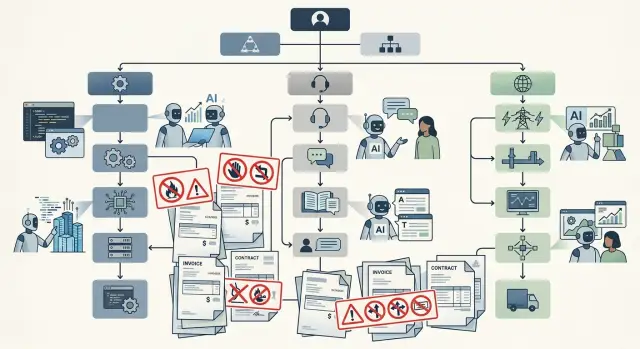
Table of Contents
Why this starts in the org chart
AI model sprawl usually does not start with architecture. It starts with reporting lines and budget ownership.
Engineering wants faster coding help. Support wants quicker replies and summaries. Operations wants automation for reports, alerts, and ticket routing. Those needs are real, so managers buy whatever solves today's problem. One team adds a coding assistant on the engineering budget. Another picks a support bot through customer service software. Ops tests a model through a cloud account nobody else reviews.
Each decision makes sense on its own. Together, they create a stack nobody planned.
Separate cost centers make the problem easy to miss. Finance sees several small invoices instead of one clear AI budget. Team leads see local wins, not overlap across the company. Before long, the business pays multiple vendors for very similar capabilities, each with different limits, contracts, and data rules.
Ownership is usually fuzzy too. Security may approve one use case. Procurement may approve another. IT may only manage the accounts it knows about. Then one basic question goes unanswered: who owns the full list of models, tools, plugins, and API accounts in use across the company?
The pattern is common. Engineering buys for code generation and reviews. Support buys for chat and summaries. Ops buys for workflows and internal search. Nobody stops to ask whether one setup could cover most of that work.
That is why AI model sprawl often begins with the org chart, not the stack. If every department can buy quickly without shared rules, the company gets duplicate spend, mixed safety settings, and different habits around customer and internal data.
Teams are not making reckless choices. They are making local choices. Without one owner across teams, those choices pile up fast.
Where the hidden cost shows up
The first bill is rarely the real bill.
Engineering buys a coding assistant. Support adds an AI reply tool. Ops picks a separate product for incident notes or internal docs. Each line item looks modest, so nobody worries. The waste shows up later.
A lot of it comes from overlap. Three teams may pay different vendors for access to very similar models, each with its own admin panel, contract, and seat count. No one sets out to buy the same thing three times. It happens because every team solves its own problem first.
Idle seats are another quiet leak. Managers keep a few licenses active "just in case" or avoid removing access because approval takes too long. Ten unused seats at $25 a month does not look serious on one invoice. Spread across several tools, it becomes a steady drain.
The company also repeats the same work. A support lead writes a prompt for ticket summaries. Ops writes a near copy for incident handoffs. Engineering builds another version for bug triage. The business pays three times for trial and error, and nobody owns the final version.
Finance often misses the pattern because the spend is scattered. It shows up as chat tools, help desk add-ons, coding assistants, API credits, and premium workspace plans. On paper, it looks like normal software spend. In practice, it is model spend hidden inside different categories.
Support and ops usually feel the pricing jump first. Heavy volume pushes support into higher limits. Ops wants logs, admin controls, and longer context windows. Both may pay more during busy periods, and API overages land on top of seat fees.
That makes the total hard to compare with one approved budget. A team may think it spends $500 a month. The company may actually spend several times that once you count unused seats, duplicate prompt work, and higher tiers nobody reviews.
How safety rules split apart
Safety rules usually do not fail all at once. They drift apart team by team.
Engineering might use an API with strict guardrails. They block raw customer data in prompts, turn off training use, and limit who can test new models. Support may choose a browser chat tool because it is faster in daily work. Ops may use a third vendor for runbooks or incident notes. Soon, three teams are operating with three different definitions of "safe."
The split tends to show up in a few obvious places: what data people can paste into prompts, how long vendors keep chats and files, and who can approve a new model or plugin.
One team strips names from customer tickets before sending anything. Another pastes full conversations into a browser tool because it saves ten minutes. Nobody is trying to break policy. They are solving local problems with local rules.
Retention makes this worse. One vendor may keep prompts for 30 days. Another may store chat history until someone deletes it. A third may keep logs for abuse review. If legal, security, or leadership asks where customer data went, the answer changes by department.
That is when incident review falls apart. Engineering says support used the wrong tool. Support says nobody gave them an approved option that worked at ticket speed. Ops says it copied a process another team already used. The meeting turns into a blame session because the company never set one rule set for everyone.
A simple rule works better than a long policy. Decide which data can go where, which vendors are approved, how long records stay, and who owns exceptions. If those four points differ across teams, safety is already split.
Signs the problem already started
You can usually hear the problem before you can measure it.
People start asking, "Which bot should I use for this?" That sounds harmless, but it often means teams already bought different tools, built different habits, and stopped working from one shared set of rules.
Legal often notices next. The same privacy question appears again and again because support bought one AI add-on, engineering tested another model, and ops signed up for a workflow tool with its own terms. Nobody meant to create duplicate review work, but that is what happens.
Vendors notice the gap fast too. Their sales teams contact engineering, support, and operations as if they were separate companies, because the buying pattern shows there is no single owner. Once that happens, extra seats, overlapping pilots, and similar contracts start piling up.
Distrust is another signal. One team checks a support reply in its tool, another asks a coding assistant, and a third checks an ops copilot. The answers do not match, so people stop trusting all of them. They spend more time comparing outputs than finishing the task.
The riskiest sign is even simpler. Ask where prompts, uploaded files, or customer data go after someone hits enter. If nobody can answer, the company does not have cross-team AI management. It has scattered usage and hope.
That gap creates conflicting AI policies even when nobody writes them down. Engineering may allow code snippets in one tool. Support may ban ticket exports in another. Ops may assume vendor data never leaves the account without checking. Everyone is acting in good faith, but the rules still clash.
AI model sprawl rarely announces itself with one major failure. It shows up as repeated questions, repeated reviews, repeated spending, and repeated doubt. If that sounds familiar, cleanup should start now, before one small exception turns into standard practice.
A simple company example
Picture a 60-person software company.
Nothing looks messy at first. The support manager buys a chat tool to draft ticket replies. It cuts first-response time, so nobody objects. The tool has its own admin panel, usage bill, and rules for what agents can paste into prompts.
A week later, engineering adds coding models inside the editor and in pull request checks. The team pays a separate vendor because the support tool is poor at code. Now engineering has a different contract, different logging defaults, and a different view of what data can leave the company.
Then ops joins in. The ops lead uses a third platform to turn spreadsheet exports and internal notes into weekly reports on uptime, revenue, and hiring. It saves time, but it also creates another store of prompts, another set of API settings, and another bill.
Within a month, the company has three rule sets.
Support allows customer conversations in prompts because reply speed matters most. Engineering blocks source code from some external tools but approves others inside the coding workflow. Ops pastes finance data into automations because nobody said the finance policy should match the support policy.
The problem stays hidden because each team spends from a different budget. Support calls it a service tool. Engineering calls it developer tooling. Ops calls it reporting automation. No one owns the full picture.
Finance discovers it at renewal time. There are three vendors, overlapping seats, token overages, and two contracts that renewed before anyone compared them. The direct cost hurts, but the bigger problem is confusion. Ask, "Which AI policy do we follow?" and three teams give three different answers.
That is why AI model sprawl usually starts in the org chart. The stack only makes the mess visible after it has already spread.
How to map every model in use
Most companies do not need special software to get started. A shared sheet is often enough because it forces each team to name the tools it pays for and the models it actually uses.
Ask engineering, support, ops, marketing, and any contractor group to record every paid AI product, add-on, API account, and bot. Count small purchases too. A cheap monthly seat can create the same data risk as a larger contract.
Use the same fields for every entry:
- Team and tool name
- Who approved the spend and who uses it each day
- Model name, vendor, and where the account lives
- What data goes in, such as customer messages, source code, tickets, or internal docs
- Retention setting, training opt-in, seat count, and renewal date
This is where the sprawl becomes visible. One support tool may keep chat transcripts for 30 days, while an engineering API account stores prompts longer or allows training by default. Two teams can think they follow the same policy when they do not.
After that, tag each row with simple flags. Mark overlap when two tools do the same job. Mark waste when nobody used paid seats last month. Mark risk when a workflow sends code, customer data, or finance data into a tool with unclear retention rules.
A small company can finish the first pass quickly. In a 40-person startup, engineering may pay for coding assistants, support may use an AI feature in the help desk, and ops may buy a meeting bot. Nobody planned the mess. Three buyers created three vendors, three sets of defaults, and three bills.
One person should own the full inventory. Not five people, and not a committee. That owner does not need to approve every purchase, but they need the full picture, a monthly review date, and the authority to ask why a new tool exists when the company already pays for one that does the same job.
How to set one rule set that teams follow
Start with data, not model names.
Most companies write AI rules around a tool, then replace the tool three months later. A better approach is to decide which information must never leave approved systems, no matter which team wants to use it.
That list is usually short. Customer records, contracts, finance data, source code, internal incident notes, and anything covered by regulation should sit at the top. If a team cannot paste that data into email, it should not paste it into a model either.
Once the data boundary is clear, decide which models each team may use for each type of work. Engineering may need one approved coding model inside a controlled environment. Support may use a different model for ticket summaries. Ops may use another for runbooks or log analysis. That is normal. The rule should simply say who can use what, for which job, and with which data class.
If support pastes full ticket histories into a public model while engineering uses a private coding setup, the company does not have one policy. It has separate habits that will keep drifting.
A short approval path helps stop that. One person or a very small group should approve every new AI tool request. The request only needs to answer four plain questions:
- What job will this tool do?
- Which team will use it?
- What data will go into it?
- Where will prompts, outputs, and logs be stored?
Keep logging and retention simple. Record the model, the user, the date, and the data type involved. Do not keep raw prompts forever, especially if staff may paste sensitive text into them by mistake. Set one retention period, write it down, and apply it across teams.
Review exceptions once a month. Temporary approvals have a habit of becoming permanent, and sprawl often grows through exceptions rather than official plans.
This rule set does not need to be long. One clear page that teams actually follow beats a ten-page policy nobody reads.
Mistakes that make cleanup harder
The fastest way to lose control is to react with a blanket ban.
If leaders block every AI tool overnight, people usually do not stop using them. They switch to personal accounts, copy work into unapproved apps, or ask another team to run prompts for them. That makes the problem harder to see and harder to fix.
Another mistake is pasting a vendor policy into the company handbook and calling it finished. Vendor rules often sound neat on paper, but daily work is messier. A support lead handles customer transcripts. An ops manager pastes logs into a tool during an outage. An engineer tests code suggestions under deadline pressure. If the policy does not fit those real tasks, teams ignore it.
Long exception lists create a slower but equally serious problem. At first, they seem practical. One team gets access to one model for a special case. Another gets a different storage rule. A third gets its own approval path. A few months later, nobody can explain which rule applies to which team, and every cleanup meeting turns into an argument about old decisions.
Waiting for a security incident is expensive too. By then, the company has already spread spend across contracts, expense cards, and trial accounts. Cleanup no longer means writing one policy. It means tracing prompts, data flows, budget owners, and legal terms after trust has already taken a hit.
Many companies also treat this as an IT-only problem. That misses the real buyers. Engineering may choose coding tools, but support may buy chat assistants, and operations may pick tools for reporting or incident response. Finance, legal, and team leads all shape what gets bought and how it gets used, so they need to be in the same review.
A cleaner approach is boring, and that is exactly why it works. Allow a small approved set of tools instead of banning everything. Write short rules that fit real workflows. Keep exceptions rare, named, and time-limited. Review usage and spend before an incident forces the issue. Put budget owners, team leads, and IT in the same discussion.
Cleanup gets easier when the rules match the work and the people buying tools help write them.
A quick check for this week
Set aside 30 minutes and run a simple audit.
Start with the people, not the software. Ask who can approve or expense an AI tool. In many companies, engineering picks coding tools, support picks chat tools, and ops picks note takers or workflow bots. Each choice can seem reasonable on its own. Together, they create duplicate spend and a policy gap.
A quick review should answer a few basic questions. Which teams can buy or trial an AI tool? Do two teams pay for the same job, like summarizing calls, searching documents, or drafting replies? Where does customer data go when staff paste text into a tool? Who owns the vendor list? Which tools are heavily used each week, and which ones just renew quietly?
One small test reveals a lot. Pick five recent AI expenses and ask who approved them, which team uses them, what data goes in, and whether the tool replaced anything else. If it takes more than a day to gather those answers, the problem is organizational, not technical.
If nobody owns that check, assign someone now. A CTO, ops lead, or fractional CTO can do it, but one name should sit next to the task. By the end of the week, you want a short sheet with owners, tools, monthly cost, data risk, and real usage. That sheet is often the first honest picture of hidden AI costs.
What to do next
Pick one owner and give that person 30 days to build a shared inventory. This does not need a huge audit. A simple sheet is enough if it shows four facts for every model or AI tool: who pays for it, which team uses it, what data it touches, and which rule set applies.
That single view exposes the mess quickly. Engineering may pay for one model through an API, support may buy a chatbot with its own model inside, and ops may run a separate assistant with different retention settings. From the outside, AI model sprawl looks like a technical problem. The first fix is usually administrative.
Keep the first rule set short enough that people will read it. Most companies need one page, not a policy binder. Write down which models and vendors are approved, what data each team can send, who approves a new tool or model, and how teams report cost, usage, and incidents.
Then clean up duplicates before the next renewal cycle. If two teams pay for tools that do the same job, pick one and retire the other. If three teams use the same model in different ways, keep the model and standardize the settings around it.
Give each team one clear path for new requests. People should know where to go, what to submit, and how long approval takes. If that path is vague, buyers will keep using company cards, trial accounts, and side contracts, and the problem will return.
If no one inside has the time or authority to sort it out, outside help can make the first pass much faster. Oleg Sotnikov at oleg.is works as a Fractional CTO and startup advisor, and this kind of review fits that role well: map the tools, trace the data flows, and cut duplicate spend before it turns into policy debt.
A shared inventory, one short rule set, and one intake path solve more than most companies expect. Do those three things before the next renewal window, and cleanup stays manageable.


