AI model fallback plans that protect customer trust
AI model fallback plans help teams keep error messages clear, avoid silent quality drops, and decide which product actions should pause first.
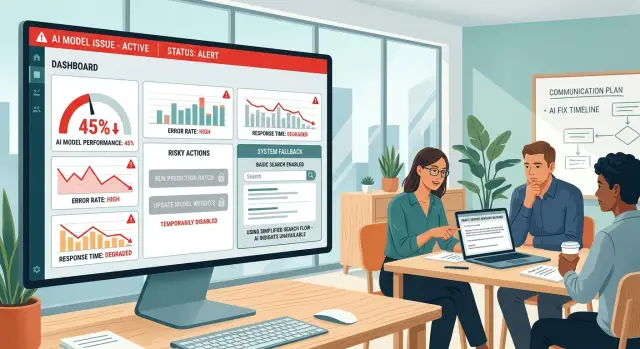
Table of Contents
What breaks trust during a model issue
Customers usually forgive a short outage. They are less forgiving when the product looks normal and starts giving worse answers.
That is the fastest way to lose trust. The screen loads, the button works, the reply arrives on time, but the answer is thin, wrong, or invented. Users do not see a model issue. They see your product acting careless.
Silent degradation feels worse than a clear failure because people keep making decisions with bad information. A support assistant might miss account details, suggest the wrong policy, or promise a feature that does not exist. The user follows that answer, runs into trouble later, and the damage feels personal.
Vague error messages make it worse. When the product hides the problem, users start filling in the blanks on their own, and they usually assume the company either does not know or does not care.
What customers notice first
Customers rarely know a model is failing. They notice symptoms.
Speed is often the first one. A task that took five seconds now takes thirty, or hangs long enough that people click again. After that, they notice changes in tone and structure. Replies get wordy, vague, or stiff. Instructions miss a step that used to be there. A summary leaves out the one detail the customer actually needed.
A few signs tend to show up early:
- slower responses or timeouts
- repeated phrases or strange wording
- missing steps in answers or workflows
- actions that stop halfway without explanation
Visible failure is easier to forgive. If a product says, "We're having trouble generating this right now. Please try again in a minute," most people understand. They may feel annoyed, but they know what happened.
Silent quality loss does more damage. The product keeps answering, but the answer gets thinner, less careful, or wrong in small ways. That kind of drift makes people doubt every result, including the good ones. Once a user starts checking everything by hand, trust is already slipping.
Support teams hear this quickly. Customers do not say, "model quality dropped." They say, "Your tool used to save me time. Now I have to redo the work myself."
A clear pause message often works better than a weak fallback. A short, honest note sets expectations and protects the relationship. Silence does the opposite.
Decide what must not degrade quietly
Start by marking the actions that can hurt someone if the model gets them wrong. The obvious ones involve money, legal terms, private data, and promises your team may have to honor later. A bad internal summary is annoying. A wrong refund amount, contract edit, or shipping promise becomes a real problem.
One simple way to sort features is to place each one in one of three groups:
- Safe to continue: low-risk output that does not change records, charges, access, or customer commitments.
- Safe with warning: output that still needs a label, review step, or confirmation before anyone relies on it.
- Stop now: anything that can send messages, change terms, move money, expose data, or make a promise on your behalf.
This sounds strict, but it saves you later. A fallback plan should not try to keep every feature half alive. It should protect the parts where a confident mistake costs more than a temporary pause.
A small example makes the split clear. If your product uses a model to draft support replies, you might let it keep suggesting text to agents during an outage, with a warning that quality may drop. But if the same model also approves refunds or rewrites billing terms, those actions should stop until the system recovers or a human steps in.
Write these stop rules before launch, not during an incident. Teams under pressure tend to keep too much running because the product still "works" on the surface. Customers judge the result, not your effort behind the scenes.
If a model issue could change what a user pays, signs, sees, or expects, do not let it fail quietly. Pause the action, explain the limit, and keep the damage small.
Set stop rules before something goes wrong
A good fallback plan starts before the outage. You need clear rules for when the product stops doing something, not a vague hope that the model will recover on its own. If answers get slow, empty, or unreliable, the product should switch modes on purpose.
Each stop rule should answer two questions: what signal are you watching, and what action do you take when it crosses the line? Keep the rules simple enough that anyone on the team can understand them during a messy incident.
You might pause automated actions if timeout rates stay above a set limit for several minutes. You might stop output that arrives empty, malformed, or repeated too often. You might turn off model-based decisions when confidence drops below your minimum, or pause tool use after several failed calls in a row. If the human review queue grows faster than staff can handle, that is a stop signal too.
Start with the actions that can hurt customers fast. Auto-send, auto-approve, auto-close, refund decisions, and status changes should pause early. A delayed answer is annoying. A wrong answer sent without review can damage trust for much longer.
Keep low-risk parts of the product available when they still help. Read-only screens, search, ticket history, previous summaries, and manual draft editing can stay on if they do not depend on unstable model output. Most people prefer a limited product that stays honest over a full product that quietly makes mistakes.
Write the rules in plain language, then match them in code and monitoring. "If empty output rises above 3% for 5 minutes, disable auto-replies and switch to manual review" is easy to test, easy to explain, and easy to trust.
One rule matters more than it seems: never hide the change. If automation stops, show it clearly in the interface and in internal alerts. Customers can accept a pause. They do not like feeling tricked.
Write failure messages people understand
When a model fails, users want plain facts fast. "We could not generate a reply right now" works better than "A temporary issue affected service quality." The first tells them what broke. The second sounds like you are avoiding the point.
A good message covers three things in order: what happened, what still works, and what you paused. That keeps the message calm and useful. If search still works but AI summaries are off, say that. If you stopped auto-send to avoid wrong answers, say that too.
Most good failure messages include four parts: the failed action, the parts still running, the paused feature, and the next step. For example: "The assistant could not draft your response. You can still open tickets and search past replies. Automatic sending is off until the model is stable again. Please try again in a few minutes or send the reply for manual review."
Do not fake certainty. Do not write "all systems are operating normally" when users can see errors. Do not promise a fix time unless your team knows it. "We're checking it now" is honest. "This will be fixed soon" often backfires.
A help desk example shows the difference. A vague banner like "We are experiencing issues" forces the user to guess whether they should wait, refresh, or answer by hand. A clear banner removes that guesswork: "Reply drafts are unavailable. Ticket routing and search still work. New drafts are paused, so no message will send automatically. Please write the reply manually or try again later."
Failure messages do not need polish. They need to stop confusion.
Build the fallback plan step by step
Start with a table of every user-facing feature. For each one, define three states: normal behavior, reduced behavior, and full stop. That forces the team to decide what can fail softly and what must shut off at once.
A support draft can fall back to a shorter reply or a saved template. A refund tool should not guess. If the model cannot call the right tool, the product should stop and ask the user to try again later or contact support.
Plans that look plain on paper usually hold up better in real incidents. Map each feature to a fallback state before you write code. Give one person the authority to stop a feature during an incident, and another person ownership of the status text users will see. Pick backups for both roles so nobody waits for approval while the problem gets worse.
Teams often skip role ownership, and incidents get messy fast. Engineering disables one path while support posts a different message somewhere else. Customers notice that mismatch right away.
Then test one failure at a time. Do not start with a giant chaos test. A timeout tells you one story. Bad output tells you another. A missing tool call often exposes the most dangerous gap because the model may still sound confident while doing nothing useful.
Run each test and watch the product like a customer would. How long does it wait before it admits there is a problem? Does it retry too many times? Does it switch to a fallback that still makes sense?
After each test, review the logs. Look for slow retries, empty responses, malformed tool payloads, and places where the rules triggered too late. Adjust the stop rules, run the same test again, and keep the notes short enough that the on-call person can use them under stress.
Simple plans survive bad nights. If a small team cannot follow the playbook at 2 a.m., the plan is still too complicated.
A simple example from a support tool
A support copilot can lose trust in ten minutes if it keeps sounding confident after the model starts failing. Picture a help desk tool that drafts replies for agents after reading the ticket, past orders, and earlier conversations.
On a normal day, that saves time. During a model outage, auto-drafting should stop first. If the tool keeps producing thin, confused, or half-empty replies, agents may send bad answers without noticing quickly enough.
The safer fallback is narrower, not fake. Let agents keep the parts that still work well, like searching past tickets, opening account history, and pulling saved macros. Pause drafting until the model is stable again.
The product should say this plainly. A banner at the top of the workspace can do the job: "Reply drafting is paused right now. You can still search past tickets and send manual replies." That tells agents what changed, what still works, and what to do next.
Urgent cases need a stricter rule. If a ticket mentions fraud, payment failure, account lockout, or a legal deadline, send it to a human queue instead of forcing weak AI output. A slower human reply is usually better than a fast wrong one.
In practice, the setup is simple. Stop auto-drafting when latency or error rates cross your limit. Keep search, templates, and ticket history available. Route urgent conversations to trained agents. Show one clear status message until drafting returns.
That is what a sound fallback plan looks like. It does not hide the outage. It reduces risk, protects agents from bad output, and keeps the customer experience steady while the system recovers.
Mistakes teams make under pressure
Pressure makes bad calls feel reasonable. A team sees a spike in latency or a few odd answers and tells itself the issue is probably temporary. That is when risky features stay on too long. If a feature can invent facts, skip a safety check, or trigger the wrong action, narrow it fast or turn it off.
Another common mistake is hiding the problem behind vague text like "Something went wrong." Users notice the change anyway. Replies get shorter, slower, or less accurate, and generic error text makes the product feel slippery. Clear failure messages do more for trust than cheerful wording.
Teams also switch to a weaker backup model and hope nobody notices. That often does more damage than a short outage. A tool that usually reads account context might suddenly answer with generic guesses. If you move to a backup, limit the scope on purpose. Let it handle simple summaries, routing, or drafts. Do not let it give policy advice, money-related answers, or final decisions unless you know it can do that safely.
Stress changes judgment, so scope limits need to be in writing before an incident starts. When alerts fire, teams often reach for the fastest patch, not the safest one.
One more mistake lingers after recovery: stale status messages. The model comes back, but the warning banner stays up, a disabled button never returns, or support keeps using incident text that no longer fits. That makes the product look disorganized. Give one person ownership of recovery cleanup and have them confirm that the interface matches the real system state.
Customers forgive outages more often than confusion. They remember when the product acted strange, said nothing useful, and pretended everything was normal.
Quick check before release
A release is not ready until the fallback path looks as deliberate as the normal path. Every customer-facing flow should have a safe fallback state. If the model cannot answer, classify, or generate, the product should show a plain message, keep the rest of the page usable, and offer the next best action.
Every risky action also needs a stop rule. If the model can send messages, change records, approve content, or trigger money-related steps, decide when the product must pause instead of guessing.
Support staff need a short script for incidents too. They should know the issue, the current limit, who is affected, and what customers can do right now. Recovery needs the same discipline. Teams often restore the model but forget the temporary rules, so customers keep seeing outage behavior after the problem ends.
Do one dry run before release. Turn the model off in staging, slow it down, and force a bad response. Then watch the full path: what the customer sees, what the agent sees, what gets logged, and who gets alerted.
A simple standard helps. If the model fails, the product should either retry safely, fall back to a simpler non-AI path, or stop the action and explain why. Anything in between usually turns into silent degradation, and customers notice that faster than most teams expect.
If this checklist feels basic, that is usually a good sign. The best fallback behavior is boring, predictable, and easy to understand.
Next steps for a safer product
Teams do better with a boring routine than with a heroic response. If you want people to trust AI features, make fallback planning part of normal product work, not a document you open only during an outage.
Keep one page for each AI feature. It should say what the feature does in normal conditions, what the first fallback is, what the product must stop doing, what message the customer sees, and who makes the call if things get messy. One clear page is enough.
Run a short drill once a month with product, support, and engineering in the same room. Pick one failure case, such as slow responses, bad answers, or a full outage, and walk through the customer experience from first error to final recovery.
These drills usually uncover the same gaps. Support does not know which message to send. Engineering is unsure when to disable the feature. Product has not defined which actions are unsafe. Nobody owns the final go or stop decision.
Fix those gaps right after the drill. Small monthly updates work better than a thick policy file nobody reads.
It also helps to keep the fallback sheet close to everyday work. Add it to release reviews, incident notes, and support training. When the team ships a new AI feature, the sheet should ship with it.
Some teams want an outside review before they rely on their plan. That is often smart, especially when the product touches customer data, money, or support promises. Oleg Sotnikov at oleg.is works with startups and small businesses on AI-first product and engineering decisions, and this kind of fallback review fits naturally into that work.
Put the next drill on the calendar, assign an owner for every fallback sheet, and test one feature this month. That alone makes the next model issue smaller, clearer, and less damaging.
Frequently Asked Questions
Why does silent AI degradation hurt trust more than an outage?
Because users keep trusting bad answers. A short outage is annoying, but a calm, wrong reply can lead to bad decisions, extra work, or promises your team never meant to make.
What should my product stop doing first during a model issue?
Pause anything that can change money, records, access, legal terms, or customer promises. If the model might send, approve, or alter something on its own, stop that path early.
How should I write a failure message users actually understand?
Write one clear sentence about what failed, one about what still works, and one about what you paused. Then tell the user what to do next, like trying again later or finishing the task by hand.
What signals should trigger a fallback?
Watch for slow replies, empty output, repeated text, malformed tool calls, and a growing review queue. Pick simple limits in advance so the product can switch modes without debate.
What can stay available when the model gets unstable?
Keep read-only and manual paths open if they still help. Search, ticket history, saved templates, and manual editing often give users enough to keep moving without bad AI output.
Should I switch to a backup model automatically?
Only if you narrow its scope on purpose. Let a weaker model handle simple drafts or routing, but do not let it make policy calls, money decisions, or final customer promises unless you already tested that path well.
How should support teams handle urgent tickets during an outage?
Send them to a human queue fast. If a case mentions fraud, payment issues, lockouts, or deadlines, a slower human reply usually causes less harm than a fast guess.
How do I test a fallback plan before release?
Start small. Turn the model off, slow it down, and force bad output in staging. Then watch what the customer sees, what the team sees, what the logs show, and whether the stop rules fire soon enough.
What do teams often forget after the model recovers?
Assign one person to remove banners, re-enable features, and confirm the interface matches the real system state. If you skip that step, users keep seeing outage behavior after the problem ends.
How do I make fallback planning part of normal product work?
Keep one simple fallback sheet for each AI feature and run a short drill every month. That routine helps product, support, and engineering agree on stop rules, user messages, and ownership before a real incident hits.


