AI message approval workflow for calm team reviews
Build an AI message approval workflow that routes low-risk drafts fast and sends sensitive messages to legal, support, or brand before send.
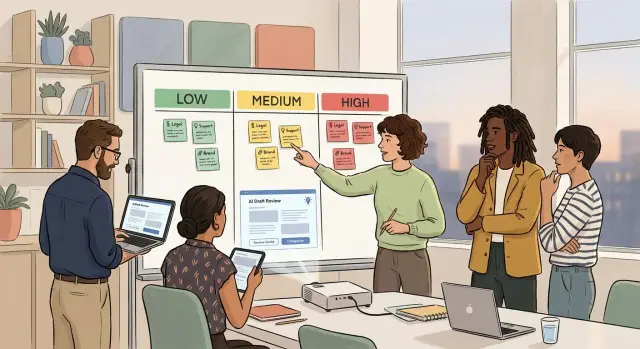
Table of Contents
Why one review queue breaks down
A single review queue looks tidy until real work starts. Then a password reset note sits beside a billing dispute, a delay notice, or a message about a data issue. Low-risk drafts wait for no good reason, and high-risk ones do not always get fast attention.
That is where most approval systems start to fail. Teams treat every AI draft as if it carries the same risk, even when the difference is obvious. A routine reply should not wait behind a sensitive customer notice that needs careful wording and extra checks.
Legal teams usually feel the pain first. If every draft lands on their desk, they spend time reading messages that never needed legal review. A shipping update or appointment reminder rarely belongs there. Over time, legal becomes a bottleneck, not because the team is slow, but because the queue is poorly sorted.
Support teams feel it during busy periods. When ticket volume jumps, they need quick answers for common questions. If those replies sit in the same line as refund escalations or policy statements, customers wait longer and agents start working around the process. Then a second problem appears: people send manual edits outside the approval path because the formal one feels too slow.
Brand teams get pulled in late. In many companies, brand review starts only after support has edited the draft for clarity and legal has changed it for safety. By then, the tone, structure, and purpose may have shifted. That leads to another round of edits, another wait, and the usual argument about which version is current.
A single queue also hides urgency. Everything looks equally pending, so nothing feels truly urgent. Teams fall back on pings, side chats, and favors to move drafts forward. That is not a process. It is traffic controlled by whoever shouts first.
If you want calmer reviews, start with a simple fact: not all customer messages deserve the same path.
Sort messages by risk first
Reviews get much easier when teams sort drafts by risk before anyone starts debating wording. If every message lands in one queue, simple updates wait behind sensitive notices, and reviewers waste time on drafts that never needed them.
Three levels are usually enough: low, medium, and high. Keep the labels plain so people can make the same call quickly.
Low-risk messages are routine and unlikely to cause harm. Think order confirmations, appointment reminders, or a notice that support hours changed. Medium-risk messages can affect trust, money, or customer expectations. Billing reminders, delivery delay notes, and service updates often fit here. High-risk messages can create legal trouble, make a promise, or cause real harm if the AI gets them wrong. Refund commitments, security incident notices, contract changes, health or financial claims, and messages in regulated areas belong in this group.
Three questions usually sort a draft fast. Could this message hurt a customer if it is wrong? Does it promise something, such as a credit, timeline, or fix? Does it touch a rule, policy, or legal duty? The more often the answer is "yes," the higher the risk.
Real examples help more than long policy language. A shared set of sample drafts teaches the team faster than abstract rules do. Put one or two real messages under each risk level and explain why they belong there. After a while, people stop debating the basics.
Borderline cases need one clear rule: move them up, not down. A billing apology may look routine, but if it hints at compensation, legal or finance may need to see it. That extra review costs a few minutes. A bad promise can cost much more.
Do not try to make the model perfect on day one. Start with three buckets, test them against recent messages, and adjust only when people keep misclassifying the same kind of draft.
Match each risk level to a reviewer
The right reviewer is the person who can catch the mistake that would actually hurt you. If a draft only confirms a shipping date or reminds a customer about office hours, you do not need three teams involved. Save full reviews for messages that can create legal, financial, or brand trouble.
Low-risk drafts should move fast. In most cases, the AI can send them with spot checks instead of formal approval every time. A team lead can review a sample each week, look for drift, and tighten the rules if the tone or facts start to slip.
Medium-risk drafts need a human who knows the customer context. Support should review messages about delays, account issues, refunds, or service changes. Brand or marketing should review anything that uses campaign language, reaches a large audience, or could feel off-brand even when the facts are correct.
High-risk drafts need legal review before they go out. That includes messages about contracts, compliance, privacy, regulated claims, price changes with legal terms, or anything that could be read as a promise. Legal does not need to see every routine email. They need to see the drafts where one sentence can create a real problem.
A simple model works well in practice. Low-risk drafts can go out automatically with later sampling by a team lead. Medium-risk drafts should wait for support or brand approval. High-risk drafts should go to legal and then to a final owner who decides whether they are ready to send. Urgent cases also need a named backup when the main reviewer is away.
That backup role matters more than most teams expect. People get sick, take vacation, or miss a message during a busy day. If nobody owns the second seat, work stalls and the process starts to feel unreliable.
Pick one backup for each team, write those names into the process, and give them the same rules as the primary reviewer. Keep the path short. One reviewer per risk level is usually enough, with a final approver only for the highest-risk drafts.
Build the approval path step by step
Start with the messages you already send. Pull one or two months of real examples, then group them into plain categories such as outage updates, billing notices, renewal reminders, refund replies, and product announcements. That gives the process something real to work from instead of a guessed list.
Next, write one short rule that assigns risk. If a draft changes money, policy, legal meaning, or public trust, mark it high risk. If it can confuse customers or create extra support work, mark it medium. If it simply confirms routine information, mark it low.
Each draft needs one owner before anyone reviews it. That person checks the facts, makes sure the AI used the right template, and sends the draft to the next reviewer. Teams lose time when three people edit at once and nobody knows which version is current.
A practical path is simple. The AI creates a draft and suggests a risk level. The draft owner checks names, dates, prices, and account details. Support reviews messages that affect customer understanding or likely replies. Brand reviews tone and clarity when the message will be widely seen. Legal reviews only the drafts that mention terms, privacy, refunds, claims, or compliance.
Set response times before launch. An outage email might need review within 30 minutes, while a renewal reminder can wait until the next business day. Fast deadlines work only when everyone knows them in advance.
You also need a rule for silence. If nobody replies, low-risk drafts can move forward after the deadline with the owner's approval. Medium-risk drafts should pause until one reviewer answers. High-risk drafts should never move on silence, especially when legal or financial language is involved.
A small example makes this clearer. Say the AI writes an outage update for customers. The owner checks the service status and timing. Support confirms the message matches what agents will say. Brand trims vague wording. Legal joins only if the email mentions credits, compensation, or contract terms.
That path keeps routine messages moving and saves full review for drafts that can cause real trouble.
Write rules the AI must follow
Review gets easier when the draft starts inside a tight fence. If the model can invent facts, soften risky language, or guess at missing details, your team spends its time fixing preventable problems instead of approving messages.
Start with claims. The model should never state a refund, deadline, feature, policy change, or service promise unless that claim comes from an approved field. If the source field is empty, the draft should skip the claim rather than fill the gap with likely wording.
Facts need structure, not trust. Require a source field for every date, number, name, and status update. That can be as simple as incident_start_time, affected_region, next_update_time, or approved_offer_text. When a fact has no source, the model should leave that part blank so a human can fill it in.
Tone needs rules too. Most teams do better with plain language, short sentences, and a calm voice. If your brand avoids jokes, hype, blame, or casual slang, say that directly in the prompt. A support update should sound steady, not clever.
Some words should trigger legal review the moment they appear. Keep that watchlist short and strict. Terms like "guarantee," "warranted," or "risk-free" can create trouble. So can phrases like "permanent fix" or "final resolution." The same goes for compliance claims such as GDPR, HIPAA, or "certified," refund promises with dates or amounts, and language about fault, liability, or admissions.
This matters because the model may use risky wording even when nobody asked for it. A sentence like "your data is fully secure" sounds harmless, but it can create a problem if your company has not approved that statement.
Give the model one more rule: do not guess. If the root cause is still under investigation, the draft should say that. If the next update time is unknown, it should leave the time blank or use approved fallback text such as "We will share the next update soon." That is safer than a fake timestamp your team has to walk back later.
A good process turns the model into a careful drafter, not a free writer. Reviewers can then focus on the parts that matter most: facts, tone, and risk.
A simple example: outage update emails
A service outage is a good test because people are stressed and every extra minute matters. You need fast approval, but you also need the message to be accurate.
Imagine your payment page fails for 40 minutes on a weekday morning. The AI drafts an email for affected customers using the facts the team already knows: what broke, when it started, what works now, and when the next update will arrive.
Support should see that first draft before anyone else. Support usually knows which details customers ask for right away, and they can spot wording that creates more tickets. They may remove guesses, add a temporary workaround, and replace vague words like "soon" with a real time.
If the draft says anything about credits, refunds, waived fees, or contract terms, send it to legal next. That step should not happen for every outage email. It should happen only when the message makes a promise tied to money or policy. A plain status update can skip legal and move faster.
Brand review fits near the end, not the start. Brand should check tone once the facts are settled. They can make the note calmer, clearer, and more human without reopening the whole path. During an outage, that difference matters. "We know this blocked your work" reads much better than stiff wording copied from a policy page.
Then send the message in small batches first. Start with a small group, watch replies, unsubscribes, and support tickets for 10 to 15 minutes, then send the rest if nothing looks off. If customers keep asking the same question, fix the next batch before it goes out.
That is what a calm review process looks like in practice. Support checks accuracy first. Legal joins only when the draft creates risk. Brand tunes the tone at the end. The team moves quickly, but nobody waits in the wrong queue.
Mistakes that create delay and rework
The slowest review process does not always come from caution. It often comes from too many hands on the same draft. A medium-risk customer message, such as a renewal reminder or billing notice, should not pass through five or six people just because they are available to comment.
This happens most often with medium-risk drafts. Teams treat them like high-risk messages, so support, legal, brand, product, and a manager all jump in. Each person adds a small edit, but the draft does not get safer in any clear way. It just gets slower.
Another common problem is that reviewers edit wording instead of making approval decisions. One person changes "we're sorry" to "we apologize." Someone else changes it back. Ten comments later, the team still has not answered the only question that matters: can this message go out, or does it need a real fix?
Copy and paste creates another layer of rework. A draft starts in one tool, moves into chat, then into a document, then into a ticket. Each move drops context. People lose the latest version, forget who approved what, and bring back edits that another reviewer already settled.
The pattern is usually easy to spot. Too many people touch the message. Comments mix legal risk, support accuracy, and style preferences. The current draft lives in more than one place. Nobody has the clear right to make the final send call.
That last point causes more delay than most teams expect. When no one owns the final decision, every reviewer protects their own area and waits for someone else to take responsibility. Legal avoids risk. Support wants every edge case covered. Brand keeps polishing tone. The draft sits there because nobody can say, "This is good enough. Send it."
Vague rules make all of this worse. If the guidance says "be careful with promises" or "keep the tone on brand," people fill in the gaps with personal taste. The AI guesses. Reviewers guess too. Then the team rewrites the same draft again.
A calmer setup is usually much simpler: one current version, one reviewer per function when needed, and one named owner who decides when the message ships.
Quick checks before launch
A workflow can look fine on paper until the first urgent message lands at 9:40 p.m. and the usual reviewer is offline. The process needs to handle that moment without guesswork.
Start with labels. Every message type needs a clear risk tag before anyone sends a draft. A billing correction, outage notice, refund response, contract update, and promo email should not sit in the same lane. When teams skip this step, reviewers waste time deciding who should even look at the message.
Backups matter just as much as primary owners. Each review queue needs one named backup who can step in fast. This sounds minor, but it prevents one of the most common delays: a single person holds the queue because nobody else feels allowed to approve.
Keep a plain audit trail. You do not need a complicated system on day one. You do need a record of who changed the draft, who approved it, and when they did it. If legal or support asks why a message went out with a certain phrase, you should be able to find the answer in minutes, not after a long Slack search.
After-hours routing deserves a real test, not a hopeful assumption. Send a practice message outside normal working hours and watch what happens. Does it go to the right person? Does the backup get notified? Does anyone know the message is waiting? A 10-minute test can save a messy overnight delay during a real outage.
One more check often gets missed: staff need a clear stop rule for auto-send. People should know exactly when the AI can send on its own and when it must stop and wait for a human. That line should be easy to remember.
A short pre-launch checklist is enough:
- Confirm each message type has a risk tag.
- Confirm each queue has a backup reviewer.
- Confirm edits and approvals leave a timestamped record.
- Run one after-hours routing test.
- Show staff the exact cases that pause auto-send.
If you want a quick standard, use a real scenario. An outage update can auto-draft the first version, but support or legal should review it if the message mentions refunds, security, or service credits. That rule keeps simple messages moving without letting sensitive drafts slip through.
What to do next
Start with one message family that people already send often, such as outage notices, shipping delays, or billing reminders. Do not launch across every channel at once. A narrow first rollout gives your team real drafts to review without turning the process into a second full-time job.
Give that message family one owner. That person should collect the current templates, note who usually edits them, and mark which drafts need support, legal, or brand review. Keep the first version plain. If people need a flowchart to use it, it is too big.
The first rollout only needs a few moving parts: choose one message type with a clear owner, set two or three risk levels for that type, assign the right reviewer to each level, and log approval time, edit count, and send errors.
Those numbers matter more than opinions. If reviews still take too long, or reviewers rewrite every draft, the rules are not clear enough yet. If errors drop and approvals get faster, the process is moving in the right direction.
Wait two weeks, then tighten the system using real examples. Look at where people paused, what legal changed most often, and which brand edits kept showing up. Turn those repeat edits into rules for the AI. That is when risk-based content review starts to feel calm instead of messy.
You do not need a perfect policy on day one. You need a small process that people will actually use. A short set of rules, one message family, and a few measurements will tell you more than a giant governance document.
If this work crosses several teams and tools, setup gets harder fast. Support may work in one system, legal in another, and brand in shared documents or email. Oleg Sotnikov at oleg.is helps startups and smaller companies build practical AI review flows, product architecture, and approval rules that fit real production systems without adding extra process for its own sake.
Once the first message family runs cleanly, copy the same model to the next one. Keep what saves time. Cut what adds noise.
Frequently Asked Questions
Why does one approval queue cause problems?
Because one queue treats every draft the same. Routine notes get stuck behind sensitive messages, legal reads things they do not need to see, and teams start using side chats or manual edits to move faster.
How many risk levels should we use?
Start with three: low, medium, and high. That gives teams enough detail to sort drafts fast without turning classification into its own job.
What counts as a high-risk message?
Mark a draft high risk when it can create legal, financial, or trust problems if it is wrong. Refund promises, contract changes, privacy notices, security messages, and regulated claims usually belong there.
Can we let low-risk AI messages send automatically?
Yes, in many cases. Auto-send works for routine updates like confirmations or reminders when you use spot checks, good templates, and a team lead reviews samples for drift.
Who should review medium-risk drafts?
Support should review most medium-risk drafts because they know the customer context and likely replies. Brand should step in when the message reaches many people or the tone could cause trouble even if the facts are right.
When should legal review an AI draft?
Bring legal in when a draft mentions terms, privacy, compliance, refunds, service credits, liability, or anything that reads like a promise. Do not send every routine email to legal, or the queue will slow down fast.
What rules should the AI follow before anyone reviews the draft?
Give the model strict rules. It should use only approved facts, skip claims when source fields are empty, keep the tone plain, and avoid risky words like "guarantee" unless someone approved them.
How do we cut delay and rework in the review process?
Keep one current version, one owner, and only the reviewers the draft actually needs. Ask reviewers to approve or reject with a reason instead of rewriting the same sentence back and forth.
What should we check before launch?
Test labels, backups, audit records, and after-hours routing before launch. Also set a stop rule so staff know exactly when auto-send must pause for a human review.
What is the best way to start with this workflow?
Start with one common message family like outage updates, shipping delays, or billing reminders. Run it for a couple of weeks, track approval time and errors, then turn repeat edits into better rules for the AI.


