AI assistants for legacy code audits: where to start
AI assistants for legacy code audits work better when you map dead paths, weak tests, and ownership gaps before you ask for fixes.
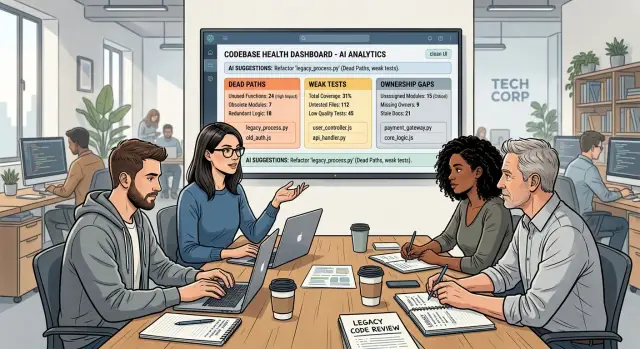
Table of Contents
Why old code confuses an AI assistant
An AI assistant can scan a large codebase in minutes. That speed helps, but old code often tells the wrong story.
Legacy systems carry rules that live in people's heads, old tickets, and half remembered incidents. A branch may look pointless until someone explains that invoices stay editable for 24 hours for one older customer group, or that a nightly job skips one region because of a problem nobody fully fixed years ago. If that context never made it into the code or tests, the assistant fills in the blanks and often fills them in wrong.
Dead paths make the problem worse. Older projects collect retired feature flags, partial integrations, fallback code, and scripts that once mattered and now do nothing. To a model, all of it still looks active. It reads ten ways to do the same task and may focus on the path no user hits anymore.
Passing tests do not fix that by themselves. Many older suites only check the easy case. They confirm that a request returns 200, that a function returns something, or that a page renders. They do not prove that the code still protects the business rule that matters. If the tests stay green, the assistant gets false confidence.
Ownership gaps add another blind spot. In many older repos, everyone touches the same files and nobody fully owns them. The assistant cannot ask the one engineer who knows why the retry limit is 7 or why one endpoint still speaks an older format.
This is the problem Oleg Sotnikov often sees when teams try to use AI to speed up work on aging systems. The first issue is rarely syntax. It is missing context. Until the assistant can tell live paths from dead ones, strong tests from weak ones, and owned code from abandoned code, it will sound sure of itself before it is actually right.
Map the system before the audit
Before you aim an assistant at legacy code, give it a map of what keeps the business running.
Start with the workflows people use every day. That usually means login, billing, customer data, admin tools, reporting, and anything that blocks work when it fails. Then mark the flows that touch money, private data, or permissions. Those paths carry the most risk, and they often cut across several services.
A refund flow, password reset, or role change may look small in the interface. The code behind it may stretch across APIs, workers, old helper functions, scheduled jobs, and permission checks.
Your map only needs to answer a few plain questions:
- Which systems support daily work?
- Which flows affect payments, data, or access?
- Which modules do developers avoid changing?
- Which recent bugs or incidents point to fragile areas?
That third question matters a lot. Every codebase has areas people tiptoe around. It might be tax logic, invoicing, or an old auth module that breaks when someone renames one field. If the team avoids touching it, the assistant should inspect it early. Fear is often a better signal than file count.
Pull incident notes, bug reports, support tickets, and postmortems into one place before the audit starts. You do not need a perfect database. A shared document with dates, symptoms, affected modules, and related commits is enough. That gives the assistant real failure history instead of a clean but misleading view of the repo.
Keep the map small. One page that the team actually updates beats a huge diagram nobody trusts.
Start with dead paths
If you want a safe starting point, begin with code that probably no longer matters.
Unused code hides risk without adding much value. It also distorts the assistant's view. If the model reads ten possible paths and only three handle real traffic, its suggestions drift toward code that no one uses.
Start with endpoints that nobody calls anymore. Old APIs often stay around because no one wants to break a forgotten client. Compare route definitions with access logs, gateway logs, and recent traces. If an endpoint has seen no real traffic for months, mark it for review.
Then look at background jobs, scripts, and feature flags. Legacy systems collect nightly jobs that process empty queues, scripts that once fixed a migration, and flags tied to launches that ended years ago. The code still exists, so people assume it still matters.
A quick pass usually turns up the same trouble spots:
- API endpoints with zero or near zero traffic
- Cron jobs or workers that run but produce nothing
- One off scripts still stored in deployment folders
- Feature flags with no clear owner
Logs give you the reality check. Code shows what the system can do. Logs show what it actually does.
Take a billing service as an example. It may still expose an old CSV export endpoint, run a nightly invoice sync job, and carry a flag for a retired discount flow. On paper, all of that looks active. The logs tell a different story: the endpoint has not been called in 180 days, the sync job handles zero records, and the flag is off for every account. That is a dead path until someone proves otherwise.
Do not rush to delete it. Tag risky removals before you touch them. Anything tied to payments, auth, compliance, partner callbacks, or older enterprise customers deserves extra care. A path can be quiet and still matter to one customer.
Simple labels are enough: "unused," "likely unused," and "unused but risky." Those labels give the assistant cleaner context and give your team a safer cleanup queue.
Check weak tests before trusting green builds
A green test suite can hide a lot.
When an assistant reads legacy code, it often treats passing tests as proof that behavior is safe. That breaks down fast when the tests only skim the surface.
Open a sample of tests and read the assertions, not just the names. If a test only checks a 200 status code, a rendered page, or a giant snapshot, it may miss the rule that users actually care about. A checkout flow can return success while still applying the wrong tax, skipping a discount limit, or charging on the wrong renewal date.
A few patterns deserve attention right away:
- Tests that check status codes but never inspect returned data
- Snapshot tests that change often and nobody reads closely
- Tests with sleeps, random dates, retries, or shared state
- Large areas of code with no test for the real business rule
Flaky tests need their own label. If a test fails because of timing, test order, random IDs, or an unstable external service, mark it before the audit goes further. Otherwise the assistant may treat test noise as product behavior and suggest fixes for the wrong thing.
Then look for rules that have no test at all. Write down the cases users would notice first: refund windows, approval limits, invoice rounding, permission checks, renewal timing. If those rules never appear in the suite, weak tests are already shaping the audit more than the code is.
One billing team had dozens of passing API tests. Every test checked the response code and a couple of fields. None of them verified that yearly plans kept the old price for existing customers during a grace period. The suite stayed green, but the important rule was missing.
Treat a clean run as a clue, not proof. It tells you what the suite watches today. It does not tell you what the system promises to users.
Find ownership gaps
An assistant can read code fast, but it cannot tell you who can safely change it.
That missing context causes bad suggestions. A branch that looks pointless to the model may protect a billing rule, a customer promise, or a workaround that only one person remembers.
Start with a simple ownership map. For each area of the codebase, note who approves changes, who reviews them, and who steps in when that person is away. Keep it plain. A spreadsheet or short table is enough.
Pay extra attention to modules mostly handled by former staff. Those areas often collect quiet risk. The team may still ship fixes there, but nobody feels sure about changing behavior. That is exactly where an AI assistant gets overconfident and starts proposing cleanup that looks tidy on screen but breaks real work.
Handoff notes matter more than most teams admit. If a module has no notes, no clear ticket history, and no owner, treat it as high risk even if it seems stable. Stability can mean the code is solid. It can also mean everyone is too nervous to touch it.
Ownership gaps show up in small ways. Review requests bounce around. Alerts have no clear responder. The same file gets edited by five people in six months, but none of them can explain the whole flow. When you see that pattern, assume the assistant will miss some piece of human context unless you add it to the audit.
Run a simple audit flow
Start small. If you point the assistant at the whole repo, it will spend time summarizing structure instead of finding trouble.
Pick one painful module with clear boundaries, such as billing, auth, or a job worker that breaks every few weeks. Then build a small evidence pack around it. Recent logs, failing tests, bug tickets, and the last few commits often tell a more useful story than the code alone.
A simple flow works well:
- Choose one module with recent bugs and clear boundaries.
- Add logs, test results, bug reports, and recent changes.
- Ask the assistant to explain risk before it suggests fixes.
- Review the output with the person who knows that module best.
That order matters. If the assistant jumps straight to a refactor plan, pull it back. You want a ranked list of risks first. Ask which paths look unused, which tests fail to protect behavior, where ownership is unclear, and what change is most likely to break production again.
Good prompts make the model slow down. Ask for short reasons, code evidence, and any assumptions it had to make. If it cannot explain those assumptions, it is not ready to guide a change.
A human owner should review the output while the context is fresh. They can spot old workarounds, hidden dependencies, and business rules the model will miss. After that review, update the plan in plain language: what to inspect first, what to ignore for now, and what needs a new test before any fix ships.
This keeps the audit cheap and honest. One module, one evidence pack, one reviewed risk list. That is usually enough to find the first real problem.
A realistic billing example
Imagine a team inherits an old billing service built in layers over many years. It handles invoices, retries failed charges, credits, and a refund path added long ago for one special customer group. Nobody on the current team wrote that refund code, and the tests around it only cover the simple case.
The team asks an AI assistant to find safe cleanup work. The model scans the repo, spots a refund branch behind an old config check, and suggests removing it. The branch looks stale. Few files mention it, recent commits ignore it, and one thin test passes without touching any edge case.
Then the team checks production logs.
The refund branch still runs a few times each week for customers on older contracts. It is rare traffic, but it is real traffic. If the team had deleted that path, a small group of paying customers would have lost refunds overnight.
The model was not broken. The repo gave it a bad map. The tests never create the older contract type, so the branch looks unused. The service also has no clear owner. The engineer who added the refund flow left years ago, and nobody formally picked up that area.
That mix is common. Code that looks dead is not always dead. Weak tests hide live behavior, and ownership gaps remove the human context that explains why strange branches exist.
The team fixes the setup before asking for more advice. They add a test for the older contract path, assign an owner for billing rules, and mark the refund branch as low traffic but active. After that, the assistant stops pushing deletion and starts suggesting safer changes, like isolating the branch behind a clearer interface and adding alerts for refund failures.
That is a much better place to start.
Mistakes that waste time
AI can read old code fast. It can also head in the wrong direction fast.
Most wasted time comes from bad setup: asking for fixes too early, trusting stale docs, or making the assistant judge too much code at once.
One common mistake is asking for refactors before checking real usage. A function can look ugly and easy to remove yet still support one nightly job, one old customer workflow, or one admin tool nobody mentions. If you skip logs, runtime traces, and recent usage data, the assistant will treat guesswork as fact.
Stale docs cause the same problem. Old comments, abandoned design notes, and outdated README files can pull the model toward code that no longer matters. If a comment says temporary workaround but the code has stayed in production for four years, the comment is noise.
Coverage numbers fool teams more often than they should. A report might show 82 percent coverage, but that says nothing about test quality. Some tests only check that a function returns anything at all. Others mock so much that they never touch the risky branch.
Another time sink is stuffing too many files into one prompt. Ask for one answer across controllers, jobs, helpers, tests, and old migration code at the same time, and the assistant starts to blur ideas together. Small batches work better.
A simple routine saves hours:
- Check which paths still run in production or staging.
- Remove stale docs and comments from the prompt.
- Read sample tests instead of trusting the percentage alone.
- Split large modules into smaller review groups.
Teams usually get better results when they slow the first pass down. Ten careful minutes up front can save a day of reviewing bad suggestions.
Quick checks before you trust a suggestion
A neat explanation can look smarter than it is.
Old systems hide rules in odd places, and the assistant often sees code shape before it sees business risk. Before you trust a suggestion, verify a few plain facts.
- Who owns the module today?
- Does the path still run in logs, traces, or recent jobs?
- Do the tests cover the exact rule you want to change?
- Does the assistant explain the failure mode, not just the code style?
Weak tests are a common trap. A test may call the function you plan to edit but only cover the easy case with clean input and expected flags. That does not prove the rule is safe to change. You want a test that shows the edge case the old code was written for.
Picture an import module with a fallback parser. The assistant suggests removing it because a newer format already exists. That sounds neat. But if logs show the fallback still handles 2 percent of imports, and nobody on the team owns that module, the safe move is to stop, collect a real sample file, and write one test before changing anything.
Good AI help names the risk in plain words. It should say what could break, where the gap is, and what proof is still missing. If it cannot do that, it should not be changing production logic yet.
Next steps for your team
Teams get better results when the first audit stays small.
Pick one area that can hurt the business if it breaks, such as billing, login, or order sync. Write down what the assistant found, what turned out to be noise, and which questions only a human could answer. After one focused pass, the same patterns usually show up again: old branches nobody uses, tests that pass without checking much, and files that nobody clearly owns.
A short routine is enough. Trace one risky workflow from start to finish. Mark missing owners for files, jobs, and alerts. Flag tests that miss edge cases or only cover happy paths. Save the findings in a simple template the team can reuse.
Do not jump into a large refactor because the assistant produced a clean plan. If ownership is fuzzy and tests are weak, big edits turn into guesswork. Close those gaps first, add a few direct tests around real failures, and only then change structure.
Consistency beats a one time cleanup. Run the same review each month, or before major work in older parts of the system. Over time, that gives your team a living legacy code audit checklist instead of another forgotten document.
If your startup or small business needs outside help, Oleg Sotnikov at oleg.is works with teams on legacy systems, technical strategy, infrastructure, and practical AI driven audit workflows. That kind of outside review can help when your team wants a second opinion before spending weeks rewriting the wrong part of the code.
One careful pass through a risky area often saves more time than a broad audit nobody follows up on.
Frequently Asked Questions
Where should we start an AI audit in legacy code?
Start with one risky module, not the whole repo. Billing, auth, refunds, imports, or another area with recent bugs gives the assistant enough context to find real problems without drowning in old code.
Why not point the assistant at the whole repo?
A full-repo scan usually produces broad summaries and shaky guesses. When you narrow the scope, the assistant can compare code with logs, tests, and recent changes and give you something you can actually verify.
How do we find dead code without breaking something?
Compare route definitions, jobs, and scripts with access logs, traces, and queue activity. If a path shows no real use for months, mark it as likely unused first and delete it only after someone checks customer impact.
Why can a green test suite still mislead the assistant?
Green builds often mean the suite checks the easy case, not the business rule that matters. A test can pass while the app still charges the wrong amount, skips a permission check, or misses an older customer path.
Which tests should we review first?
Read tests around money, access, dates, and edge cases before anything else. If a test only checks a status code, a snapshot, or a happy path, treat it as weak until you add an assertion for the real rule.
How do ownership gaps cause bad AI suggestions?
The model sees code, but it does not know who understands the hidden rule behind it. If nobody clearly owns a module, the assistant may suggest a cleanup that looks neat and still breaks a promise your team made years ago.
What should go into the evidence pack for an audit?
Keep it small and concrete. Recent logs, failing or flaky tests, bug tickets, incident notes, and the last few commits usually tell the assistant more than a pile of source files alone.
When should we avoid deleting a low-traffic branch?
Stop when the path touches payments, auth, compliance, partner callbacks, or older contract terms. Low traffic does not mean zero value, and one rare branch can still matter to paying customers.
How can we verify an AI suggestion before we trust it?
Check four things right away: who owns the module, whether the path still runs, whether tests cover the exact rule, and what failure the suggestion might cause. If the assistant cannot explain those points clearly, do not ship the change.
When should we get outside help with a legacy code audit?
If your team keeps debating the same risky area, no one owns the module, or billing and auth logic feel too fragile to touch, bring in outside review before a rewrite. A consultation with an experienced CTO or advisor can help you inspect one module, sort noise from real risk, and choose a safer first step.


