AI input contracts for teams that want better outputs
AI input contracts help teams state source data, desired action, and failure cost before work starts, so models return safer, more useful output.
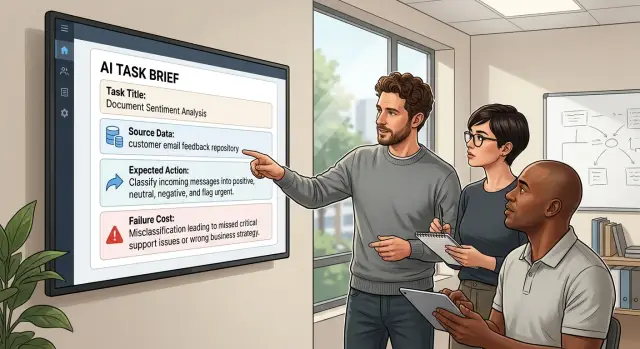
Table of Contents
Why vague requests break AI work
Most bad AI output starts before the model writes a word. A teammate says "summarize this," "draft a reply," or "make a plan," but they do not say which source to trust, what action they want, or how the result will be used. The model fills those gaps on its own.
That guesswork often sounds polished, which makes it harder to catch. If the source is unclear, the model may mix an old spec, a chat message, and a rough note as if they all carry the same weight. If the goal is unclear, it also guesses the format. One person wanted a short internal summary. Another expected a customer-ready document. The answer disappoints both.
Teams also skip the part that matters most: what a wrong answer will cost. A weak draft for an internal note might waste ten minutes. A weak draft for pricing, security, hiring, or product scope can waste a week. When nobody states the failure cost, the model treats every task like a casual first pass.
A simple product example shows the problem. A manager asks AI to "write release notes from the sprint." That sounds clear, but it is not. Should the model use ticket titles, merged code, QA notes, or chat updates? Should it write for customers, sales, or the support team? Should it mention unfinished work or hide it? If nobody answers those questions, the model makes choices that people later have to undo.
That is why vague requests feel fast at first and slow by the end. People save 60 seconds when they ask. Then they spend 20 minutes checking facts, fixing tone, rewriting structure, and arguing about what the task even was.
Teams that use AI input contracts cut a lot of this waste. They ask for three things before the prompt goes in: the source data, the expected action, and the cost of being wrong. That small pause usually beats a long cleanup cycle.
What an input contract looks like
A useful contract is short enough that people will actually use it. Think of one small form that every person fills out before an AI task, whether they want a draft email, a bug summary, or a market comparison. If the form takes more than a minute, most teams will skip it.
Teams that use AI input contracts usually keep the form to three plain fields:
- Name the exact source data. List the file, table, document set, transcript, or ticket queue the model should use. "Use the April churn survey and the pricing FAQ" is far better than "look at our customer feedback."
- State the action with one clear verb. Summarize, classify, compare, rewrite, extract, or draft. One verb keeps the task tight.
- Set the failure cost in normal language. Say what happens if the answer is wrong: you lose 20 minutes, send a bad customer reply, publish a false claim, or create a legal risk.
This small form works because it forces the human to make choices before the model starts guessing. Most weak human prompts for AI fail at that step. People know what they mean, but they do not name the source, the action, or the risk, so the model fills in the blanks.
Keep the wording plain. Skip long background text unless the model truly needs it. If the request needs two verbs, split it into two tasks. If the failure cost is high, add human review before anyone sends, publishes, or ships the result.
The best version fits on one screen and reads like instructions to a careful coworker. That is the point. A short form will not make a bad process perfect, but it will catch fuzzy requests early, and that alone saves rework.
The three parts of a usable request
A usable request has three required parts. A fourth item helps when format is strict. When one part is missing, the model guesses, and guesses are expensive.
Teams that use AI input contracts usually write shorter requests, not longer ones, because each part has a job. You tell the model what it can look at, what it should do, and how careful it must be.
Source data is the raw material. That can be files, meeting notes, table exports, support chats, or screenshots. Be exact. "Use the April refund CSV and the three checkout screenshots from yesterday" gives the model something real. "Look into refunds" does not.
Expected action is one clear verb. If the model needs to do two jobs, split them into two requests. Simple actions work best:
- Classify support tickets by issue type
- Extract dates, names, or totals from documents
- Compare version A with version B
- Draft a reply from notes you provide
- Rewrite technical text for a non-technical reader
Failure cost tells the model and the human reviewer how much risk sits in the task. Use low, medium, or high, then add one sentence for why. Low cost might fit idea generation or rough summaries. Medium cost may fit internal notes that someone will review. High cost includes customer-facing messages, pricing changes, contract text, and anything that could create legal, financial, or reputational damage. When the cost is high, teams should ask for citations to source data, slower review, and a human sign-off.
One more thing helps a lot when format matters: include a sample output. Five lines is often enough. If you want a JSON object, a table, a bug ticket, or a short email, show one example. The model usually matches structure better from one sample than from a paragraph of rules.
A request can stay simple and still work well: source data, expected action, failure cost, and a sample when layout matters. That small habit cuts rework because the model stops filling blanks that humans forgot to define.
How to add it to daily work
Start where work already enters the team. If people ask for AI help in chat, put the template in chat. If requests start as tickets, add it to the ticket form. If work comes through an intake form, make the same fields required there too. New habits stick faster when nobody has to learn a new tool first.
A simple rollout usually works better than a big policy change. Put the same short request block in the places your team already uses:
- team chat shortcuts or pinned request format
- product and engineering tickets
- bug report or feature intake forms
- internal request docs for support, ops, or marketing
Do not let empty fields slide through. If the requester skips source data, expected action, or failure cost, the task should stop before it reaches the model. A half-filled request wastes more time than a rejected one. People learn fast when the system refuses vague work.
Team leads need to back this up. They should send unclear requests back without apology and ask for a rewrite. That sounds strict, but it saves hours of cleanup later. After a week or two, most people start writing better requests on the first try.
One practical exercise helps a lot: take ten old prompts your team actually used and rewrite them with the new format. Pick a mix of good, bad, and messy ones. You will see the same gaps show up again and again. Usually it is missing source material, a fuzzy action like "improve this," or no mention of what goes wrong if the answer is wrong.
Keep the form short enough to fill in under a minute. If it feels like paperwork, people will dodge it or paste nonsense into the boxes. For most teams, three required fields do the job. Add one optional field for deadline or output format if you need it, but stop there.
That is how AI input contracts become normal work instead of another rule people ignore.
A simple example from a product team
A support lead has 200 customer messages from the last two weeks. Some describe bugs. Some ask for missing features. Others show plain confusion after a recent update. She needs a fast read on what customers are upset about, so she sends the set to a model.
The request is not "summarize this." She gives the model the exact source data: a cleaned export of the 200 messages, with message text, date, and a simple customer label if the team has one. Then she states the action in one sentence: group complaints by theme, count each theme, and pull one short example for each group.
She also adds a few limits. The model should use only those messages. It should not guess what customers meant if the wording is vague. It should keep bugs separate from feature requests, even if both mention the same screen.
The failure cost matters here. She marks it as medium because the product team plans to use the output when drafting release notes and deciding what to explain more clearly in the next update. A bad answer will not break production, but it can send the team in the wrong direction for a week.
That one label changes the review step. The team does not paste the result into a doc and move on. They open five sample rows from the original messages and compare them with the model's themes. If three messages about billing ended up under onboarding, they know the grouping logic slipped. If the sample looks right, they use the report with more confidence.
This kind of check takes a few minutes. It often saves an hour of debate later.
A simple request in this format can look like this:
- Source data: 200 support messages from the last 14 days
- Expected action: group complaints by theme and count them
- Failure cost: medium, because release notes will use the result
That is the point of AI input contracts. They give the model enough structure to do useful work, and they give the team a reason to verify the answer before it spreads.
Where failure cost changes the process
A team should not handle every AI task the same way. A weak draft for an internal note costs a few minutes. A wrong payroll update, security change, or legal message can create real harm.
Failure cost is the price you pay when the model gets something wrong. That price can be time, money, customer trust, or extra work for the team. Once you name that cost, the process gets much easier to set.
Low cost tasks can start rough. Think of a first draft for release notes, a summary of meeting notes, or a list of interview themes. In these cases, speed matters more than perfect wording, so a requester can give lighter instructions and clean up the result after.
Medium cost tasks need more control. If the model writes customer-facing copy, tags support tickets, or prepares data for another step, you need tighter rules. Give it sample inputs, define the output format, and check a few results before anyone uses them at scale.
- Low cost: rough draft first, quick human skim after
- Medium cost: examples, fixed format, and sample checks
- High cost: human review and approval before any action
High cost tasks need a hard stop before the model can act. Put payroll, security, and legal work in this bucket. The model can help prepare a draft, explain a rule, or flag missing data, but a person must review the result before it changes money, access, contracts, or compliance records.
That review should be specific. Someone checks the source data, confirms the expected action, and asks one blunt question: "If this is wrong, who pays for it?" If the answer is "an employee, a customer, or the company," do not let the model act on its own.
This is where AI input contracts earn their keep. The same request form can stay simple for low cost work and become stricter as risk goes up. You do not need a heavy process for every task. You do need one when a bad output can trigger a real-world mistake.
Mistakes teams make with request forms
Teams usually do not fail at AI input contracts because the form is too long. They fail because people treat the form like admin work, not part of the task.
The first mistake is simple: they paste links instead of source. A ticket link, a doc link, or a chat thread is not the same as usable input. The model needs the actual text, table, error message, or examples that matter. If the source stays scattered across tabs, people assume the AI "saw it" when it really guessed.
Another common problem is the request itself. Someone writes "fix this" or "make it better" and moves on. That leaves the model to pick its own goal. Should it rewrite the copy, find a bug, shorten a report, or change the design? A request needs a target people can check after the work is done.
Failure cost gets distorted too. Teams often mark every task as high cost because they want attention or faster turnaround. That makes the label useless. A homepage draft, an internal summary, and a billing rule change should not go through the same level of review. If every job is urgent and risky, nobody knows where extra checks belong.
Rush work causes a different kind of mess. When people feel pressure, they skip the form and send a fast message instead. That feels quicker for ten minutes. Then the AI returns something based on missing context, another person acts on it, and the team spends the next hour cleaning up rework.
A small product team can see this in one afternoon. A designer drops a Figma link, a PM writes "fix the onboarding copy," and engineering marks the task high cost just in case. The output misses the real issue because nobody pasted the actual screens, defined the change, or explained what would go wrong if the wording stayed the same.
Good request forms are boring on purpose. They ask for source, expected action, and failure cost every time, especially when work feels urgent.
Quick checks before you press send
A request usually fails before the model answers. It fails when the sender skips a few plain checks. Two minutes here can save an hour of rework, and that is the whole point of AI input contracts.
Use these four tests before any prompt goes out:
- Can another person open the same source data and see the same facts?
- Does the action start with one clear verb, such as "summarize," "compare," "draft," or "classify"?
- If the answer is wrong, what do you lose first: money, time, or trust?
- Who will check the result before anyone acts on it?
The first check sounds basic, but teams miss it all the time. If the source data lives only in one person's memory, the model has to guess. "Review the churn issue" is weak. "Review these 12 cancellation tickets from May and group the reasons" gives the model a fixed base.
The one-verb rule matters just as much. When a request asks for analysis, recommendations, and a customer message in one shot, the answer gets muddy. Split the work. Ask for one action first, then move to the next step.
Failure cost changes how careful you need to be. A rough summary for an internal note is cheap to fix. A wrong answer in a pricing update, legal draft, or customer email can waste money or damage trust fast. When the cost is high, give tighter input, ask for citations to the source data, and require a human review.
A named reviewer closes the gap. If nobody owns the check, people treat the output as finished because it looks polished. That is how small mistakes turn into team mistakes.
A simple product example makes this clear. A manager who writes "look at onboarding feedback" will get vague output. A manager who attaches 30 survey responses, asks "cluster complaints," states that a wrong answer could delay a release, and names the support lead as reviewer will get something the team can use.
If you cannot answer all four questions, stop and fix the request. The model will not clean up a messy brief for you.
What to do next
Do not roll this out across the whole company on day one. Pick one team and one repeat task instead. Support tickets, bug triage, sales call summaries, and first-pass product research are good starting points because people already know what a good result looks like.
Keep the template short and close to the task. AI input contracts only work when people can fill them out in less than a minute. If the form feels heavier than the work, people will skip it.
- Choose one repeat task that shows up several times a week
- Ask for three fields only: source data, expected action, and failure cost
- Put three good examples right next to the template
- Review the results after two weeks
Those examples matter more than most teams expect. Save one easy request, one normal request, and one messy request that still worked well. When someone is unsure how much detail to include, they can copy the shape of a good request instead of guessing.
For the two-week test, track three numbers: rework, review time, and bad outputs. Rework shows how often people need to fix or rerun the result. Review time tells you whether the contract makes checking faster. Bad outputs should include the subtle ones too, like a summary that sounds right but uses the wrong source notes.
A simple test makes the point fast. If a product team asks a model to turn customer calls into feature requests, the requester should name the call notes, say whether the model should summarize or classify them, and mark the failure cost. If the output only feeds an internal ideas list, the cost is low. If it shapes next sprint planning, the cost is higher, and someone should review every answer.
If the numbers improve, add a second task. If they do not, do not pile on more rules. Cut the template down or choose a task with cleaner inputs.
If your startup or small team wants help setting simple AI rules, Oleg Sotnikov advises companies on practical workflows, Fractional CTO work, and AI-first development setups. A short outside review can cut a lot of trial and error.


