AI infrastructure costs matter more than model pricing alone
AI infrastructure costs shape margins long after the model call ends. Learn how logs, queues, storage, and review tools change the real math.
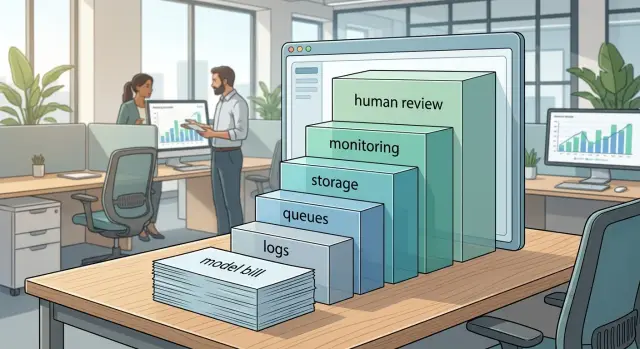
Table of Contents
Why the model bill is not the full bill
A single prompt can look cheap and still lose money. The model may cost a few cents, but that request often wakes up a queue, writes logs, stores files, runs safety checks, and sometimes sends work to a human reviewer.
That is why AI infrastructure costs matter as much as token prices. Teams often celebrate a lower model bill, then wonder why margins stay thin. The missing spend sits around the model, not inside it.
A simple customer request can touch several paid systems in one pass. The app sends the prompt to the model, a retrieval step pulls documents from storage, logs and traces record the flow, a retry job runs if something times out, and a reviewer checks the answer if confidence is low.
None of those steps looks dramatic on its own. At scale, they add up fast. Ten thousand requests a day can create a large volume of log data, queue traffic, object storage, and review tickets.
Storage and logging are easy to ignore because they grow quietly. A team may keep every prompt, every response, every attachment, and every trace. Months later, the cloud bill tells the real story.
Where the extra costs come from
Most teams notice the model bill first because it is easy to count. The harder part is everything around it. AI infrastructure costs grow in the layers that make the system usable, debuggable, and safe enough to ship.
Start with logs. When a prompt fails, returns junk, or produces a risky answer, the team needs to see what happened. That means storing prompts, model settings, outputs, timestamps, user IDs, and often a trace of each step. A few thousand requests a day can turn into a large pile of text data, especially when responses are long or agents call several tools in one run.
Queues add another bill. Many AI tasks do not finish in one quick request. Teams push jobs into a queue for retries, background work, file processing, and rate limit control. That queue may look cheap at first, but retries, duplicate jobs, and stuck workers waste money. When one failed task runs three more times, the model cost is only part of the loss.
Storage keeps growing too. Users upload files. The app stores embeddings for search. It saves generated drafts, summaries, screenshots, and version history so people can compare outputs later. None of that is unusual. It is normal product behavior. But once customers expect history and search, storage stops being optional.
Monitoring is another quiet cost. If the app makes money, the team needs alerts before users report that something broke. Metrics, dashboards, error tracking, uptime checks, and audit trails all have a price. You can lower that bill with a lean stack or self-hosted tools, but you cannot skip it and still run a dependable product.
Human review changes the math again. If a support reply, medical summary, contract draft, or code change needs approval, you now pay for review software and the reviewer's time. Even a quick 30-second check can erase the margin on a cheap model call.
Costs usually rise when a product needs longer log retention, more retries for flaky jobs, search over uploaded files and past results, or manual approval before users see the answer.
That is why model pricing vs infrastructure is the wrong debate for most teams. They are tied together. A cheap model inside an expensive workflow can still lose money on every task.
Follow one request from start to finish
A single user request looks cheap when you count only one model call. Real cost starts earlier and keeps going after the answer appears on screen.
Imagine a customer asks your product, "Summarize this support thread and suggest a reply." The app receives the text, checks the user's plan, loads the right prompt, and often pulls extra context from a database. Before the model sees anything, your servers already spend CPU time, memory, and network traffic.
Then the app calls the model API. This is the line item most teams watch, and it matters. But the app may retry if the first call times out, trim the prompt if it breaks token limits, or send a second call to format the answer. One user action can turn into two or three paid requests without anyone noticing.
When the result comes back, the work is not done. Most products save the prompt, answer, user ID, timing, and status for history, billing, and support. If you keep attachments, screenshots, or source documents, storage grows faster than token spend in many products. Logs pile up too when every request writes debug data, latency metrics, and error traces.
Background jobs add another layer. A queue may store tasks to index the conversation, send a notification, run moderation, create embeddings, or trigger a review step for risky answers. Queues are cheap per item, but they touch workers, databases, and more logs. That quiet background flow is a big reason model pricing vs infrastructure is the wrong fight. You pay for both.
Monitoring keeps the service usable, and it has its own bill. Teams record failures, slow responses, retry storms, and traffic spikes so they can fix problems before users complain. If one bad deploy causes a flood of errors, your observability stack can jump in cost on the same day your app gets slower.
Review tooling matters too. If your team reads sampled outputs, labels mistakes, or runs automated checks before sending replies in sensitive cases, that process needs storage, worker time, and sometimes another model call.
One request can touch the app server, the model API, the database, object storage, queue workers, logs, alerts, and review checks. That is why AI infrastructure costs often decide margins before model prices do.
If you trace one request from start to finish, weak spots show up fast. Maybe retries waste money. Maybe stored history grows without limits. Maybe background jobs run for every task when only a small share needs them. Those details decide whether a feature stays cheap or turns into a slow leak.
A simple margin example
A support assistant handles 20,000 chats a month. On paper, the model bill looks harmless. If each chat costs about $0.01 in tokens, the monthly model cost is only $200.
That number makes the product look healthy. If 100 customers each pay $15 a month, revenue is $1,500. A quick glance says there is plenty of room left.
The trouble starts when you count the rest of the path each chat takes.
A typical chat creates more than one cost: logs for prompts, responses, and errors; storage for chat history, attachments, and audit records; queue jobs for follow-up tasks and retries; and review work when a human checks risky or low-confidence replies.
Now put simple numbers on that flow. Logs and storage add $180 a month. Retries, queue workers, and background jobs add another $120. That brings the running total to $500 when you combine them with the $200 model bill.
Then the team adds a light review layer. A small review team checks only 5% of chats, but people still cost money. One part-time reviewer and the review tool together add $700 a month.
Now the real monthly cost is $1,200, not $200. Spread across 20,000 chats, that is $0.06 per chat.
At first, that still seems fine against $1,500 in revenue. But the margin is now only $300, and it can disappear fast. If the average customer sends a few more messages than expected, or if retries spike during a bad release, the cost per chat jumps before anyone notices.
A small change can flip the business. If average chat length grows and the model cost rises from $0.01 to $0.015, the monthly model bill moves from $200 to $300. Total cost becomes $1,300. Margin drops to $200.
If support asks reviewers to check 10% of chats instead of 5%, the product can slide into a loss without any dramatic outage or visible failure. The team may think usage is growing and customers are active while the unit economics quietly get worse.
That is why AI infrastructure costs matter as much as model pricing. Cheap tokens do not save a product if logs pile up, retries stay high, and humans spend too much time reviewing output.
How to measure your real cost per task
Start with one workflow that has a clear beginning and end. Do not measure the whole product at once. Pick something small and repeatable, like "generate a reply draft for a support ticket" or "review one invoice and send it for approval." That gives you a real unit to price.
Then write down every service that touches that unit. Most teams count the model call and stop there. That misses the parts that often decide AI margins.
A simple worksheet should include the model call, the app server or worker that prepares the request, queues and retries, logs and file storage, and any human review step.
Be strict here. If one failed task creates three retries, those retries are part of the cost. If your team stores prompt and response data for debugging, that storage is part of the cost too. If reviewers spend 20 seconds checking bad outputs, that labor belongs in the same line item.
Average traffic can hide the problem. Count normal volume, then count peak traffic and failure spikes. A workflow that looks cheap at 1,000 tasks a day can get expensive fast when a queue backs up, workers scale out, and every timeout creates another round of logs. Teams that use tools like Sentry, Grafana, background workers, and object storage often find that support tooling grows faster than expected when traffic gets messy.
Retention rules matter more than most people think. Decide how long you keep full logs, uploaded files, screenshots, and model outputs. You may need detailed debugging data for only 7 or 14 days, then keep small metadata records after that. If you keep everything forever, your storage bill keeps growing even when task volume stays flat.
Now turn all of that into one number. Add the monthly cost for every tool in the workflow, including review time, and divide by the number of completed tasks. That gives you the real cost per task, not just the token cost.
A quick example makes this concrete. Say one task brings in $0.80 in revenue. The model costs $0.18, compute and queues add $0.07, logs and storage add $0.09, and human review adds $0.21. Your real cost is $0.55 per task. That may still work. But if retries push the average to $0.68, your margin gets thin very quickly.
This is where AI infrastructure costs stop being abstract. If the full workflow cost is too close to revenue, you do not have a model pricing problem alone. You have an operating model problem.
Mistakes that drain margin
The fastest way to lose money on an AI product is to focus on model pricing and ignore the small operating choices around it. AI infrastructure costs often grow through routine habits: a few extra writes, a few extra retries, one more review step, one more tool subscription.
One common leak is keeping every log forever. Full prompts, responses, traces, screenshots, and debug events feel harmless when traffic is low. After a few months, storage bills rise, search gets slower, and engineers waste time digging through noise. Keep the logs you need for support, billing, audits, and debugging. Drop the rest, or expire it on a schedule.
Queues cause another quiet problem. Teams often send tiny jobs into a queue even when the job could finish right away in the request flow. That adds queue writes, reads, workers, retries, and more logs around each step. A queue makes sense for slow or bursty work. It is a bad habit for a two-second task that runs once and rarely fails.
Saving the same payload in several places is another classic mistake. A team stores the request in the app database, the queue, object storage, analytics, and a support tool. Now one user action creates five storage events instead of one. It also creates five places to clean up later. Pick a source of truth and save references where you can.
Manual review is expensive when the risk is low. If staff members check routine summaries, tag suggestions, or low-impact drafts by hand, labor cost can pass model cost very quickly. Review the output that can cause real damage. Let the rest pass through simple rules, spot checks, or score thresholds.
Failed calls and silent reruns drain margin faster than most teams expect. If the model times out, the app retries, the worker retries, and the user clicks again, one task can turn into three or four paid attempts. Track failure reasons. Put limits on retries. Make duplicate detection boring and strict.
Tool sprawl makes all of this worse. Teams add a prompt tool, an eval tool, a tracing tool, a review tool, and then another review tool before anyone fully uses the first set. Each tool adds seats, setup time, exports, and one more place where data gets copied.
A simple rule helps: if a new step does not cut errors, save time, or reduce support load in a clear way, remove it. That is how teams protect AI margins before scale turns a small leak into a monthly problem.
A quick check before launch
Before launch, run the service like a small business, not a demo. AI infrastructure costs usually look fine at low traffic, then margins slip when retries pile up, logs keep growing, and people review far more work than they need to.
Start with one number: cost per successful task. Not per API call, not per session, and not per request that started. If 100 tasks begin, 82 finish correctly, and you spent $82 across models, queues, storage, review time, and monitoring, your cost is $1 per successful task.
Before you launch, answer five plain questions:
- Can you calculate the full cost of one finished task, including failed attempts and human review time?
- Do you know how long logs, screenshots, prompts, outputs, and audit records stay in storage before deletion or archiving?
- Do retries stop after a fixed limit, and do queues have a hard ceiling so backlog does not grow for hours without anyone noticing?
- Do humans review only the cases with real risk, such as low-confidence outputs, payment steps, legal text, or customer-facing changes?
- Can you name any tools, dashboards, or agents that nobody opens in practice, yet still create events, store data, or trigger jobs?
The first question often exposes the biggest mistake. Teams count model spend and forget the work around it. A task that needs two retries, one database write, one queue handoff, long-term logs, and a five-minute manual check can cost far more than the model call.
Log retention is a quiet budget leak. Debug logs feel cheap until they include full prompts, outputs, attachments, and trace data for every run. Keep what you need for support, billing, and safety. Drop the rest fast. If you need longer retention, move old data to cheaper storage and make that rule automatic.
Retry limits matter just as much. If an upstream service slows down, uncapped retries can flood your queue, repeat model calls, and create duplicate review work. Set a small retry budget, add backoff, and decide when the system should fail fast.
Human review needs the same discipline. Review the risky edge cases, not every output. That sort of rule-based review is often where teams find easy savings without lowering quality.
Last, clean out tools nobody uses. Old observability add-ons, extra review panels, and duplicate alerting stacks keep billing even when the team stopped looking at them months ago. If a tool does not change a decision, remove it before launch.
Next steps if the numbers do not work
When AI infrastructure costs wreck your margin, do not start by shrinking the product. Start by cutting the parts users never notice. In many teams, the first fix is not the model at all. It is log retention, duplicate storage, idle workers, and tools nobody opens anymore.
Short retention windows are often the cleanest win. If you keep every raw prompt, every response, every trace, and every screenshot for months, your storage bill will grow long after model prices drop. Keep what you need for support, safety, and billing disputes. Archive less, delete sooner, and store summaries instead of full payloads when you can.
Batch work that does not need an instant answer. Reports, embedding refreshes, document reprocessing, and low-priority evaluations cost less when you run them in larger jobs at quiet times. Users usually care about response speed in the main task, not in the cleanup work that happens later.
Start with cuts that hurt least
A few changes usually move the numbers quickly:
- Reduce retention for verbose logs, traces, and temporary files.
- Combine background jobs into batches when a delay of a few minutes is fine.
- Remove duplicate backups, mirrored buckets, and old vector stores nobody queries.
- Cancel review and observability tools that overlap but do not change decisions.
Be strict about duplicate storage. Teams often save the same content in the app database, object storage, analytics tools, support tools, and a review system. That feels safe at first. It gets expensive fast. If one copy handles the real business need, the rest should justify their cost.
Unused tools deserve the same treatment. A review platform that helped during launch may stop earning its place once workflows settle down. The same goes for extra dashboards, queue monitors, or test environments that run all week for a task you check once a month.
Put cost review on a weekly rhythm
Track cost per workflow every week, not just total spend. A total cloud bill hides the problem. A workflow view shows that one support flow costs 8 cents, another costs 42 cents, and one internal review loop burns money without helping quality.
Use a small scorecard for each workflow: model cost, queue cost, storage cost, human review time, and error rate. If the workflow still loses money after simple fixes, change the workflow itself. Maybe it needs fewer steps, a shorter prompt, or less human review.
If your team needs an outside view, Oleg Sotnikov at oleg.is works with startups and smaller businesses as a Fractional CTO and advisor on AI-first development, infrastructure, and automation. That kind of practical review helps when the bill looks messy and the team cannot tell which part is actually hurting margin.
Do the cheap fixes first, measure again in a week, and keep only the parts that earn their place.
Frequently Asked Questions
Why is token price not enough to judge an AI feature?
Because the model bill covers only one part of the workflow. A single request can also trigger retrieval, logs, storage, queue jobs, retries, monitoring, and sometimes a human review. If you price only tokens, you can miss the real cost per finished task and think your margin is better than it is.
What hidden costs usually appear first?
Logs and storage usually creep up first because teams save everything by default. Queues and retries follow close behind, especially when jobs fail or time out. If people review even a small share of outputs, labor can overtake model spend fast.
How do logs and storage get expensive so fast?
They grow quietly with every request. If you store full prompts, outputs, traces, attachments, and screenshots, you create a large pile of data even when traffic looks modest. Months later, the storage bill rises while the model bill may stay flat.
When do queues and retries start hurting margin?
Retries hurt when one user action turns into several paid attempts. A timeout can trigger an app retry, a worker retry, and another click from the user. That chain raises model spend, queue traffic, worker time, and log volume all at once.
Does human review always make AI features unprofitable?
No, but it needs tight rules. Review the outputs that can cause real harm or low confidence, and let routine work pass through simple checks or spot reviews. If people review low-risk drafts by hand, margin disappears quickly.
What should I measure to find my real cost per task?
Start with one workflow that has a clear start and finish, then count every service that touches it. Include model calls, compute, queues, retries, logs, storage, monitoring, and review time. Divide the full monthly cost by completed tasks, not started requests.
How long should I keep prompts, outputs, and logs?
Keep full debugging data only as long as your team actually uses it. Many teams need detailed logs for 7 to 14 days, then smaller metadata after that. If you keep raw prompts, outputs, and attachments forever, storage keeps growing without helping support or debugging.
Should I put every AI task into a queue?
No. Use a queue for slow, bursty, or retry-prone work, not for every tiny step. If a task finishes in the normal request path and rarely fails, a queue can add extra writes, worker load, retries, and noise for no real gain.
What should I cut before I change models?
Cut the parts users never notice first. Shorten retention, remove duplicate storage, cap retries, batch background work, and cancel tools nobody uses. Those changes often save more money than a model swap and cause less product risk.
What is the best quick cost check before launch?
Check cost per successful task before launch. Make sure you can name the full cost of one finished workflow, set hard retry limits, define retention rules, and limit manual review to risky cases. If you cannot explain those numbers in plain terms, launch will hide a margin problem instead of fixing it.


