AI generated SQL safety: read-only roles and review
AI generated SQL safety starts with simple guardrails: read-only roles, row limits, review steps, and clear approval rules before execution.
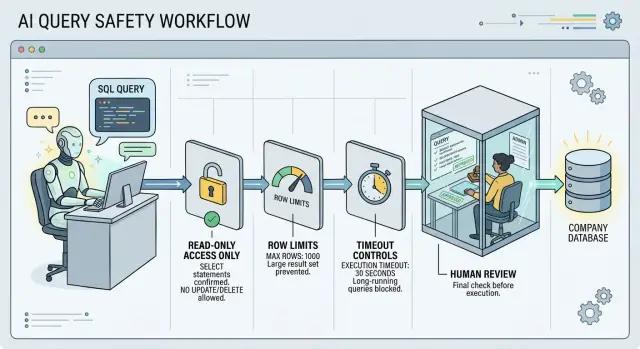
Table of Contents
Why AI-written SQL needs guardrails
A model can write SQL that looks clean and still cause real trouble. It predicts the next likely query. It does not feel the cost of a full table scan, know which tables contain sensitive data, or notice that production is already under heavy load.
That gap is where problems begin. A prompt like "show me customer orders from last month" can turn into a query that reads every order ever placed because the date filter is wrong or missing. The result can still look believable, which makes the mistake easy to miss.
Some failures are obvious. If a model writes DELETE FROM users without a WHERE clause, rows disappear fast. Others are quieter. A bad join can duplicate revenue numbers. A broad SELECT * on a huge table can slow the database for everyone else. A query that skips tenant filters can expose another customer's data.
Safe AI-written SQL is mostly a system design problem, not a trust problem. Careful people still approve risky queries when they look reasonable at first glance. Strong models still guess wrong when table names are similar, business rules live outside the schema, or old examples in the prompt point them the wrong way.
Guardrails catch those weak spots before damage happens. Read-only roles block writes. Query limits stop runaway reads. A review step gives one clear moment to ask, "Does this query touch the right tables, with the right filters, for the right reason?"
That is much cheaper than cleaning up after a mistake. You do not need to assume the model is reckless. You only need to assume it can be wrong in small ways, and small SQL mistakes can become data problems very quickly.
What one bad query can do
A bad query does not need to look dangerous to cause trouble. It can look tidy, even sensible, and still hit the wrong table, scan too much data, or lock up a busy database.
Models guess. Sometimes they guess table names from common patterns like users, orders, or transactions, even when your schema uses different names. If the model points at the wrong table, the result may be empty, confusing, or worse, it may expose data the person never meant to touch.
Missing filters are another common problem. One forgotten WHERE clause can turn a small report into a full-table read across months or years of records. A person might ask for "last week's failed payments" and get every payment ever stored. That stops being a small mistake when the table includes customer details, internal notes, or financial data.
Slow queries cause a different kind of damage. A large join or sort can force the database to work much harder than expected. Other users feel that immediately. Pages load slowly. Background jobs pile up. Reports start competing with normal product traffic.
Write access makes every error more expensive. A bad UPDATE can change thousands of rows in seconds. A bad DELETE can wipe data before anyone notices. Even with backups, recovery takes time, and the team still has to work out what changed.
The usual failure points are simple:
- guessed table or column names
- missing filters or date ranges
- joins that multiply rows by accident
- queries that read far more than needed
- any command that can change or remove data
A small example makes the risk clear. If someone asks for "inactive users from Europe" and the query skips both the date filter and the region filter, the tool may return the entire user table. Most teams only need to see that happen once.
Start with read-only access
Give the model its own database user. Never let it run under the same account your app, analyst, or admin uses. If that account can write data, drop tables, or change permissions, one bad prompt can turn a reporting task into an outage.
Read-only access is the first rule. The model should have permission to run SELECT queries and nothing else. Block INSERT, UPDATE, DELETE, TRUNCATE, ALTER, CREATE, and DROP. If your database allows it, block functions or extensions that can reach the file system or call outside services too.
Keep the scope narrow. Many teams expose the whole reporting database because it feels faster at the start. It is usually better to expose a small set of approved views that already hide extra columns, join common tables, and rename fields into plain language. For most teams, an allowlist like sales_summary_view, customer_orders_view, monthly_revenue_view, and support_ticket_counts_view is enough. That setup is boring on purpose. Boring is safer.
Sensitive tables should stay out of reach even if the model "probably" will not need them. That includes payroll, raw user records, password data, tokens, audit logs, internal notes, and any table with legal or medical data. If a person needs special approval to open a table, the model should not see it by default.
A simple test helps: if you want the model to answer "How many paid orders did we have last month?" it does not need direct access to the full users table or raw payment history. It only needs a clean reporting view with the fields required for that answer.
This setup also makes review easier. When the model can only read a few approved views, each query has fewer ways to go wrong.
Set hard limits before execution
A model should not decide on its own how much data to pull, how long a query can run, or whether a wide join is acceptable. Execution should be a gated process, not just the next step in a chat.
Start with a hard row cap. If the model asks for 500,000 rows, the database should still stop at the smaller number you set ahead of time. For many reporting tasks, 100 to 1,000 rows is enough to confirm that the query is correct. Huge result sets are expensive, slow to inspect, and easy to misuse.
Time limits matter just as much. A query that runs for 30 seconds in production can block other work, burn resources, and make a harmless report look like an outage. Set a statement timeout at the database or session level so long queries die fast. A failed query is annoying. A stuck query is worse.
Some query shapes need extra restrictions. Full table scans on large tables should fail when an index should be used. Very wide joins should be limited. Cross-database or cross-schema access should need approval. SELECT * should be rejected on wide tables, especially when they include sensitive columns.
A sample-first approval flow works well. First, the model returns the SQL and a small sample, maybe 20 rows. A person checks whether the columns, filters, and joins make sense. Only after that should the system allow a larger run, and even then under a second limit with a tighter timeout.
That pattern catches a lot of bad SQL early. If the model joins customers to orders without the right condition, duplicated rows will show up in the sample before they turn into a giant export. The same goes for missing WHERE clauses, accidental scans, and reports that pull far more data than anyone asked for.
These controls are simple. That is why they work.
Add review checkpoints
A person should approve every new query before any tool runs it against production data. That sounds slow, but it usually adds a minute or two and can save hours of cleanup.
The review step should show the exact SQL, not a summary. Reviewers need to see what the model plans to run, which tables it will touch, and how many rows it may return. If your stack can show an estimated row count before execution, use it. A query that should return 50 rows but may scan 8 million needs a second look.
The model should also explain the query in plain language. One short sentence is enough: "Count active customers who placed an order in the last 30 days." That sentence helps reviewers catch mismatches fast. If the SQL says one thing and the explanation says another, stop there.
A good approval screen or ticket should include the full SQL text, the tables and views involved, the estimated row count or scan size, the reason for the query in plain language, and the name of the approver with a timestamp. That last part matters more than teams expect. When you log who approved a query and when, people pay closer attention, and audits get much easier.
Keep the rule simple. Low-risk queries can go through one reviewer. Unusual queries, such as large joins, access to finance data, or repeated retries, should need a second person.
A small team can do this without much process. One analyst asks for a report, the model drafts the SQL, and a teammate checks it in a queue before execution. That one checkpoint catches a surprising number of mistakes.
Build the flow step by step
A safe flow starts before the model writes any SQL. Give it the user's request in plain language first, such as "show paid invoices from last month by customer." A clear request reduces guessing.
Next, let the model write SQL only against a safe schema map. This map is a small approved view of the database: allowed tables, allowed columns, and the joins that make sense. If the model can only see customers, invoices, and a few reporting fields, it has much less room to produce a risky query.
A practical flow looks like this:
- The app sends the plain request and the safe schema map to the model.
- The model returns draft SQL and a short plain-English explanation of what it thinks the query does.
- Automated checks scan the SQL for write commands, missing date or row filters, and signs of very large scans.
- A reviewer approves or rejects the draft, and the system runs only approved queries.
- The app stores the SQL, result size, approval status, and final outcome in a log.
Keep the automated checks strict. Block anything with INSERT, UPDATE, DELETE, ALTER, or DROP. Flag queries that touch full tables without a limit or join too many large tables at once. Simple rules beat clever ones here.
Human review matters most when the query is new, broad, or expensive. A reviewer can catch simple mistakes quickly: the wrong date field, a missing tenant filter, or a count that should have been grouped. For routine reports, teams often move to sampled review instead of checking every single query.
Keep a record of what happens after execution. Save the query text, how many rows it returned, how long it ran, and whether it passed review. After a few weeks, the logs usually reveal the same weak spots again and again. That gives you a clear place to tighten the flow.
A simple reporting example
A support manager wants last week's refund totals by country. It sounds simple, which makes it a good test case. The model can help write the draft, but it should not get free access to the database.
In a safer setup, the model can query only approved reporting views. So instead of touching the live orders table, it writes a SELECT against a reporting view that already exposes the fields needed for refunds.
SELECT
  country,
  SUM(refund_amount) AS total_refunds
FROM reporting.refunds_by_order
GROUP BY country
ORDER BY total_refunds DESC
LIMIT 50;
The draft is close, but it misses a detail that matters: the date filter. If you run this query as written, you get all refund totals, not just last week's. This is where the execution layer proves its worth.
Before anything runs, the system caps the result size, sets a short timeout, and checks the query against the request. It sees that the prompt asked for last week, but the SQL has no date range. The query stops there and moves to review.
A reviewer compares the request and the draft, then fixes the query.
SELECT
  country,
  SUM(refund_amount) AS total_refunds
FROM reporting.refunds_by_order
WHERE refund_date >= CURRENT_DATE - INTERVAL '7 days'
  AND refund_date < CURRENT_DATE
GROUP BY country
ORDER BY total_refunds DESC
LIMIT 50;
Now the query matches the question. The reviewer approves it, runs it with a read-only role, and saves it as a reusable report for the support team.
That is what this looks like in practice. The model handles the repetitive part quickly. The limits catch the obvious miss. A person makes the final call.
Mistakes teams make early
Most teams do not start with a disaster. They start with one shortcut that feels harmless. A model answers a few simple reporting questions, everyone relaxes, and the basic controls never get added.
The first bad habit is access. Teams often hand the model the same database credentials a developer already uses. That feels fast, but it gives the model far more reach than it needs. If one prompt goes wrong, the damage can spread much further than expected.
The same early mistakes show up again and again. Teams use a normal dev or admin login instead of a read-only account with a narrow scope. Early test queries return small result sets, so nobody adds row limits or timeouts. People point the model at production first because the real data is there and the test copy looks stale. Review happens after execution, when someone checks the chart or table, not the SQL that produced it. Approved queries end up buried in chat logs, screenshots, or memory, so later nobody can answer who ran what and why.
Skipping SQL review is more common than teams admit. People look at the final numbers, see that they look reasonable, and move on. But a query can still scan too much data, join the wrong tables, or expose columns nobody meant to touch. Looking only at the result is like checking a finished cake without asking what went into it.
The production-first habit is especially risky. A copied database gives you room to find bad joins, slow scans, and edge cases before real users feel them. Even a partial copy is better than learning in production.
Audit trails matter too. When a team keeps the approved SQL, the prompt, the reviewer name, and the execution time, small problems stay small.
Quick checks before go-live
A safe setup should fail closed. If the model asks for too much data, touches the wrong table, or writes a new query shape, the system should stop and ask for help instead of guessing.
A short pre-launch checklist beats a long policy document:
- Create a separate read-only role just for AI queries.
- Set hard caps on rows returned, query runtime, and table access.
- Require a human to approve any new query or meaningful change.
- Log the full chain: prompt, generated SQL, approval decision, execution time, and result size.
- Test the whole flow on non-production data first, including bad prompts and edge cases.
Each item blocks a different kind of failure. A read-only role stops writes. Table limits keep the model away from payroll or customer secrets. Runtime and row caps stop the classic SELECT * problem from turning into a slowdown.
Human approval matters most when the model does something new. If a query template already passed review and only the date range changes, you can often automate that safely. If the model adds joins, touches a new table, or widens filters in a way that increases access, a person should inspect it first.
Logging is not just for audits. It helps you spot patterns quickly. If one prompt keeps producing oversized queries, you can fix the prompt, narrow the schema the model sees, or block that path entirely.
Test the whole flow on non-production data, not just the SQL. Try vague requests, messy wording, and oversized reports. If the guardrails hold up there, you are much closer to a setup you can trust.
What to do next
Pick one low-risk reporting job and keep it small. A weekly revenue summary, a support volume report, or a count of new signups is enough to test the process without putting real operations at risk. If the model fails, you lose a report, not customer data.
Write the approval rule before you expand access. Teams often skip this, then argue later about which queries need review. Put it in plain language: which prompts can run on their own, which SQL patterns always need review, who approves exceptions, and what gets blocked every time.
A gradual rollout works better than a big launch. Start with one read-only role that can see only the tables needed for that report. Add hard limits on rows, runtime, and result size before any query runs. Send unusual queries to a person for approval, even if they look harmless. Then review the logs after the first week and tighten the weak spots you find.
That log review matters more than many teams expect. Look for queries that ran too long, touched more tables than planned, returned messy results, or got rejected for the same reason more than once. Those patterns tell you where the prompt, permissions, or limits still leave too much room.
If the first use case stays stable for a week or two, add one more report and keep the same rules. Do not widen database access just because the model did well on easy tasks.
If you want an outside review, Oleg Sotnikov at oleg.is works with startups and small teams on practical AI adoption, infrastructure, and Fractional CTO support. A short review of roles, limits, and approval steps can help you tighten the process without slowing reporting to a crawl.
Frequently Asked Questions
What are the minimum guardrails for AI-written SQL?
Start with a separate read-only database role that can run SELECT and nothing else. Then add hard caps on rows and runtime, show every new query to a human reviewer, and log what ran and why.
Why should the model use a read-only role?
Because one wrong prompt or one small SQL mistake can change or erase data fast. A read-only role turns a bad query into a failed report instead of an outage.
Is a sample result enough to make AI SQL safe?
No. A sample tells you whether the shape looks right, but it does not replace limits. Keep row caps, short timeouts, and review in place even for sample runs.
How do I stop the model from touching the wrong tables?
Use approved reporting views instead of raw tables. Give the model a small schema map with only the tables, columns, and joins you want it to use.
How many rows should I let an AI query return?
Set a hard row cap in the database or execution layer before the query runs. For most reporting tasks, a small result set is enough to check accuracy before you allow anything larger.
What should I do about slow or expensive queries?
Set a short statement timeout so long queries die fast. That protects the database when the model writes a wide join, misses a filter, or scans far more data than you expected.
Do I really need human review every time?
Yes, for every new query and for any query that changes shape in a meaningful way. Once a report template proves stable, you can automate small input changes like a date range and keep review for anything broader.
Should I test AI SQL on production or a copy first?
Start on non-production data. A copy of production, even a partial one, gives you room to catch bad joins, missing tenant filters, and slow scans before real users feel the impact.
What should I log for AI-generated SQL?
Store the original prompt, generated SQL, approver name, execution time, result size, and outcome. Those records help you spot repeat mistakes and answer who ran what later.
When should I bring in outside help for setup or review?
Pick one low-risk report, lock it behind a read-only role, and keep the schema narrow. If you want a second set of eyes, Oleg Sotnikov can review your roles, limits, and approval flow and help you tighten weak spots without making reporting painful.


