AI-first company roles: how reviewers, operators, experts change
AI-first company roles change when systems draft, sort, and route work. Learn how reviewers, operators, and experts shift their daily tasks.
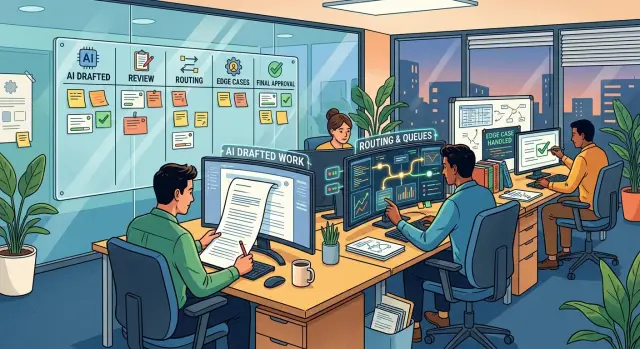
Table of Contents
Why these roles change first
The first jobs to change in an AI-first company are the ones closest to incoming work. When a request arrives, AI can read it, draft a reply, tag it, estimate priority, and send it to the right queue in seconds. A lot of routine effort disappears before a person even opens the task.
That changes the work of reviewers, operators, and subject experts first. They used to spend much of their time writing first drafts, cleaning up inputs, and moving work from one step to the next. Once software handles the first pass, speed matters less than judgment.
Take a simple support case. A customer asks for a refund, mentions a billing bug, and sounds angry. AI can summarize the issue, pull account history, suggest a response, and route the case to billing or engineering. The human no longer starts from scratch. The human checks whether the draft is safe, whether the route makes sense, and whether the case breaks the usual pattern.
This shift happens quickly for a few plain reasons. Routine tasks usually follow patterns, and AI is good at pattern-heavy work. Sorting work early stops small delays from turning into backlogs. Drafting is cheap for machines, but bad judgment is still expensive. Teams also learn faster when people spend time correcting exceptions instead of rewriting the obvious.
That is why these roles move first. The center of the job shifts from "make the first version" to "decide if the first version is right." People still matter just as much, but in a different spot. They approve, reject, escalate, tune instructions, and give the system better examples. Over time, the people who do best in these roles are usually the ones with calm judgment, good taste, and enough context to spot the odd case early.
What reviewers do now
When AI writes the first draft, reviewers stop acting like backup authors. Their job is to decide, quickly, whether an output is usable, risky, or not worth saving.
That change matters because constant rewriting hides the real problem. If a reviewer quietly fixes weak drafts all day, the team never learns where the prompt, rules, or routing failed.
Good reviewers check facts first, then fit. Did the answer use the right policy, the right context, and the right level of confidence for this case? A short review often comes down to four questions: is it correct, is anything missing that changes the decision, does it break a rule or create risk, and should it go through, get revised, or get thrown away?
The best reviewers reject bad output early. They do not spend ten minutes polishing something the AI got wrong in the first sentence. A fast rejection with one plain reason is better: wrong customer context, unsupported claim, missing approval, unsafe instruction.
Those reasons should stay short and specific. "Missing account history" or "policy conflict" helps far more than "needs work." Clear labels make it easier to improve prompts, add checks, and route edge cases to a person sooner.
Reviewers also catch the mistakes that sound smooth. AI can write a polished answer that still skips the one detail that matters. A human notices the refund that breaks policy, the summary that leaves out a legal note, or the email draft that answers the wrong question.
In a lean setup, that judgment is where people earn their time. This is also the pattern Oleg Sotnikov often points to in small AI teams: humans keep control by reviewing for risk and rules, not by rewriting every line.
Useful review notes stay concrete. "Wrong" does not tell anyone what to fix. "Used the old pricing plan" does.
After a week or two, patterns start to show. Strong reviewers turn those patterns into better examples, tighter rules, and simple test cases so the next batch starts closer to correct.
How operators run the flow
Operators spend less time doing the task itself and more time keeping work moving. They watch queues, routing rules, and the moments when a person needs to step in. If they miss a problem for half a day, small errors turn into a backlog.
Their day often starts with a quick scan of volume and failures. Did intake jump overnight? Did the model send too many cases to manual review? Did a missing field break a trigger, so urgent work landed in the wrong place? Operators catch these issues before reviewers get swamped.
Most of them watch the same signals every day: queue size by work type, failed triggers or missing data, handoffs that bounce between teams, and items stuck longer than the usual handling time.
Then they tune the flow. If the auto-approve threshold is too strict, people waste time on easy work. If it is too loose, bad decisions slip through and reviewers spend their day cleaning up avoidable mistakes. Operators adjust the threshold, watch the result for a few days, and change it again if needed.
Escalation rules need the same care. A support team might tell the system to send billing disputes, angry messages, or legal terms straight to a person. That sounds simple until the model starts flagging too much. A week later, the "urgent" queue is full of routine tickets. Operators fix that by tightening the rule, adding clearer labels, or creating a fallback path.
They also track friction. A flow can look fast on a dashboard and still annoy the team. Maybe agents wait 20 seconds for suggested replies. Maybe the system asks for the same approval twice. Maybe it routes a case correctly, then forces someone to copy the same notes into another tool. That is broken flow, not a small annoyance.
This role gets more important as the team gets leaner. One operator who understands queues, thresholds, and handoffs can save hours across the week. Without that person, the company does not get faster with AI. It just creates confusion at higher speed.
Where subject experts add more value
Subject experts help most when they stop spending the day on routine cases and start shaping the rules behind them. That shift happens early because the model can handle the common path, but it still misses the odd cases that carry more risk.
Those cases are usually easy for a human to spot. A refund request with two overlapping discounts. A support message that sounds friendly but hints at legal trouble. An invoice that matches the amount but not the contract terms. The expert steps in, makes the call, and explains why.
That explanation should stay short. Long policy documents rarely help a model or a busy team. A few clear rules pulled from real examples usually work better. For example: if a customer changed plans within 24 hours, send the case to billing review. If identity details do not match, pause the case and ask for one specific proof. If a message mentions injury, threat, or a regulator, skip the drafted reply and route it to a person.
This is where expert time pays back quickly. One clear rule can stop the same mistake from showing up 50 times next week.
Experts also define what "good enough" means in real work. That standard is rarely written down well. An expert can say, "This draft is fine if the facts are right and the promise is small," or, "Any contract exception needs human approval, even if the draft looks correct." A model will not guess that on its own.
A short weekly review usually helps more than constant small fixes. The expert can scan flagged cases, group the misses, remove rules that no longer fit, and add one or two fresh examples. After a month, teams usually see fewer repeats and cleaner handoffs.
Many teams waste subject experts by asking them to clean up every output one by one. That gets expensive fast. Ask them to handle edge cases, write simple rules, and reset the quality line when it starts to drift. A small amount of expert time can improve the whole system.
A simple way to redesign the roles
Most teams make this harder than it needs to be. Pick one workflow and map what happens today in plain language. A support queue works well because the steps are easy to see: someone reads the request, decides where it goes, drafts a reply, checks it, and steps in when the case gets messy.
Write down who starts each task, who reviews it, and who routes it. Do not start with job titles. Start with actions. You want a simple list of work, not an org chart.
Then check which parts AI can handle right now with acceptable risk. In many teams, AI can draft replies, sort incoming items, tag urgency, and send routine cases to the right person. It usually should not make the final call on unusual cases, policy edge cases, or anything with legal or financial risk.
A clean split is often enough. One person owns quality and checks whether the output is correct. One person owns flow and keeps the queue moving. One subject expert handles exceptions, missing context, and hard judgment calls. AI drafts, sorts, and routes the routine work. Then the team tests that setup on one process for two weeks.
This is where the new roles become clear. The reviewer stops doing first-pass work all day. The operator stops acting like a human sorter. The subject expert spends less time on routine cases and more time on the few cases that actually need experience.
Keep a simple failure log during the test. If AI sends a case to the wrong place, drafts a weak answer, or misses an exception, write it down. After two weeks, do not try to fix everything. Fix the three problems that show up most often.
That small habit matters. A short error log gives you better role design than a long meeting does. It also shows whether the real problem is the prompt, the rule, the queue design, or the owner.
A realistic example from a support team
Picture a software company with four support agents and 500 tickets a week. Before AI, each agent read every message, tagged it, picked a template, and wrote a reply. Most of the day went to sorting and first drafts.
After the shift, the inbox works differently. AI reads each new ticket, tags it by topic, sets a rough priority, and drafts a reply. Simple cases move fast. A password reset or a basic billing question might need only a quick check.
The reviewer steps in where risk is real. One person checks refund requests, legal edge cases, and messages from angry customers before anything goes out. That reviewer is not there to polish commas. They look for bad promises, wrong policy calls, and replies that could make a tense situation worse.
The operator has a different job. They watch the flow instead of answering one ticket at a time. If the backlog starts to grow, if tickets sit too long, or if AI keeps tagging outage reports as billing issues, the operator reroutes work. They can pause auto-send, send a batch to the right queue, or raise a flag for the reviewer.
The subject expert usually joins when the same miss shows up more than once. Say the AI keeps treating a failed enterprise invoice as a normal payment issue. The expert reads those cases, rewrites the rules, adds better examples, and tightens the prompt so the next batch lands in the right place.
In a small team, the split is simple: AI drafts replies and tags incoming tickets, a reviewer approves sensitive cases, an operator watches queues and fixes stuck flows, and a subject expert updates rules after repeated errors.
Humans still make the final call when money, access, legal terms, or customer trust are on the line. That line matters. If a customer asks for a refund after a messy outage, AI can prepare the facts, but a human should decide what the company will actually do.
Mistakes teams make in the first month
The first month is where these role changes usually get messy. Teams see a strong demo, trust it too early, and remove review before they know where the output breaks. That can look fine on easy work and then fail on billing disputes, angry customers, or cases with policy risk.
Quality needs a baseline before anyone changes job scope. Teams should sample output, score it, and separate low-risk work from high-risk work. If they skip that step, reviewers stop catching real errors and start cleaning up avoidable messes.
Another common mistake is sending every small decision to subject experts. Managers worry about mistakes, so they ask experts to approve almost everything. Soon those experts spend their day clearing routine cases that a reviewer or operator could handle with a short rule.
Experts do better work when they shape rules, audit patterns, and step into unusual cases. They should not spend all day rubber-stamping password resets, basic refund questions, or simple account changes. Save their time for policy exceptions, money issues, legal wording, and edge cases.
Operators also struggle when nobody gives them clear escalation rules. "Use your judgment" sounds reasonable and falls apart the moment the queue gets busy. Operators need plain triggers that tell them when to stop the flow and hand the case off.
A small team should track more than speed. Watch correction rate, reopened cases, escalation volume, and customer complaints after AI-assisted handling.
Speed is the easiest number to celebrate, and it can fool people fast. If reply time drops from 12 minutes to 3 but follow-up tickets double, the system got worse.
Teams also change too many workflows at once. They update support replies, internal routing, expert approvals, and reports in the same week. Then nobody knows which prompt, rule, or handoff caused the problem. Pick one queue, keep review in place, and run it long enough to see a pattern. Two calm weeks teach more than one loud launch day.
Quick checks before you change job scopes
When teams change these roles, trouble usually starts with blurry ownership. The model drafts the work, but nobody knows who must judge it, who must move it, and who should step in only when the case gets hard.
A small check now can save weeks of confusion later. If one answer is "no," fix that before you rename jobs or rewrite titles.
Reviewers should be able to explain an approval or rejection in one or two plain sentences. If they cannot, they are rubber-stamping and bad work will slip through.
Each queue needs one operator who owns the flow. Shared ownership sounds fair, but it often means nobody notices stuck items, odd routing, or repeated failures until the backlog grows.
Subject experts should see the cases that need judgment, not every routine case. If experts still read everything, the new setup is just the old process with extra software on top.
The team should trace mistakes to a clear source, such as a prompt, a routing rule, or a bad handoff between people and software. If errors stay vague, fixes turn into guesswork and the same problem comes back.
Managers also need to remove old duties when they add new review or operator work. If people keep the old approvals, old reports, and old manual checks, they end up doing two jobs badly instead of one job well.
A support team makes this easy to picture. If AI drafts replies and sorts tickets, the reviewer should check tone, facts, and risk. One operator should own the inbox rules and watch for stuck tickets. A product or policy expert should only see edge cases, such as billing disputes or unclear refund terms.
Many teams trip here in the first month. They add AI tasks, keep every old step, and call it a redesign. A real redesign is smaller and stricter: clear reviewer logic, one owner per queue, experts on exceptions, and a clean trail back to the source of each error.
Next steps for a smaller, safer rollout
Do not start with the messiest workflow. Pick one process that already follows clear rules and has a clear finish line. A support triage queue, basic invoice checks, or simple refund requests are better starting points than work that depends on judgment at every step.
That matters because role changes happen fastest in routine work. If the rules are stable, reviewers can focus on exceptions, operators can watch flow and failures, and subject experts can step in only when the case truly needs them.
Before you switch on automation, write down approval limits. Be plain about what the system can do on its own, what it can draft but not send, and what must stop for human review. Most teams skip this part, then argue about edge cases in production.
A short rollout sheet is usually enough. List the actions AI can take without approval, the actions that always need a reviewer, the cases that must go straight to a subject expert, and who pauses the workflow if error rates climb.
For the first month, check error patterns every week. Do not just count failures. Look for repeats. Maybe AI sends low-risk cases to senior staff, misses a policy exception, or drafts replies that sound right but miss one fact from the ticket. Those repeated small errors are the ones that quietly drain time.
Keep the scope tight until the new reviewer and operator work feels steady. Reviewers should spend less time fixing routine output. Operators should know where work gets stuck and why. If people still rely on side messages, manual spreadsheets, or memory, the rollout is still too loose.
Expand one step at a time. Add a second queue, a new approval band, or a new draft type. Do not add all three in the same week.
If you want a second opinion before scaling, Oleg Sotnikov at oleg.is works with startups and smaller teams on practical AI adoption, infrastructure, and Fractional CTO support. Sometimes an outside review is enough to spot weak approval lines, missing handoffs, and monitoring gaps before they turn into expensive habits.


