AI exception path: show where people step in and why
Most teams map the smooth flow and miss the hard part. Learn how an AI exception path shows failures, handoffs, reviews, and human decisions.
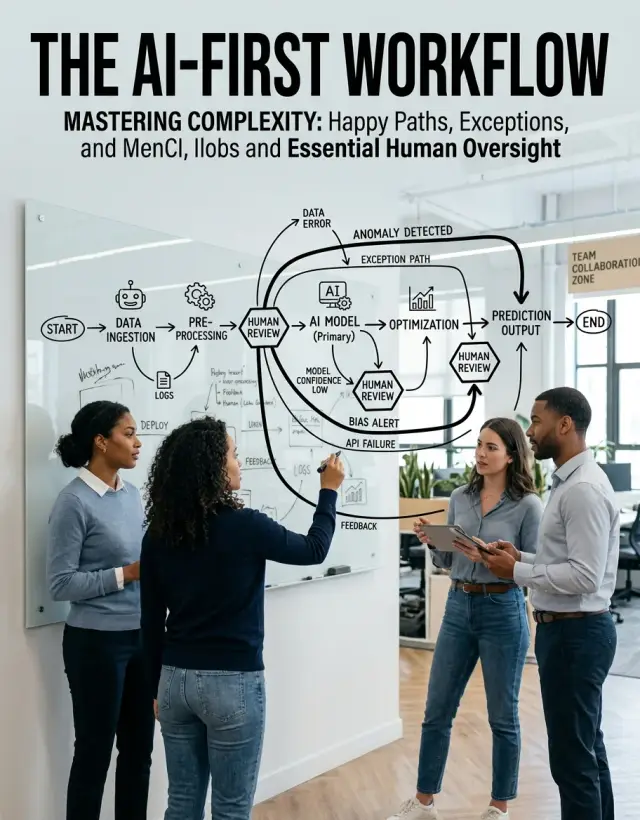
Table of Contents
Why most team diagrams fail
Most teams map the version of work they want to believe exists. The diagram starts with clean input, moves through tidy boxes, and ends with a finished result. That looks fine in a slide deck. It breaks the first time AI gets a strange file, missing data, or a request that doesn't fit the pattern.
The problem is simple: people usually draw the demo flow. They map the path that works when the prompt is clear, the source data is complete, and every handoff behaves. Real work doesn't stay that neat for long.
An AI-first team process usually breaks in the messy middle. A customer sends the wrong format. A model gives a low-confidence answer. Two systems disagree. A field is blank, or worse, filled with something that looks right but isn't. The work doesn't stop. It just leaves the diagram.
Then the team patches the gap in whatever way feels fastest. Someone drops context into chat. Someone else jumps on a call. A manager fills in missing details from memory. An operator edits the output by hand and moves on. The team gets through the problem, but the process map starts telling a false story.
That false story causes more damage than most teams expect. When the same issue shows up again, nobody knows who owns it, how long they should spend on it, or when they should escalate it. On paper, the AI looked like the owner. In practice, a person became the owner, but the system never admitted it.
A support queue makes this obvious. Imagine an AI that reviews incoming tickets and routes them to the right team. The diagram says: ticket arrives, AI classifies it, support gets the result. In real life, some tickets come in with vague text, screenshots with no context, or a mix of billing and product issues. Support staff step in through chat, rewrite the summary, and reroute the case by hand. If that human step stays invisible, leaders think the system runs more smoothly than it does, and the hidden cost keeps growing.
That's why the AI exception path matters more than the happy path. The smooth flow shows what the team hopes will happen. The exception path shows how work survives when the AI gets stuck. That's the version people need if they want clear ownership, faster fixes, and fewer surprises during the day.
What an exception path needs
A useful AI exception path answers five questions: what broke, who owns it, what they do, how fast they must do it, and how the work ends. If even one answer is missing, people guess. Guessing is where delays and bad decisions begin.
Start with the exact trigger that breaks the normal flow. Don't write "AI fails" or "needs review." Write the condition that moves the task out of automation. It might be a confidence score below a set number, a missing field in a form, a billing amount that doesn't match the order, or a message that touches a policy the model should not decide on its own.
Make that trigger visible in the AI operations diagram as a clear event, not a vague note. If your team uses alerts, queues, or tags, name the one that fires. Someone should be able to look at the chart and understand why the case left the normal path.
The next step should name the person or role who takes over. Use a real role, not a fuzzy label like "human review." "Support manager," "finance analyst," or "on-call engineer" gives the team a real owner. If one person covers weekdays and another covers nights, note that too. Otherwise the work sits in limbo.
Then show the action that person takes, along with a deadline. The action needs a verb: approve, reject, fix, request missing information, or escalate. The deadline needs a number: 15 minutes, 4 hours, 1 business day. Without a clock, the diagram looks complete but tells nobody how long the customer may wait.
A short refund example makes this easier. Say an AI agent drafts a refund reply, but the order already shipped and the amount is above your refund limit. The exception path should show the trigger, assign the case to support, set a response window, and spell out what support does next.
After that, draw the route out of the exception. Most teams forget this part. The case can return to the AI after a person fixes the input or approves the draft. It can move to a full manual finish if the case is too risky or unusual. Or it can go to engineering if the same exception keeps appearing and the process itself needs a fix.
Last, note what the customer or user sees while the work is delayed. A short status message matters. "We are checking one detail and will reply within 4 hours" prevents repeat messages and lowers frustration. Silence creates more work for everyone.
If the diagram shows the trigger, the owner, the action, the deadline, the exit route, and the user message, people can follow it even when things get messy.
Where people should step in
People should not sit in the middle of every AI task. They should step in where a wrong answer costs money, trust, security, or a lot of cleanup.
Low-confidence output is the obvious starting point. If the model sounds unsure, gives conflicting answers, or pulls weak evidence from messy notes, someone should check it before anyone acts on it. This matters even more when the AI writes customer replies, change summaries, or code that touches production.
Some actions always need human approval because they are hard to undo. Money movement, permission changes, account edits, contract terms, and anything that changes who can see or do what should not run on autopilot. AI can prepare the request, collect context, and suggest the next step. A person should approve it.
Policy, legal, security, and brand risk need a named owner too. If the AI drafts a public outage response, writes hiring language, or answers a compliance question, someone has to decide whether the wording is safe and accurate. Teams get into trouble when they treat those cases like routine admin work.
Missing context is another clear handoff point. AI often fails not because the model is terrible, but because nobody gave it the one fact it needed. A person can ask one short follow-up question and unblock the process in two minutes.
Repeated exceptions also deserve attention. This is where exception handling in AI stops being reactive and starts improving the system. If the same odd case shows up every week, don't keep routing it through chat and hoping for a better answer next time. Fix the process. Add a required field. Add a rule. Change the prompt. Put a simple check in place before the model runs.
Good teams do this well. They let AI handle the bulk work, then place people at a few sharp edges where judgment still matters. That's the difference between a useful human-in-the-loop workflow and a vague promise that "someone will review it if needed."
How to draw the diagram
Start with a workflow that already happens every week. Don't pick a rare crisis or a big future plan. Pick something ordinary like support triage, content review, invoice matching, or a code change that goes through AI before a person approves it. Routine work exposes the real gaps fastest.
Keep the page plain. If the diagram needs a long walkthrough, it's already too complex. A good AI exception path fits on one screen or one sheet of paper.
- Draw the normal flow first with a few simple boxes. Use short labels such as "request arrives," "AI drafts reply," "person reviews," and "send result." If you need more than six or seven boxes, split the process into two diagrams.
- Mark every place where the AI can guess, wait, or fail. Guess means it makes a judgment call. Wait means it needs missing data, approval, or a system response. Fail means it returns the wrong format, low confidence, or no result at all.
- For each marked point, add four notes: the trigger, the owner, the tool or queue, and the time limit. "Confidence under 80%, support lead, help desk queue, 15 minutes" is concrete enough to run.
- Draw the next move after human review. The work should return to the main flow, move to a manual path, or stop. Label the arrows with outcomes such as "approved," "fixed," "needs more data," or "closed without action."
- Add one stop rule. If the same exception repeats twice, or the time limit expires, the work should not bounce around forever. Send it to a named person who can decide.
One small detail saves a lot of confusion: put names on roles, not departments. "Ops" and "engineering" are too broad. "On-call engineer" or "billing manager" tells people who actually acts.
You also need one visual rule for machine steps and one for human steps. Many teams use squares for system actions and circles for human checks. That's enough. Fancy notation doesn't help.
If you want to test the chart, run one recent task through it and time each handoff. If someone asks, "Who takes this now?" or "How long do we wait?" the diagram still has a hole.
A simple example from support
A small SaaS company gets a few hundred support emails each week. The team wants fast replies, but it doesn't want AI making account decisions on its own. So it maps the support flow around the cases that can go wrong.
When a new email arrives, AI reads the message, checks account status, and sorts the request. It tags common issues like password reset, login trouble, billing question, bug report, or "unclear." That first pass is quick and usually accurate enough to save a lot of manual triage.
Most password problems never need a person. If the account matches a normal reset pattern, the system sends self-service steps, asks the user to confirm the email address, and points them to the reset flow. Those tickets close on their own, which can save the team 15 to 20 minutes every hour on busy days.
The harder cases start with billing disputes. If a customer says they were charged twice, canceled but still got billed, or doesn't recognize a renewal, the AI stops there. In a good AI exception path, that stop is part of the design, not a failure.
Instead of replying with a guess, the system opens human review and passes over a short summary. The support agent sees the invoice history, renewal date, payment status, and recent account changes. Then the agent checks whether the charge is duplicated or simply delayed, whether the cancellation happened before renewal, whether fraud or account sharing is involved, and whether the next step is a refund, credit, or explanation.
After that, the agent acts. They approve a refund, send the case to finance, ask one follow-up question, or explain why the charge is valid. That human step matters because the cost of a wrong billing decision is much higher than the cost of a short review.
Many teams stop drawing too early. They show intake, AI sorting, and reply. They forget the last part: what happens when the same exception shows up again and again.
If the support team keeps seeing the same billing case every week, it should update the rule. Maybe the AI needs a better trigger for duplicate charges. Maybe it needs one more field from the billing system. Maybe the first reply to the customer is too vague, so people keep writing back. That is what makes a human-in-the-loop workflow useful. The team doesn't just survive exceptions. It learns from them and makes the next pass cleaner.
Common mistakes that confuse everyone
One common mistake is turning the diagram into a map of every tiny decision. That looks thorough, but it ruins the point. An exception should mark a case that breaks the normal route, needs judgment, or needs a person to act. If a typo, a low-confidence score, and a missing field all get their own branch, the page becomes noise.
Ownership breaks down next. A box that says "human review" is too vague. Which human? The support lead, the engineer on call, the finance manager? If nobody owns the handoff, everyone assumes someone else will pick it up. Then the case waits in a queue, or worse, sits in a chat thread where nobody notices it for hours.
Hidden manual work causes even more confusion. Teams often say the process is automated, but the real steps live in Slack messages, private notes, or someone's memory. One person checks the output, another copies text into a tracker, a third approves it in email. None of that appears on the diagram, so new team members learn the wrong process on day one.
Time rules matter too. If the AI sends a case to a person, how long can it wait? What happens after 15 minutes, 2 hours, or the end of the day? Without a clear limit, "review later" turns into "forgotten." Without an escalation rule, urgent cases and routine cases pile into the same bucket.
Return paths get missed all the time. Teams draw the break in the process, then stop. But exceptions are not dead ends. If a person corrects the input, the system should say whether the case goes back to the model, moves to approval, or exits as rejected. Leave that out, and people invent their own fixes. That's how two people end up doing the same work, or nobody does it at all.
A few questions expose most of these problems fast. Does each exception really need a different action, or did you split one issue into five branches? Does every handoff name one owner, not a team or a channel? Can a new hire see every manual step without asking in chat? Does each exception have a time limit and a backup owner? After a person acts, does the case return to the main flow, retry, or close?
A quick check before rollout
Rollout problems rarely come from the main flow. They start at the first unclear handoff, the first alert nobody owns, or the first user message that says, "Why is this stuck?"
Before you ship an AI-first team process, put the diagram on one screen and ask someone new to the team to read it cold. If they need a long explanation, the chart is still hiding work.
A solid AI exception path passes a few simple tests. A new teammate can point to the next owner in less than a minute. Every exception box says what triggers it and how long the team has to react. The chart shows the fallback when nobody replies. The user can see some kind of status during the delay. And the team can count how often each exception happens.
That user-facing part gets missed constantly. Inside the team, everyone knows that an engineer, reviewer, or founder will step in. The user sees silence. That gap often creates more support work than the original error.
Counting exceptions changes decisions quickly. If one review path fires three times a day, a person can handle it. If it fires 300 times, the team needs a rule change, a better prompt, or a different model.
This matters even more in a tiny AI-augmented team, where one unclear branch can waste an hour of senior time every day.
What to do next
A diagram is only useful if it matches what your team did last week, not what you wish happened. Start with two or three recent incidents. Pick one customer-facing issue, one internal delay, and one case where a person had to override the AI. If the diagram can't explain those moments clearly, it's still too neat.
Then track exceptions for one month. You don't need a big study. A simple count works: wrong output, missing context, policy risk, unclear request, tool failure, and approval needed. After a few weeks, patterns usually appear fast. One team may find that half of its delays come from unclear inputs. Another may learn that humans spend too much time rechecking work the model gets right most of the time.
Use that count to clean up the path. Remove handoffs that only pass work from one person to another without a decision. Keep checkpoints where a person protects users, money, compliance, or brand risk. Merge duplicate reviews if two people check the same thing for the same reason. Write down who steps in, what they check, and how work returns to the AI flow. Set a time limit for each human step so exceptions don't sit in a queue all day.
Most teams cut too much in the name of speed or keep every approval because it feels safe. Both choices create problems. If a human step prevents bad refunds, legal risk, or poor customer messages, keep it. If it only adds delay and nobody can explain why it exists, remove it.
A good AI exception path should answer three questions without hesitation: what failed, who owns it, and what happens next. If any of those answers are fuzzy, the team will improvise under pressure. That's when costs rise and trust drops.
An outside review can help when the team is too close to its own habits. Oleg Sotnikov, through oleg.is, advises startups and smaller companies on AI-first workflows, lean operations, and Fractional CTO work. A quick review from someone who has built and run lean AI-augmented systems can make the handoff points clearer and cut weeks of trial and error.
Then revise the diagram again after a month of real use. The best version is usually the one your team keeps updating because it matches the work people actually do.
Frequently Asked Questions
What is an AI exception path?
An AI exception path shows what happens when automation cannot finish the job cleanly. It names the trigger, the owner, the action, the time limit, and where the work goes next.
Why is the happy path not enough?
The happy path only shows the version that works when inputs are clean and the model behaves. Real work breaks in the messy middle, so teams need the path that handles wrong files, weak answers, missing data, and risky decisions.
When should a person step in?
Bring a person in when a wrong answer can cost money, trust, security, or a lot of cleanup. Billing disputes, permission changes, legal or policy questions, low-confidence output, and missing context usually need human judgment.
What should every exception box include?
Each exception needs five things: the exact trigger, the role who owns it, the action they take, the deadline, and the exit route. If you leave out one of those details, people start guessing.
Who should own an exception?
Name one real role, not a vague label like "human review" or a department name. "Support manager," "finance analyst," or "on-call engineer" gives the team a clear owner and cuts delay.
How fast should human review happen?
Set a deadline that matches the risk and the customer impact. A billing issue or account lock might need minutes, while a lower-risk review can wait a few hours, but every handoff needs a clock.
What should the user see while the work is delayed?
Tell the user that the team is checking one detail and give a real reply window. That short message cuts repeat follow-ups and keeps the delay from turning into more support work.
How do we test whether the diagram actually works?
Run one recent task through the diagram and time each handoff. If someone still asks who owns the case, how long to wait, or where the work goes after review, the chart still has a hole.
What mistakes make exception diagrams confusing?
Teams often draw too many branches, hide manual work in chat, skip time limits, or forget the return path after review. Those gaps make the process look smooth on paper while people patch it by hand every day.
How often should we update the exception path?
Review it after a few weeks of real use and count how often each exception shows up. If the same case keeps returning, fix the rule, add missing data, change the prompt, or move that work to a better path.


