AI in software delivery: compare cheap, useful first wins
AI in software delivery often pays back fastest in small, repeatable tasks. Compare four options by setup cost, speed to value, and team fit.
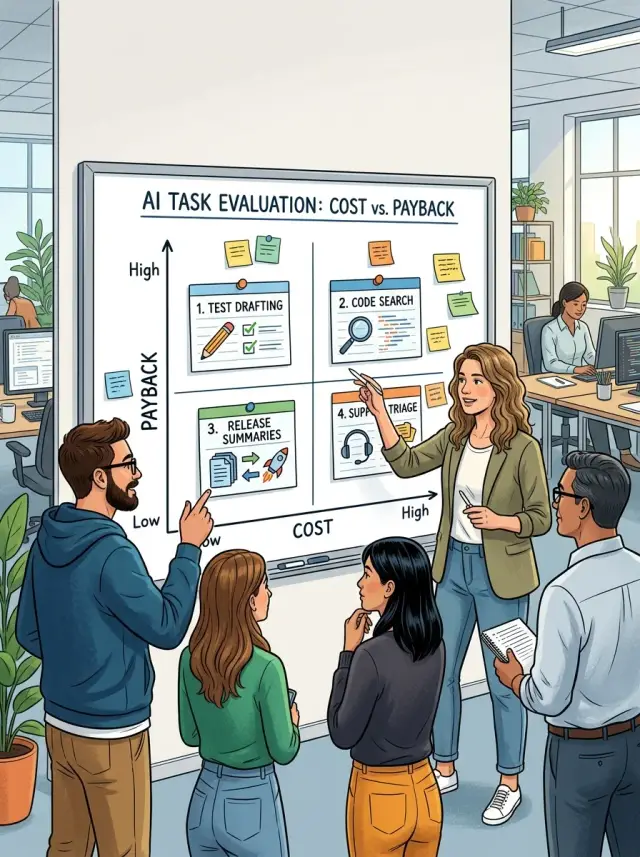
Table of Contents
Where teams lose time first
Most teams don't lose time on the hardest engineering work. They lose it on small tasks that repeat all week.
A developer writes another round of similar tests, then spends 20 minutes digging through an old repo for the same logic. A product manager turns commit notes into a release update. A support lead sorts the same ticket types again and again.
That's why the best first use of AI in software delivery is usually narrow. Pick work that repeats often, uses information you already have, and produces something a person can check in a minute or two. If setup takes weeks, touches production logic, or forces a big process change, it's probably not your cheapest first win.
Cheap means fast to set up, low-risk if it fails, and easy to review before anything goes live. The best early projects also have a clear off switch. If the experiment isn't helping, the team can stop without creating a mess.
The four options worth comparing are:
- test drafting
- code search for developers
- release summaries
- support triage
All four save time on routine work. What changes is setup cost, review effort, and how quickly the team feels the payoff. Small startups and busy product teams often feel this first because the same few people write, search, summarize, and sort all week.
How to compare setup cost and payback
A use case that looks cheap on paper can get expensive fast once people start cleaning data, fixing prompts, or checking every output by hand. The fastest win usually has low setup work and a clear weekly time saving.
A simple scorecard works better than vague ROI talk. Rate each option from 1 to 5 on four things: setup time, data cleanup before the tool becomes useful, review effort after each output, and the cost of being wrong.
Keep one-time work separate from running cost. A release summary tool might take a few days to connect to commits, tickets, and changelogs, then need very little care each week. Support triage can look easy at first, but if labels are messy and agents keep fixing bad routing every day, the running cost climbs fast.
Measure payback in weeks or sprints. That keeps the decision honest. If test drafting saves a QA engineer four hours a week and setup takes 12 hours, payback is about three weeks. If code search saves developers only a few minutes a day, it can still be useful, but the payback is slower unless the team works in a large codebase and searches constantly.
It also helps to ask who feels the gain first. QA usually notices test drafting early. Developers feel code search first. The release owner feels release summaries right away. Support leads see triage wins first. If the people doing the work don't feel relief in the first sprint or two, the tool usually fades out.
Test drafting
Test drafting is often one of the cheapest ways to try AI. The model doesn't need to make product decisions or touch production systems. It reads a ticket, a diff, or a code change and turns that into a first pass of test cases for a developer or QA person to review.
That first pass can be simple and still save time. If a ticket says "add password reset by email," the model can suggest happy-path checks, error cases, and basic permission checks. If it reads a pull request, it can draft tests around changed functions, input limits, and likely regressions.
This works best when the team already has a few good past tests, clear naming rules, and CI that runs tests and reports failures quickly. If those pieces already exist, setup stays cheap. You're not building a new flow. You're giving the model examples, a prompt, and a place in the pull request process.
People still need to review the hard parts. Someone has to add edge cases the ticket missed, remove weak tests that only mirror the code, and watch for flaky tests tied to timing, network calls, or random data. AI can suggest broad coverage. Humans still decide what matters and what the team can trust.
The payoff is usually easy to spot when the team already writes tests. Drafting can cut the boring part by 10 to 30 minutes per change, sometimes more on repetitive CRUD work. That's why test drafting often beats flashier ideas at the start: it fits habits the team already has.
Code search
Code search often looks like a cheap first move because it works on code you already have. You don't need to change how the team writes software on day one. You index the repo, connect permissions, and give developers a faster way to ask, "Where do we handle retries for billing?" instead of opening ten files by hand.
There are really two different setups here. Simple semantic search finds files, functions, and snippets by meaning rather than exact words. It's usually faster to set up and easier to trust. Agent-style repo help goes further. It reads search results, follows references, and answers questions in plain language. That can save more time, but it needs better prompts, tighter access rules, and more testing.
Most of the setup cost lands in three places: indexing, access control, and repo cleanup. Indexes need to stay fresh or answers go stale after a few merges. Access control matters even more in mixed repos, where contractors, support staff, and engineers should not all see the same code. If you run GitLab or another internal source control system, this part can stay fairly contained.
The payoff shows up in dull, repeated work. A developer can trace a bug across services in minutes instead of searching by guesswork. A new hire can find the auth flow or billing logic without interrupting the team every hour. During release prep, search also helps with impact checks, like finding every place that touches a shared API or feature flag.
Messy repos slow this down fast. If folders have no clear owners, docs are thin, and old code never gets archived, search still returns results, but people spend extra time sorting noise from signal. Code search pays back best when the codebase is at least tidy enough for a good answer to exist.
Release summaries
Release summaries are often the cheapest place to start. The model doesn't touch production or change code. It turns writing your team already has into a first draft.
Most of the raw material is already there. Pull request titles, commit messages, issue titles, and short merge notes usually give the model enough to assemble a clear update for customers or internal teams.
That keeps risk low. If the draft misses context, a person can review it in a few minutes and fix the wording before anything goes out. A rough summary is annoying. A bad code change is expensive.
The time savings show up for people who write updates over and over. Product managers save time on release notes. Founders save time when they need a quick summary for investors or customers. Release owners save time because they no longer have to scan every merged item by hand.
A small team feels this quickly. Imagine a week with 14 merged pull requests, 6 bug fixes, and 3 minor feature updates. Without help, someone reads each title, checks the ticket, groups changes, rewrites them in plain language, and trims duplicates. With AI, that person starts from a draft and spends time on review instead of assembly.
The weak spot is obvious: vague inputs create vague summaries. If commits say "fix stuff" or "updates," the draft will be muddy too. Teams get better results when pull requests and issue titles say what changed and who it affects.
This use case stays practical because the human check is short, setup is light, and the payoff is easy to notice after the first few releases.
Support triage
Support triage is often cheap to automate, but it needs more care than release summaries or test drafting. The model isn't just writing text. It's deciding who sees a ticket first, and that can change response time by hours.
A useful setup usually sorts incoming messages by plain labels such as topic, urgency, account type, and whether the message looks like a bug report.
That sounds simple. Most of the extra work sits around the model, not inside it. Teams need clean labels, fallback rules for unclear tickets, and privacy checks before sending message content to an external model. If a ticket includes card data, health data, or private customer records, the system should mask it or keep that ticket out of the AI path.
Payback depends heavily on ticket value. A high-ticket B2B team can get fast returns because one saved enterprise escalation can cover weeks of tooling cost. If an account pays five figures a year, routing its outage report to the right engineer in two minutes instead of two hours matters.
Low-volume teams get less back. If you handle only a handful of tickets a day, manual triage is often good enough. In that case, simple rules beat a model.
Bad triage also hurts customers faster than a bad release note. A messy release note may confuse someone for a minute. A wrongly routed support ticket can leave a paying customer locked out, angry, and waiting in the wrong queue while the clock keeps running.
Which option usually pays back first
For most teams, release summaries pay back first. They are cheap to start, easy to review, and hard to mess up in a costly way. If the draft is clumsy, a person fixes it in minutes.
For an average team, the ranking usually looks like this:
- Release summaries - lowest setup cost, fastest value, lowest error risk
- Test drafting - low to medium setup cost, fast value, medium error risk
- Support triage - medium setup cost, fast value at high volume, medium error risk
- Code search for developers - medium to high setup cost, slower payback, higher trust risk
Release summaries win because the input already exists: pull requests, tickets, and commit notes. A product manager, founder, or engineer can check the output quickly before sharing it. Even a small team can save time every sprint.
Test drafting can beat summaries in one common case: the team already has a strong QA habit and writes tests every week. If engineers follow clear patterns, the draft does real work instead of producing noisy guesses. In that setup, AI can save hours each sprint, especially on repeatable API, form, and regression tests.
Support triage can jump ahead when inbound volume is high and categories are clear. A team handling hundreds of similar requests each week can cut a lot of manual sorting quickly. If tickets already fit simple buckets like billing, bug, access, and feature request, the model has less room to confuse people.
Code search often looks tempting, but it's rarely the first win. It needs better context, cleaner docs, and more trust from engineers. When it gets things wrong, people lose time chasing the wrong file or the wrong assumption.
How to run a small pilot
Start with one task that happens every week, not a broad "AI rollout." Repetition makes results easy to judge. A weekly release summary, a first draft of test cases, or first-pass support triage all work well if one person owns the process end to end.
That owner should do the work by hand at first. Copy the ticket, commit notes, or support messages into the model. Copy the result back out. It feels crude, but that's the point. Manual copy and paste shows whether the output is useful before anyone spends time on bots, plugins, or API work.
A small example works better than a big plan. If your team ships every Friday, ask one engineer or product manager to use AI for release summaries for two weeks. They should use the same source material each time, keep the prompt stable, and edit the draft before it goes out. By the second week, weak spots usually show up.
Track a few simple things during the pilot: how many minutes the first draft saved, how many minutes people spent fixing mistakes, how often the output was good enough to use, and what forced a fallback to the old method.
Those notes matter more than a polished demo. Teams often rush into integrations before they know what "good" looks like. That's backwards. First get the prompt, review rules, and fallback steps into a shape that one person can follow without guessing.
Only then should you automate. If the owner can run the workflow for two weeks with steady output, low correction time, and no confusion about when to trust it, the process is ready for the next step. If not, keep it manual and fix the weak parts first.
Mistakes that waste time and budget
The fastest way to overspend is to start too big. Teams often jump straight to a full coding agent because it sounds impressive. That's usually the most expensive path to set up, test, and trust.
A narrower task works better first. Drafting test cases from clear specs, writing release notes from merged tickets, or sorting support requests by type asks less from the model and less from your team. The downside is smaller, feedback is faster, and surprises are easier to contain.
Another common mistake is feeding the system weak source material and expecting clean output. If tickets say "fix login issue" with no steps, or commit messages say "misc updates," the model has almost nothing solid to work with. It will still produce something, but your team will spend time correcting guesses instead of saving time.
This shows up fast in release summaries and support triage. Messy inputs create polished nonsense. Inputs don't need to be perfect, but they do need enough detail to anchor the result.
Teams also track the wrong thing. They judge output quality in isolation and ignore whether anyone actually saves time. A release summary that reads well but still needs 25 minutes of cleanup isn't much of a win. A support triage draft that cuts first-response prep from 10 minutes to 3 is.
Keep human review in place until the workflow earns trust. Dropping review too early gets expensive because one bad summary, one misrouted support case, or one weak test draft can create rework for several people. Review doesn't need to last forever, but it should stay until errors become boring.
This is also the approach Oleg Sotnikov often recommends: start with tight, practical automation before moving to larger AI changes. It's less flashy, but it usually costs less and pays back sooner.
Quick checks before you choose
The cheapest first step usually sits where the input is already clean and the output is easy to review. If the raw material is messy, setup grows fast and the savings often disappear.
Start with the input. Test drafting works better when user stories, bug reports, and expected behavior already live in one place. Code search needs a codebase with decent naming and at least some documentation. Release summaries are easier when pull requests and commits explain what changed. Support triage only works if tickets already carry enough context to sort them.
Then assign one person to own review. That part gets skipped too often. A QA lead can approve drafted tests. An engineering manager can check code search answers. A product or release owner can sign off on summaries. A support lead can review ticket routing. If nobody owns the final check, the trial drifts.
Also ask a blunt question: what breaks when the model gets it wrong? A weak release summary may confuse customers for a day. A bad support label may delay a refund or send an urgent issue to the wrong queue. Drafted tests that miss edge cases can waste a sprint if the team trusts them too much.
A one-week trial is a good filter. Pick one team, one workflow, and one reviewer. If that small test still needs new tools, heavy cleanup, and meetings across departments, it probably isn't your cheapest option.
A realistic team example
A six-person SaaS team usually doesn't have spare time for a big AI project. Picture one product manager, one designer, three engineers, and one support lead. They share one codebase, ship every week, and spend too much time turning commits into release notes, checking pull requests, and answering the same support questions.
Over one month, they test four small uses for AI. They skip anything that needs new infrastructure, deep model tuning, or weeks of cleanup.
Release summaries go first. Setup is light: connect commit history, pull requests, and ticket titles, then ask the model to draft a short changelog for customers and an internal summary for the team. On day one, the draft is imperfect, but it already saves the product manager 20 to 30 minutes per release. After four weekly releases, that time adds up.
Test drafting comes next. The engineers already write predictable API and form logic in the same shared codebase, so AI can suggest test cases from recent changes. The team still reviews every test, but the blank-page problem disappears. They save time on routine coverage, especially for edge cases they might miss when they're rushing.
Code search helps, but it doesn't win first place for this team. With only three engineers and one codebase, people already know where most things live. AI search is useful when someone joins later or when old modules get touched, but the payback in month one is smaller.
Support triage waits. The support inbox is messy, labels are inconsistent, old tickets use different wording, and escalation rules live in people's heads. If they automate triage too early, the model will sort messy input into messy buckets. They first need clean labels, a short rule set, and a few examples of what counts as billing, bug, account, or how-to. Only then does triage start saving time instead of creating rework.
What to do next
Pick one task this week, not four. Write down the manual steps people follow now, who does them, and how long each run takes. If a release note takes 25 minutes every Friday, or support triage eats 40 minutes a day, put that on paper first. That baseline matters more than guesses.
A short trial is enough. Give one use case 7 to 14 days, then judge it by time saved, error rate, and review effort. If the tool saves 15 minutes but adds 20 minutes of checking, drop it. Small wins count only when they stay small to review.
Keep the setup plain. Choose one task with repeatable inputs, time the current workflow for a few runs, test one prompt or one narrow automation, keep a human review step, and decide to keep or kill it with real numbers.
Add automation only where review stays quick and safe. Drafting test cases from a ticket can work because a developer or QA person can scan the output quickly. Auto-posting release summaries can also work if someone checks the final text before it goes out. Full automation sounds tempting, but it usually creates cleanup work.
If your team wants an outside view, Oleg Sotnikov offers this kind of practical help as a fractional CTO and startup advisor through oleg.is. His work is usually less about a big AI rollout and more about finding one low-risk pilot that actually fits how your team ships software.


