AI confidence signals for money and record changes
AI confidence signals help teams see why a system acts, which evidence it used, and when staff should review payments, refunds, or record edits.
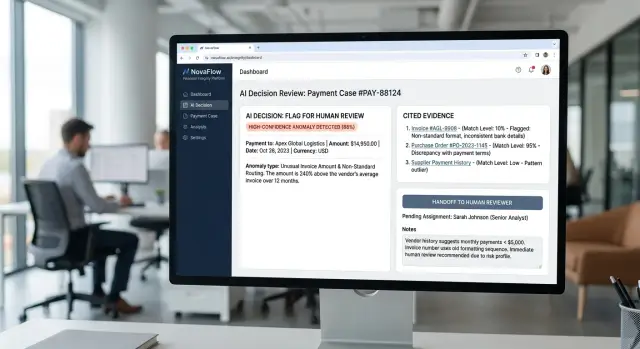
Table of Contents
Why blind AI actions cause trouble
Money and record changes turn small errors into real costs fast. If an AI sends a refund to the wrong customer, edits an invoice total, or updates a billing address on the wrong account, the damage starts right away. Finance has to fix the cash movement, support has to answer complaints, and someone still has to clean up the records.
The money is only part of the problem. One bad invoice edit can break month-end reconciliation, create a tax issue, or make a customer pay the wrong amount. Even when the amount is small, the cleanup often costs more than the original mistake.
Trust drops even faster than cash. Staff can work with a suggestion they understand, even if they still double-check it. They stop trusting a tool that simply says "done" after changing a payment status or customer record.
That loss of trust spreads through the team. Finance people start keeping their own spreadsheets. Support agents avoid the tool and ask a manager to approve simple changes by hand. A process that should save 10 minutes now adds 20.
Customers usually ask one simple question when money moves: who approved this? "The AI did it" is not a useful answer. People want to know what information the system used, whether it matched the right account, and why it treated the change as safe.
Without clear confidence signals, every bad action turns into a slow investigation. Teams dig through logs, inbox threads, admin history, and chat messages to rebuild what happened. That is backwards. The system should show its reasoning and evidence when it acts, not force people to reconstruct the story later.
This is where an AI audit trail matters. The point is not blame. The point is speed. When a refund, invoice update, or record change goes wrong, teams need to see the source, the checks, and the approval path in minutes. If they cannot, they freeze automation or move the work back to manual steps.
Blind AI actions do not fail quietly. They create cost, doubt, customer friction, and hours of cleanup.
What a confidence signal should show
A useful confidence signal does more than flash a number. It tells a person, in plain language, how sure the system is and why. A simple label like high, medium, or low often works better than a raw score like 0.87, especially when money or records are involved.
It should also say what the AI plans to do before it does anything. If the system wants to approve a payment, change a bank account, or edit a customer record, that action should appear in one clear sentence. People should never have to guess what the next click will trigger.
Good confidence signals also name the facts behind the action. That means the exact records, amounts, and dates in play. A reviewer should be able to scan the screen and see something like: invoice 1842, vendor ACME Parts, $12,400, due on 12 May, bank account ending 2219. Specifics build trust. Vague summaries do not.
When the data is weak, the system should say so plainly. The biggest warning signs are missing data, conflicting data, stale data, and unusual data. Maybe the invoice date is missing. Maybe the invoice amount does not match the ledger. Maybe a bank account changed yesterday and nobody confirmed it. Maybe the payment is far above the normal range. Those details matter more than a polished confidence score.
The signal should also show the result of the action, not just the action itself. If the AI approves a payment, what changes next? Does the invoice move from pending to paid? Does the balance drop? Does a vendor record update? People make better decisions when they can see the full before-and-after picture.
That is why an AI audit trail should start at the moment of decision, not after the fact. For payment approval automation or record change approval, the safest screen says: this is what I found, this is what I plan to change, and this is where I am unsure. If the system cannot say that clearly, it is not ready to act on its own.
Show the evidence, not just the answer
A confidence score alone does not help much when AI wants to move money or edit a record. People need to see why the system picked that action. If the screen only says "92% confident," most teams still have to open several tabs and check the work by hand.
Good confidence signals show the trail, not a magic answer. Put the evidence next to the decision so a reviewer can verify it in one view. If AI wants to update billing terms, show the invoice it read, the contract on file, and the latest CRM note on the same screen.
Each source needs a clear label. Show the document name, date, owner, and record ID. That helps people sort fresh evidence from older records fast, which matters when a signed document from last week conflicts with a note someone typed six months ago.
Quote the exact line that supports the action. "New remittance details effective May 1" tells a reviewer far more than "matched from invoice." Short quotes also expose weak matches. If the quoted line does not clearly support the change, the reviewer will catch it right away.
Put fresh evidence above older material. A signed contract from last week should not sit beside a stale CRM note as if both carry the same weight. If sources disagree, say that directly. Do not smooth over the conflict.
When the model fills a gap, label that as an assumption. A note like "Invoice did not include contract number. AI matched vendor name and amount to the last approved record" changes the review completely. People trust systems more when the system admits where it guessed.
In practice, an evidence panel often needs only a few fields: source type, quoted text, date and time, who created or approved the source, and an assumption flag when the model inferred anything.
This also creates a usable AI audit trail without extra work. If a finance lead can confirm or reject the change in 20 to 30 seconds, the evidence view is doing its job.
Draw a clear line for human review
A safe system does not treat every action the same. Small, routine changes can pass on their own, but only inside a written limit. For example, a refund below $50 that matches the original order and customer email can go through automatically. If the amount jumps, the account looks unusual, or the records do not match cleanly, a person should decide.
Money changes need firm rules, not guesswork. Set one threshold for automatic approval and another rule for anything unusual: a first-time vendor, odd timing, changed invoice details, or a request that does not fit normal behavior. These cases do not always mean fraud or error. They mean the cost of being wrong is high enough that a quick human check is cheaper.
Mixed signals are another stop sign. If the AI finds one record that supports the action and another that raises doubt, pause the task. Do not let the model average out the conflict. A person can read the notes, ask one question, and clear it in a minute. That minute can prevent a bad payment, a broken customer record, or a messy audit later.
Some actions should always go to review:
- deleted records
- changed bank details
- large refunds or payouts
- edits to tax, payroll, or legal records
- any action with missing or conflicting evidence
The log matters as much as the decision. Record who approved, rejected, or edited the action, what the AI proposed, what evidence it used, and when the change happened. If someone overrides the suggestion, log that too. That creates an AI audit trail people can trust when finance, support, or compliance teams ask what happened.
Confidence signals only help when they connect to clear action bands. High confidence can move a small, reversible change forward. Medium confidence can create a draft for review. Low confidence, mixed evidence, and sensitive record changes should stop and wait for a person.
Build the decision flow step by step
Start with a plain list of every action your system can take that changes money or records. Include the obvious ones, like issuing a refund or changing a payment amount, but also quieter edits such as changing bank details, closing an invoice, or updating a customer record after a failed match. Small edits and permanent changes should not sit in the same bucket.
A simple risk ranking keeps the flow honest. A spelling fix in a customer name is low risk. Changing a billing address is higher. Editing tax numbers, vendor bank details, payment status, or refund amounts belongs near the top because one wrong move can create real damage and extra cleanup.
Turn actions into rules
For each action, decide what evidence the AI must have before it can act. If it wants to approve a payment, it might need a matching invoice, a purchase order, the right vendor, and a total within a set tolerance. If it wants to update a record, it may need two matching sources instead of one. This is where confidence signals become useful: they should reflect whether the evidence is complete, current, and consistent.
Then write a rule for each outcome:
- Auto-approve when the risk is low and every required check passes.
- Pause for human review when the amount is large, the record changed recently, or one source disagrees.
- Reject when evidence is missing, the conflict is clear, or the action cannot be undone.
- Log the reason every time so you keep a usable AI audit trail.
- Keep the limits simple enough that a human can understand them in one read.
Test the flow before launch
Do not guess. Replay real past cases through the rules before you turn anything on. Use easy cases, messy cases, and cases where staff caught an error at the last minute. If the system auto-approves something your team would have stopped, fix the rule. If it pauses on harmless cases all day, loosen it.
A good first version is usually strict. You can widen it later after the results stay clean for a few weeks.
A simple payment change example
A duplicate charge is a good test case because the facts are usually clear, but the money still matters. One wrong refund creates a second problem, and one missed refund can upset a customer fast.
Picture a customer who writes to support and says they paid twice for the same order. The AI should not jump straight to "refund approved." It should first pull the payment record, the order ID, the support note, and the refund policy for that purchase.
Then it checks whether the records agree. It looks for the same customer account, the same amount, and two charges posted within a short time. It also checks whether anyone already refunded one of those charges.
If those details line up, the system can show a high confidence label. Good signals do more than show a score like 92%. They also explain why the score is high: matching order number, matching amount, duplicate charge within 3 minutes, no prior refund, and a policy that allows a refund for an accidental duplicate payment.
That explanation matters because staff can see the reason, not just the result. The screen should show the exact evidence next to the suggested action, so a support agent does not need to open six tabs and piece the story together by hand.
A simple rule can decide when a human steps in. If the refund is under a set limit, such as $100, the AI can prepare the action for quick approval. If the amount is over that limit, or if one record does not match, it should send the case to staff instead.
When staff open the case, they should immediately see the two payment IDs, the customer message about the duplicate charge, the policy line that allows the refund, and the confidence label with the reasons behind it.
At that point, approval often takes seconds. The agent reads the evidence, confirms that the refund amount fits the policy, and clicks approve. If someone asks later why money moved, the team has a clear AI audit trail instead of a vague note that says "system processed refund."
Mistakes teams make early
The first version often looks neat on a dashboard and weak in real use. Teams add a confidence number, then stop there. A score of 92 means very little if nobody can see why the system reached it, which records it checked, or what facts pushed the result up or down.
Another early mistake is trusting one source as if it is always current. That source might be a CRM record nobody updated, an old vendor profile, or a spreadsheet copied last month. If the AI reads stale data, it can sound sure and still be wrong. Money moves and record changes suffer from this more than most tasks because small errors create real cleanup work.
Confident wording makes the problem worse. Some systems write approval messages that sound final even when the evidence is thin. People read "approved" or "match confirmed" and assume the case is safe. The system should say when it found a weak match, missing fields, or conflicting records. Plain language helps more than polished language.
Teams also ignore edge cases too early. They test the common path and forget the messy cases that show up in real work: a vendor changes bank details right before payroll, two customer records look similar but do not fully match, an invoice total fits the pattern but the purchase order is missing, or a refund request comes from a new email address.
Those cases need clear human review rules before launch, not after the first mistake. A simple threshold is not enough. You also need rules for missing data, unusual timing, record conflicts, and any change that touches legal or financial records.
Logging only the final action is another common miss. "Approved at 3:14 PM" is not an AI audit trail. Teams need the evidence too: which sources the system checked, what values matched, what did not match, and what the reviewer saw at that moment. If you cannot replay the decision, you cannot trust it, fix it, or explain it later.
A quick check before you turn it on
An AI tool should earn trust before it touches a payment, a refund, or a customer record. If your team cannot explain one action in plain language, the system is not ready yet.
A short prelaunch check catches the problems that cause real damage: silent guesses, missing records, and approvals that move faster than your controls.
- Make sure a person can see the reason for each action. A note like "invoice total matches purchase order and receipt" is enough. A score with no explanation is not.
- Check that every amount points back to a source record. Your team should trace a payment to the invoice, contract, or order without digging through logs for 20 minutes.
- Force the system to stop when data is missing or when two records disagree. If one file says $4,800 and another says $4,300, the tool should pause and ask for review.
- Match approval limits to actual risk. A small office supply purchase and a bank detail change should not follow the same path.
- Test how fast your team can undo a bad action. Reversing a wrong record update in five minutes is very different from cleaning up a broken ledger at month end.
This is where confidence signals matter most. They should tell people why the tool feels sure, what evidence it used, and what blocked full confidence. Good signals do not hide uncertainty. They show it clearly.
A simple test works well. Pick three recent cases: one clean, one messy, and one borderline. Ask a finance or operations person to review the AI output without help from the builder. If that person cannot follow the trail from recommendation to source record, stop and fix the design.
Teams often spend weeks tuning prompts and almost no time on reversal paths. That is backwards. The safer system is not the one that sounds smartest. It is the one that stops on bad inputs, respects approval limits, and gives your team a clean way to correct mistakes.
Next steps for a safer rollout
A good rollout feels boring. If AI can approve a refund or change a customer record, you want calm, repeatable behavior, not clever surprises.
Start with one narrow workflow. Refund approvals under a fixed amount work well. Record corrections with clear source documents also work. Pick a case where the rules are easy to explain, the evidence is easy to check, and the cost of a mistake is limited.
Use the first few weeks to learn from real decisions, not lab tests. Teams usually focus on wrong approvals and miss the other problem: the system pauses too often, so staff stop trusting it and work around it. You need both numbers.
A simple rollout plan looks like this:
- Choose one action and define the safe boundary. For example, allow AI to recommend refund approval up to a set limit, but require a person above that amount.
- Log every decision with the evidence used, the confidence signal, and the final outcome.
- Review false approvals and false pauses every week with the people who handle these cases.
- Adjust thresholds only after that review. Staff feedback matters more than guesswork because they see the edge cases first.
Keep the review tight. Look at a handful of examples, not just totals. One bad approval tied to a missing invoice can tell you more than a dashboard full of averages. The same goes for unnecessary pauses. If the system keeps showing low confidence on cases your team finds obvious, the threshold is probably too strict or the evidence mapping is weak.
Write down who can change the rules, who can override a decision, and how you record that override. This keeps the system honest. It also gives you a clean AI audit trail when finance, ops, or compliance teams ask what happened.
For teams that need help designing approval rules, review loops, and practical AI adoption, Oleg Sotnikov at oleg.is works as a Fractional CTO and startup advisor. His work focuses on building AI-augmented development and automation systems that stay useful under real operating pressure, not just in demos.


