AI company role map for teams where AI does the work
AI company role map for teams using AI every day: define operator, reviewer, architect, and domain owner so handoffs stay clear and work gets done.
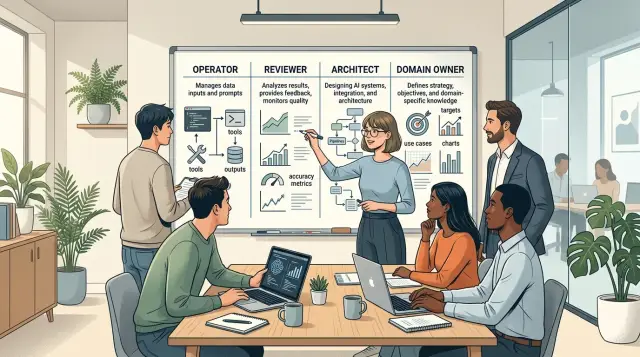
Table of Contents
Where work gets lost
Teams rarely lose work because nobody touched it. They lose it because several people assume someone else owns the last decision.
That gets worse when AI handles most of the execution. Drafts, code, test cases, support replies, and specs appear in minutes, so it feels like progress. But speed can hide a mess: output keeps moving while ownership stays vague.
A job title does not fix that. "Engineer," "product manager," "CTO," or "founder" may describe a role on paper, but they do not tell the team who can approve a prompt change, reject a shaky result, choose a data source, or stop a bad release. When those calls stay fuzzy, work slips through the gaps.
That is why a role map matters. It turns broad titles into clear decisions. Without it, teams fall into a familiar loop. One person asks AI to do the work. Another glances at the result. A third assumes the first two checked the risks. Nobody owns the final call.
A simple product example shows the problem. A team uses AI to draft onboarding emails and help center content. Marketing edits the tone. Engineering connects the tool. Support spots factual mistakes. Legal worries about claims. The copy goes live late because each group waits for someone else to say, "yes, this is correct and safe to ship."
The cost shows up fast: delays while people chase approval after the work already exists, rework when output looked finished but missed a rule, silent risk when nobody checks accuracy or edge cases, and weak accountability when problems reach customers.
Teams do not need more titles. They need clear ownership over decisions, reviews, and final approval.
The four roles in plain language
Teams get confused when "doing the work" and "owning the result" blur together. When AI handles much of the execution, four roles keep a task visible from start to finish.
The operator runs the task. This person gives the prompt, gathers context, triggers tools, and moves the work forward.
The reviewer checks the output. This person looks for errors, weak reasoning, missed edge cases, and anything that should not ship.
The architect decides how the work should happen. This person chooses the pattern, guardrails, tools, and technical tradeoffs before the team scales the task.
The domain owner decides what "good" means. This person owns the business outcome, sets the rules, and makes the final call when priorities clash.
One task, four touches
Take a simple task: add an email alert when a payment fails. The operator asks AI to draft the flow, update the code, and prepare tests. The reviewer checks the message logic, failure cases, and whether the tests prove anything real.
The architect decides where that alert should live, how retries should work, and whether the team should use the existing event system or a quick patch. The domain owner decides when users should get the alert, what the message should say, and whether support should also get a copy.
All four roles touch the same task, but they do not make the same decision. That is the point. In a good role map, nobody assumes someone else will catch the gap.
One person can hold two roles, especially on a small team. A founder might act as domain owner and reviewer. A senior engineer might act as operator and architect. That can work if the person says which hat they are wearing at each moment.
Some calls still need one clear owner. User impact and business rules belong to the domain owner. Technical design belongs to the architect. Quality acceptance belongs to the reviewer. Task execution belongs to the operator.
If two people share one decision, delays start quickly. If nobody owns it, AI produces output, everyone assumes progress happened, and the work quietly disappears.
What the operator does
The operator is closest to day to day AI execution. This person runs prompts, starts tools, watches task queues, and keeps work moving. When nobody owns this role, tasks stall in half finished states because everyone assumes the AI already handled them.
Before asking AI to act, the operator gathers the context the model will not guess on its own. That often includes the current ticket, earlier decisions, source files, style rules, customer notes, and hard limits. Good operators do not send vague requests and hope for magic. They shape the task so the model gets enough facts to produce something useful on the first pass.
In practice, the job is simple: prepare the input, run the right workflow in the right tool, check whether the output fits the task, flag uncertainty early, and pass the work to review.
Flagging weak output early is a big part of the job. If the model invents details, changes more than asked, or sounds certain while guessing, the operator should say so right away. Five minutes of doubt can save a full day of cleanup.
The operator also needs a clear stopping point. This person can draft, rerun, compare outputs, and package results for the next step. This person should not approve final facts, accept business risk, merge code, or push changes into production alone. That boundary keeps responsibility visible.
A useful rule is simple: the operator moves work forward fast, but stops before final approval when the result can affect customers, money, security, or live systems.
What the reviewer does
The reviewer reads the output before anyone treats it as done. AI can produce polished nonsense, and operators can miss it when they move quickly. The reviewer slows the loop just enough to catch bad facts, broken logic, and the wrong format.
A good reviewer asks plain questions. Did the AI use the right numbers, names, and sources? Does the draft contradict an earlier decision? Does it follow the required structure and tone? Can the next person use it without guessing?
If something fails, the reviewer sends it back with exact fixes. "Needs work" is too vague. "Replace the pricing table with current numbers, remove the unsupported claim in paragraph three, and use the release note template" gives the operator a real next step.
The reviewer should approve only work that meets the bar. "Close enough" creates expensive cleanup later. One weak approval can turn into a bug, a bad customer message, or a document nobody trusts.
This kind of review is easy to skip and expensive to skip. At oleg.is, Oleg Sotnikov uses the same idea in AI first delivery work through code review, test checks, documentation checks, and release approvals. The tools draft quickly, but a person still decides what is correct and ready.
The reviewer should also track repeat errors. If the AI keeps inventing edge cases, or operators keep missing one required format, someone should log that pattern and report it. Then the team can fix the prompt, tighten the checklist, update the template, or change the handoff. Review stops being a gate and starts improving the whole system.
What the architect does
The architect decides how work moves from request to result. If the operator runs the process and the reviewer checks the output, the architect builds the process they both use.
This role matters because AI usually fails in patterns, not at random. When the same bug, bad answer, or missed step appears three times, the architect treats it as a system problem and changes the setup so the next run goes better.
Early on, the architect makes four decisions: the workflow, the tools inside it, the rules that limit risk, and the handoff points between AI and people.
That means answering practical questions. Which tasks can AI finish without help? Which ones need review before anything ships? What prompt, template, or checklist should the AI follow? What test should block a bad result? When should the system stop and ask a human?
Those choices shape the whole team. If the architect is too loose, people waste time fixing avoidable errors. If the architect is too strict, every task waits for approval and speed disappears.
Consider a product team using AI to draft release notes, support replies, and test cases. The architect may let AI publish internal test cases on its own, require review for customer facing release notes, and force escalation for any support message that mentions billing, security, or data loss. That is not micromanagement. It is simple risk control.
The architect also writes the fallback rules. If the model fails a test, asks for tools it should not use, or produces uncertain output twice in a row, the system should route the task to a person. No guessing.
Small teams often give this role to a founder or a fractional CTO. That works well while the company is still learning where AI can act alone. Over time, the architect keeps tuning prompts, tests, permissions, and routing until work stops slipping through the cracks.
What the domain owner does
The domain owner decides what "correct" means for the business. That sounds obvious, but this is where many AI heavy teams fail. The AI can generate options, the operator can run the task, and the reviewer can catch obvious problems. None of them can decide whether a result is good for revenue, support load, customer trust, or legal risk.
This person sets priorities when goals clash. If a change might raise conversions but increase refunds, the domain owner makes that call. If faster shipping means more edge case mistakes, the domain owner decides how much risk the team will accept. Without that decision maker, work keeps moving but nobody owns the tradeoff.
A good domain owner answers a few direct questions. What counts as done for this feature? Which metric matters most right now? Which mistakes can the team tolerate, and which ones are unacceptable? When users fall outside the normal path, what should happen?
Edge cases are a big part of the job. AI is good at patterns. Business rules are often messier. A startup may have a billing flow where most customers fit the standard plan, but a few have custom contracts, delayed invoices, or refund terms. The domain owner decides how those cases should work. If this person does not answer, the AI will guess, and guesses turn into support tickets.
This role owns the outcome, not just the request. "Build a new onboarding flow" is a request. "Reduce drop off without raising support volume" is an outcome. That difference matters.
In a healthy role map, the domain owner is usually the person closest to the business result. This person does not need to write prompts or review code. This person does need to make clear calls, make them quickly, and stay accountable when the result goes live.
How to assign roles step by step
Start with the work that repeats every week. Repeated work exposes confusion quickly, and it is the best place to build a role map people will actually use.
Do not start with job titles. Titles hide real work. List the flows your team runs again and again, such as writing specs, shipping small fixes, answering support tickets, preparing reports, or updating product copy.
Then map each flow in plain language:
- Write the flow as a short chain of actions. Keep it simple, like "ticket arrives, AI drafts fix, human checks, code ships, issue closes."
- Mark who starts the flow, who reviews the output, who says yes or no, and who resets the flow when AI goes off track.
- Put one real name on every decision point. One person can hold two roles on a small team, but each decision still needs one owner.
- Add stop rules for AI output. Decide in advance when the work must pause, such as missing source data, failed tests, unclear customer impact, or anything that touches money, security, or legal terms.
- Run the map on one live process for two weeks. Do not roll it out across the whole company on day one.
That two week test matters. You will spot delays that looked harmless on paper. Maybe the reviewer checks work only twice a week. Maybe the domain owner gets pulled in too late. Maybe the operator keeps feeding bad context into the model, so the same mistake keeps coming back.
Keep notes during the test. Count how many times AI needed a retry, how often a human stepped in, and where work waited for a decision. Those numbers show where the map is thin.
If your team wants a simple starting point, pick one flow with clear output and low risk. Bug triage or internal documentation often works well because the edges are easier to see. Once one flow works, copy the structure to the next one.
A simple example from one product team
A small SaaS team wants to change billing. They plan to add prorated charges when a customer moves from a monthly plan to an annual plan in the middle of a cycle. It sounds routine, but billing bugs create refunds, support tickets, and angry customers very quickly.
The operator starts the work. Using AI, this person drafts a short spec, turns it into tickets, and generates test cases for upgrades, downgrades, failed cards, duplicate invoices, and canceled subscriptions. In a healthy role map, the operator pushes the task forward but does not make final calls on risky edge cases.
The reviewer slows the team down for one hour and saves them a week. This person reads the AI draft and spots bad assumptions. The draft forgot tax rules for one region, handled account credits the wrong way, and assumed every plan change should bill immediately. None of those problems are hard to spot once someone looks carefully, but AI often writes with false confidence.
After two similar billing problems in a month, the architect steps in. This person does not rewrite every ticket. This person fixes the system that keeps creating the same mess. A required billing template gets added for AI prompts, a review gate appears before anything touches invoices, and the team builds a small test dataset with real plan change cases.
The domain owner makes the call when money is at risk. If the business needs speed, this person may approve a limited release for lower risk accounts first. If finance accuracy matters more that week, this person can delay the launch until the team checks every tax and refund path.
That split keeps ownership clear. The operator creates, the reviewer checks, the architect improves the process, and the domain owner decides how much risk the business should take.
Common mistakes that create gaps
Most role problems start when a team gives one person full authority and skips review. That feels fast for a week. Then prompts drift, risky changes ship, and nobody can say who checked what. Authority and review should sit with different people, even on a small team.
Another common mistake is turning reviewers into backup operators. Instead of checking output against rules, they rewrite every task themselves. That hides weak prompts, broken tests, and vague instructions. Review should catch errors and send work back with a reason, not absorb the whole workload.
Teams also get into trouble when the architect owns daily delivery. The architect should set the structure: standards, boundaries, handoffs, and failure paths. If that person spends every day pushing tickets over the line, the structure gets stale and nobody updates the rules AI follows.
The domain owner often arrives too late. If this person appears only for final approval, the team learns the real business rules after the work is already done. That is how refunds, exceptions, pricing quirks, and legal wording slip through. The domain owner needs to shape the work early, while tasks and review checks are still being defined.
Edge cases create the biggest gaps because teams treat them as rare. A support flow may handle normal returns well, but what about a partial shipment, a fraud flag, or a customer with two accounts? If no role owns those cases, AI will guess and people will blame the tool.
A simple test works well. Pick one messy scenario and ask four questions: who runs it, who reviews it, who set the rules, and who decides the business outcome. If one person does all four, or nobody owns one of them, work will probably disappear there.
A quick check before you automate more
Teams usually add more AI before they fix ownership. That is how work slips through the cracks: the model did something, someone glanced at it, and nobody knew who had the final call.
Before you automate another step, check a few basics:
- Give every workflow one named owner. Not a department and not "the product team."
- Write a review rule for every AI action. Decide what can pass on its own, what needs a human check, and what must stop until someone approves it.
- Tell reviewers what rejection looks like. Wrong facts, missing edge cases, broken formatting, or a risky change with no explanation should all be easy to name.
- Make sure the architect can see patterns. Repeated mistakes matter more than isolated ones.
- Ask the domain owner to write down tradeoffs around speed, accuracy, cost, legal risk, and customer impact.
A small team can test this in one afternoon. Take one flow, such as AI written release notes or support replies, and assign names beside each decision. If you cannot do that on one page, the workflow is not ready for more automation.
What to do next
Pick one process that fails in small, expensive ways. A good first target is bug triage, customer support replies, release checks, or internal reporting. If people already say, "I thought AI handled that," you probably found the right place to start.
Write the first role map on one page. Put the process name at the top, then assign operator, reviewer, architect, and domain owner. Add one short sentence for each role: what this person decides, what this person checks, and when the work moves forward. If one person holds two roles for now, write that down. Hidden overlap causes more trouble than team size does.
Then run the map for two weeks of real work. Do not judge it from a planning session. Watch where tasks stall, where reviews pile up, and where nobody feels allowed to change the prompt, rule, or workflow. Update the map while those examples are still fresh.
That is usually the fastest way to make a role map useful instead of decorative. A rough one page version that people actually use beats a polished diagram nobody follows.
If your team needs outside help, Oleg Sotnikov at oleg.is works as a fractional CTO and startup advisor. He helps teams turn AI adoption into clear ownership, review loops, and practical operating rules instead of a pile of fast output.
Frequently Asked Questions
What problem does a role map solve?
It stops the "someone else owns it" problem. A role map puts one real person on execution, review, system design, and the final business call, so work does not sit in a gray area while AI keeps producing output.
What does the operator actually own?
The operator runs the task day to day. That person gathers context, writes or runs prompts, uses the tools, checks whether the result matches the request, and sends it to review. The operator should not approve risky facts, business tradeoffs, or production changes alone.
When should the reviewer reject AI output?
Reject it when facts look shaky, the format breaks the rules, edge cases are missing, or the result creates risk the team did not approve. A good rejection names the exact fix, so the operator knows what to change on the next pass.
How is the architect different from the reviewer?
The reviewer checks this run. The architect fixes the system behind many runs. If the same mistake keeps showing up, the architect changes prompts, templates, tests, permissions, or handoffs so the team stops seeing the same failure again.
What does the domain owner decide?
This person decides what "good" means for the business. The domain owner sets priorities, chooses tradeoffs, defines edge case behavior, and makes the final call when speed, revenue, support load, trust, or legal risk pull in different directions.
Can one person hold more than one role?
Yes, small teams do that all the time. It works if you name the role for each decision and keep approval clear. One person can operate and architect, for example, but one decision still needs one owner.
Which workflows should we map first?
Start with repeated work that already causes small delays or cleanup. Bug triage, support replies, release notes, internal docs, and small product changes work well because the handoffs are easy to spot and the team can test the map quickly.
What stop rules should we set before we automate more?
Set stop rules anywhere mistakes can hurt customers or the business. Pause when source data is missing, tests fail, customer impact looks unclear, or the task touches money, security, legal terms, or live production systems.
How do we know the role map is working?
Look for fewer stuck tasks, faster approvals, and less rework after review. You should also see clearer handoffs, fewer repeat mistakes, and fewer moments where people say, "I thought AI handled that."
What mistake makes work disappear most often?
Most teams fail when they blur execution and approval. One person runs the AI, someone else glances at the result, and nobody owns the last decision. That feels fast at first, then errors slip through and nobody can say who approved them.


