AI coding policy: write rules from real team failures
Build an AI coding policy from broken tests, wrong-file edits, and unsafe commands so your team writes rules people trust and follow.
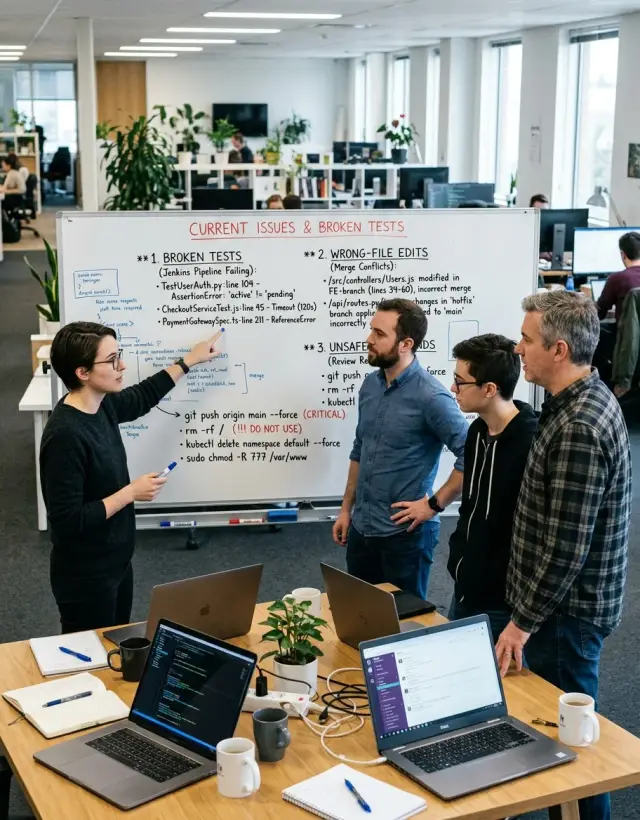
Table of Contents
Why teams need a policy after the first bad AI edit
The first bad AI edit rarely looks dramatic. It looks small, even helpful. A developer asks the assistant to clean up one function, skims the diff, and moves on. Then the test suite starts failing in places nobody touched, and half the afternoon disappears into cleanup.
Broken tests are often the first clear sign that the tool changed more than the person asked for. The code still compiles. The main screen still loads. But a helper got renamed, a default changed, or a mocked response no longer matches what the app expects. Teams lose time because the damage hides in boring places.
Wrong file edits are worse in a quieter way. The assistant sees two similar files and patches the shared one instead of the local one. Nothing breaks right away. A week later, another feature starts acting strangely because a common utility drifted away from its original job. That kind of drift costs more because nobody remembers when it started.
Unsafe commands turn a messy edit into a real incident. An AI tool might suggest git clean -fdx, a force reset, or a database command to fix the environment. A tired developer may paste it without thinking, especially if the earlier suggestion looked smart. One bad command can wipe local work, break a shared dev setup, or point the wrong script at real data.
That is when an AI coding policy stops sounding like paperwork. A short rule like "AI cannot run destructive commands" or "review every file outside the requested scope" can save hours.
Most teams do not need a long document. They need a simple policy built from a failure everyone remembers, because those are the rules people actually follow.
Start with incidents, not opinions
Most teams write a policy too early. They argue about taste, naming, or whether the model should be "allowed" to touch certain files. That usually goes nowhere. Start with the mistakes your team already paid for.
Pull five to ten recent AI failures from real work. Skip weird edge cases. Pick the ones that burned an hour, broke a deploy, changed the wrong file, or ran a command nobody should have approved. People respect rules when they remember the mess behind them.
For each incident, save the same evidence:
- the prompt or instruction that triggered the change
- the diff the AI produced
- the test output, logs, or error message
- a short rollback note that says how the team fixed it
That small record matters. Without it, people argue from memory, and memory gets soft fast. With it, you can point to the exact moment the model guessed wrong, skipped a test, or edited code outside the task.
Then group the incidents by what actually failed: code edits, tests, and shell commands. One group might show that the AI keeps touching nearby files it was never asked to change. Another might show that it claims tests passed when nobody ran the full suite. A third might show risky commands, like deleting generated files, rewriting migrations, or using force flags without review.
Be picky about what makes the cut. Ignore style fights. If one developer hates the AI's variable names and another does not care, that is not a policy problem yet. If the AI changed a migration, broke local data, and cost two people half a day, that belongs in the document.
A good policy starts with expensive failures, not abstract fears. If a rule ties back to a real prompt, a real diff, and a real rollback, your team can enforce it without drama.
Turn one incident into one rule
One bad AI edit can give you a better rule than a long debate. Start by writing the failure as one plain sentence that anyone on the team can understand. For example: the AI changed the test helper instead of the payment file named in the task.
That sentence keeps the rule tied to a real memory, not a theory. People remember a broken build, a wrong file edit, or a risky command that touched the wrong environment. They do not remember vague policy language.
Next, name the risk in normal words. Say what happened, or what almost happened. In the example above, the risk is simple: the team could merge a change that looks correct in review but breaks unrelated tests and hides the real payment bug.
Then write the smallest rule that would have blocked that failure. Small rules get used. A broad rule like "be careful with AI edits" is useless. A narrow rule works better: AI can edit only files listed in the task, and the developer must confirm those file paths before saving changes.
Add one check that fits normal work. Good checks are boring on purpose:
- compare the changed files to the task
- run the related tests before review
- confirm the command will run in the right environment
- scan for deleted code outside the requested area
Last, assign the check to a real person. If nobody owns it, nobody does it. On a small team, the person who opened the task can confirm file paths, and the reviewer can verify tests or command safety before merge.
That is how a policy stays believable. One incident becomes one rule, one check, and one owner. If another failure happens later, add another small rule.
What your first policy should cover
Your first policy should focus on the moments where a small miss turns into a painful cleanup. Most teams do not need a long document. They need a few clear rules for edit scope, sensitive files, tests, shell access, secrets, and merge review.
Start with file selection. Before an AI tool changes anything, it should name the files it plans to edit and explain why those files matter. That one step catches a lot of bad changes, especially when the model grabs a similar file, an old test, or the wrong config.
Draw a clear line around sensitive files. If the edit touches deployment settings, database migrations, auth, billing, or shared libraries, the tool should stop and ask for approval before it writes code. Wrong file edits in those areas waste hours fast.
Tests need rules on both sides of the change. Before the edit, the tool runs the relevant tests, lint checks, or type checks and records the result. After the edit, it runs the same checks again, plus anything tied to the changed code. If the baseline already fails, the tool should say that clearly instead of pretending it caused or fixed the issue.
Shell commands need a second look when they can destroy data or change the environment. Your policy can mark a small group of commands as approval only: delete commands, git history rewrites, database writes, deploy commands, package upgrades, and anything that changes infrastructure. Dry runs help, but they do not replace approval.
Access rules matter even more. Do not let AI tools read production secrets, write to live databases, or inspect raw customer data unless a person chooses that step on purpose. Use staging, scrubbed samples, and short lived credentials when you can. Lean teams often move faster with these limits because they stop cleaning up avoidable damage.
A human should review before merge when the change crosses a clear line:
- the edit touches auth, payments, infra, or migrations
- the tool ran a risky shell command
- tests changed or got skipped
- the edit affects many files or generated code
- the change uses secrets, production access, or live data
If your policy covers those areas in plain language, people will use it. Most teams have already felt the pain each rule prevents.
A simple example from one bad afternoon
A small team asked an AI agent to fix a bug in a reporting screen. The bug looked narrow: one date field broke when users exported a CSV. The agent found the problem fast, but it changed a shared helper instead of the report code.
That helper also formatted dates for invoices, email summaries, and an admin dashboard. The original bug looked fixed. The report tests passed. People moved on.
About twenty minutes later, unrelated tests started failing in another part of the repo. An invoice snapshot changed. A background job test broke because it expected the old date format. Nobody noticed the shared helper edit at first, because the commit message only mentioned the report bug.
Then the day got worse. Someone tried to clean up the workspace and rerun everything from scratch. In a rush, they used a risky cleanup command that removed more local files than expected. Now the team had two problems: a bad AI edit and a messy recovery.
That kind of afternoon gives you better policy ideas than a long meeting ever will. The team did not write a giant document. They wrote three short rules tied to what actually happened:
- If an AI agent edits a shared helper, a person must review every file that depends on it before merge.
- If unrelated tests fail after an AI change, stop and inspect the changed files before asking the AI for another fix.
- AI agents and rushed humans cannot run destructive cleanup commands without explicit approval.
Those rules worked because they matched the chain of failure. The first rule covered the wrong file edit. The second stopped the team from stacking confusion on top of confusion. The third dealt with the panic move that made recovery slower.
Notice what they did not write. They did not ban AI. They did not require five approvals. They did not create a policy full of vague advice like "be careful with shared code." People ignore that sort of sentence.
Simple rules stick when everyone remembers the cost. One broken helper changed tests in places nobody expected. One rushed command turned a normal rollback into an annoying cleanup job. After that, a three rule policy felt reasonable, not heavy.
Rules people actually follow
People ignore policy when it reads like legal text. They follow rules that sound like the team, fit on one screen, and point to a mess everyone remembers.
A rule should be short enough to paste into chat without trimming it. If someone cannot read it during review in five seconds, it is too long.
The best rules come with a memory attached. "After the AI edited the wrong file" is stronger than "Ensure file scope accuracy." People remember the afternoon they lost two hours. They do not remember polished policy language.
Use the same words your team already uses in pull requests, standups, and Slack. If your team says "red tests," write "red tests." If they say "wrong file edit," use that exact phrase. Plain language lowers the chance that people skip the rule or argue about what it means.
A short example next to the rule helps even more:
- "Name the file before you edit it." Example: "Fix auth timeout in session.ts, not billing.ts."
- "Do not mute a failing test to get green." Example: "No skipped test, snapshot update, or mock change unless the ticket asks for it."
- "Read shell commands before you run them." Example: "Anything with rm, migration, or bulk update needs a human check first."
These are not elegant. That is why they work. They sound like something a teammate would say after cleaning up a bad AI change.
A policy also gets stale fast if nobody touches it. Each new miss should trigger a tiny review. Ask one question: did this failure reveal a missing rule, or a rule nobody could understand?
Small teams do this well because the feedback loop is short. Someone sees the failure in the morning, writes one clear rule after lunch, and the next pull request already reflects it. If a rule needs a paragraph of explanation, split it or delete it.
Mistakes that make the policy useless
The fastest way to kill trust in a policy is to make it about taste. If a rule says the AI must write comments in a certain tone or name variables a certain way, people will ignore it. Rules need to focus on risk: broken tests, edits in the wrong file, secrets in prompts, or commands that can change data.
One rule should solve one problem. Teams often cram three or four ideas into a single sentence, then argue about what it means. "AI may edit code only after review and tests and approval for infra changes" sounds strict, but nobody knows which part failed. Split that into separate rules so the team can follow them and fix the right thing when something goes wrong.
A blanket ban looks clean on paper and fails in practice. After one ugly incident, some teams ban AI from writing tests, touching migrations, or changing production config at all. That can make sense for a short cooling off period. It becomes a problem when there is no exception path, no owner, and no time limit.
People then work around the policy in private, which is worse than using AI in the open. A small team might ban AI from test files after one bad edit, then lose a day on a safe refactor because nobody can approve an exception.
A hidden policy is almost the same as no policy. If the only copy sits in a forty page handbook, nobody checks it before a risky edit. Keep the rules where the work happens: next to the repo guide, in the pull request template, or in the command runner that blocks unsafe commands.
Old rules cause quiet damage too. A team might keep a rule from its first chaotic month even after it has better tests, code owners, and review habits. Then the policy slows safe work while missing new risks. Review it on a schedule, or after a real incident, and delete rules that no longer pull their weight.
A weak policy usually shows the same symptoms:
- people ask for exceptions every week
- reviewers argue about wording instead of risk
- the safest path feels slower than ignoring the rule
- nobody can name when the rule last prevented a bad change
That last point matters. Good rules earn respect because people remember the failure that caused them, and they can still see the risk today.
Quick checks before an AI change lands
A short review at the end catches most AI mistakes before they spread. Five minutes is often enough to stop a wrong file edit, a fake fix, or one risky shell command from turning into a long cleanup.
This step works best when it is routine, not optional. Keep it short so people still do it on a busy day.
- Match the changed files to the original task. If the request was "fix one checkout bug" and the diff also touches auth, billing, and CI config, stop and ask why.
- Read the diff from top to bottom. Do not skim only the new function. AI often slips in renamed variables, removed checks, or extra cleanup that nobody asked for.
- Run the smallest test that proves the edit works. If the change affects one parser, run that parser test first. You do not need the whole test suite to catch the first obvious break.
- Review the recent shell commands the AI used or suggested. Watch for deletes, permission changes, branch rewrites, package removals, or commands that might hit live systems.
- Ask one reviewer to scan the AI's assumptions. A second set of eyes can catch claims like "this file is unused" or "this config already exists" when neither is true.
Small misses pile up fast. An AI edits the right function, but it also cleans up a second file no one mentioned. The tests pass because nobody ran the one test that covered the edge case. Later, someone notices a shell command that removed generated files the team still needed.
Each miss looks minor on its own. Together, they create a messy rollback, confused teammates, and less trust in the tool.
If your team is small, keep the rule plain: no AI change lands until one person checks scope, diff, proof, commands, and assumptions. That habit does more than a long document nobody reads.
Next steps for a small team
A small team does not need a thick policy document. Your first policy should fit on one page, and people should be able to remember it without opening a wiki every hour. If the rules feel heavy, nobody will use them when work gets busy.
Pick three rules that match the failures you already saw, then run them for two weeks. That short trial matters. It shows where the rules help, where they annoy people, and where they still leave gaps.
A simple first set often looks like this:
- AI can edit only files named in the task
- AI must run the agreed test check before a commit
- AI cannot run risky shell commands without human review
Keep the wording plain. If a new hire cannot understand a rule in ten seconds, rewrite it.
Store each rule in one shared place with the owner, the check, and one real example. A tiny table is enough: the rule, who updates it, how the team checks it in reviews or CI, and the incident that caused it. When people can see the rule next to the failure, they argue less about whether it is needed.
Do not add rules every time somebody feels nervous. Add a new rule when a clear incident shows a repeatable problem. If the AI changed the wrong file twice in one sprint, that is a rule candidate. If one person had a strange prompt and fixed it in five minutes, it probably is not.
This also keeps the policy short. Most small teams need fewer rules than they think. Six sharp rules beat twenty vague ones.
If your team is still unsure where review checks should live, what CI should block, or which commands need approval, Oleg Sotnikov at oleg.is works with small teams as a Fractional CTO and startup advisor. He helps teams set up practical AI development workflows, review rules, and safe command controls without turning the process into red tape.
The best next step is boring on purpose: write three rules, test them for two weeks, and keep the examples beside them. One bad afternoon is enough to build a policy people will actually use.
Frequently Asked Questions
Why write an AI coding policy after just one bad edit?
Because one small AI miss can burn hours. A short policy gives the team a default way to work: stay inside the named scope, run the agreed checks, and ask before risky commands.
What should go into the first version of the policy?
Start with file scope, test checks, and shell command approval. Those three rules catch most early mistakes without turning normal work into paperwork.
What should we save from an AI failure?
Save the prompt, the diff, the test output or logs, and a short note on how the team fixed the problem. That record keeps people focused on what actually failed instead of arguing from memory.
How do we turn one incident into one rule?
Write the failure as one plain sentence, name the risk, then add the smallest rule that would have stopped it. Give one person the check so the rule happens in real work.
How do we stop wrong-file edits?
Make the tool name the files before it edits anything, then compare the final diff to the task. If the request names one file and the AI also changes a shared helper or config, stop and inspect it before you save or merge.
Should AI run tests before and after it changes code?
Yes. Run the same test, lint, or type check before and after the edit so you can see what changed. If the baseline already fails, say that clearly and do not let the AI pretend it fixed or caused everything.
Which shell commands should need human approval?
Do not let AI run delete commands, git history rewrites, database writes, deploy steps, package upgrades, or anything that can touch real data without human review. One rushed paste can create a bigger mess than the original bug.
When should a person review an AI change before merge?
Ask for review when the change touches auth, payments, infra, migrations, shared libraries, generated code, skipped tests, secrets, or lots of files. A second person often catches a bad assumption faster than another AI prompt.
Should we ban AI from risky areas after one bad incident?
Usually no. A short cooldown for one area can make sense after a messy incident, but a permanent ban often drives people to hide AI use instead of using it openly. Clear approvals and limits work better than blanket bans.
How often should we update the policy?
Keep the first version to one page or less, then review it after a real miss or a short trial like two weeks. Remove rules nobody uses, and add new ones only when the same problem shows up again.


