AI code generation boundaries for risky code paths
AI code generation boundaries help teams keep models away from migrations, pricing rules, and security code until humans review those paths with care.
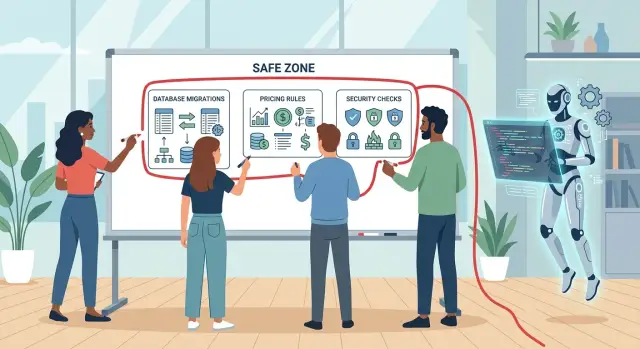
Table of Contents
What goes wrong when AI writes risky code
A small edit in the wrong place can do real damage. Change one condition in a billing rule and every invoice after that point can carry the wrong price. Change one field in a migration and a background job may start writing broken data into records that looked fine a minute earlier.
The real problem is speed. AI can produce code in seconds, teams move quickly, and bad changes spread before anyone stops them. A bug in a UI button is annoying. A bug in pricing, access control, or database structure can leak data, charge the wrong amount, or turn recovery into a slow, expensive mess.
The riskiest paths usually fall into three groups:
- data paths such as schema changes, backfills, deletes, and import jobs
- money paths such as discounts, tax logic, invoices, credits, and subscription rules
- access paths such as roles, permissions, admin actions, tokens, and account boundaries
These areas need more than a quick scan because the code often looks reasonable. That is what makes it dangerous. A model can write a neat function, pass a basic test, and still break the rule the business depends on.
Picture a simple case. A team asks AI to "clean up" pricing logic for annual plans. The new code removes one branch that looks redundant. That branch handled customers who locked in a legacy rate two years ago. Renewals now bill them at the current rate. Support gets angry emails, finance sees refund requests, and trust drops because of a change that took minutes to write.
The same pattern shows up in data work. AI suggests a migration that renames a column and updates the app code to match. It misses one reporting script and one export job. The app still opens, so the pull request looks fine. Overnight, reports go blank and the team has to untangle which records changed before anyone noticed.
Access bugs can get worse even faster. If AI moves an authorization check to the wrong layer, a user may reach data they should never see. Nothing crashes. The mistake sits there quietly until the wrong person opens the wrong screen.
That is why AI code generation boundaries matter. Risky code rarely fails only at the line that changed. It fails across connected systems, old customer contracts, support workflows, and team assumptions. In those paths, small diffs still need slow review.
Which code paths need a hard stop
Some changes should never go from model output to a merge without a person checking every branch. If one mistake can corrupt records, change what customers pay, or weaken access control, set a hard stop.
Database migrations sit near the top of that list. A model can write SQL that looks clean and still lock a busy table, drop data you meant to keep, or fill old rows with the wrong values. Rollbacks fool teams too. A migration may look reversible and still leave bad data behind.
Billing logic needs the same level of care. Prices often depend on plan rules, trial dates, coupons, seat counts, tax rules, credits, and rounding. One bad condition can undercharge for months without anyone noticing. Overcharging is worse because customers notice fast and remember it.
Take a SaaS app with monthly and annual plans, a discount for larger teams, and tax by country. AI updates one pricing function after a schema change. The test order covers one plan in one country, so it passes. Real users on mid-cycle upgrades start getting totals that are a few dollars off. That sounds small until finance has to repair hundreds of invoices.
Security edges need strict human review too. That includes login flows, password resets, token storage, session checks, admin routes, API scopes, and file access rules. Models often follow the happy path and miss the branch where access should fail. Attackers look for exactly that branch.
For most products, a short review-only list is enough:
- schema changes, backfills, and destructive cleanup
- code that decides what a user pays
- code that grants, denies, or expands access
- authentication, session, and secret handling
The risk is not that models always break these areas. The risk is that they can break them quietly. A migration may finish and still write the wrong default into half the rows. A permission check may work for normal users and still expose one admin action.
Teams that use AI well do not treat every file the same. They move faster in low-risk areas and slow down where one wrong line can lock data, leak access, or create a billing mess.
How to draw the boundary in your own product
Start with risk, not file size. A tiny function can do more damage than a large feature if it changes saved records, moves money, or decides who gets access.
Most teams already know which areas feel risky. The problem is that the rule often lives in someone's head. Put it in the repo so every developer, reviewer, and contractor sees the same boundary.
Mark the code that can hurt you fast
Create a short set of labels for protected paths. Keep them plain and boring. You do not need a framework for this.
Use labels for data changes, money logic, and access control. In practice that means migrations, backfills, deletes, imports, pricing, discounts, tax, refunds, credits, login, roles, permissions, tokens, API keys, and secret handling.
Use the same labels everywhere people work: folders, pull requests, review templates, and issue tracking. If a change touches one of these areas, the author adds the label before review starts. If they are unsure, they still add it.
This sounds basic because it is. It also removes a lot of bad judgment calls. AI can still help write surrounding code, tests, and drafts. The marked path gets slower human review.
Assign people, not just teams
Each protected area needs a named reviewer. "Backend team" is too vague. One person should own migration review, one should own money rules, and one should own auth and secrets. A second reviewer can step in, but the default owner must be clear.
Write down what that reviewer checks. For data changes, they confirm rollback steps, data safety, and whether old records still work. For money logic, they check rounding, refunds, taxes, and free-to-paid transitions. For access code, they verify role checks, session behavior, and secret use.
A small startup can do this without heavy process. One founder or CTO may review all three paths at first. That is still much better than treating every pull request the same.
A good boundary is easy to follow on a busy day. If your team cannot explain it in one minute, it is still too fuzzy.
A simple review flow for sensitive changes
Sensitive code needs a slower path. Let the model help where mistakes stay small, then stop it before changes touch migrations, billing logic, permissions, or anything that can lock users out or charge the wrong amount.
That split keeps speed where it is safe and adds friction where it pays off. The goal is not to ban AI. The goal is to stop blind trust.
A review flow can stay simple:
- Use AI for a draft, helper functions, test cases, or a scratch implementation.
- If the change touches a protected path, keep it as a patch for review instead of a direct edit.
- Have a named reviewer read the logic before anyone argues about style.
- Run tests that match the risk, not just the feature.
Those tests should reflect real failure modes. For migrations, use a copy of real data or seed data that looks like production. For pricing, test rounding, discounts, taxes, credits, and proration. For access rules, test both allowed and denied actions for each role. Then record who reviewed the change and who approved the merge.
The named reviewer matters more than people expect. If nobody wants their name attached to a pricing rule or permission change, the team should pause. That usually means the code is still unclear, the tests are weak, or the change is too large.
A small billing example shows why this works. An AI draft might apply a yearly discount before tax because that looks tidy in code. A human reviewer may know the product also has coupons, regional tax rules, and mid-cycle upgrades. The draft is still useful, but only after someone checks the order of operations and runs a few ugly cases.
Teams that work this way still move fast. AI handles the boring parts. Humans keep control of the risky judgment.
A realistic example with billing logic
A small SaaS team wants to push annual plans before the next quarter. They add a new 15% discount for customers who switch from monthly billing to a yearly plan.
The change sounds simple, so they ask an AI tool to update the checkout logic, invoice preview, and admin promo settings. The generated code looks clean. Tests pass. Nothing crashes.
The problem sits in an older coupon rule that the model did not fully respect. The product already has a legacy coupon for "$100 off annual" from a past campaign, and that coupon should never stack with any percentage discount.
The AI changes the pricing function and keeps the old coupon check, but moves it too late in the flow. Now checkout applies the new 15% annual discount first and still allows the fixed coupon. A plan that should cost $490 with one discount ends up much lower than the team intended.
On one order, the miss does not look huge. Over 200 checkouts, the gap adds up fast. The company does not collapse, but it loses revenue, support time, and trust when finance has to explain corrected invoices.
A simple boundary catches this before release. The team allows AI drafts for billing work, but a human must review any path that affects totals, taxes, discounts, refunds, or coupon stacking.
That review finds the issue quickly. One engineer checks old promo cases by hand. Another compares a few checkout totals against the pricing sheet used by sales and finance.
The mismatch is obvious:
- new annual discount alone: correct
- old coupon alone: correct
- both together: wrong because the new logic changed rule order
The fix is simple. The team adds an explicit guard that blocks stacked discounts, then writes a test for every active pricing rule and one test for each retired coupon that still exists in the code.
The useful part is not that humans wrote perfect code on the first try. It is that they knew this part of the product needed discipline. AI saved time, but review protected the edge where a small pricing mistake could quietly leak money for days.
Common mistakes teams make
Most teams do not get hurt because the model writes bad syntax. They get hurt because the code looks calm, readable, and finished. That polish lowers suspicion, especially when people feel rushed.
One common mistake is trusting green tests that only cover easy cases. A pricing rule can pass every test and still charge the wrong amount when a discount ends at midnight, a customer changes plans in the middle of a billing cycle, or a refund overlaps with tax logic. The report says "pass." The customer sees the bug.
Timing causes trouble too. Teams let AI edit a database migration late on Friday because the diff looks small and easy to merge. But a short migration can still lock a table, remove a column too early, or break code that still expects the old schema. Friday is a bad time to learn you need a manual repair.
Review speed is another problem. Generated code often looks cleaner than rushed human code. Variable names are neat. Comments sound certain. Reviewers skim because nothing looks messy. That is when mistakes slide through. Clean code can still hide a bad default, a missing null check, or a silent change in business rules.
Teams also treat permission checks like ordinary app logic. That is risky. One weak condition can turn "users can view their own invoice" into "users can view any invoice if they guess the ID." Models often copy broad patterns, and permission code punishes broad patterns.
Database work needs a rollback plan before anyone merges. If the team cannot answer "how do we undo this without losing data?" they are not ready to ship. A reversible migration, a backup, or a staged release feels slow. It saves a lot of pain later.
The warning signs are usually obvious:
- reviewers spend less time on billing or permission changes than on visual changes
- migrations ship without a tested rollback step
- teams merge small Friday database edits because they look harmless
- tests miss edge cases around dates, retries, partial failures, and access scope
- people assume readable code is safe code
Teams do better when they slow down at the boundary. If a change touches money, access, or data shape, the model should draft it and a person should prove it is safe.
Quick checks before you merge
The last five minutes before a merge matter a lot. If a change touches money, identity, or stored data, a fast skim is not enough. Someone on the team should stop and answer a few plain questions.
If the change can create bad records, charge the wrong amount, or open the wrong door, treat it as sensitive even if the diff looks small.
- Does it modify schemas, migrations, defaults, or how old records get read?
- Does it affect price, tax, discounts, credits, proration, or invoice totals?
- Does it touch roles, permission checks, API tokens, passwords, session logic, or secrets?
- Did one named reviewer own the review from start to finish?
- Is rollback real, not theoretical?
Small examples make this easier to judge. If AI added a migration that makes a field required, ask what happens to old rows. If it changed invoice logic, run one or two hand-worked cases and compare the result. If it touched auth, test with a user who should have access and one who should not.
This does not need a heavy process. One reviewer, one short checklist, and one rollback note can catch most bad merges. Teams moving fast with AI tend to need this more, not less, because the code arrives quickly and looks clean even when the behavior is wrong.
If any answer is fuzzy, do not merge yet. Ask for a manual review, add a test for the exact edge, or split the risky part into a smaller change. A short delay before merge is cheaper than fixing bad data, refunding invoices, or cleaning up a security incident the next morning.
Next steps for a safer AI coding process
Most teams do not need a big framework. They need one page that says where AI can write freely, where it can draft only, and where a human takes over. Clear boundaries cut arguments during code review and save time when pressure rises.
Start with the three areas that cause the most damage when they go wrong: database migrations, pricing logic, and security checks. A bad UI suggestion annoys users. A bad migration can lock a table, drop data, or turn a quick deploy into a recovery job. A small pricing bug can leak revenue for weeks. A weak permission check can expose customer data in one afternoon.
Write the first policy
Keep it short enough that every engineer can remember it. A first version can be as simple as this:
- AI can propose changes in safer areas such as UI text, tests, and internal tools.
- AI can draft code for migrations, pricing, and security paths, but a human reviews every line before merge.
- Two people review any change that touches money, access control, secrets, or schema changes.
- The pull request explains risk, rollback steps, and what the team tested.
That usually works better than adding another assistant, plugin, or prompt library. Tools do not fix weak review habits. Rules do.
Set the review path before you expand AI use. If your team adds more models and agents without review rules, speed goes up first and regret shows up later. Start small, run the policy for a couple of weeks, then tighten the wording where people got confused.
A simple ownership rule helps too: one engineer owns each risky path. That person does not block work, but they keep the standard clear. In a small company, this might be the tech lead or founder. In a growing team, it might be the person who knows billing, auth, or data changes best.
If a lean team needs help setting those guardrails, Oleg Sotnikov at oleg.is works with startups as a Fractional CTO and advisor on architecture, infrastructure, and practical AI-first development. That kind of outside review is often useful when the team wants to move faster without lowering standards.
The goal is simple. Let AI move fast in safe areas. Slow down on code that can break data, money, or trust. Teams that keep that line clear usually ship faster overall because they spend less time fixing avoidable mistakes.
Frequently Asked Questions
What code should AI never merge without human review?
Treat migrations, billing logic, permission checks, login flows, token handling, and secrets as draft-only areas for AI. A person who owns that path should read every branch and test the ugly cases before merge.
Why are database migrations so risky?
A migration can lock a busy table, fill old rows with bad defaults, or break code that still expects the old schema. One small mistake can turn a normal deploy into a data repair job.
How do I spot money-related code that needs a hard stop?
Slow down when code changes totals, taxes, discounts, credits, refunds, proration, or coupon stacking. Run a few hand-worked examples and compare them with the numbers your finance team expects.
Is clean-looking AI code safer?
No. Models often write tidy code that reads well and still changes the rule that matters. Read for behavior, not style, and check old edge cases that the diff does not show.
Who should review sensitive AI-generated code?
Name one owner for data changes, one for billing, and one for auth if your team has enough people. In a small team, one founder or CTO can cover all three, but everyone should know who makes the final call.
What tests matter most before we merge?
Match the tests to the risk. Use real-looking data for migrations, ugly billing cases for pricing, and both allowed and denied actions for every role in access code.
Can AI still help with risky code paths?
Yes, but let it draft helper code, tests, and a first pass at the logic instead of pushing the final change alone. Keep the risky patch separate so the reviewer can inspect the exact diff.
What is a simple policy to start with?
Write one short rule in the repo: AI can write freely in low-risk areas, but it can only draft changes in data, money, and access paths. Require a named reviewer and a rollback note on every pull request that touches those areas.
How should we handle rollbacks for AI-written migrations?
Plan the undo path before you merge. If you cannot restore the old schema or repair the data without guesswork, split the change into stages or wait until you can.
What warning signs show that our team trusts AI too much?
Watch for teams that skim billing or auth changes, merge Friday migrations, or trust green tests that only cover easy cases. Those habits let quiet bugs slip into production and sit there until the damage spreads.


