AI code quality gates that catch risks before production
AI code quality gates reduce bad releases by adding tests, linting, dependency checks, and a clear human sign-off before production.
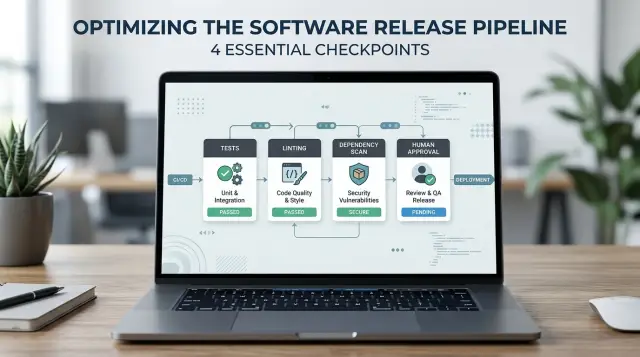
Table of Contents
Why unchecked AI code is risky
AI tools can produce code that looks finished before it's actually safe. The names are neat, the structure is tidy, and the comments sound sure of themselves. That surface polish can fool a busy team.
The problem is simple: code can read well and still break the product. A function may pass the happy path and fail on edge cases. A query may return data quickly and still expose records a user should never see. A payment flow may look fine in a demo, then charge the wrong amount when a coupon, retry, or failed webhook appears.
Small teams feel this first. When two or three people handle product, support, and shipping at the same time, fast output feels like relief. If AI writes a feature in minutes, the temptation is to merge it and move on. That's often where trouble starts.
AI makes weak code look believable. People trust what feels familiar. They skim a pull request, notice that it compiles, and assume the hard thinking already happened. It didn't.
The damage usually lands in parts of the product users notice right away: billing, account access, sign-up flows, admin permissions, and background jobs that touch customer data. These aren't rare edge cases. They're normal parts of a real product. One wrong condition, one missing check, or one risky package can turn a small merge into a support problem.
That's why quality gates matter. They aren't there to slow every release. They're stop points where the team checks risk before production takes the hit. Good teams don't trust code because it sounds right. They trust it after it passes a few clear checks and a human decides it's safe enough to ship.
If your startup uses AI to move faster, that's fine. Speed helps. Blind speed gets expensive. A ten-minute review before release is cheaper than a weekend spent fixing broken sign-up, refunding charges, and explaining a data leak to customers.
What a quality gate looks like
A quality gate is a rule code must pass before it moves forward. The result should be clear: pass or fail. If people debate the answer every time, the gate is too vague.
The best gates are plain on purpose. They remove guesswork, catch common mistakes early, and stop risky changes from slipping into production just because a tool produced them quickly.
The standard should stay the same for everyone. Code written by a developer and code drafted by AI should face the same tests, lint checks, and review path. If AI code gets an easier ride, the team starts trusting speed over proof.
Most gates should run automatically. Computers are good at checking whether tests pass, whether style rules fail, and whether a dependency has a known security issue. People are better at judging whether a change matches the product, whether the logic makes sense, and whether the risk is acceptable.
A practical setup is usually small and strict. The test suite passes in CI. The linter finds no blocking issues. New dependencies meet the team's security policy. A reviewer approves changes that touch sensitive areas such as auth, billing, or data deletion.
Each rule needs to stay binary. "Mostly fine" is not a gate. "Looks okay to me" isn't one either.
Short rule sets work better than long policy documents. A team can follow four or five rules every day. A 30-point checklist quickly becomes background noise, especially when people feel pressure to ship.
This matters even more when teams rely on AI often. Generated code can look clean and still miss an edge case, pull in the wrong package, or quietly break an older path. Clear gates contain that risk without dragging every change to a halt.
If a rule causes constant debate, rewrite it. If a rule never catches anything, remove it or lower its cost. The best gates are easy to remember, easy to automate, and hard to bypass by accident.
The four gates to add first
Start with four checks, not ten. Small teams can keep this simple and still cut a lot of risk.
- Run tests on the path that changed. If AI edits billing logic, test billing. If it changes login, test auth and session handling. You don't need a huge suite on day one, but you do need real coverage around the changed flow.
- Run linting and formatting on every change. This catches sloppy mistakes early: unused variables, broken imports, odd syntax, and inconsistent style. It also makes review faster because the diff is easier to read.
- Scan new or updated packages. Check for known security issues and license problems before the package reaches production. One careless dependency can create more risk than the generated code itself.
- Require a named reviewer for risky changes. Anything that touches payments, auth, data deletion, public APIs, or infrastructure should wait for human sign-off. Put a person on the record, not a vague note that "the team approved" it.
These four gates work best under one simple rule: if one gate fails, the deploy stops. Don't wave a warning through because the release feels small. Small changes break real systems every week.
Teams that work with Oleg Sotnikov often need this kind of simple control first, especially when AI speeds up output faster than review habits can catch up. A startup can generate five pull requests in one afternoon. Without gates, that speed turns into cleanup work.
Keep the first version fast. A test run that finishes in a few minutes gets used. A reviewer checklist with three or four questions gets read. You don't need perfect safety. You need a process that catches common failures before users do.
How to set up the flow
Start by closing the easiest path to mistakes. Protect the main branch so nobody can push straight into it. Every change should go through a pull request, even if your team is small and moving quickly.
That rule does two jobs at once. It gives your checks one place to run, and it makes review part of normal work instead of a last-minute scramble.
Set the flow in a fixed order so people don't guess what happens next. A developer opens a pull request instead of pushing to main. CI runs tests and linting on every pull request. If the change updates a package or lock file, CI also runs a dependency scan. The team merges only after every check passes and a reviewer approves the change.
This works because most low-risk changes pass without drama, while risky changes stop early. A failing test blocks broken logic. A lint error catches messy code before it spreads. A dependency scan spots known problems when someone adds or updates a package, not weeks later.
You don't need to scan every file on every run if that slows the team too much. Start with package manifests and lock files. That gives you most of the benefit with far less noise.
Add human approval where risk is high
Some changes need a person to read them no matter how good your automation looks. Require manual approval when a pull request touches login, billing, customer data, permissions, or deployment settings. AI often writes plausible code in these areas, and plausible is not the same as safe.
A short rule helps: if the change can lock users out, charge money, expose data, or break a release, a human must approve it.
For a small team, one reviewer is often enough. The reviewer checks the diff, confirms the automated checks passed, and asks one plain question: "Would I feel fine shipping this today?" If the answer is no, the pull request waits. That pause saves far more time than a rushed fix in production.
A simple example from a small team
Picture a five-person startup that wants file uploads in its customer portal. The feature looks small, so the team asks an AI coding tool to build the first version.
The tool produces a working upload form, a backend handler, and a new package for processing files. In a demo, it looks fine. A user picks a file, clicks upload, and sees it appear in the account area. That's often the moment teams trust the code too early.
The first gate is tests. One test sends a file much larger than the app should accept. The upload still goes through. Without that check, one customer could fill storage quickly, slow the app, or create an ugly cloud bill. The team adds a file size limit and returns a clear error message.
A lint run catches smaller problems around the same feature. The AI tool left dead code in the handler and skipped a basic input check. Those bugs don't look dramatic, but they make future bugs harder to spot.
Then the dependency scan flags the library the AI selected. It has an open security issue in one of its packages. Nobody noticed during the demo because the feature still worked. The scan forces a pause, and the team swaps it for a safer option.
Finally, a reviewer opens the portal in a guest session and reaches the upload page without logging in. That's worse than a broken button. It means anyone can probe the feature and try the endpoint. The reviewer finds a missing auth check that the generated code assumed already existed.
By release day, the team has fixed three real problems before users ever see them: no file size limit, a risky package, and guest access to a protected page. The release slips by one day. That's a cheap trade.
Where teams make avoidable mistakes
Teams often trust green checks too much. A test suite can pass and still tell you almost nothing if it only covers happy paths. AI-generated code makes this worse because it often looks complete even when it misses edge cases, weak error handling, or weird inputs that real users trigger on day one.
That's why test coverage alone doesn't settle the question. A small set of thoughtful tests usually beats a large pile of shallow ones. If a change affects payments, auth, or data deletion, someone should ask a blunt question: what would fail here in real life, and do our tests prove we'd catch it?
Another common mistake is turning one person into the permanent approver for every risky change. That sounds safe, but it usually creates a bottleneck and weaker reviews. One reviewer rarely holds full context on product behavior, security, infrastructure, and business risk every time. Approval works better when the reviewer fits the change, not just the title.
Teams also hurt themselves by applying the same rules to every edit. A typo fix shouldn't wait behind the same gates as a change to billing logic. When the process treats tiny edits and high-risk changes the same way, people get annoyed, click through checks, and stop taking the process seriously.
Temporary exceptions cause slow damage. A team skips a dependency warning to ship faster, disables a flaky test for one release, or postpones manual approval on a Friday evening. Then nobody comes back to clean it up. If you allow an exception, give it an owner and an expiry date. Otherwise it stops being temporary.
Readable code fools people more often than messy code. AI is very good at tidy structure, clean naming, and comments that sound confident. Reviewers relax when the output looks polished. That's the trap. Clean code can still hide bad assumptions, unsafe package updates, or logic that passes tests only because the tests are too narrow.
The fix isn't more ceremony. It's better judgment. Use stricter review where failure would hurt, lighter rules where risk is low, and clear ownership when someone makes an exception.
How to keep manual approval useful
Manual approval only works when the team saves it for changes that can do real damage. If every pull request needs the same sign-off, people start approving just to clear the queue. After a week or two, the gate becomes a habit instead of a real check.
Pick a short set of changes that always need a second look. Most teams should include anything that touches customer data, payment logic, login flows, permissions, account deletion, and public API access. AI-generated code can look neat while still changing a rule that should never move.
A reviewer shouldn't read code in a vacuum. Give them a tiny checklist and ask them to verify the parts that matter most:
- Does this change expose, copy, or delete user data?
- Can it charge money, change pricing, or skip a billing rule?
- Does it alter roles, permissions, tokens, or admin access?
- Did someone open the app and test the changed path by hand?
- If the team skipped a gate, did they record why?
That last point matters more than it seems. Exceptions happen. A hotfix may need to move fast. Even then, the team should record who approved the exception, what they skipped, and what they plan to check right after release. A one-line note in the ticket is enough. Memory fails quickly under pressure.
Reviewers should also open the app and try the path that changed. Click the button. Submit the form. Log in with a normal user and, if needed, an admin user. Five minutes of direct use often catches problems that tests miss, such as the wrong account seeing the wrong menu or a billing screen allowing the wrong plan.
Keep override rights tight. A small group should have permission to bypass manual approval, ideally people who understand product rules as well as code. If everyone can force a release through, the gate has no teeth.
Quick checks before every release
A release should pass the same checks every time, in the same order. If a build only works on one developer's laptop, that tells you almost nothing about what will happen in production.
Run the full test suite on a clean branch in your shared pipeline. That means fresh dependencies, fresh environment setup, and no hidden local fixes. Teams skip this when they feel rushed, and that's usually when small errors turn into late-night rollbacks.
A short release checklist is enough:
- Confirm tests pass in CI, not only on a local machine.
- Check lint results for the files changed in this release and fix new warnings.
- Review dependency scan results and clear unresolved high-risk issues.
- Verify rollback steps for database, schema, or config changes.
- Name the person who can stop the release if something looks wrong.
Linting often gets treated like cosmetic cleanup. It's more useful than that. New warnings in touched files can point to weak error handling, dead code, unsafe types, or rushed edits that deserve one more look.
Dependency checks need the same discipline. AI-generated code may pull in packages that solve a problem quickly but add security or maintenance risk. If a scan flags a serious issue, don't wave it through and promise to fix it later. Later rarely comes.
Rollback checks matter most when a release changes schema or configuration. A code deploy is easy to undo. A broken migration isn't. Write down the exact reversal steps before you ship, and make sure the team can follow them without guessing.
One more rule prevents a lot of pain: everyone should know who has release authority and who has stop authority. These can be the same person, but the decision must be clear. If a tester, engineer, or manager spots real risk, they need a direct path to pause the release instead of arguing in a chat thread.
What to do next
Pick one repository and make the process real there first. Add one branch rule for code that moves toward release, and use one short approval checklist that every risky change must pass. A small rule people follow beats a perfect policy nobody remembers.
Keep the first version plain. Run tests, lint the code, scan dependencies, and require human approval before release when the change touches sensitive areas. That's enough to catch a lot of bad AI-generated code without slowing the team to a crawl.
Don't spread your effort evenly across the whole product. Tighten test coverage first around billing, login, and data export. Those areas can hurt users, create support work, and turn a small release mistake into a real business problem. A checkout bug is worse than a layout bug. Treat it that way.
If the same gate fails again and again, the gate usually isn't the problem. The prompt may be weak, the test data may be poor, or the codebase may need clearer patterns for the AI to follow. Fix the root cause instead of arguing with the process.
For a small team, AI code quality gates should feel boring and predictable. A pull request opens, checks run, one person reviews the risky parts, and the change moves forward or goes back for fixes. If that flow feels heavy, trim the checklist before you remove the gates.
If your team needs help deciding where to put those gates, Oleg Sotnikov at oleg.is works with startups and small businesses on AI-first development workflows, infrastructure, and Fractional CTO support. Sometimes a short outside review is enough to set sensible rules and avoid expensive mistakes.
Start small, watch where the process breaks, and improve that part first. That's how these gates become normal team habits instead of one more policy people ignore.
Frequently Asked Questions
What is a quality gate?
A quality gate is a simple rule that code must pass before your team merges or deploys it. Good gates give a clear yes or no, like passing tests in CI, a clean lint run, a dependency check, or a named reviewer for risky changes.
Do small teams really need AI code quality gates?
Yes, especially if two or three people handle everything at once. Small teams feel the cost of bad releases fast, so a few strict checks save time, support work, and refund pain later.
Which gates should I add first?
Start with tests for the changed path, linting and formatting on every pull request, dependency checks for new or updated packages, and human approval for changes that touch auth, billing, data deletion, APIs, or deploy settings. That covers a lot of real risk without adding much drag.
Should AI-generated code follow different rules than human code?
Use the same baseline rules for both. AI code does not deserve an easier path, and human code does not deserve a free pass either. What matters is risk: sensitive changes need more review no matter who or what wrote them.
What changes always need manual approval?
Ask for human approval when a change can lock users out, charge money, expose data, change permissions, or break a release. Login flows, billing logic, customer data handling, admin access, public APIs, and infrastructure changes fit that rule.
How much testing is enough for AI-written code?
Test the flow that changed, not just the happy path. If AI touched uploads, try large files and bad file types. If it touched billing, try retries, coupons, and failures. A few thoughtful tests beat a pile of shallow ones.
Do I need to scan every dependency on every pull request?
No. Start by scanning package manifests and lock files on pull requests that add or update dependencies. That gives you most of the value with less noise and less waiting.
What should we do when a hotfix needs to ship fast?
Treat hotfixes as exceptions, not shortcuts. Let one named person approve the release, write down which gate you skipped and why, and run the missing checks right after the fix lands. If nobody owns the exception, it will stay forever.
How do we stop manual review from turning into rubber-stamping?
Keep the reviewer pool small, but do not make one person approve everything. Match the reviewer to the change, ask them to open the app and try the changed path, and give them a short checklist so they judge risk instead of clearing a queue.
Where should I start if our release process is messy?
Protect your main branch, require pull requests, and let CI run tests and linting on every change. Then add dependency checks and a short approval rule for risky areas. Pick one repository first and make the flow normal there before you spread it wider.


