AI bug taxonomy: sort issues before your team fixes them
Use an AI bug taxonomy to separate hallucinations, missing context, tool failures, and policy misses so your team fixes the right layer first.
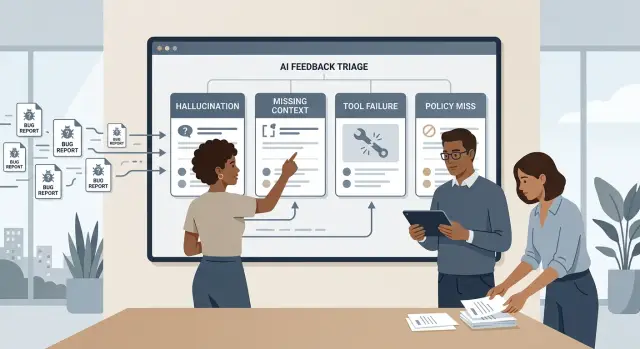
Table of Contents
Why AI bug reports get mixed up
Most teams start with the symptom. The bot gave a wrong answer, so the report says "hallucination" and stops there. That feels neat, but it hides the cause.
The same bad reply can come from different layers. The model might invent a fact. The prompt might miss needed context. A search tool might time out and return nothing. The product might not have a clear rule for when the assistant should refuse, escalate, or ask a follow-up question.
That is why AI bug reports get noisy so fast. People use one label for different failures, even when the fixes live in different places. An engineer can spend two days tuning prompts and later find that the tool call broke before the model even had a fair shot.
The reverse happens too. A team sees short, vague, or off-target answers and blames the tool. In reality, the assistant may have lost the customer details it needed. Product teams miss rule gaps for the same reason. If a reply looks confused, they may blame missing context when the real problem is that nobody told the system what to do.
A useful bug taxonomy separates the symptom from the source. That sounds minor. It changes triage.
Instead of asking, "Was the answer bad?" ask, "Which layer failed first?"
That shift saves time because each tag points to a different owner. Prompt and retrieval work go to one team. Tool problems go to another. Rule and compliance issues go to product or policy owners. Pure model behavior stays in its own bucket.
If teams skip that split, they dump unlike issues into one queue. The queue looks busy, but patterns stay hidden. People fix the wrong layer, the same bug comes back, and everyone decides the AI is unreliable when the real mess is the process around it.
The four tags to start with
Most reports begin the same way: "the bot gave the wrong answer." That single line can hide very different problems. A clean taxonomy separates model mistakes from data gaps, tool problems, and rule problems.
Hallucination is the easiest tag to recognize. The model states something false, invents a source, or fills in a missing detail with something that sounds believable but is untrue. If a support bot says an order shipped yesterday when no shipment exists, that is a hallucination.
Missing context is different. The model may answer in a sensible way, but it does not have the data, history, or instructions it needs. A user asks, "Can I return this?" and the assistant replies with the general return policy because it never got the order date or product type. The answer sounds reasonable, but the system did not give the model enough to work with.
Tool failure means the problem sits in the action layer. The assistant may call the wrong tool, skip a needed tool, or get a bad result and continue anyway. Picture a chatbot that should check a billing system before answering but replies from memory instead. The model is not necessarily inventing facts. It may be working with a broken or missing tool result.
Policy miss is about rules. Sometimes the assistant allows something it should block. Other times it blocks a normal request that should pass. If a customer asks for a copy of their own invoice and the bot refuses for no clear reason, that is a policy miss, not a hallucination.
Pick one primary tag even when a report shows more than one issue. Start with the first layer that failed. If the bot skipped the account lookup and then guessed the answer, mark tool failure as primary and hallucination as secondary. That simple choice helps the right team fix the right thing first.
Match each tag to the failed layer
A tag only helps if it sends the issue to the team that can change the behavior. Good triage cuts out the usual loop where support files a bug, engineering guesses, and three teams touch it before anyone fixes the real cause.
If the assistant invents a fact, start with the layer that shaped the answer. That usually means the prompt, the retrieval setup, or the team that reviews answer quality. A made-up refund rule often comes from weak instructions or poor source selection, not a broken API. Hallucination reports usually belong with the people who own prompts, knowledge retrieval, or evaluation.
If the answer feels thin because the model never saw the customer tier, account history, current page, or recent message, send the report to the people who control context. That might be the memory layer, the data pipeline, or the UI that collects input. The fix is often simple: pass one more field, keep a short session summary, or expose a missing record.
Tool failure belongs somewhere else. When the assistant picked the right action but the action did not run, timed out, hit the wrong endpoint, or returned stale data, the problem is in the integration layer. Send those reports to the API, integration, or agent workflow owner. If a scheduling bot says "I booked it" after the booking call failed, the tool path broke.
Policy misses need a different owner again. If the assistant shared something it should block, skipped a required approval, or gave advice outside product rules, route it to the team that owns safety rules, business rules, or approval flows. These fixes usually start with clearer boundaries and better checks, not a new prompt.
When a report feels unclear, ask one question: which layer had the power to prevent this exact outcome? Send it there first.
What to collect with every report
Good triage starts with plain, complete evidence. If a report skips the basics, teams argue about the label instead of fixing the problem.
Start with the user's goal. One sentence is enough: "The user wanted a refund summary from three support emails" or "The user asked the bot to book a follow-up call." That line tells the team what success looked like before they read anything else.
Minimum report pack
A report is usually strong enough to triage when it includes five things:
- the user's goal in one clear sentence
- the exact prompt, or the full message history if the bug happened in chat
- the model name, model version, and date of the run
- any tool calls, tool errors, and the data those tools returned
- the expected answer next to the actual answer
The exact conversation matters more than a summary. Small details change model behavior fast. One missing sentence in the chat history can make a hallucination look like missing context and send the issue to the wrong team.
Tool data matters just as much. If the assistant called search, retrieval, billing, or calendar APIs, save the raw request and response when you can. If a tool returned empty data, timed out, or sent stale records, write that down. Otherwise people blame the model for an integration problem.
Put expected and actual output side by side. Do not write "bad answer" or "wrong result." Write what the system should have done and what it did instead. Short comparisons save time.
A small example makes the point. If the user asked for "today's open invoices" and the assistant replied with made-up totals, include the invoice tool response. If the tool returned no records, the issue may be a tool problem or missing context. If the tool returned correct records and the model invented numbers anyway, that points somewhere else.
Screenshots can help, but raw text is better. If you remove private data, note what you removed so the team can still judge the failure.
How to tag an issue
Start with the last user request, not the broken answer. That message tells you what the assistant needed to do, which facts mattered, and what a good reply should have looked like.
Then ask a plain question: what did the assistant need in order to succeed? Maybe it needed account details, a product document, a database lookup, or a rule that allowed a certain reply. If you skip this step, teams often blame the model for a problem that started somewhere else.
A simple review flow works well:
- Check whether the needed context was available in the prompt, memory, or retrieved content.
- If the answer depended on outside data, check whether a tool actually ran and returned something useful.
- Look for any rule, safety setting, or product policy that changed, shortened, or blocked the answer.
- If all of that looks fine, check whether the model still invented a fact or ignored clear evidence.
This order matters. If the model never got the shipping policy, tag the issue as missing context even if the final answer also sounds made up. If the support bot called the order API and got an error, tag tool failure before you start debating the wording.
Policy checks belong after context and tools for a reason. A blocked refund instruction, an overly cautious refusal, or a forced rewrite can make the answer look confused when the model actually followed a rule. In that case, the first failure is in the policy layer.
Use the hallucination tag only when the assistant had what it needed, no tool broke, no rule warped the output, and it still invented details. That gives the model team something real to fix.
Pick the earliest layer that failed and use that as the main tag. Add a second tag only when the chain truly has two breaks, such as missing context followed by guessing.
A simple chatbot example
One chat transcript can point to very different failures. That is why teams should tag the cause, not just the symptom.
Say a customer asks support to reschedule an order and change the delivery address. The bot replies, "Your order already shipped, so I can't change it." A human agent checks the order system and sees the package is still in packing.
That sounds like one bug, but the fix depends on what happened behind the scenes.
If the bot never looked up the order at all, tag it as tool failure. Maybe the order API call failed, timed out, or the bot skipped the lookup step. The team should fix the tool path, not rewrite the answer text.
If the bot did query the order system but got stale data or missed the latest status update, tag it as missing context. The model answered from incomplete facts.
If the bot had no shipment data and still claimed the order already shipped, tag it as hallucination. The problem is the invented status.
If the company does allow address changes during packing but the bot refused anyway, tag it as a policy miss. Then the failure sits in the business rules, guardrails, or prompt instructions.
Small details matter here. If logs show a successful lookup with an old timestamp, the issue points to stale context. If there is no lookup in the logs, the tool layer failed. If the lookup returned "packing" and the bot still said "shipped," that is a hallucination.
The customer only sees a wrong answer. Your team needs to see which layer broke first, or it will spend a day fixing the wrong thing.
When one issue needs two tags
Some reports need two tags because one failure sets up the next. If you tag only the loudest symptom, the wrong team picks it up and the first bug stays in place.
Start with the earliest failure in the chain. A bad answer might look like a hallucination, but if the assistant never received the customer record, the first break is missing context. The false answer came after that.
Pick the first break
Use a secondary tag when the first failure clearly triggered another problem. The first tag tells you where to look first. The second tag tells you what users actually saw.
Teams often add too many labels. That feels careful, but it blurs ownership. Most reports need one primary tag and one secondary tag. If you cannot explain the pair in one short sentence, split the ticket or rewrite the timeline.
A few pairs show up again and again:
- missing context + hallucination: the model lacked account data, then guessed
- tool failure + hallucination: the tool timed out, then the model filled the gap with a made-up answer
- policy miss + tool failure: the assistant tried an action it should not have attempted
A support example makes this clearer. The bot tries to check an order, but the order lookup returns nothing because the tool call fails. The bot then replies, "Your package arrives tomorrow." Primary tag: tool failure. Secondary tag: hallucination.
If two teams need separate fixes, split the ticket. One ticket can cover the broken lookup. Another can cover the assistant behavior after missing data. Keep them linked, but do not make one team wait for the other team's queue.
Add one short note that explains why both tags are there. For example: "Primary tag is tool failure because the CRM lookup returned nothing. Secondary tag is hallucination because the assistant still answered with a fake order status."
That note saves time. The triage owner sees the chain quickly, engineering knows where to start, and product can judge user impact without rereading the whole transcript.
Mistakes that waste triage time
Most slow triage starts with a label that says more than the evidence supports. The whole system breaks down when every bad output gets dumped into the same bucket.
The most common mistake is calling every wrong answer a hallucination. Sometimes the model did invent a fact. Sometimes it answered from stale context, failed to call a tool, or followed a rule you did not expect. If the team starts with the wrong tag, it fixes the wrong layer.
Another time sink is reading only the chat transcript. The visible reply is only part of the story. Tool logs, retrieval traces, prompt version, and policy events often show what actually happened. A bot that says "I can't find your order" may look confused, but the real issue could be a timeout in the order lookup tool.
Reviewers also lose time when reports skip the expected result. "The answer is bad" forces someone else to guess what good looked like. A short sentence helps: what the assistant should have done, what source it should have used, or what action it should have taken.
A few habits cause trouble fast:
- mixing policy complaints with product bugs in one ticket
- creating vague tags such as "bad answer" or "wrong reply"
- filing a report without logs, prompt version, or tool output
- describing only what happened, not what should have happened
Policy and product bugs need different owners. If a safe request gets blocked, that may be a policy miss. If the assistant gives the wrong refund status because retrieval pulled the wrong record, that is a product issue. Put both in one pile and triage turns into debate.
Tag names also need clear edges. "Bad answer" tells nobody where to look. "Missing context" or "tool failure" gives the team a starting point. One tag should mean one kind of failure.
Teams that stay strict on this save real time. They spend less effort arguing over labels and more time fixing the system that actually broke.
Quick checks for a clean report
A report should let another person reproduce the problem in a few minutes. If they need a call, extra backstory, or a guess about what the user typed, the ticket is still too vague.
Clean reports keep the taxonomy useful. Triage moves faster when the ticket already shows what failed, which model touched it, and which team should look first.
- Paste the exact user request. Include the full prompt, any uploaded content, button clicks, and settings that shaped the answer.
- Name the model and the tools involved. If the reply used retrieval, web search, a calculator, or a code runner, say so.
- Choose the tag that points to one team first.
- Write the expected result in plain words.
- Check that a teammate can replay it quickly in a fresh session.
Small details matter more than people expect. "User asked for a summary" is often not enough. "User asked: 'Read this support thread and draft a refund reply in a polite tone'" gives the reviewer something real to test.
The expected output matters just as much. A ticket that says "bad response" starts an argument. A ticket that says "it should refuse medical advice and suggest speaking to a doctor" gives the team a clear target.
One short example shows the difference. "Bot made up a number" is messy. "GPT-4.1 with spreadsheet tool off, prompt pasted below, returned a revenue total that does not match the attached table. Expected output: sum the listed values only" is a report someone can act on right away.
Next steps for your team
Start small and make the habit stick. Put the four tags into your bug tracker now: hallucination, missing context, tool failure, and policy miss. Then add a short report form so people stop writing long complaints that hide the real problem.
Keep the form lean. If it takes more than two minutes to fill out, people will skip details or guess. A simple form can ask for what the user tried to do, the exact output or failure, what should have happened instead, and the first tag that seems to fit with one piece of evidence.
That is enough to begin. A simple system that people actually use beats a perfect one that nobody touches.
Run one review every week. Look at tagged issues together, not one by one in isolation. If your team keeps mixing up two tags, fix the definitions or merge them. Confusing labels create noisy data, and noisy data leads to bad fixes.
Give the process a few weeks before you start tuning prompts or swapping models. Count which layer fails most often. If tool failure keeps showing up, the problem is probably in integrations, permissions, timeouts, or parsing. If missing context wins, work on retrieval, session state, or the way you pass user data into the model. If policy misses rise, tighten instructions and review guardrails.
This is where many teams lose time. They tweak prompts first because it feels fast. Often the real issue sits somewhere else.
If your team needs help setting up triage, delivery habits, and a practical AI-first workflow, Oleg Sotnikov at oleg.is works as a Fractional CTO and startup advisor on production AI systems. That kind of outside help is useful when you need a working process, not another slide deck.
Done well, this becomes part of your normal release rhythm. Reports get shorter, triage gets faster, and fixes land in the right layer.
Frequently Asked Questions
What’s the difference between hallucination and missing context?
Hallucination means the assistant invented a fact. Missing context means the assistant answered with too little data, like no order date, account status, or prior message. If the system never gave the model what it needed, tag missing context first.
What if the bot skipped a lookup and then made something up?
Use tool failure as the primary tag and hallucination as the secondary tag. The first break happened when the lookup did not run, timed out, or returned nothing. Fix that path first, then decide how the assistant should respond when data is missing.
How do I pick the primary tag?
Start with the user’s last request and ask which layer could have prevented the bad result. Pick the earliest layer that failed: context, tool, policy, or model. That sends the ticket to the team that can act on it first.
What should every AI bug report include?
Include the user’s goal, the exact prompt or full chat history, the model name and run date, any tool calls and tool results, and the expected answer next to the actual answer. Raw text usually helps more than screenshots because another reviewer can replay the issue faster.
When should I add a second tag?
Add a second tag only when one failure clearly caused another. If a tool timed out and the assistant guessed, tool failure comes first and hallucination comes second. If you cannot explain both tags in one short sentence, keep one tag or split the ticket.
How can I tell a policy miss from a bad model answer?
Check whether a rule blocked, changed, or allowed the reply. If the assistant refused a normal request or allowed something your product rules forbid, tag policy miss. If no rule shaped the answer and the assistant still invented details, use hallucination.
Why do exact prompts and chat history matter so much?
Small details change model behavior fast. One missing sentence can turn a context problem into what looks like a model problem. Full history shows what the assistant actually knew when it answered.
Who should handle each tag?
Send missing context issues to the team that owns memory, retrieval, or input data. Send tool failures to the people who own APIs and agent logic. Send policy misses to product or rule owners. Send true hallucinations to the team that tunes prompts, retrieval, or answer quality.
Is 'bad answer' ever a useful tag?
No. It only names the symptom. A tag like missing context, tool failure, hallucination, or policy miss tells the team where to look first and makes patterns easier to spot.
What’s the simplest way to start using this taxonomy?
Add the four tags to your tracker and use a short form with the user goal, exact input, expected result, actual result, and one piece of evidence. Review the tagged tickets every week and see which layer fails most often. That gives your team a clear place to improve first.


