AI automation rollback: how to pause, undo, and rerun
AI automation rollback starts with simple controls to pause, undo, and rerun work before bots change invoices, customer data, or access.
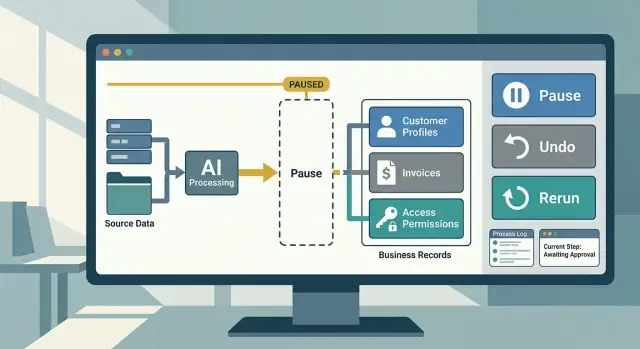
Table of Contents
What goes wrong without a rollback plan
One bad run can spread faster than most teams expect. An AI workflow rarely makes one mistake and stops. It often repeats the same mistake across every record it touches.
Say a model reads support tickets and marks refund requests as "resolved" instead of "needs review." In ten minutes, it can close hundreds of cases, trigger follow-up emails, and remove work from the team queue. By the time someone notices, the wrong status is already in your system.
That is why record changes need extra care. A draft summary, suggested reply, or internal note is easy to replace. A write to a customer account, invoice, order, contract, or support case is different. Once the system saves that change, other tools can act on it right away.
A bad write rarely stays in one place. It can send the wrong message to customers, hide work that still needs a human, corrupt reports teams rely on later, or trigger billing, shipping, or access changes.
Alerts help, but alerts are not recovery. An alert tells you something looks off. It does not pause the workflow, show every record that changed, or restore the old values. Without a rollback path, people end up doing slow detective work under pressure.
That cleanup costs more than most teams expect. Someone has to find the bad records, compare old and new values, decide what to keep, repair downstream data, and explain the mess to support, finance, or customers. A mistake that took one minute to write can take two days to unwind.
Without a rollback plan, teams start to fear their own automations. They add manual checks everywhere, delay launches, and stop trusting the data. That loss of trust hurts even when the model works fine the next time.
The safest way to think about AI is simple: if it can change records that matter, it also needs a way to pause, undo, and rerun that work in a controlled way.
Decide which records matter most
Start by separating records you can rebuild from records you cannot. A draft reply, internal note, or suggested tag is usually easy to replace. A paid invoice, signed agreement, customer balance, permission setting, or shipment status is not.
This sounds obvious, but teams skip it all the time. They let AI write into live systems before deciding which data can absorb mistakes and which can cause real damage in minutes.
A workable rollback plan starts with a plain inventory. Write down every record the automation may touch, then mark each one as draft or final. Draft records should stay reversible by design. Final records need tighter rules before the model can change them.
Records that usually need extra care include:
- billing and payment data
- customer account status
- user permissions and access levels
- inventory or order state
- contracts, approvals, and compliance logs
Then rank actions by the damage they can cause if they fail. Do not rank them by how hard they are to build. A bad summary on an internal note may waste ten minutes. A wrong refund amount, closed support case, or deleted access rule can create hours of cleanup and upset customers.
A simple scale works well. Mark each action as low, medium, or high risk based on two things: how many records it can change and how hard those records are to repair. If one bad run can touch 5,000 customer profiles, that action belongs in the high-risk group even if each edit looks small.
Each record type also needs a human owner. Support can own ticket status. Finance can own invoices and credits. Operations can own fulfillment data. Product or engineering can own permissions and user state. That owner decides what the automation may change on its own, what must pause for review, and what must stay read-only.
This keeps rollback from turning into guesswork. When you know which records matter most, you can set pause points, undo rules, and reruns with much less chaos.
Put a pause point before changes land
The safest place to catch a bad decision is right before the system writes anything to a real record. Once the model updates a customer profile, sends a refund, or closes a ticket, cleanup gets harder.
A good rule is simple: the model can prepare changes first, but it should not always apply them right away. Let it draft the action, show what will change, and wait when the risk is high.
Where a pause point helps
A pause point makes sense when one action can affect money, legal records, customer access, or data other tools depend on. In those cases, a review queue is better than full auto.
That queue does not need to be fancy. It can be a small inbox, a table in your admin tool, or a task list in your internal system. What matters is that a person can quickly see the proposed change, the reason for it, and the exact record it will touch.
Use clear approval rules so people do not guess. For example:
- send anything over a refund limit to a human
- pause account changes for VIP or enterprise customers
- hold edits when model confidence is low
- review actions that affect more than one record at once
Keep these rules narrow. If you route every action to a person, the queue turns into a traffic jam and people stop paying attention.
Low-risk work should still run on its own. Drafting tags, sorting incoming requests, filling internal notes, or preparing suggested replies usually does not need approval. Those tasks save time without putting important records at risk.
The split is straightforward: if an action is easy to ignore, automate it. If it changes something people rely on, pause first.
One more detail matters. Show the reviewer the change in plain language, not raw model output. "Change billing email from A to B" is easy to approve. A block of JSON is not.
Small teams often do this better than large ones because they keep the rules short. That is also how experienced CTOs set up safe AI operations: automate the boring parts, add review where mistakes get expensive, and make the approval path obvious.
Make every change easy to undo
If an automation can edit a live record, it needs a clean way back. That starts before the write happens, not after someone spots a bad result in a dashboard, inbox, or CRM.
Save the old state first. A simple before snapshot is often enough: the field value, the record version, and the exact data the automation plans to replace. If the job touches several fields, save all of them together so the system can restore the record in one move.
An audit trail matters just as much. You want to know which automation made the change, when it ran, what prompt or rule triggered it, and which records it touched. Under pressure, that cuts hours off the search for the bad run.
What an undo record should include
- the original value or full pre-change snapshot
- the new value the automation wrote
- the job ID, user, or service account behind the change
- the time of the write and the batch or run number
Do not treat each field update as its own tiny event if people think of the work as one action. If an automation closes a refund case, adds a note, and changes the status, group those updates together. Then one undo reverses the whole action, not half of it.
Speed matters more than most teams expect. When a model starts changing the wrong records, nobody wants a long manual recovery plan. The undo should be fast enough that an operator can use it in minutes, with clear scope and a preview of what will roll back.
A good rule is simple: if a person can spot the mistake in one screen, they should be able to undo it in one screen too. That may mean a single button for the last run, a batch rollback by job ID, or a command that restores records from the stored snapshot.
This is where rollback stops being theoretical. You are not trying to build a perfect model. You are building a system that lets people recover quickly, keep working, and rerun the job after they fix the prompt, rule, or data filter.
Add safe reruns step by step
When an automation fails halfway through, the worst fix is to press retry and hope for the best. That is how teams send the same email twice, add two notes to one account, or change a record that a person already fixed.
A safer approach starts with smaller steps. If your workflow reads a record, asks the model for output, saves a note, and updates a status, each step should stand on its own. When one step fails, rerun that step only. Do not restart the whole chain unless you know the earlier steps left nothing behind.
Before any rerun, check whether the first run partly worked. Partial success is common. The model may have created the draft, but the final save timed out. Or the save may have worked, but the system never marked the job as complete. If you skip that check, your retry can create a second change instead of finishing the first one.
A retry also needs protection against duplicate writes. Give each run a unique operation ID and attach it to every write. Then your app can tell, "I already saved this change," and skip the second write. That one guard saves a lot of cleanup.
A good rerun check is short:
- confirm which exact step failed
- check whether any earlier write already landed
- make sure the record still matches the expected state
- reuse the same operation ID on retry
Keep a plain log entry for every rerun. Write down who triggered it, what failed, what the system found during the check, and why the rerun was allowed. "Timeout" is useful. "Model returned invalid format" is useful. "User changed the record, so we skipped retry" is even better.
Teams that run AI in production usually learn this the hard way: retries are not a repair tool unless they are narrow, duplicate-safe, and easy to explain later. If your team cannot say exactly what a rerun will touch, it is too broad.
A simple example from a support team
A support team often starts with a bot that does small, useful jobs. It reads new tickets, adds tags, fills in account details, and writes a short internal note so the next agent has context. That sounds harmless until the bot mixes up two customers with similar names.
Picture a billing ticket from "Northwind Solar." The bot matches it to "Northwind Systems" instead, then adds the wrong customer tag and prepares to write a note that says the account has a refund dispute. That is the sort of mistake that turns a simple ticket into a finance problem.
A safer flow puts a pause point right before any edit lands in billing notes. The bot can still draft the note, suggest the tag, and show the matched customer record, but a person confirms the account ID before the system saves anything. That single pause saves a lot of cleanup later.
The flow can look like this:
- The bot reads the ticket and suggests a customer match.
- It adds a draft tag and draft note, but does not save them to billing history.
- A support agent checks the preview and spots the wrong customer.
- The agent rejects the change, fixes the customer ID, and sends the step back for another run.
If the bad edit already slipped through, the team needs a clean undo. That means the system stores the original note, the new note, who approved it, and when the change happened. One click should remove the wrong tag and restore the previous billing note version.
Then the team reruns only the failed part. They do not need to reopen the whole ticket or repeat earlier steps that were correct. They update the customer match, keep the original message, and rerun the note step with the corrected input.
That is the difference between a small incident and a messy afternoon. The bot still helps, but people stay in control when the record can affect billing, refunds, or trust.
Mistakes that create a bigger mess
Small errors get expensive when an automation writes to live records before anyone can trace what happened. The worst part is not the first mistake. It is the cleanup after a team loses track of which records changed, why they changed, and whether a retry will make things worse.
One common failure starts with writing first and logging later. A workflow updates customer notes, changes order status, or edits a billing field, then tries to record the action after the fact. If the log step fails, you now have changed records and no clean history. Teams end up guessing which rows to fix by hand.
Another mess starts when people rerun the whole job with no checks. A failed task does not always mean nothing happened. Maybe it updated 200 records, timed out on record 201, and returned an error. If someone retries the full batch, the first 200 may get changed again. That can duplicate messages, reopen closed tickets, or overwrite a human edit that happened after the first run.
Scope causes trouble too. One prompt should not touch too many systems at once. If the same step can edit a CRM record, send an email, create an invoice, and post to Slack, one bad output spreads fast. Keep the model's reach narrow. Let one step propose a change, and let a separate step apply it where it belongs.
Test data also gives teams false confidence. Clean sample records rarely act like live work. Real records have odd names, missing fields, old notes, duplicate entries, and exceptions nobody documented. If you skip test data that looks and behaves like production, the first real run becomes the test.
A better approach is boring on purpose. Log the intent before the write. Mark each record with a run ID. Retry only the records that need another pass. Test with scrubbed data that still keeps the messiness of real operations. That slows the first launch a little, but it saves hours when something breaks on a Tuesday afternoon.
Quick checks before launch
A rollback plan should pass a few plain tests before you let it touch live records. If one of these checks fails, keep the automation in review mode and fix the gap first.
Start with the stop button. When something looks wrong, a person should be able to pause new work with one click. The pause should stop fresh jobs from starting while clearly showing which items already ran and which are still waiting.
Then check recovery. If the automation edits customer notes, order data, tickets, or invoices, your team needs a clean way to restore the last good state. That restore path should be fast and boring. If recovery depends on an engineer writing a custom script under pressure, you are not ready.
Use this short checklist:
- a non-technical teammate can pause the workflow without shell access or code changes
- the team can restore one record or a small batch to the previous version
- the system can rerun one failed item without creating duplicates, double charges, or repeated messages
- the logs show what the model read, what it changed, and why the action happened in plain language
The rerun test matters more than many teams expect. A failed job is annoying. A failed job that runs twice and creates two records is worse. Pick one real item from staging, fail it on purpose, then rerun only that item and confirm the result stays clean.
Logs need the same level of care. A support lead or operations manager should be able to read the event trail and answer four basic questions: what started this, what changed, what failed, and what happens next. If the log only makes sense to the person who built it, the system is too fragile.
One rule is worth keeping: if your team cannot pause it, restore it, or explain it, do not let it write to records that matter.
What to do next
If your team tries to make every workflow safe at once, the work usually stalls. Pick one workflow, one record type, and one place where a bad change would hurt. That makes the first version small enough to test, fix, and trust.
A good rollback plan is plain on purpose. You want clear steps, not clever logic. If an AI process edits customer support tickets, start there. Leave billing, refunds, and account access for later.
Run a failure drill before you go live. Feed the workflow a bad input, stop it halfway, and check whether your team can pause the job, undo the changes, and rerun only the safe part. Put a timer on it. If people spend 20 minutes asking who owns the fix, the process is not ready.
Write down the owners in one short note and keep it where the team already works:
- who can pause the workflow
- who can approve an undo
- who can rerun the job after a fix
- who checks the logs afterward
Names beat vague role labels. "Ops team" is too loose. "Maya pauses it, Chris approves the undo, Lee reruns it" is much better.
It also helps to keep one small test set of records that your team can break on purpose. That gives you a safe way to practice undoing automated changes and rerunning failed automations without touching live data. After two or three drills, weak spots get obvious. Maybe the logs are too thin. Maybe the rerun step repeats work you already reversed. Better to find that now.
If you want an outside review, Oleg Sotnikov at oleg.is does this kind of Fractional CTO work with startups and small teams. A short review before launch can tighten the pause, undo, and rerun steps while the fixes are still cheap.
Once one workflow survives a messy test run, use the same pattern on the next one. Safe AI operations grow one tested process at a time.


