Human approval points in AI automations that prevent mistakes
Human approval points in AI automations help teams stop bad refunds, risky account changes, and accidental sends before they cause real damage.
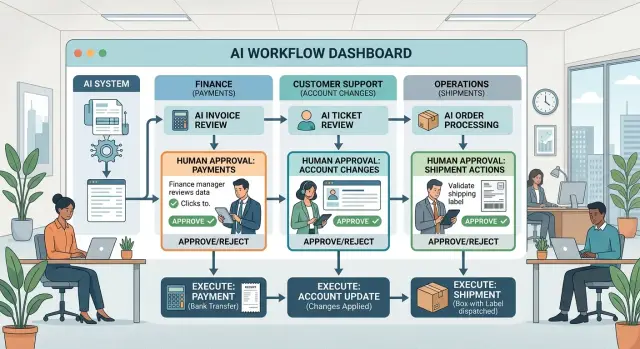
Table of Contents
Why this matters before you automate irreversible actions
AI can sort tickets, draft replies, flag odd invoices, and prepare next steps with little risk. The problem starts when it can do something you can't cleanly undo.
Send a refund to the wrong customer, and finance has to chase it down. Pay the wrong vendor account, and you may end up with a bank issue, an audit issue, and an angry supplier. Delete the wrong record, and support loses the history it needed. Ship the wrong order, and now you're paying for freight, return handling, replacement stock, and damage control.
Teams usually learn this the hard way. One-way actions are cheap to trigger and expensive to fix. The original click takes a second. The cleanup can take three people, five systems, and two days of back-and-forth.
These mistakes also spread fast. Billing syncs to accounting. Shipping data reaches the warehouse. Deletions remove context from later reviews. Once that chain starts, the cost rises quickly.
That doesn't mean every task needs a person in the loop. That's where teams often get stuck. They either trust the agent too much, or they add approval to everything and make the whole process slow.
A better split is simple. Low-risk tasks can run on their own, like tagging a ticket or drafting a reply. Medium-risk tasks can prepare work for review, like filling in a refund request or a payout form. High-risk tasks should stop right before the final action.
That's the point of approval gates. You don't pause everything. You pause only when money leaves, data disappears, permissions change, or a real-world action starts.
Lean teams miss this because automation saves time so quickly at first. But one bad payout or one mistaken deletion can wipe out those gains. A good review flow keeps the speed where it's safe and adds human approval only where loss can happen fast.
What counts as an irreversible action
An irreversible action is any step an AI agent can take that you can't cleanly undo in a few minutes. Sometimes the action itself is permanent, like deleting a record. Sometimes you can reverse it on paper, but the cost, confusion, or trust damage remains.
Money is the clearest example. If an agent sends a refund, pays a vendor, issues store credit, or changes invoice terms, the company might recover later, but it still loses time, creates accounting work, and may trigger disputes.
Data changes belong in the same group. When a system deletes, merges, or overwrites a customer record, the old version may be gone for good. Even with backups, restoring one bad change can take hours and can break reporting, billing, or support history.
Access changes need the same care. If an agent upgrades permissions, removes access, resets security settings, or changes who can approve spending, one mistake can lock out staff or expose private information.
Operational changes often look harmless until they go live. A shipment reroute, a cancellation, a rescheduled field visit, or a stock transfer can trigger fees and upset customers. One automated change can create a chain of manual fixes across support, finance, and warehouse teams.
Messages can be irreversible too. An email or chat reply that promises a refund, admits fault, confirms a contract term, or gives the wrong billing answer can create legal and trust problems fast. You can send a correction, but the first message still sits in the customer's inbox.
A simple test works well. Stop before any action that:
- moves money
- changes or removes records
- changes permissions or account ownership
- commits the company to a shipment, cancellation, or schedule
- sends a message with legal, billing, or reputation risk
Those are the points where a person should pause, read, and approve before the agent acts.
Where finance needs a human review
In finance, review should happen right before money leaves the account, the ledger changes, or a tax record updates. Those are the moments where one fast mistake turns into real loss, cleanup work, or a compliance problem.
Refunds are the first place to draw a line. Let the agent handle small, routine cases if the rules are clear, but set a hard threshold for review. A person should check any larger refund, look at the order history, and confirm that the reason makes sense. A $20 mistake is annoying. A $2,000 mistake gets noticed in the next meeting.
Vendor payments need the same caution, especially when bank details change. An agent can match invoices, flag duplicates, and collect the paperwork. It should not approve a payment to a new account on its own. Finance staff should compare the details with past records and confirm the change through a trusted contact. Fake bank update requests often look ordinary.
Write-offs, credits, and manual discounts also need a person. These changes affect revenue and margins, and they can hide a deeper issue. Sometimes the problem is a real billing error. Sometimes it's a customer asking for an exception outside policy. A quick review keeps those cases from piling up into messy books.
Month-end close needs a hard stop on casual edits. Once the period closes, invoice changes should pause until someone approves the correct fix. In most cases, finance should decide whether to issue a credit, create an adjustment, or move the change into the next period. Let the agent draft the correction, not post it.
Tax and payroll changes should always go to a person. One wrong tax code or withholding setting can affect every payslip in the next run. That's not a good place to trust automation without review.
The rule for finance can stay very plain: if the action moves cash, changes bank data, edits closed books, or touches tax or payroll, a person approves it first.
Where support needs a human review
Support teams can automate plenty of routine work. Password resets, order status updates, and simple FAQs are usually fine. The risk starts when an agent can change an account, move money, or send a message that creates a real obligation.
An agent should not close accounts or delete customer data on its own. Those actions are hard to undo, and a small mistake can lock out the right user or erase information the company still needs for billing, disputes, or compliance. A person should confirm the request, check the account history, and make sure it matches policy.
Changes to email, phone number, or shipping address also need a human check. These requests look harmless, but they are common account takeover moves. If the agent updates contact details before someone verifies identity, it may hand control to the wrong person.
Refunds and replacement orders need limits. Small, low-risk cases can follow clear rules, but high-value refunds should pause for review. The same goes for expensive replacement shipments, repeat claims, or orders with odd patterns. AI can collect the facts and draft the response, but a person should approve the final action.
Support replies can create trouble too. If a message promises compensation, admits fault, or says the company is responsible for a loss, a human should review it first. One badly worded reply can turn a simple complaint into a legal or financial issue.
Some tickets should go straight to a trained person:
- suspected fraud or account takeover
- abuse, threats, or harassment
- cases involving minors, elderly customers, or people in distress
- disputes that mention chargebacks, legal action, or regulators
A simple rule works well here. If the next support action changes ownership, erases data, sends money, or makes a promise, stop the agent and ask for review. That one pause can prevent the kind of mistake customers remember for years.
Where ops needs a human review
Operations teams deal with stock, supplier commitments, work schedules, and service windows. If an agent changes any of those on its own, one small mistake can turn into a missed delivery, an idle crew, or a broken promise to a customer.
Inventory moves are an obvious stop point. When a system wants to transfer items between locations, a person should check quantities, timing, and demand at both sites. A bad move can leave one warehouse overfilled and another unable to ship.
Purchase orders need the same care, especially when the amount is large or the agent wants to switch suppliers. Lowest price doesn't always mean lowest risk. A buyer may know that one vendor ships late, packs poorly, or pushes awkward payment terms, and that judgment rarely shows up neatly in the data.
Schedule changes also need human review. If an agent moves crews, delivery routes, or field visits, a manager should confirm travel time, staff availability, and customer commitments. A schedule can look efficient on screen and still fail in real life if the team lacks the right tools or two jobs now overlap.
Service shutdowns and maintenance notices should stay behind approval unless the case is routine and low risk. If a planned action could interrupt service, delay a delivery, or put an SLA at risk, a person needs to make that call.
Most ops teams end up drawing the line in the same places: stock transfers across sites, purchase orders above a set amount, supplier swaps, schedule edits that affect crews or same-day deliveries, and any service pause or customer notice.
Picture a growing company with two warehouses and a small delivery team. The agent sees low stock in one city and tries to move inventory overnight, reassign a driver, and delay maintenance on a packing station. Each choice may look sensible on its own. Together, they can create late orders and overtime costs.
The agent can still do most of the work. It can draft the change, explain why it wants to make it, and show the expected result. Then an ops lead approves, edits, or rejects it. That's the safest version of automation when operations touch physical goods, service uptime, and customer promises.
How to map approval points step by step
Start on paper, not in code. Open a shared document and trace every action the agent can take, from reading a ticket to changing data, issuing a refund, or triggering a deployment. Include the boring cases and the messy ones. Teams often miss the actions that happen after the main task, like sending a confirmation, closing an account, or updating a system record.
A simple map usually works better than a big diagram:
- Write down every action the agent may take.
- Mark the actions that are expensive, risky, or slow to undo.
- Set one clear approval rule for each risky action.
- Assign a real person or team to approve it.
- Log the request, the context, the decision, and the reason.
The second step matters most. Some actions look small but cause big problems later. Changing a customer plan, canceling a shipment, deleting a user, sending money, or pushing a config change can all create damage that takes hours or days to fix. If reversal costs time, trust, or cash, treat it as an approval point.
Keep each rule plain and specific. Avoid soft rules like "review unusual cases" because nobody agrees on what unusual means when they're busy. A better rule is "finance approves refunds over $250" or "ops approves any production change outside business hours." Clear rules reduce arguments and speed up decisions.
Name the approver with the same level of detail. "The team" is too vague. Pick a role, queue, or on-call owner. If support owns account closures, say that. If finance owns vendor payments, say that. If nobody owns a case, the agent should stop and wait.
Logging closes the loop. Save the request, the facts the agent saw, who approved it, and why they said yes or no. That record helps when you audit a mistake, tune the workflow, or explain a decision later.
Most teams should start with more approval points than they think they need. You can remove extra checks after a month of clean runs. Fixing one bad payment or one deleted record usually costs more than a few extra approvals.
A simple example from a growing company
A small online store gets a message from a repeat customer two days after delivery. The customer wants a refund for a damaged item and also asks to change the shipping address for a replacement.
An AI agent can handle the early work quickly. It reads the message, pulls the order history, checks the payment record, finds the past support thread, and drafts a reply that explains the next steps.
That part is useful because nobody wastes time copying details between systems. The risk starts when the agent moves from gathering facts to taking actions that are hard to undo.
A simple flow looks like this:
- The agent collects the order number, item status, refund amount, and current shipping address.
- It drafts one reply for the customer and one internal note for the team.
- It sends the refund request to finance because the amount is above the team's approval limit.
- It pauses the replacement until support confirms the customer's identity and ops checks stock.
Finance reviews the refund first. If the amount is small, the policy may allow automatic approval. In this case, the refund crosses the limit, so a person checks the damage claim, payment method, and any past exceptions before money goes out.
Support handles the address change next. That sounds minor, but it isn't. If the agent ships to a new address without checking identity, the company could send goods to the wrong person and lose both the item and the refund.
Ops reviews the replacement shipment last. The team checks whether the item is still in stock, whether a similar item is acceptable, and whether shipping the replacement makes sense before inventory gets locked and a label gets created.
That's what a good approval flow does in real life. The agent does the repetitive work, but people approve the moments that can cost money, expose customer data, or create a shipment nobody can pull back.
Mistakes teams make when they skip review points
Approval flows usually fail for boring reasons, not technical ones. Many teams decide approval by channel instead of by action. A refund request from chat gets one path, while the same refund from email gets another. Risk doesn't care where the request came from.
The rule should follow the action itself: refund money, delete data, close an account, change inventory, or send a legal message. When teams map approvals by inbox, tool, or department, they miss the real source of risk.
Vague rules cause quiet damage. Teams write things like "large refund," "important customer," or "high impact change" and assume everyone reads them the same way. They don't. One person thinks "large" means $50. Another thinks it means $500.
Good rules use numbers, named conditions, and a few plain examples. If a support lead can explain the rule in one sentence, the agent can follow it too.
A lot of companies send every risky case to one manager. That feels safe for a week, then the queue grows. Customers wait, staff get blocked, and people start working around the process because it slows down real work.
If one manager must approve everything, the system is already strained. Split approvals by risk level and assign a backup for each action.
Teams also forget real life. Weekends happen. Approvers get sick. Slack goes down. A finance lead may be offline when an urgent payout request appears, or an ops change may sit unreviewed until Monday morning. Every approval path needs a fallback, a timeout, and a safe default action. In most cases, "pause and notify" is better than "continue anyway."
One more mistake is easy to miss: teams never check what the system got wrong. They don't review missed approvals, and they don't study false alarms that slowed people down for no reason. After a month, finance, support, and ops all have the same complaint: too many bad interruptions and not enough protection where it counts.
Review the logs, sample the edge cases, and adjust the rules. That's how approval points stay useful instead of turning into noise.
A short checklist before launch
The last pass before release should be blunt. If an agent can charge money, remove access, delete records, or send a final customer answer, someone should confirm that the approval path is clear, fast, and hard to bypass. Good review gates are boring by design, and that's a good thing.
Before launch, check five things:
- every action that can cause direct loss is written down
- hard thresholds exist for money, access level, and deletion size
- each approval lane has one named owner
- reviewers can see the full case without digging through several tools
- every decision leaves an audit trail
Small details matter here. If a finance lead must open three tabs to check a refund, they will approve too fast or ignore the queue. If support can't see the last customer messages, they may approve an account change that makes a bad situation worse. If ops can't tell whether a rollback touches one service or the whole production stack, the review step becomes guesswork.
A practical test works well: run five fake cases before launch. Include one easy case, one obvious rejection, and a couple of messy edge cases. If reviewers hesitate, ask extra questions, or approve without enough context, fix the workflow before the agent touches anything real.
Next steps for a safer rollout
Start small. Pick one workflow in one team, and choose the one that causes the most stress when it goes wrong. A finance refund flow, a support escalation path, or an ops change request is enough. You don't need to map every approval in the company on day one.
Keep the first rollout narrow. Give one person clear ownership, write down the exact action that needs approval, and name the person who can say yes or no. That removes the usual confusion when an agent reaches a decision point.
For the first two weeks, track what the workflow missed, which approvals slowed work down without adding much safety, where people weren't sure who should approve, and which actions should have been blocked automatically. This short test shows where your rules are too loose and where they are too strict. Teams often find both problems at once.
Then tighten the rules before you expand. Adjust thresholds, rewrite vague approval notes, and set clear fallback rules for weekends, sick days, or silent inboxes. If no approver responds, the system should wait, route to a backup, or stop. It should not guess.
This is where approval points become practical instead of theoretical. You're deciding which actions need a person, which can run on rules alone, and which should never happen without a second look.
If your team needs outside help, someone with real operating experience can make this much easier. Oleg Sotnikov at oleg.is works as a fractional CTO and startup advisor, and this kind of workflow design fits naturally into that role. A good rollout should feel calm after a week or two. If it still feels chaotic, the map probably needs another pass.
Frequently Asked Questions
What is an approval point in AI automation?
An approval point is the moment when the agent stops and asks a person to confirm the next step. Put it right before actions that can cost money, erase data, change access, or commit the company to something in the real world.
Which actions should always pause for human review?
Stop for review before the agent sends money, deletes or overwrites records, changes permissions, confirms a shipment or cancellation, or sends a message that makes a billing, legal, or trust promise. If you cannot cleanly undo the action in a few minutes, add a gate.
Should every refund need a person to approve it?
No. Let small, routine refunds run on rules if your policy is tight and the risk stays low. Send larger amounts, repeat claims, or odd cases to finance before money leaves the account.
Why do email, phone, and shipping address changes need review?
Because attackers often start with small profile changes. If the agent updates contact or delivery details before someone checks identity, it may hand control to the wrong person or ship goods to the wrong address.
When should ops review an AI decision?
Ops should step in when the action affects inventory, suppliers, delivery schedules, service windows, or customer commitments. The agent can prepare the change and explain why, but a manager should approve anything that could create late orders, extra costs, or downtime.
Who should approve risky actions?
Pick a named role, not a vague group. Finance should own money movement, support should own account and customer actions, and ops should own stock, scheduling, and service changes.
What should a reviewer see before they click approve?
Show the full case in one place. The reviewer should see what the agent found, what action it wants to take, the rule or threshold involved, and the likely result if they approve or reject.
What happens if nobody approves in time?
Do not let the agent guess. Route the request to a backup person, set a timeout, and keep the action paused until someone decides. In most teams, "pause and notify" beats "continue anyway."
How do I set approval thresholds without slowing everything down?
Start with simple numbers and tighten them after a short test period. For example, you might auto-approve very small refunds and review anything above a fixed amount. Avoid fuzzy rules like "large" or "unusual" because people read them differently.
How should we test approval gates before launch?
Run a handful of fake cases before launch. Include one easy approval, one obvious rejection, and a few messy edge cases. If reviewers need extra context or the agent reaches the wrong gate, fix the flow before you use real customer or finance data.


