AI agent permissions: read, draft, and commit rules
AI agent permissions should start with read access, move to draft actions, and reach commit rights only after checks, logs, and human review.
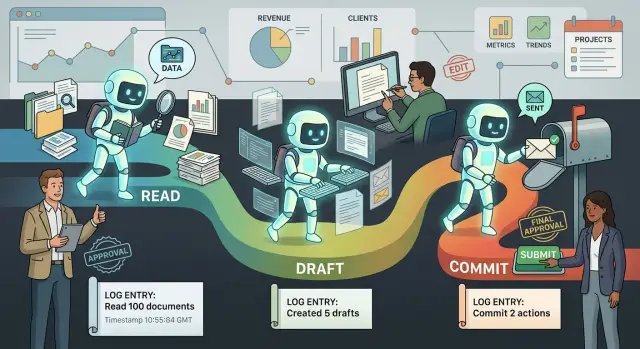
Table of Contents
Why business actions need clear limits
An AI agent can cause real damage in a few seconds. If it can issue refunds, change a CRM record, cancel an order, or contact a customer on its own, one wrong guess stops being a small bug and becomes a business problem.
People usually forgive a bad suggestion. They do not forgive a bad action. A rough draft email is easy to fix before anyone sees it. Two hundred wrong emails sent to customers create cleanup work, support tickets, and awkward apologies.
That is why permission limits matter. Teams lose trust fast after one bad automated move. Once that trust drops, even useful automation gets blocked because nobody wants to approve the next mistake.
Wide access feels fast at first. You connect the agent to billing, support, inventory, and customer messages, and work starts moving. Then the first error lands. A support agent closes valid tickets too early. A finance agent refunds the wrong orders. A sales agent overwrites clean records with guessed data.
The real cost is not just the first mistake. Software repeats. A person might make one bad call, then notice it. An agent can make the same bad call across hundreds of items before anyone steps in.
A simple split helps keep that risk under control:
- Read access lets the agent gather facts.
- Draft access lets it prepare a change for review.
- Commit access lets it make the change in the live system.
That separation gives teams room to learn. They can see where the agent helps, where it gets confused, and which tasks still need a person in the loop. When commit rights arrive too early, every error feels bigger than it should. When read and draft come first, the agent has time to earn trust with boring, predictable behavior.
What read, draft, and commit mean
Teams trust automation faster when permissions move in small steps. You do not start by letting an agent act in production. You start by asking three plain questions: what can it see, what can it prepare, and what can it change?
Read answers the safest question. Can the agent look at the right information without changing anything? In read mode, it can inspect data, search records, summarize notes, or compare documents. It cannot send, update, approve, delete, or publish anything.
Draft is the middle step. Can the agent prepare something useful for a person to review? In draft mode, it can write a reply to a customer, suggest a refund, prepare a schedule change, or queue an updated record. A person still decides whether that draft should go through.
Commit is the highest-risk step. Can the agent make the final change safely in a live system? In commit mode, it sends the message, updates the account, changes the price, closes the ticket, or triggers the workflow.
These levels look simple, but they change how a team feels about risk. A read-only agent can still produce a bad summary, but it cannot damage customer data. A draft-capable agent saves time because it does the first pass while a person keeps final control. A commit-capable agent saves the most time, but it also carries the most responsibility.
Think about a purchase order workflow. In read mode, the agent checks vendor history and payment status. In draft mode, it prepares an approval note with the amount and any warning signs. In commit mode, it approves the order in the finance system.
That ladder matters. If an agent cannot produce clean drafts, it is not ready to commit. And if a team is not comfortable with read access, giving the same agent live write access is asking for trouble.
Where each permission level fits
Permission levels work best when they match the actual business risk. The starting point is not full autonomy. It is work that is useful, easy to check, and cheap to undo.
Read access fits jobs where the agent needs context but should not change anything. That includes research, summaries, status checks, backlog reviews, CRM lookups, incident triage, and weekly reports. An agent can read support tickets, order history, or project notes and tell a person what changed. If it gets something wrong, nobody has to repair data or explain an unexpected action to a customer.
Draft access fits work that leads to an action but still needs approval. This is a strong middle ground for emails, support replies, sales quotes, ticket updates, and record changes. The agent does the slow part first. It writes the reply, fills the form, suggests tags, or prepares a note for the CRM. A human edits, approves, and sends.
Commit access belongs to a much smaller group of tasks. Use it for actions with clear rules, small impact, and low downside if the agent slips. Good examples include assigning a standard label, creating a follow-up task, sending a routine reminder, or moving a ticket after it matches a fixed rule. These jobs work when the rule is obvious, the action is reversible, and every step lands in a log.
Some actions should stay behind human approval even after the agent performs well. Payments, legal approvals, account closures, contract changes, security settings, and anything that deletes customer access belong in that group. The same goes for refunds above a set amount.
A quick test helps. If a mistake would cost money, create legal risk, or damage trust, keep it at read or draft. If a person can undo the action in seconds and the rule is clear, commit may be reasonable.
How to roll this out step by step
Most teams make the same mistake. They give an agent one broad role, then hope prompts and common sense will keep it safe. That breaks fast when the agent can touch money, customer records, or live systems.
Start with a plain inventory of actions, not tools. "Read the CRM" is one action. "Draft a reply to a customer" is another. "Send the reply," "issue a refund," and "change a subscription" are separate actions too, because each one carries a different level of risk.
Then score the cost of getting each action wrong. Keep it simple. Ask three things: how hard is it to undo, who gets affected, and what does the mistake cost in time or money? A bad summary might waste ten minutes. A wrong payment or deleted record can create days of cleanup.
A practical rollout usually follows four steps:
- Write down every action the agent might take and name an owner for each one.
- Put every action in read mode first so the agent can observe, gather context, and produce logs without changing anything.
- Move low-risk actions to draft mode after you review enough outputs and see that people only make small edits.
- Allow commit rights only for narrow actions after logs, reviews, alerts, and stop rules work in real conditions.
Draft mode is where teams learn the most. You can compare what the agent suggested with what a person actually approved. If reviewers rewrite half the output, the agent is not ready. If they approve almost everything with minor edits for a few weeks, you may have a case for limited commit access.
Commit mode needs clear brakes. Set stop rules before you switch it on. For example, require human approval when the action touches refunds above a set amount, unusual account changes, missing customer data, or anything outside normal hours.
Treat each action as its own trust decision. An agent that can safely draft support replies still should not update billing records. That slower approach is calmer, easier to measure, and much easier to defend inside the business.
A simple example from customer support
Customer support makes this model easy to see. The work repeats often, the rules are usually written down, and the cost of a mistake is easy to spot.
Say a customer asks for a refund after a delayed order or a duplicate charge. The agent starts with read access only. It checks the order history, payment status, shipping notes, refund policy, and past messages with that customer. It can gather the facts in seconds, but it cannot send a message or move money.
Next comes draft access. The agent writes a reply for the support rep and suggests a refund amount based on the policy and what happened. It might suggest a full refund for a duplicate charge, or a smaller credit for a late delivery. The person reviewing the case can see the draft, the reason behind it, and the records the agent used.
That step matters because it shows whether the agent reasons well before anyone gives it real authority. A rep can catch small problems early, like a wrong refund amount or a reply that sounds too rigid. In many teams, that alone saves a lot of time because the slow part is reading the case, not clicking the refund button.
Larger refunds should still go to a team lead. If the amount is above your limit, if the customer has a messy order history, or if fraud flags appear, the agent stays in draft mode. The lead reviews the suggested amount, edits the message if needed, and approves or rejects it.
Commit access comes last. After the team reviews enough cases and sees that the rules hold up, it can allow the agent to issue small refunds on its own. For example, the team may allow automatic refunds for clear duplicate charges under a fixed amount, with matching payment data and no past refund on the same order.
That is the read, draft, commit model in practice. The agent earns more freedom only after it proves it can follow the rules. If anything looks odd, it should fall back to draft or read mode instead of guessing.
Rules that keep people in control
Trust grows when an agent acts inside clear limits. Most teams do better with boring rules than with big promises about autonomy. If an agent can touch customer messages, refunds, invoices, or production systems, put hard limits around cost, time, and approvals.
A good starting point is simple. Set a money cap on each action and on daily totals. Put expiry times on drafts and planned changes. Match approval rules to the risk level. Keep a full log for every action, including the prompt, the data the agent used, and the final result.
Logs matter because memory gets fuzzy fast. When a customer asks why a refund happened, or a teammate asks why a server setting changed, you need a clean record. Logs also help you spot weak prompts, bad source data, and repeated mistakes.
People also need an easy way to stop the system. That means a clear pause switch, not a hidden admin trick. It also means reversal tools: cancel the email batch, roll back the config change, reopen the ticket, or flag the payment for review before it settles.
A weekly review keeps the rules honest. Pick a sample of both drafts and commits and read them like a manager would. Check whether the agent used the right data, followed policy, and made choices a reasonable employee would make.
This model only works if staff can see what happened, stop what should not happen, and fix what slipped through. Teams that skip those controls usually lose trust long before they reach full autonomy.
Mistakes teams make
Teams get into trouble when they treat permission levels like a feature switch instead of a trust ladder. Read comes first, draft comes next, and commit should arrive only after the team sees steady, boring accuracy over time.
The most common mistake is giving commit access too early. A draft can be wrong and still be safe because a person catches it before anything changes. A commit action is different. One bad decision can send the wrong refund, update the wrong customer record, or close a case that still needs help.
Another common mistake is wiring the agent into five systems at once. That sounds efficient, but it makes testing messy. If the agent reads from the CRM, writes to support tickets, updates billing notes, and sends emails on day one, nobody knows which part failed. One workflow that works well beats a large setup that nobody trusts.
Teams also ignore logs because the first version feels small. That is a mistake. Small systems still need a record of what the agent saw, what it suggested, what it changed, and who approved it. When something goes wrong, memory is useless. Logs show the exact step where the error started.
Writing to live records without a rollback plan is another fast way to lose confidence. If the agent edits an order, changes a subscription status, or rewrites customer data, the team needs a clear undo path. That can be version history, soft deletes, staged updates, or a review queue that holds changes before they hit production.
A support example makes the point. Suppose an agent drafts replies well for two weeks. That does not mean it should also update refund status in the billing system. Draft quality proves writing skill. It does not prove judgment across connected systems.
Before any commit access, ask four plain questions:
- Has the agent done the same task in draft mode long enough?
- Can a person review edge cases without slowing work too much?
- Do logs show every action and approval?
- Can the team undo a bad change in minutes, not hours?
If any answer is no, keep the agent in draft mode a bit longer.
Checks before you allow commit actions
Commit rights should stay rare. In most teams, an agent can read data or prepare a draft long before it should send refunds, change records, publish content, or push code on its own.
Use a short gate before you approve any commit action. Ask for a plain reason. If the team cannot explain why the agent needs direct write access, it probably does not need it yet. "It saves time" is too vague. "It can close duplicate support tickets after matching order ID, email, and payment status" is specific enough to judge.
Make review and rollback fast. A person should be able to spot the result quickly and undo it without digging through five tools. If a wrong action takes an hour to fix, the permission is too risky.
Test messy cases, not just clean ones. Give the agent missing fields, conflicting records, vague customer requests, and unusual timing. Commit failures usually come from gray areas, not normal inputs.
Keep an audit trail that names people and actions. You want a record of who approved access, what the agent changed, when it happened, and what data triggered the action.
A simple rule helps: if a manager would hesitate to let a new employee do the task alone on day one, do not give that agent commit rights yet.
Customer support is a good example. Drafting a refund response is low risk. Issuing the refund is not. Before you allow the second step, check whether a person can review the amount, confirm the policy match, and reverse the payment if the case was wrong.
Teams often skip the rollback test. That is where trouble starts. An action can look safe in a demo and still create real damage if the system cannot recover fast.
What to do next
Start with one workflow that already has firm rules and low risk. Good choices include refund requests under a fixed amount, invoice matching, or support ticket tagging. If people on your team already agree on the right outcome most of the time, that workflow is ready for a small AI trial.
Write down the current boundary in plain language. Keep it short: what the agent can read, what it can prepare, and what it can finish on its own. That one-page document often clears up confusion before any tool does.
A simple first pass might look like this:
- Read: customer history, past tickets, policy docs, order status
- Draft: reply text, internal notes, suggested next step
- Commit: only low-risk actions with a hard rule, such as tagging a ticket or sending a standard follow-up
- Human review: refunds, account changes, legal replies, and anything that affects money or trust
Then set a review window before you expand access. Two weeks is often enough for a first test. During that time, track a few plain measures: how often the draft needed edits, how many wrong actions the agent suggested, how long reviews took, and whether staff felt safe using it.
Do not widen permissions because the demo looked good. Widen them because the numbers stayed stable and the mistakes were easy to catch. If the agent keeps getting one case wrong, keep that case in draft mode and move on.
One workflow at a time is usually the right pace. A team that gives commit access to five processes at once learns very little when something breaks.
If you want a second opinion before giving an agent live write access, Oleg Sotnikov at oleg.is works as a Fractional CTO and startup advisor and helps companies set approval rules, logs, and rollout steps for AI-driven systems. That kind of outside review is often useful when the agent is moving beyond drafts and into real business actions.