AI agent memory design: keep facts, drop costly noise
AI agent memory design works best when you keep stable facts, short summaries, and clear delete rules instead of every token forever.
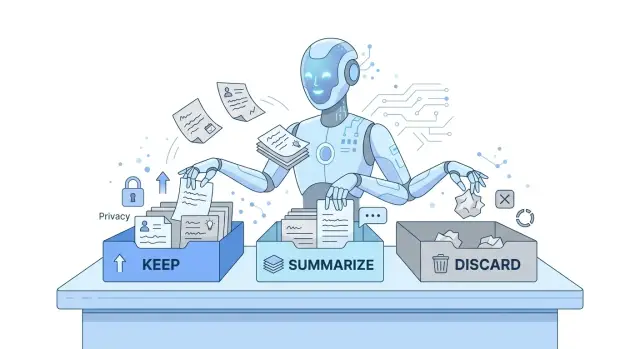
Table of Contents
Why saving everything causes problems
Saving every transcript feels safe at first. Teams assume more history will give an agent more context. In practice, it often leads to a bigger bill, weaker answers, and more privacy risk.
A single chat log looks harmless. An agent session is rarely just chat, though. It also creates tool output, retries, summaries, and system messages. Keep all of that for every session, and even a modest product can build a large archive in a few weeks.
Quality usually drops before anyone notices the storage problem. Old chatter competes with the fact that matters now. A user mentions five ideas, changes their mind twice, and jokes in the middle. Later, the agent pulls back the wrong detail and acts on it. More memory doesn't always mean better memory. It often means more noise.
The pattern is common: yesterday's draft shows up after a new one was approved, an old preference overrides a newer instruction, retrieval returns fluff instead of facts, and the agent burns tokens reading history instead of doing the task.
Privacy risk grows at the same time. People put temporary details into conversations all the time: phone numbers, pricing notes, internal names, access instructions, health details, and personal context. If the system stores everything by default, those details stick around longer than they should. They can also end up copied into backups, analytics, or search indexes.
Then the trust problem starts. Someone asks, "What does the agent remember?" and nobody gives a clear answer. One person thinks it keeps full chats. Another thinks it stores only summaries. A third doesn't know private notes still sit in the database. Once memory gets fuzzy, debugging slows down and policy decisions turn messy.
That's why AI agent memory design should start with deletion, not collection. Keep the facts that help the next task. Drop the rest before it turns into cost, confusion, and risk.
What deserves a spot in memory
A simple rule works well: save the facts a person would hate to repeat. In practice, that means stable facts and active commitments, not every sentence from the chat.
If a user shares something that will shape the next few tasks, keep it. If it only helped with one reply and has no future use, let it go. Memory should help the next step, not act like a raw transcript.
Most useful memory falls into four groups. The first is stable facts, such as a user's role, company, project name, or current goal. The second is open work: tasks in progress, decisions already made, and deadlines that still matter. The third is preferences that change how the agent should respond, like tone, format, language, or which tools to use. The fourth is limits the agent must respect, including budget, policy rules, approval steps, and tool access.
These facts earn their place because they change future behavior. If the agent knows the team has a $10,000 monthly budget, no access to production data, and a launch date in three weeks, it can give better suggestions right away.
Preferences matter more than many teams expect. If a user always wants short answers, CSV exports, or a weekly summary on Friday, saving that prevents constant correction. Working style matters too. A founder who wants rough options first needs a different response than a manager who wants one clear recommendation.
What a useful memory entry looks like
A memory entry should read like a fact, not a diary note. "Budget capped at $10,000 until Q3" is useful. "User seemed worried about spending during a long discussion" is vague and likely to age badly.
A small example makes the difference clear. A startup advisor might learn that a client wants to ship an internal tool by May 30, use PostgreSQL, avoid new vendors, and keep costs low until funding closes. Those facts belong in memory because they shape architecture, timelines, and tool choices across later chats.
Good memory stays boring. That's a good thing. Keep what is durable, actionable, and likely to matter again.
What to drop right away
Once teams start thinking about fact retention for AI agents, the first win is usually deletion. If an agent keeps every greeting, aside, and typo, memory fills with text that adds nothing to the next job. That doesn't just waste storage. It also raises cost and makes retrieval less accurate.
Small talk is the easiest thing to cut. "Hi," "thanks," jokes, and repeated pleasantries rarely help with the next task unless tone itself matters. The same goes for repeated confirmations like "yes, that works" or "can you try again" when the final result already captures the decision.
Typos and overwritten instructions should go too. People often say the same thing twice in different words, especially when they refine a request. Keep the cleaned meaning once. Drop the messy trail that led there. If a user first writes "send the report Friday" and then corrects it to "send the report next Monday at 9," store the final instruction, not both versions.
Task-only notes should expire fast. If the agent created a reminder like "use CSV import for this upload" and the upload is done, remove it. Finished work should leave behind outcomes, not scratch notes. Otherwise, the agent carries stale instructions into the wrong task later.
Raw logs create another kind of bloat. Full traces, long transcripts, and step-by-step tool output rarely deserve permanent storage. A short summary is usually enough: what the agent tried, what worked or failed, and any fact that should affect the next task. That summary is easier to search, cheaper to keep, and safer from an agent memory privacy standpoint.
A blunt test helps: if this detail disappeared tomorrow, would the next task get worse? If the answer is no, delete it. If the answer is "only for auditing," move it out of working memory and into a separate record with stricter retention rules.
A small memory model that stays clear
A clean memory model separates what the agent is doing now from what it should remember later. That split prevents a lot of trouble. Most failures come from mixing live chat details with facts that should survive after the task ends.
Current task context
This bucket holds the active goal, recent messages, files in use, and the last few decisions. It should stay small and change fast. When the task ends, most of it can disappear.
Durable profile
This is where stable facts live: user preferences, product rules, account limits, and a team's writing style. If a fact will help again next week, it belongs here. If it only matters for today's thread, it doesn't.
Dated summaries
Long conversations rarely need a full replay. A short summary with a date is usually enough: what the user wanted, what the agent tried, what worked, and what still needs attention. For conversation summarization for agents, one clean paragraph often beats a full transcript.
Temporary notes
These are reminders like "wait for invoice on Friday" or "use the draft plan until legal replies." Give each note an expiry date when you save it. If the date passes and nobody renews it, delete it.
One simple rule keeps all four buckets honest: every saved item needs a short source note. It can be as small as "from user message on May 12" or "from CRM record." When a fact causes trouble later, you can check where it came from instead of guessing.
This model works because each memory type has one job. Current context helps the agent act now. The profile keeps durable facts. Summaries compress long threads. Temporary notes expire before they pile up. Small memory isn't weak memory. It's memory with rules.
How to build the flow step by step
Start with a narrow question: what will the next task actually need? If a fact won't help the agent answer, plan, or follow up later, don't save it.
Use real tasks, not theory. If your agent helps with support, sales follow-up, or internal operations, look at ten recent conversations and mark the facts that mattered in the next interaction. Most teams find a surprisingly small set.
Write those fact types down in plain language. Useful memory usually includes user preferences, ongoing goals, account or project facts that rarely change, constraints like budget or deadline, and decisions the user already made.
Keep each memory item short and structured. A sentence or two is often enough. Store the fact, a timestamp, and the source if you need traceability. Don't save full message dumps when a clean summary will do the job.
Set discard rules before launch, not after the database starts swelling. Drop greetings, one-off small talk, repeated rephrasings, temporary emotions, and details that expired during the same session. If a field doesn't improve later answers, remove it fast.
Then test with messy, real conversations. Synthetic examples look tidy. Real users ramble, change their minds, and mix useful facts with noise. Run the flow on actual transcripts and inspect what the agent kept. Trim any field that looks interesting but never helps.
A simple monthly review supports memory cost control. Check how much memory you store per user, whether answer quality improved after recall, and whether you kept anything that raises privacy risk. If storage keeps growing while quality stays flat, your rules are too loose.
Teams often skip this because the system still works. That's a mistake. Memory grows quietly, and later cleanup hurts more than early discipline.
A realistic example
Maria uses a travel assistant a few times each month. Early on, she says she usually flies out of Berlin, avoids red-eye flights, aims for a mid-range budget, and prefers quiet hotels over trendy ones. Those details should stay in memory because they help on the next trip.
A lot of other chat should disappear. One morning Maria says she needs five minutes because a coffee break ran long after a rough meeting at work. That detail may matter for the next reply, but it doesn't help with future travel plans. The agent should use it in the moment, then drop it.
Trip search creates another layer of temporary notes. The assistant compares three flight options, rejects one because it leaves too late, and saves a few hotel candidates near the city center. Those notes help during the search, but they shouldn't live forever. They cost money to store, clutter later searches, and add privacy risk for no real gain.
When Maria books, memory should shrink again. The agent can keep the final facts: route, travel dates, total price, hotel choice, and receipt details like the booking reference or invoice information. That gives Maria something useful later if she needs to file an expense report, ask for support, or rebook a similar trip.
This is where AI agent memory design gets practical. The agent keeps stable preferences, drops one-off chat, and clears search notes once they stop helping. It doesn't try to remember every sentence.
A simple rule fits this example well. If a fact will likely improve the next task, keep it. If it only explained a moment in the conversation, let it go.
Mistakes that make memory messy
Most memory problems start with fear. Teams worry that if they don't save everything, the agent will miss something. So they keep full transcripts for every task, even when a short summary would do a better job. That choice adds cost fast, slows retrieval, and gives the agent more junk to sort through on the next turn.
A raw transcript also mixes signal with noise. One line may contain a stable fact like a user's billing cycle. The next ten lines may be jokes, false starts, or a guess that later turned out to be wrong. If all of that lands in one record, the agent has a hard time knowing what to trust.
Another common mistake is treating all facts as permanent. Many details have a short life. A user may need extra reminders this week, prefer a draft in Spanish for one project, or ask for a temporary pricing exception during a trial. If nobody sets an expiry date, those notes hang around long after they stop being true.
Prompt size creates its own mess. Some teams stuff large chunks of memory into every request, even for simple tasks like rewriting an email or checking a date. The agent then spends tokens reading context it doesn't need. That's one of the easiest ways to waste money.
Sensitive data is where sloppy memory turns into a real problem. If the agent stores phone numbers, health details, home addresses, or internal HR notes without a clear reason, the memory layer stops being useful and starts being risky. Keep only data tied to a real task, and remove it when the task ends.
A cleaner record separates confirmed facts, temporary notes with expiry dates, open questions, and guesses you already rejected. That makes later retrieval far less confusing.
Picture a sales assistant after a 20-minute call. It doesn't need every sentence. It needs a few facts: company size, budget range, buying timeline, and one blocker. Everything else can stay out.
Review your memory rules
A blunt review catches most memory problems. If your team can't defend a memory field in one clear sentence, it probably doesn't belong there.
Start with purpose. Every field needs a job tied to a future task, not a vague hope that it might help later. "Preferred invoice format" has a clear use. "Full chat transcript from last Tuesday" usually doesn't.
Then ask a few direct questions. Why does this field exist? What future action needs it? When should it be deleted? Is it a confirmed fact, a user preference, or a guess that still needs proof? Would a short summary do the same job as the full thread?
Delete rules matter more than most teams expect. Memory grows in quiet ways. One harmless note becomes fifty, then search slows down, costs climb, and privacy risk spreads across data nobody remembered keeping.
Teams also mix facts with assumptions too easily. If a user says, "I might move to Berlin next year," the agent shouldn't store "User lives in Berlin." Store the uncertainty or skip it. Small errors like that turn memory into fiction.
Full threads are often a bad bargain. A short summary usually keeps the parts that matter: the decision, the constraint, the preference, and the next step. In practice, one clean paragraph often beats twenty pages of chat.
Personal data deserves the toughest review. If the task doesn't need a phone number, home address, medical detail, or family note, drop it. Keeping less data isn't just cheaper. It's safer.
One habit helps a lot: once a month, pick ten stored memories at random and ask the team to justify each one. If people hesitate, the policy is already too loose.
Next steps for your team
Most teams make memory harder than it needs to be. Start with one agent, one task, and one diagram that fits on a single page.
Draw the flow from input to answer, then mark the few moments where memory actually helps. That usually means user preferences, account limits, open tasks, and decisions that still affect the next step. If a detail won't help the next task, leave it out.
Keep the first version small on purpose. A short fact store is easier to review, cheaper to run, and much safer to delete when it should disappear. Teams often get better results from ten clean facts than from thousands of raw conversation fragments.
Then run a pilot with real work, not a demo. Pick a narrow use case, such as support follow-up or sales call notes, and test it for a week or two. Track cost per task, answer accuracy after memory recall, deletion rate for stale or risky facts, and the number of times bad memory changed the answer.
Review the pilot every few days. If the agent keeps storing facts nobody uses, cut them. If people correct the same missing detail again and again, add that detail to the memory rules. This is an editing job, not a one-time design exercise.
Write the rules in plain language so non-engineers can challenge them. A product manager or support lead should be able to read the memory policy and spot what feels risky, useless, or too vague.
If your team wants a second set of eyes, Oleg Sotnikov at oleg.is offers Fractional CTO advisory that can help review memory rules, agent design, and the cost trade-offs around AI-first workflows. Keep the next step modest: ship one memory flow, measure it, trim it, and only then copy the pattern to other agents.
Frequently Asked Questions
Do I need to store full chat transcripts?
No. Full transcripts usually add noise, raise token cost, and keep private details longer than you need. Save a short summary and the few facts that will help on the next task.
What belongs in agent memory?
Keep stable facts, active work, user preferences, and hard limits. Good examples include role, project name, budget cap, deadline, language preference, approval rules, and tool access.
What should I delete right away?
Delete greetings, small talk, jokes, typos, repeated wording, and scratch notes from finished tasks. If a detail will not improve the next task, drop it.
How should I organize memory?
Use four simple buckets: current task context, durable profile, dated summaries, and temporary notes. That split keeps live chatter away from facts you want to reuse later.
How long should temporary notes stay?
Give temporary notes an expiry date when you save them. If the note no longer affects work after that date, delete it instead of letting it hang around.
Are summaries better than raw logs?
Usually, yes. A clean summary keeps the decision, constraint, and next step without dragging old chatter into every prompt. Raw logs still help for audit or debugging, but keep them outside working memory.
How do I lower privacy risk?
Store less data, keep only task-related facts, and remove personal details as soon as the task ends. Also track where each memory came from so your team can review and fix bad entries fast.
How can I tell if memory is helping?
Watch three things: storage per user, token spend, and answer quality after recall. If memory keeps growing while answers do not improve, your rules are too loose.
What mistakes make memory messy?
Teams often save everything because they fear missing context. That creates stale facts, bloated prompts, and wrong recalls, like an old preference overriding a newer instruction.
How should a team start with agent memory design?
Start with one agent and one real task. Write simple save and delete rules, test them on messy conversations, and trim anything nobody uses. If you want outside review, a Fractional CTO can help you tighten the design before costs grow.


