Timeout rules for agent tool calls that keep work moving
Timeout rules for agent tool calls help teams decide when to retry, ask a person, or stop early so one slow service does not stall the whole run.
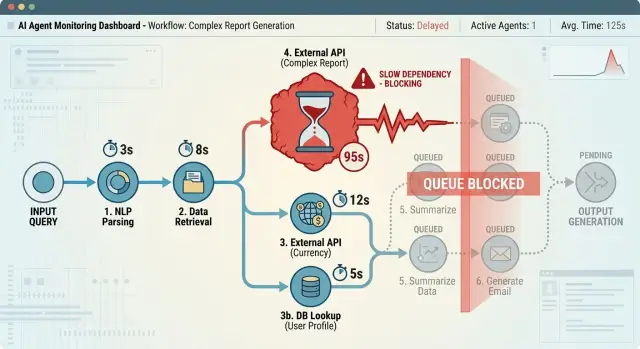
Table of Contents
Why slow tool calls break the whole agent
An agent almost never does just one thing. It calls a tool, waits for the result, uses that result to choose the next step, and keeps going. When one API hangs for 30 or 40 seconds, the whole chain can stall.
That delay does more than slow a single action. It blocks every step behind it, keeps a worker busy, and makes other requests wait longer too. One stuck call can turn a healthy queue into a traffic jam.
Users feel this right away. They do not know whether the agent is waiting on billing, search, or a database. They just see silence. When nothing seems to happen, trust drops fast. Some people refresh, send the same request again, or open a second ticket. That adds more load while the first job is still stuck.
Long waits also hide the real problem. Sometimes the tool is not actually slow. The agent may have sent the wrong customer ID, used an expired token, or asked for data that does not exist. If the system keeps waiting instead of timing out, the real error stays buried. You lose time, and the logs get harder to read.
Picture a support agent that needs order details before it can answer a refund question. If the order service stalls, the agent cannot move forward, explain the delay clearly, or decide whether to bring in a person. The customer sees a blank pause, not a careful workflow.
That is why fast failure often beats quiet waiting. A short, clear stop gives the system room to retry, switch paths, or hand the case to a human before one slow tool drags down everything else.
Set a time budget for each step
Timeouts work better when you set them per step, not as one vague limit for the whole job. Start with a plain inventory of the workflow: API requests, database lookups, searches, file reads, model calls, and webhooks.
Write the steps down in the order the agent uses them. Then mark which ones block the user directly. A step that affects what the user sees on screen needs a much tighter limit than a background sync or a report that can finish later.
Fast checks should get seconds, not minutes. A cache lookup, permission check, or simple status call usually has no reason to run past 2 to 5 seconds. If it hangs longer than that, the agent should move on, retry under clear rules, or use a fallback.
Slower work can have more room, but only when the result is worth the delay. A document parse, large search, or code scan may deserve 20 or 30 seconds if it gives the agent something it cannot get another way. If the step adds only a small improvement, keep the budget tight.
A simple starting point looks like this:
- Immediate user-facing checks: 1 to 5 seconds
- External API calls: 5 to 15 seconds, based on real history
- Heavy analysis or generation: 15 to 45 seconds when it clearly changes the outcome
- Background jobs: separate limits so they do not block the current task
You also need a total budget for the full run. If the agent has 60 seconds overall, it cannot spend 30 seconds waiting on one slow service and pretend the rest of the workflow is still healthy.
That total cap forces tradeoffs. A support agent might spend 3 seconds checking account status, 8 seconds pulling recent orders, and 12 seconds searching past tickets. If one call burns half the budget, the agent should stop chasing extra context and answer with what it already knows, or ask a human to step in.
Match retries to the failure
A retry policy should treat temporary failures very differently from bad requests. If a tool times out, drops a connection, or returns a 502 or 503, the problem might clear on its own. A retry can make sense. If the agent sent the wrong field, missed a required parameter, or asked for data that does not exist, another attempt just wastes time and money.
Start with error types, not a blanket rule for every tool. The agent needs to know which failures are temporary, which come from bad input, and which mean the tool is unusable right now.
Retry short-lived problems such as network timeouts, connection resets, 429 rate limits with a clear wait instruction, 5xx server errors, or brief auth issues caused by expired short-term tokens. Stop right away when the agent caused the failure. Bad input, invalid IDs, missing fields, wrong permissions, and schema mismatches usually need a fix, not another try.
Keep retry gaps short. In many cases, 2 to 5 seconds is enough before the first retry, then a slightly longer pause before the second. After that, stop. Three quick failures already tell you a lot. Ten retries usually turn one delay into a blocked workflow.
Paid tools and rate-limited APIs need even stricter limits. If every attempt costs money or burns quota, cap retries at one or two unless the step really matters. A billing lookup can wait for a person. A card charge should never repeat unless you have a very clear idempotency rule.
Record every retry decision. Store the tool name, attempt number, error code, wait time, and reason for trying again. That trail helps you tune budgets, spot noisy tools, and see when the agent should ask for help instead of trying one more time.
A simple example: if a support agent cannot fetch an order because the commerce API returns 503, it can retry twice with short pauses. If the order number fails validation, it should ask the customer to confirm the number and stop retrying.
Know when the agent should ask for help
A bad handoff usually happens too late. If the agent keeps retrying until every timeout is gone, the user waits longer and the person taking over gets a harder case.
Ask for a person before the next action can cause harm. That includes sending money, deleting data, changing account access, closing a ticket, or sending a customer a claim the agent cannot verify. If the step is easy to undo, one more retry may be fine. If the step can cause real damage, stop early.
Conflicting results are another clear trigger. When one tool says "paid" and another says "past due," the agent should not guess. The same goes for shared facts like account status, shipping address, or renewal date. A short retry window can help when systems update at different speeds, but after that the case should move to a human.
Some cases are not about failure at all. They are about choice. If the user needs to choose between valid options, ask early instead of acting on a weak guess. A support agent can offer a refund or a replacement, but only the customer can decide which one they want.
A small rule set works well:
- Hand off immediately if the next action affects money, security, compliance, or customer records.
- Hand off if two tools disagree on the same fact after the allowed retry count.
- Hand off if the user must choose between valid options.
- Hand off if the time budget is nearly gone and the agent still lacks one trusted answer.
The handoff note should be short and specific. A human does not need every log line or the full chain of thought. They need the request, the blocked step, the tools checked, and the exact conflict or timeout.
For example: "Customer asked to cancel and refund. Billing API returned active subscription. CRM returned canceled subscription. Agent retried once. No refund sent. Human review needed before account change."
Human handoff works best when the trigger is plain. If the agent cannot tell what is true, or cannot act safely, it should stop and pass the case on.
Know when the agent should stop
An agent that never stops turns one slow service into a full workflow failure. Set a hard end for the whole job, not just for each tool call. If the task has a 60-second limit and the agent has already spent 50 seconds, another retry on a service that usually takes 20 seconds is a bad bet. Stop and return control.
Repeated timeouts from the same service are another strong stop signal. One timeout can be random. Three in a row from the same API usually means the service is down, overloaded, or blocked by auth or network problems. More retries just burn time and money.
The agent should also stop when missing data blocks the next safe action. If it cannot find a customer ID, order number, approval state, or account match, it should not guess. A guess can update the wrong record, send the wrong reply, or trigger a payment message for the wrong person.
Fallbacks need the same test. If the fallback gives a simpler but still correct result, use it. If the fallback changes facts, fills in missing details, or takes action on weak evidence, stop instead. A short incomplete answer is much better than a clean, confident, wrong one.
When the agent stops, return a plain status instead of spinning again. Keep it brief and concrete: what step failed, which service timed out, how many retries ran, and whether a person needs to step in.
For example: "Stopped. Billing API timed out 3 times in 45 seconds. The agent could not verify invoice status, so it did not send a refund message. Human review needed."
Good timeout rules do not try to rescue every case. They stop work when extra waiting is likely to make the result slower, messier, or wrong.
Build the policy from the workflow backward
Start with the full workflow, not the individual tool. Write down the last acceptable finish time for the whole job, then work backward. If a task must finish in 2 minutes, every tool call has to fit inside that limit, with room for retries, logging, and a final decision.
This avoids a common mistake: giving each dependency a generous timeout and then discovering that the agent can spend five minutes waiting on three separate slow services.
Next, sort the tools by how fast they normally respond. A cache lookup or rules check should get a short leash. A database read may get a bit longer. A third-party API or document-processing step may need the longest window, but it still needs a cap. Do not set these limits by guesswork alone. Use real timings from a few normal runs and a few bad ones.
Then give each tool only two simple rules: one retry rule and one stop rule. Keep them plain. Retry once after a network timeout, for example, but stop immediately on a permission error or bad input. If a tool fails for a reason the agent cannot fix, more retries only add noise.
Add one human handoff point where judgment matters. This is usually the place where the agent would otherwise make a risky choice with partial data, such as refund approval, account access, or any customer-facing action that could cause harm if it is wrong. One clear handoff point is often enough to keep the system safe without slowing everything down.
Before shipping, run a few ugly tests. Make one dependency slow but successful. Make one time out twice. Make one return incomplete data. Make one fail with a permanent error. Then let the whole workflow hit its final deadline. If the agent still finishes cleanly, asks for help at the right time, or stops without thrashing, the policy is probably in decent shape.
A simple support workflow example
A support agent gets a new ticket that says, "My payment went through, but my account still looks locked." It reads the message, pulls the customer ID, and checks the account record before it tries to answer.
The first call goes to the account service. The agent waits 2 seconds because that system usually replies fast. If nothing comes back, it retries once. That is a reasonable tradeoff here because short network hiccups happen, and one retry often fixes them without slowing the queue too much.
If the account service replies, the agent compares billing data with the notes in the CRM. Sometimes those systems disagree. Billing may show "paid," while a CRM note says the customer asked to cancel yesterday. The agent should not guess which source is right. It should ask a person and pass along a short summary of the conflict.
The next step is a knowledge search. The agent may need an internal refund rule or renewal policy before it can answer. This tool is less predictable, so the policy should be stricter. If the search times out twice, the agent should stop that branch instead of trying again and again.
At that point, the case still needs to move forward. A short status update is better than silence:
- "I checked your account and found a billing mismatch."
- "I could not confirm the policy from our internal docs."
- "A support specialist needs to review this case."
That gives the customer a clear answer and gives the team a clean handoff instead of a hidden failure sitting in the workflow.
Common mistakes that create stuck or noisy agents
A slow tool call can do more damage than a hard failure. When a tool hangs, the agent often keeps waiting, retries at the wrong time, or fills the logs with vague errors. That is how a useful workflow turns into a messy one.
One common mistake is giving every tool the same timeout. A database lookup, a payment API, and a document parser do not behave the same way. If you give all of them 30 seconds, some steps will fail too early and others will waste time long after the user has stopped caring.
Another mistake is retrying just because the first call timed out. Hope is not a policy. If a tool usually answers in 2 seconds, then suddenly takes 25, a second or third try may only pile up more work. A good retry policy looks at the task, the tool, and the cost of delay before it tries again.
Teams also forget the user side of the problem. Most people will accept a short pause if the task matters. Few will accept a full minute of silence while one dependency struggles. If the agent needs customer data to answer a ticket, it is often better to say "I need help from a human" after a clear limit than to keep the customer waiting for a result that may never arrive.
Poor logging makes all of this worse. Logs that say only "request failed" do not tell you whether the tool timed out, returned partial data, or failed after three retries. Another common gap is having per-step limits but no total budget for the whole run. Even sensible step limits can add up to a stalled session when many small delays stack together.
Clear logs fix this faster than most teams expect. Record which tool timed out, how long the agent waited, whether it retried, and why it stopped. If you cannot see that path in one place, stuck agents will keep coming back.
Checks before production
If your team cannot explain a timeout in one plain sentence, the rule is too hard to run in production. Each limit should answer three simple questions: what are we waiting for, how long will we wait, and why does that amount of time make sense for this task?
Retries should be just as easy to defend. A retry should exist for a known failure case, not because "more tries feels safer." If the tool usually fails in the same way after the first attempt, extra retries only waste time and hide the real problem.
Before launch, check five things:
- Can someone explain every timeout without opening the code?
- Does each retry map to a known failure case?
- When the agent stops, does it return a clear status such as timed_out, blocked, or needs_human?
- Can a person see which tool timed out, how many retries ran, and what the agent did next?
- Have you tested one slow tool during a busy period, not only in a quiet test run?
That last check catches a lot. A support agent may look fine in the morning, then stall in the afternoon when ticket volume rises and one outside service slows down by a few seconds. Light-load testing misses that pattern.
Make the timeout trail easy to read. A log line, trace, or dashboard event should show the tool name, start time, stop time, retry count, and final outcome. If your team already uses systems like Sentry or Grafana, put that data there so the person on call does not have to dig through raw logs.
When the agent stops, it should say so clearly and return useful context. Silence is the worst outcome. A human should know, within a few moments, what timed out and whether the next step is to retry, step in, or leave it alone.
What to do next
Start on paper, not in code. Write the timeout rules in plain language so anyone on the team can read them, challenge them, and improve them.
A good first draft is simple: how long the agent waits, how many times it retries, when it asks for a person, and when it stops. If you cannot explain those four choices in a few lines, the policy is probably too hard to run.
Then look at real logs. Slow calls often stay in a workflow because nobody checks whether they ever lead to a better result. If a tool times out after 45 seconds but almost never succeeds after 12, cut the wait. That one change can save a surprising amount of time across a busy system.
Use one workflow as your test bed before you spread the pattern everywhere. Support triage is a good place to start because the steps are easy to see: classify the request, fetch account data, draft a reply, and hand off if the system gets stuck.
A practical rollout is simple. Write the rules in plain English, review real failures and delays, shorten any timeout that adds no useful result, test the policy on one workflow for a week, and copy the pattern only after that first workflow stays stable.
Do not aim for perfect settings on day one. Aim for fewer stuck runs, fewer noisy retries, and cleaner handoffs. Teams usually learn more from ten real failures than from a long planning meeting.
If you need an outside review, Oleg Sotnikov at oleg.is works as a Fractional CTO and advisor for startups and small teams. He helps companies build AI-first development and automation systems, which can include practical timeout, retry, and human handoff rules that fit real production work.
The best policy is the one your team keeps updating after it meets real traffic.
Frequently Asked Questions
What timeout should I set for an agent tool call?
Start with the step, not the whole agent. Give fast user-facing checks about 1 to 5 seconds, most external API calls about 5 to 15 seconds, and heavier analysis only 15 to 45 seconds if it changes the result in a meaningful way. Then set a hard cap for the full run so one slow service cannot eat the whole budget.
Should every tool use the same timeout?
No. A cache lookup, a billing API, and a document parser do very different work, so they need different limits. If you give every tool the same timeout, some steps will quit too soon while others will waste time long after the answer stopped being useful.
When should the agent retry a failed tool call?
Retry short-lived failures such as timeouts, dropped connections, 502 or 503 errors, and some rate-limit responses with a clear wait value. Do not retry bad input, missing fields, wrong IDs, schema errors, or permission problems the agent caused.
How many retries are too many?
Stop after one or two short retries in most cases. If the same service times out three times, or the job is close to its total deadline, another try usually makes the workflow slower and messier without improving the result.
When should the agent hand the case to a human?
Ask for a person before the next action can cause harm. That includes money movement, account access changes, deleting data, closing records, or any case where two tools disagree on the same fact and the agent cannot verify which one is right.
What should the user see after a timeout?
Show a plain status instead of staying silent. Tell the user what step got blocked, whether the agent retried, and whether a person needs to review the case. A short honest update keeps trust much better than a blank pause.
Do I need a total timeout for the whole workflow?
Yes. Per-step limits help, but small delays can still stack up into a stalled session. A total budget forces the agent to trade off, skip low-value steps, and stop cleanly when more waiting will not help.
What should I log for timeouts and retries?
Log the tool name, attempt number, wait time, error code, and the reason for each retry or stop. Keep that trail easy to read in one place so your team can spot noisy tools, cut bad retries, and explain failures without digging through raw logs.
What mistakes create stuck or noisy agents?
Teams often make every timeout too generous, retry because they hope the next try will work, and forget to cap the full workflow. Another common problem is vague logs like request failed, which hide whether the tool hung, returned partial data, or failed for a permanent reason.
How should I test timeout rules before production?
Run ugly tests on purpose. Make one dependency slow, make one time out twice, make one return incomplete data, and make one fail with a permanent error. If the agent still stops cleanly, hands off at the right moment, and returns a clear status, your policy is in decent shape.


