Tool selection rules for agents that email, write, deploy
Tool selection rules for agents help teams rank actions by blast radius, add tighter approval near money or production, and cut avoidable errors.
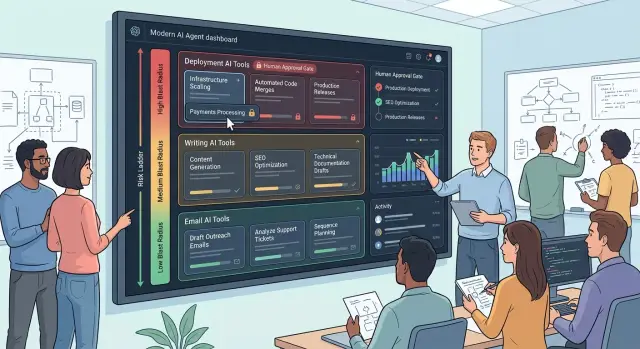
Table of Contents
Why this gets risky fast
An agent that only drafts text can waste a few minutes. The same agent with inbox access, billing access, or deploy rights can hurt customers in minutes.
That jump is easy to miss because the task can look almost the same on the surface. "Write a message" sounds harmless. "Send the message to 8,000 customers" is a different class of risk. "Update a config file" sounds small. "Push that change to production" is not.
The real issue is not just whether the agent makes a mistake. It is where that mistake lands. A typo in a draft is cheap. A typo in a payment amount, a recipient list, or a production setting can trigger refunds, support spikes, downtime, and angry customers.
The contrast is simple:
- Bad wording in a draft email creates rework.
- Bad wording in a sent email creates customer confusion.
- Bad code in a local branch creates a review comment.
- Bad code in production can break checkout or lock users out.
- A wrong number in an internal note is noise. A wrong number in a live payment flow costs real money.
That is why money and production need tighter checks than writing and research. Teams often give one agent a wide set of tools because it feels efficient. It is efficient right up to the first expensive error.
Good tool rules start with blast radius, not convenience. Ask one plain question: if this agent acts on the wrong input, how much damage can it do before a human notices?
Clear rules beat one-off exceptions. If a team says "this agent can usually deploy" or "it can send emails unless the campaign feels sensitive," people will guess, and agents will inherit messy boundaries. Simple rules hold up better: drafting is open, sending needs approval, production changes need stronger approval, and anything near money gets the strictest checks.
That may feel slower at first. It is usually much cheaper than cleaning up one bad send or one broken release.
How to rank tools by blast radius
Start with one question: what can this tool change if the agent gets it wrong once? That is the blast radius. Rank tools by effect, not by how often the agent uses them and not by how confident the model sounds.
A read-only tool usually sits near the bottom. If an agent can search docs, inspect logs, or check a dashboard, it can still expose private data, so you should scope access carefully. But it does not alter the world. In most cases, the harm stays limited and you can trace it.
Writing changes the picture. An agent that edits a draft, opens a ticket, or updates a document can create confusion and cleanup work. That usually stays inside the company, so the radius is bigger than reading but smaller than customer-facing actions.
Email jumps much higher because it reaches real people fast. One wrong message can confuse a customer, leak internal details, or promise something your team cannot deliver. You can send a follow-up, but you cannot undo the trust damage.
Deploy tools sit above that for most teams. A bad deploy can break a live service, block signups, or create subtle bugs that last for hours. Rollback helps, but users still see the outage and support still deals with the fallout.
Payment tools belong at the top. Charging a card, issuing a refund, changing an invoice, or moving funds can create direct financial loss and long cleanup. Even a single mistake matters.
A simple ranking method works well. Ask how many people or systems the tool can affect in one action, how fast the effect happens, how hard it is to reverse, and whether the action touches money, legal records, or live service.
If two tools seem similar, put the one closer to inboxes, production, or money in the higher tier. Teams often overrate complex tools and underrate simple ones. A plain email sender can be riskier than a log query.
A four-level risk model
Most teams do better with a simple ladder than with a giant policy document. Sort each tool by what happens if the agent makes a bad call, uses the wrong data, or acts at the wrong time.
Level 1 is read-only work. The agent can search docs, read tickets, inspect logs, or pull analytics. It learns, but it does not change anything.
Level 2 is preparation work. The agent can draft an email, write a SQL query for review, prepare a deployment plan, or fill in a support reply without sending it. This level still needs care, but a person can review the output before anything happens.
Level 3 starts to touch the outside world or system records. Sending an email to a customer, updating a CRM field, changing a calendar event, closing a ticket, or editing a database record belongs here. These actions often look small, yet they can confuse people, create legal trouble, or leave a messy audit trail.
Level 4 is where mistakes get expensive fast. Moving money, issuing refunds, changing production code, editing live infrastructure, rotating secrets, changing DNS, or running a migration on a live database all fit here. One wrong action can break service, lose revenue, or wake up the whole team at 2 a.m.
The level should depend on recovery cost, not just the button label. A tool might look harmless, but if undoing the action takes hours, pulls in several people, or requires customer outreach, move it up.
A draft email is usually Level 2. A tool that sends that email to 5,000 customers is Level 3. A tool that can both send the email and apply account credits after a complaint is closer to Level 4 because it mixes communication with money.
The same rule applies to engineering tools. Reading deployment logs is Level 1. Writing a release note is Level 2. Restarting one service in staging may be Level 3. Pushing a config change to production is Level 4, even if the change is only one line.
What checks fit each level
Checks should get stricter as an agent gets closer to customers, cash, or production. A typo in a draft note is not the same as a bad deploy or an accidental refund.
At the lowest level, let the agent act on its own and keep strong logs. That works for things like tagging tickets, summarizing calls, drafting internal notes, or collecting data for a report. You still want a trail with the prompt, tool used, result, timestamp, and user or service that triggered it.
The next level needs a preview before anything becomes public. If an agent writes a blog draft, prepares a pull request, fills a status page update, or builds an email draft, show the full output to a person before publish, merge, or send. A preview catches the boring mistakes that cause real trouble: wrong names, stale numbers, odd formatting, or the wrong environment.
Outbound email deserves a stricter rule. Once an agent can contact a customer, vendor, or lead, a person should approve each message before it goes out. Show the recipient, subject line, body, attachments, and the reason the agent picked that contact. That takes a minute and can save hours of cleanup.
Money and production need named approval, not a vague admin check. If the action can charge a card, issue a refund, change pricing, deploy code, update DNS, touch production data, or rotate secrets, tie approval to a real person and the exact action they approved. If the payload changes, ask again.
A small team can keep this simple:
- Low risk: auto-run with logs
- Draft and publish tools: require preview
- External communication: require human approval
- Money and production: require named approval, and sometimes two people
Keep a record of every approval. Save who approved it, what the agent proposed, when they approved it, and what actually happened next. If something goes wrong, that record gives you a clean way to review the mistake and tighten the rule instead of guessing.
How to set the rules
Start with actions, not app names. "Email" is too broad. Drafting a reply for review, sending a password reset, and emailing a refund notice do not carry the same risk.
Write down every tool the agent can open, then break each one into exact actions. A shared sheet works fine at first. The point is to see what the agent can read, change, send, delete, or deploy before you talk about permissions.
That inventory should answer five things: which tool the agent can access, which actions it can take inside that tool, what data it can read, what it can change or send, and who gets hurt if it makes a bad call.
This is where teams usually go wrong. They skip this step and jump straight to "allow" or "block," which leaves a lot of gray area.
Once the actions are listed, rank each one by blast radius. Editing an internal draft is small. Sending 500 customer emails is bigger. Merging code into the main branch is bigger still. A production deploy tied to billing, payments, or user data sits near the top.
For each risk level, set three limits and keep them specific: approval, time, and volume. Decide whether the action needs no approval, one human check, or two-person approval. Decide when it can run and how long that approval stays valid. Decide how many emails, records, files, or deploys it can touch at once.
Specific limits stop small mistakes from becoming expensive ones. For example, you might allow an agent to draft release notes any time, but only let it deploy to staging during office hours, and never let it push to production without a named reviewer.
On a modern startup stack, this matters fast. Updating a help article in a CMS is one thing. Triggering a CI/CD pipeline that reaches a live Kubernetes cluster is very different, even if both happen from the same chat prompt.
Test the rules with fake data first. Use a sandbox inbox, a staging repo, and sample customer records. Try normal cases, bad prompts, and messy edge cases. If the agent tries to send too much, edit the wrong record, or asks for approval too late, fix the rule before real users ever see it.
If a rule is hard to explain in one sentence, it is probably too loose.
A realistic example
A customer writes to support after a billing bug charges them twice. The agent reads the ticket, checks the account history, and pulls the last invoice. That part is low risk because the agent only gathers facts.
Next, the agent drafts a reply. It can explain what happened, apologize, and suggest the next step. It can also add a clean note to the CRM with the issue type, invoice number, and a short summary for the team.
Those CRM updates usually have a small blast radius. If the note is clumsy, your team can fix it in seconds. The customer never sees it, and no money moves.
Sending the email is different. Once the message goes out, the company has made a promise in writing. If the draft says "we already refunded you" when nobody approved a refund, support now has a bigger problem than the original bug.
A sensible rule looks like this:
- The agent can read the ticket and billing history.
- The agent can draft the customer reply.
- The agent can write internal CRM notes.
- A person must approve the final email before it sends.
Now the bug reaches engineering. A coding agent finds the billing rule that caused the double charge and prepares a fix. It can open a pull request, add tests, and explain the change in plain language.
It still should not push straight to production. A reviewer needs to check the patch, and the team needs a rollback plan. If the fix breaks invoice generation, you want one clear step to undo it fast.
Refunds need their own path. Even if the support agent is right and the coding agent fixed the bug, neither one should issue money back on its own. The agent can prepare the refund request with the amount, charge ID, and reason. Finance, support leadership, or another named approver should make the final call.
That split keeps the fast parts fast. Agents handle reading, drafting, tagging, and prep work. People approve actions that touch customer promises, production systems, or cash.
Mistakes teams make
Teams usually do not get in trouble because the agent is smart. They get in trouble because the rules are loose. A team starts with one useful automation, then keeps adding tools until the agent can read inboxes, edit code, and trigger deploys with the same account.
That broad admin access feels convenient for a week. After that, it becomes a single point of failure. If the agent picks the wrong recipient, changes the wrong file, or runs the wrong command, the damage spreads fast because nothing limits the blast radius.
Another common mistake is treating staging and production like the same room with different labels. Teams let an agent practice in staging, see no obvious problems, and then give it nearly identical access in production. That misses the point. A staging mistake is noise. A production mistake can send real emails, change live pricing, or break a checkout flow.
Tool names fool people too. A tool called "deploy-helper" or "mail-assistant" sounds harmless, but names do not matter. Permissions matter. One email tool may only draft a message. Another may send to 50,000 contacts. One deploy tool may build a preview branch. Another may restart live services. You need to inspect the real scope behind each button.
Email actions often get less attention than deploy actions, and that is a mistake. Teams forget send caps, rate limits, daily quotas, and recipient rules. An agent that can send unlimited messages can burn a domain, annoy customers, or create support work in minutes. Even a writing agent needs hard limits if it can publish or send what it writes.
Rollback gets skipped too often. Teams plan for success, not for messy failures. If an agent edits a config file, who restores the last good version? If it sends the wrong campaign, who stops the next batch? If it deploys a broken build, who reverts it, and how long does that take? If nobody can answer those questions in one minute, the setup is not ready.
This is exactly the kind of review that matters before rollout: give each agent the smallest set of permissions it needs, separate staging from production for real, and test the undo path before trusting the action path. Oleg Sotnikov's Fractional CTO advisory often helps teams work through those boundaries in practical terms.
A short pre-launch checklist
These rules should feel a little boring. That is a good sign. If a tool can spend money, reach real customers, or change production, treat it as a launch blocker until you can explain the guardrail in one plain sentence.
Run these checks before you give an agent live access:
- Keep money actions behind named approval. Charges, refunds, purchases, credits, and invoice changes should not run on the agent's judgment alone.
- Separate test audiences from real people. If the agent can send email, SMS, or chat, start with internal accounts, strict rate limits, and clear logs of every message.
- Start production access at the smallest level. Read-only beats write access. Staging beats production. A generated diff plus human approval beats direct deploy.
- Give humans a real kill switch. Someone should be able to pause the queue, revoke credentials, or disable the job in seconds.
- Prove that you can undo the last step. Revert the deploy, cancel the message batch, or restore the record from backup before launch, not after a mistake.
Small details matter more than teams expect. A sender address that points to real customers, a payment token left in the wrong environment, or a deploy key shared across tools can turn a minor test into a public problem fast.
A simple example makes the line clear. An agent that drafts release notes in a document editor is low risk. The same agent becomes much riskier when it can publish those notes to your status page, email every customer, and ship the code behind them.
Lean teams need this discipline even more. When fewer people watch each step, the agent needs tighter limits. That usually means narrow permissions, short-lived credentials, staged rollouts, and one person who can shut things down without asking for access first.
If any answer feels vague, keep the tool out of the workflow for now. A safer first launch often uses slower steps and more approvals, and that is usually the right trade.
What to do next
Start smaller than you think. The safest first setup gives agents tools that can read data, search docs, or prepare drafts, but cannot send, change, delete, or deploy anything.
That first step feels slow, but it gives you a clean baseline. You learn how the agent behaves, where prompts go wrong, and which tasks people actually trust it to handle.
A practical rollout is simple. Give the agent read-only access to the systems it needs to understand the work. Let it create drafts for emails, tickets, docs, or pull requests, but keep the final action with a human. Add one higher-risk action only after the safer one works in daily use. Then review real logs and tighten prompts, permissions, and approval rules.
Tests help, but real work shows the weak spots. An agent may look fine in a sandbox and still make bad calls when an inbox gets messy, a customer uses vague language, or a deploy happens during a busy day.
Write approval rules in plain language. Skip policy-speak. A short rule like "The agent can draft customer replies, but a person must approve anything that mentions refunds, contracts, pricing, or account changes" is easier to follow than a long internal document nobody reads.
Do the same for code and deployment. If the agent can open a pull request, say who reviews it. If it can deploy to staging, say what checks must pass first. If money or production is involved, name the exact point where human approval is required.
One risky action at a time is the right pace. Teams get into trouble when they bundle too much authority into one rollout because the demo looked good.
If you want a second opinion before expanding access, Oleg Sotnikov and oleg.is focus on this kind of practical technical review: permissions, rollout plans, production boundaries, and AI-first workflows that do not hand too much power to an agent too early. That is usually cheaper than cleaning up after one bad email blast or one careless production change.


