Account merges without broken history: a practical plan
Account merges fail when IDs, owners, logs, and billing links drift apart. Use this plan to merge records safely and keep history intact.
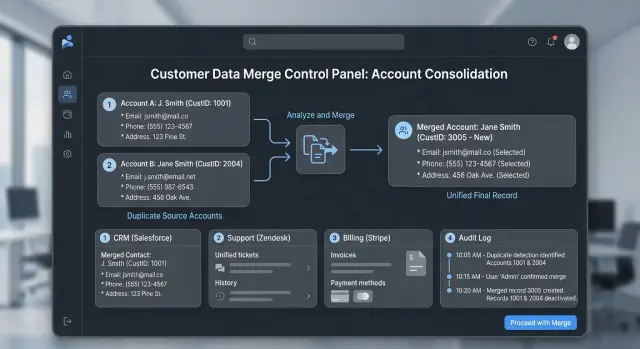
Table of Contents
Why merges break history
Merges fail when a customer does not have one clean identity.
The same person can have a CRM contact ID, a help desk user ID, a billing customer number, and a login account. If a team treats those records as one simple profile, it erases the map that shows how those IDs connect.
That is where history starts to break. A sales or support team merges two profiles and thinks the work is done, while the billing record still points to the old account. Now invoices, refunds, payment failures, and tax records live on one side, while product access and support notes live on the other.
The mess grows quietly. Old tickets still reference the retired account. Internal notes stay attached to the wrong record. An invoice shows the old company name while the active subscription sits under the new one. Later, when someone checks the timeline, the story no longer adds up.
Support usually feels it first. An agent opens a customer record and sees only half the conversation. Finance hits the same problem when a payment dispute appears and the transaction history is split across two systems. Both teams end up proving that two records belong to the same person instead of fixing the actual issue.
A small mistake spreads fast. Once other tools sync the wrong account, duplicates multiply and people start patching the problem by hand. Those fixes create new errors because each team works from a different version of the truth.
A clean merge does more than combine profiles. It preserves the trail of who owned the record, who paid, what changed, and when. If that trail stays clear, support can respond faster and finance can trust the numbers.
List every identifier first
If you start a merge before you map IDs, you can break the only trail that connects past actions to the right person. Two records can share one email and still belong to different billing accounts, organization memberships, or login histories.
Start with one table that covers every system holding customer data. Use one row per duplicate record. Then collect every identifier you can find, not just the ones shown on the profile page. That usually means internal user IDs, email addresses, phone numbers, login names, single sign-on IDs, billing customer numbers, subscription IDs, invoice accounts, organization IDs, workspace IDs, and team IDs.
This part feels tedious, so teams often rush it. That is usually what creates the mess later.
Check more than the app database. Look at the CRM, support desk, billing tool, analytics events, admin panels, exports, and any scripts people still run by hand. Old IDs often stay alive in places nobody remembers until the first invoice fails or a support agent opens the wrong history.
Mark which identifiers stay fixed. Internal user IDs, organization IDs, and billing account IDs often remain stable even after someone changes an email address, phone number, or company name. Those stable IDs give you something solid to work from.
Then write down where each identifier appears. Note the system name, table or collection, field name, report column, and search screen. If finance searches by customer number but support searches by email, both paths need to lead to the same surviving record.
A simple example shows why this matters. Two user records share one email. One record owns the active subscription, and the other owns the project history. If you catch that before the merge, you can map both IDs to one final account instead of losing half the story.
Pick the record that will survive
Keep the record that other systems already trust most.
If your CRM, billing app, support desk, and login system already point to one customer ID, keep that one alive. The oldest record often wins, but only if it is still real and active. If the oldest entry is a test account, a closed profile, or an old import full of bad data, it should not survive just because it came first.
A better rule is simple: keep the record with the most trusted ID and the widest set of working connections.
Then move newer details into that record instead of creating a third version. Bring over the latest phone number, current company name, recent consent status, and any notes people still need. The surviving account should become the one place both staff and systems use from now on.
Tie cases cause a lot of trouble, so write the rule before anyone starts merging by hand. If two records look equally good, nobody should guess.
A short tie-break rule is enough:
- Keep the record linked to billing or signed contracts.
- If neither has billing, keep the record used for login most recently.
- If both still look equal, keep the older ID.
- If one record shows signs of bad import data, remove it from consideration.
Store that rule in a short internal note, not in someone's memory. When five people merge records, small personal habits turn into inconsistent data very quickly.
A simple example helps. Customer A exists in your CRM as ID 1842 and in support as a newer duplicate, ID 9917. If invoices, subscriptions, and API logs already trust 1842, that record should survive. Move the better contact details from 9917 into 1842, mark 9917 as merged, and block new systems from treating 9917 as the customer again.
Map ownership and access
When you merge duplicate accounts, names and email addresses are only part of the job. Ownership usually lives in several places at once: the CRM, the support desk, the billing system, and the product itself. Miss one of them, and the wrong person may end up with admin rights, seat access, or invoice visibility.
Start by writing down who owns the account in each system. The sales owner in the CRM may not match the billing contact or the person who opens support tickets. That mismatch is common, especially in small teams where one person signs the contract and someone else runs the product day to day.
Check the practical access points before you merge anything. Look at the account owner in the CRM and support tool, active team members and paid seats, admins and managers, people who can reset passwords or export data, billing contacts who can view invoices, and anyone who can see or change payment methods.
Shared access needs extra care. If two duplicate records belong to the same company, do not assume every user on record A should move to record B. Compare names, roles, and recent activity. A former employee might still sit on one record, while a contractor may only need support access and nothing more.
A quick example makes the risk obvious. The CRM shows Anna as the account owner, the support tool shows Ben, and billing emails go to [email protected]. After the merge, Anna may stay the commercial owner, Ben may keep support access, and finance should still receive invoices. That setup is fine when you choose it on purpose. It becomes a mess when one merged record silently replaces all three.
Before you finish, test the result with real permissions. Log in as an admin, a normal team member, and a billing contact. Make sure each person can see what they should see, and nothing more. That short check prevents a lot of cleanup later.
Keep the audit trail readable
When two accounts become one, the audit trail often turns into guesswork. A support agent opens the record, sees an address change or a refund, and cannot tell whether it happened before the merge, after it, or on the other account.
Keep the original timestamps and actor names. If Maria from support changed a phone number last month, that action should still show Maria and the same time after the merge. Do not rewrite old events to match the surviving account. That makes the log look cleaner, but it makes the history less useful.
Add one clear merge note everywhere the change matters. Put it in the customer record, the billing system, and any internal admin log your team uses. The note should name both IDs, say which record survived, and show when the merge happened.
A good merge note includes the old account ID and the surviving account ID, the approver's name and timestamp, a short reason for the merge, and one shared reference used across systems.
That shared reference matters more than most teams expect. If finance checks a chargeback and support checks a ticket, both should be able to trace the same customer action across systems without guessing. A simple merge reference or case number is often enough.
If your tools cannot store one common reference, keep a small cross-reference table. Map the old IDs, the new ID, and any related event IDs from billing, CRM, and support. It is not glamorous work, but it saves hours when a customer disputes a charge or asks who changed access.
Store the approval record too. Someone should be able to answer two plain questions later: who approved this merge, and why. If that takes more than a minute, the audit trail is already getting blurry.
Check billing before you touch customer data
Billing breaks faster than profile data. A customer might tolerate a messy contact record for a day. They will not tolerate a double charge, a missing invoice, or a tax document with the wrong legal name.
Before you run a merge, freeze the billing picture for both records. Pull the live subscription ID, plan name, next renewal date, unpaid invoices, credit balance, refund history, and the payment processor customer ID. You need a clean snapshot before anything changes.
The billing review should cover four areas: active subscriptions and scheduled renewals, unpaid invoices and retry status, credits or refunds still sitting on the account, and saved payment methods with their true owner.
If both accounts have a card on file, choose one payment method to keep. Use the one tied to the active contract and the most recent successful payments. Keep the other method in your internal notes until the next billing cycle ends, then remove it if you no longer need it.
Be careful with payment tokens. Some billing systems tie a card token to one customer record only. If you move data without checking that rule, the surviving account may lose the card and fail its next renewal.
Stop duplicate charges before the merge starts. Pause automatic renewals, retry jobs, and invoice collection for the affected accounts during the merge window. Then search for cases where both old and new records still point to live subscriptions. That is one of the most common cleanup jobs after a rushed merge.
Tax data needs the same care. Match the legal entity name, tax ID, billing address, and invoice email to the account that should survive. If one record belongs to an individual and the other belongs to a company, use the one that matches the signed agreement. Keep the old name as a searchable note, not as the name shown on future invoices.
Run the merge step by step
A clean merge should feel boring. That is a good sign.
If people keep editing both records while you work, small mismatches turn into hours of cleanup. Start with a short freeze on both records. Tell support, billing, and anyone else who touches customer data that edits pause for a limited window. Even 15 to 30 minutes is often enough when the prep work is done.
Before you change anything, export both records and the links around them. Save identifiers, owners, open tickets, invoices, subscriptions, login data, and any connected records in other systems. If the merge goes sideways, you need a snapshot that lets you roll back quickly.
Use the same order every time:
- Move the history first so the surviving record keeps notes, events, tickets, and past actions in one timeline.
- Move ownership and access next so the right people can still see and manage the account.
- Update billing references last so invoices, subscriptions, and payment records point to the surviving record.
That order matters. If you switch billing first, finance may see the new account while support still works from the old one. People then make fresh edits in two places, and the duplicate problem starts again.
When the move finishes, test the paths people use every day. Search for the customer name and old identifiers. Try login or account recovery. Open the support view and confirm the full history appears in one place. Check the invoice view and make sure the payer, tax details, and balance still match.
Keep edits locked until every check passes. Then reopen access, note the merge in your internal log, and store the old and new IDs together. Good merge work depends less on clever tools and more on a calm, fixed order.
A simple example across three systems
A customer signs up for a trial with [email protected]. Two weeks later, she buys a paid plan with [email protected] because accounting needs invoices in that inbox. Now the same company exists twice.
Sales works in the CRM and keeps updating the older record. The account owner adds call notes, deal stage changes, and the contract draft there. Support never sees that record because Maria opened her ticket from the newer email. The help desk treats that second profile as the real customer.
Billing makes the split worse. The payment gateway charges the newer customer profile created at checkout, but the invoicing tool still points to the older record. One account shows the subscription. The other shows the invoice history. When someone asks, "Did this customer pay?" the answer depends on which screen they open.
The fix starts with ID mapping, not with a merge button. The team lines up the CRM account IDs, the support user IDs and ticket owner, the billing customer ID and subscription ID, the invoice IDs and tax profile, and the login emails and team access.
After that, they pick one record to keep. In most cases, the older account wins if it has the contract history, the right legal company name, and the cleanest ownership. The newer email does not disappear. It stays as an alias or secondary contact so Maria can still log in and receive receipts.
Then they move every billing link, ticket, note, and owner to the surviving account and add one audit entry that explains the old IDs and the new home for each record. The result should be one clear timeline. Sales sees the deal, support sees the tickets, and finance sees charges and invoices in the same place.
Mistakes that create cleanup work
Most cleanup starts with one bad shortcut: someone merges by email and ignores every other identifier. Two records can share one email after a company rename, a shared inbox, or a reused address. If the CRM says customer A, the billing system says customer B, and the support tool has a third ID, email is not enough. Compare internal IDs, external IDs, owner assignments, billing references, and login history before anyone clicks "merge."
Another costly mistake is deleting the old record too soon. Keep it long enough to redirect lookups, confirm reports, and answer support questions. When a customer writes in two weeks later, your team needs a clear path from the retired record to the surviving one. If that path is gone, people start guessing, and guesses create more duplicates.
Hidden automation causes a lot of trouble. Webhooks, CSV exports, nightly sync jobs, and warehouse loads often still point to the old account ID. The merge looks fine in one screen, then the next sync recreates the duplicate by morning.
Staff notes matter more than many teams expect. If sales, support, and finance do not see what changed, they keep using old numbers, old names, or old billing contacts. Add a short note that says which record survived, when the merge happened, who approved it, and where the old ID now points.
One small habit saves hours later:
- Pause automations tied to the old ID.
- Leave a redirect or alias on the retired record.
- Log the reason for the merge.
- Tell the teams that touch the account.
Cleanup usually starts after the merge, not during it. Ten careful minutes before the change are much cheaper than a long afternoon spent fixing broken history, confused staff, and billing records that no longer match.
Quick checks before and after rollout
A merge is only safe when old account IDs stop sending people to different records. If one old ID still opens a stale profile, support will find it first, and customers usually notice it soon after.
Before rollout
Test the merge the way real people and real systems use it. Do not rely on one lookup screen. Search by every old ID you have: account ID, customer number, email, billing ID, and any external reference stored in support or finance tools. Each search should land on one final account.
Open a few active support tickets and a few closed ones from the last week. Agents should see the same final account in each ticket, not a mix of old and new records. If even one ticket still points to an old profile, stop and fix the mapping before you proceed.
It is also worth running one billing test that does more than a visual check. Create a test invoice, run a payment retry, or update a subscription. Those actions tell you far more than a quick look in the admin panel.
Right after rollout
Watch fresh activity, not just the migration report. New logins, ticket updates, invoices, and webhook events should all attach to the final account.
Review logs during the first hour and again later the same day. Look for missing events, repeated updates, or strange retries. Duplicate updates usually mean one old identifier still feeds an old route. Missing events usually mean a lookup table was not updated in one service.
Compare a few known customer accounts against the new activity. Make sure billing actions still attach to the final record, and flag any duplicate writes before they spread into reports.
These checks are intentionally boring. Boring checks save days of cleanup.
What to do if duplicates keep spreading
If duplicate accounts keep coming back, the merge process is not the main problem. The source is.
People, forms, imports, support tools, and billing systems all create records in slightly different ways. That small drift turns into cleanup work every week.
Set one merge rule for the whole company. Everyone should know which record survives, which IDs must stay attached, who approves edge cases, and when a merge must stop for manual review. If support uses one rule and finance uses another, duplicates will keep multiplying.
A short review step helps more than a long policy document. Before anyone closes a merge, they should confirm billing links, tax or invoice fields, ownership, and audit notes. It takes a few minutes and prevents the kind of mistake that leads to refunds, missing invoices, or a customer losing access history.
Track where duplicates begin. Do not just count how many you merged. Log the source of each duplicate, such as a signup form, CRM import, manual sales entry, or subscription sync. After a couple of weeks, patterns usually become obvious.
If web forms create the problem, tighten matching rules at signup. If imports cause it, add deduplication checks before records enter the system. If staff create duplicates by hand, simplify the search flow before record creation. If billing creates extra customer profiles, fix the sync logic first.
At that point, the work stops being routine cleanup and starts becoming process control. A team that reviews a small sample every week usually spots the pattern early and stops the spread.
If the problem touches product data, billing logic, and operations at the same time, an outside review can save a lot of rework. Oleg Sotnikov at oleg.is helps startups and small teams think through problems like this before rollout, especially when ownership mapping, audit history, and billing flows cross several systems at once.
Frequently Asked Questions
Why is merging by email alone risky?
Because email only shows one contact point. Two records can share the same inbox while billing, login, contract, or workspace data still point to different accounts.
What should I map before I merge two accounts?
Map every identifier you can find first. Pull internal user IDs, CRM IDs, support IDs, billing customer numbers, subscription IDs, invoice accounts, org or workspace IDs, login names, phone numbers, and any old aliases people still use.
How do I choose which record should survive?
Keep the record that other systems already trust most. If billing, contracts, login history, and staff workflows already point to one ID, keep that one and move newer contact details into it.
What ownership checks matter before a merge?
Check who owns the account in each system before you merge. Make sure the right people keep admin access, support access, seat access, and invoice visibility after the move.
How do I keep the audit trail readable after a merge?
Keep the original timestamps, actor names, and old IDs visible in your logs. Add one clear merge note that names both records, says which one survived, and shows who approved the change.
What billing checks should I do first?
Start with a billing snapshot. Capture the live subscription, renewal date, unpaid invoices, credits, refunds, payment method owner, tax details, and processor customer ID before you touch profile data.
What order should I follow during the merge?
Use the same order every time. Move history first, then ownership and access, then billing references, and keep edits frozen until your checks pass.
Should I delete the old record right after the merge?
No. Keep the old record long enough to redirect lookups, confirm reports, and answer support questions, then retire it in a controlled way.
How do I test the result after rollout?
Search by every old identifier and make sure each one lands on the final account. Then test real actions like login recovery, ticket lookup, invoice view, and a billing update so you catch broken links early.
What should I do if duplicates keep coming back?
Look at the source, not just the duplicates. Track whether forms, imports, staff entry, sync jobs, or billing tools create the extra records, then tighten that part of the process.


