Access reviews after org changes: when to trigger them
Access reviews after org changes help teams catch leftover permissions when managers change, staff move teams, or contractors finish work.
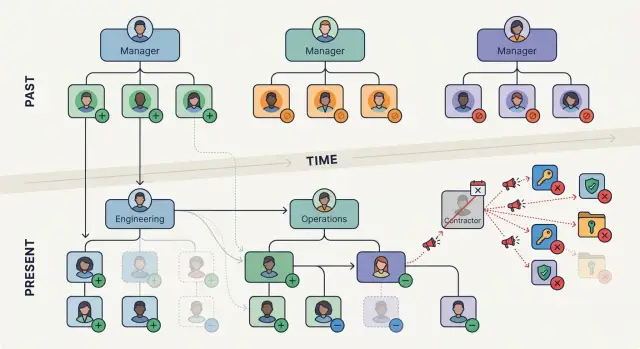
Table of Contents
Why calendar-only reviews miss real access problems
A quarterly or annual review sounds neat, but people do not change roles on a neat schedule. Teams shift every week. Managers leave. Contractors finish a project on Tuesday, not at the end of the quarter. If reviews only happen on a calendar, access can stay wrong for months.
That is where most trouble starts. Someone moves from sales to operations and still keeps access to old customer exports, pricing tools, or admin settings they no longer need. Nobody keeps it on purpose. The business just moved faster than the review process.
Normal company activity creates permission drift all the time. A promotion, a transfer, a temporary project assignment, or a new reporting line can leave old access in place while new access gets added on top.
Manager changes create a quieter version of the same problem. The old manager knew what a person needed. The new manager may approve new requests without checking what is already there. A few months later, one employee can end up with access from two roles and two reporting structures, even if their day-to-day work got narrower.
Contractors are another blind spot. A contractor joins for a six-week migration, gets access to chat, file storage, tickets, dashboards, and a few internal apps, then rolls off when the work is done. If nobody ties access checks to that end date, those accounts often stay active because nothing feels urgent.
Most of this does not come from a breach or some dramatic mistake. It comes from ordinary business motion. A company hires, reshuffles teams, changes vendors, and moves people around. The review process has to move with it.
Calendar-based reviews still help. They are good for broad cleanup. What they miss is the moment when access becomes outdated. By the time the next scheduled review arrives, the wrong permissions may have been sitting there so long that everyone assumes they are normal.
Which org changes should trigger a review
A review should start whenever a person's work, reporting line, or contract changes enough that yesterday's access no longer fits today's job.
A few events deserve an immediate check:
- a move to a different department, even if the title stays similar
- a new manager taking over one employee or a whole team
- a contractor nearing the end of the agreement or finishing the work
- a role change where old tools stay in place by default
- a project ending while temporary access may still be active
Team transfers are one of the easiest places to spot a mismatch. Someone who leaves finance for operations may still have access to payroll folders, approval queues, or reports they no longer need. The same pattern shows up in engineering, where a move from product work to internal tools can leave old production permissions in place.
Manager changes matter too, even when titles do not change. The new manager often has a better view of what the person actually does each day. They can confirm whether current access still makes sense or whether the person kept extra permissions from an old assignment.
Contractors need tighter timing. If the agreement ends Friday, access should not drift into next month because the next review cycle is six weeks away. This comes up all the time with shared drives, chat groups, ticketing systems, and vendor portals.
Role changes inside the same team also deserve a look. Promotions, lateral moves, and temporary coverage assignments often add tools without removing the old ones. Over time, that creates a pile of unused access that nobody notices because each change looked small on its own.
Project closures are another common miss. Teams grant temporary access fast so work can start, then forget to clean it up when the project wraps. Repositories, dashboards, test environments, and admin panels often stay open long after the work stops.
If your HR or project system records any of these events, treat that record as the start signal for a review. Do not wait for the next calendar reminder.
What to check when someone moves teams
Start with the systems the person still signs into every week. Pull the real list from your identity provider, SSO logs, VPN, cloud accounts, internal tools, shared drives, and admin panels. People often keep access that nobody remembers, especially if they joined the old team months or years ago.
Then compare two things side by side: what the old role allowed and what the new role actually needs. This sounds obvious, but it is where stale access usually survives. A move from sales to partnerships, or from support to operations, may keep some shared tools but not the same customer exports, billing rights, or production dashboards.
Do not guess. Ask the new manager what work the person owns now, what data they need, and what actions they should be able to take on day one. A short reply is enough if it is specific.
Check temporary access too. People often keep one-off permissions from a project, handoff, or emergency request. Those extras tend to stay because nobody remembers when they were added.
Shared accounts need their own review. If a person knows a team password, has a recovery code, or can still get into a vendor portal through a generic login, that access needs to be removed or rotated. Named-user reviews do not catch shared credentials well.
The goal is simple: keep what supports the new job and remove what belongs to the old one.
How to set up trigger-based reviews
Calendar reviews are easy to schedule, but they often land too late. A better setup starts the review when a real change happens, so the process matches the way people actually move through the business.
Start with a small trigger set
You do not need a long list on day one. Start with three events that cause the most stale access:
- someone moves to a new team
- someone gets a new manager
- a contractor reaches the end of the contract
Pull those events from the records you already trust. For employees, that is usually your HR or payroll system. For contractors, it may be a vendor tracker, a finance record, or the contract end date in your HR tool.
When one of those events appears, create a review task right away. Send it to two people: the direct manager, who knows what work the person does now, and the system owner, who knows what access is normal and what looks off.
Do not ask reviewers to hunt through five admin panels. Put a short access list in the task itself. Keep it plain: email groups, shared drives, admin roles, VPN, code repos, support tools, finance tools, and any unusual elevated access.
A growing company can start with simple automation. HR marks a team change, then the workflow opens a task in the ticket system. The manager approves what should stay, the system owner removes what should go, and the ticket stays open until the removal is done.
Keep the review short
Long review forms get ignored. A good triggered review asks a few direct questions:
- Does this person still need each listed access item?
- Should any new access replace the old one?
- Who will remove unneeded access, and by when?
Track the decision in one place. Do not close the task when someone clicks "approve." Close it only after the access change is confirmed. That last step matters because old access usually stays in place when approval and removal happen in different systems.
Keep the trigger set small and the review task short. People are much more likely to finish the work.
A simple example from a growing company
A 40-person software company is growing fast, and roles change before the next quarterly review arrives. Mia starts as a designer. In July, her manager moves her into product operations because she already knows the product, the release schedule, and the support team's pain points.
Her new job changes what she needs every day. She should still keep Figma and the shared design library because she still helps with mockups and reviews. But she no longer needs access to the finance folder she used during a short budget planning project in spring. She also does not need approval rights in the vendor billing tool anymore.
That same week, the company wraps up a website refresh project with an outside contractor named Ben. Ben had access to the staging site, the asset library, and a shared project board. Nobody is worried about him because the work ended cleanly. That is exactly when old access tends to stay in place.
A triggered review starts when Mia's team changes and Ben's contract end date arrives. One review queue catches both cases instead of waiting for the next calendar reminder.
The reviewer checks a short list:
- keep Mia's design tools and product docs
- remove Mia's finance folder access and billing approvals
- turn off Ben's staging account and project board access
- archive Ben's shared file access after handing off final assets
This takes about 15 minutes if the company keeps role changes and contract dates in one place. It also avoids the usual mess where people keep access simply because nobody remembers who should remove it.
That is the real advantage of triggered reviews. The check happens when the risk appears. Mia keeps the tools she still uses, and the company removes the access that no longer matches her job. Ben leaves with a clean handoff, and his accounts do not sit around for another three months.
In a growing company, that small habit goes a long way. A few quick triggered reviews can remove more real risk than one big review at the end of the quarter.
Who should act on the review
One person should not carry the whole job. The manager knows what the person needs today, but the manager should not be the only check.
The work moves faster when each step goes to the person closest to that decision. That also cuts down on guesswork.
Split the job by role
The direct manager should confirm current job needs. If someone moved from sales to operations, the manager can say which tools still matter and which do not. Managers are usually best at judging day-to-day access, not unusual risk.
App owners should review anything sensitive, expensive, or out of the ordinary. That includes admin rights, finance systems, customer data exports, production access, and shared service accounts. A manager may know the employee changed teams, but the app owner knows whether that access still makes sense.
IT or security should handle the actual removal and set a clear due date. If access needs to be removed in two business days, write that down and track it. Reviews stall when everyone agrees in principle but nobody owns the last step.
A simple split often works well:
- the manager approves what the person still needs
- the app owner checks risky or unusual access
- IT or security removes access by a set deadline
- HR or people ops provides the change event and date
- the system logs every action
That last part matters more than many teams expect. Record who approved the access, who removed it, and when each step happened. If a problem comes up later, you need a clear trail, not a pile of chat messages.
This also helps when a new manager takes over. They may not know which old permissions were inherited, temporary, or never cleaned up. A written record gives them a starting point instead of a blank page.
Avoid any process that depends on one careful person remembering to chase everyone else. Use tickets, review tasks, or identity workflows so the request moves automatically from manager to app owner to IT. People forget. Systems do not, if you set them up well.
Common mistakes that leave old access in place
Old access usually sticks around for boring reasons, not because anyone made a deliberate choice. Teams get busy, org charts change, and people assume the next scheduled review will catch it.
Waiting for the next quarterly review is one of the easiest ways to miss real changes. If someone moves from support to finance on Monday, their old tools should not stay open until the end of the quarter. The same goes for a manager change. A new manager may have very different expectations about what that person should keep.
Another common miss is treating employees as the only people who matter. Contractors, agencies, interns, and short-term specialists often get broad access so they can move fast. Then their work ends, their accounts stay active, and nobody owns the cleanup. Contractor offboarding needs the same attention as employee offboarding.
Shared logins make this worse. When a team uses one account for a dashboard, vendor portal, or test environment, nobody can tell who still needs it. Reviews then focus on named users while the shared account sits outside the process. If you cannot tie access to a real person, you cannot review it well.
Review design matters too. If reviewers get a giant spreadsheet with hundreds of lines, many will skim, approve, and move on. A raw access dump looks thorough, but it often hides the few permissions that changed after a team move or reporting change. People review faster and better when you show only the apps, groups, and roles that need a decision.
The last mistake is closing the review when someone clicks "approved" or "remove" instead of when the change actually happens. Approval is not removal. Someone still needs to disable the group membership, revoke the app role, rotate the shared password, or shut down the account.
A simple rule helps: keep the review open until the system shows the access is gone. That one habit makes triggered reviews much more reliable than a tidy checklist with no follow-through.
A quick checklist for each review
A review should end with a clear decision for every permission: keep it, remove it, or confirm it for a short period. If nobody can make that call, the review is too vague to trust.
A short checklist works better than a long policy document. People skip process when it feels heavy. They follow it when it fits on one screen and tells them exactly what to confirm.
Use the same five checks each time:
- Confirm the change that triggered the review. Did the person move to a new team, get a new manager, switch from employee to contractor, or finish a contract?
- Compare current access with the new role, not the old one.
- Ask the current manager to approve only what the person still needs.
- Make sure IT or the system owner removes old access and records the date.
- Set a follow-up date for anything temporary.
A small example makes this easier to picture. If a developer moves into an engineering manager role, they may still need the code repository, but they may not need production database access anymore. If nobody checks that old access against the new job, it can sit there for months.
This checklist also makes ownership clear. The manager decides what the person should keep. IT removes what no longer fits. Someone records the change. Miss any one of those steps, and old access tends to survive.
What to do next
Start small. Pick one department, then choose one or two business apps where access tends to linger after people move around. Finance, support, and internal admin tools are often good places to start because old permissions there can cause real trouble.
If automation is not ready, do the first round by hand. That is usually better than waiting six months for a perfect setup that never ships. A manager, an app owner, and someone from IT or security can review a short list together and make decisions in one meeting.
A workable first pass looks like this:
- Pick one trigger, such as a manager change or a team move.
- Pull the current access list for the affected person.
- Ask whether each permission still matches the new job.
- Remove what no longer fits, then note why.
- Track the result in a shared sheet or ticket.
Do that for a month, then look at the numbers. Count how many outdated permissions you removed, how many reviews you completed, and which apps created the most cleanup work. If one small group loses 20 stale permissions in a month, that is a strong sign the process is worth expanding.
Write the rules before you buy more tools. Keep them plain and specific. For example: when a contractor leaves, review all app access within one business day. When someone changes teams, review access to the old team's apps and groups. When a manager changes, confirm that direct reports still need the same approvals and admin rights.
That is enough to build a solid routine. Fancy workflows can wait. What matters first is that people know when a review starts, who checks the access, and who removes it.
If your team needs help setting that up, Oleg Sotnikov at oleg.is works with startups and smaller companies on practical automation, infrastructure, and Fractional CTO support. That can be useful when you want a clear process and a small pilot without turning it into a long internal project.


